excessive cpu usage

redheadedtim

New member
Local time
3:55 PM
Messages
12
Roughly 1 hour after rebooting, with nothing running besides MSN, xfire, and mozilla, my CPU utilization goes to 78-90% with no let down. AMD Phenom X4 9550 w/ 6gb ram, nvidia 9500, install is 2 days old. This is very disappointing because it means that even youtube videos hitch, and games get 2fps. Sad to say I had better performance in xp sp2 on a 3.2ghz P4 w/ 2gb ram and an ATI x800xt. Not counting games even. Although sadly SWG get roughly the same or worse performance, which is likely split between equal perf being poor engine on SWG (SOE)'s part, and the 2fps on Win 7 (when I launch after having been up for 1 hour or more). I've shut down obviously non-essential services (anything HP installed, my media sharing services) and used msconfig to take out services that aren't MS provided. Even Vista provided better performance, although I still had hitching on youtube videos (i've got high speed cable 3whatever and get downloads at 500+k/sec). Any ideas? This is very disappointing. I would rather get the benefits of Win 7 but I'm at the point where I'll install XP on this new pc. And I'm leaving out UI problems I have w/ Win7. Any tips are appreciated. I've done malware scans as well and dont have a virus scan running realtime (unless it's built into Win7).
Thank you for reading this, and ty in advance for any suggestions.
rht
 

My Computer

OS
Win 7 build 7100
And yet you have not told us what all is running in Task Manager....
 

My Computers

System One System Two

  • Computer type
    PC/Desktop
    Computer Manufacturer/Model Number
    The Beast Model A (homebrew)
    OS
    Windows 11 21H2 Current build
    CPU
    AMD Ryzen 9 3950X
    Motherboard
    MSI MEG X570 GODLIKE
    Memory
    4 * 32 GB - Corsair Vengeance 3600 MHz
    Graphics Card(s)
    EVGA GeForce RTX 3080 Ti XC3 ULTRA GAMING (12G-P5-3955-KR)
    Sound Card
    Realtek® ALC1220 Codec
    Monitor(s) Displays
    2x Eve Spectrum ES07D03 4K Gaming Monitor (Matte) | Eve Spec
    Screen Resolution
    3x 3840 x 2160
    Hard Drives
    3x Samsung 980 Pro NVMe PCIe 4 M.2 2 TB SSD (MZ-V8P2T0B/AM) } 3x Sabrent Rocket NVMe 4.0 1 TB SSD
    PSU
    PC Power & Cooling’s Silencer Series 1050 Watt, 80 Plus Plat
    Case
    Fractal Design Define 7 XL Dark ATX Full Tower Case
    Cooling
    SteelSeries Apex Pro Wired Gaming Keyboard
    Keyboard
    SteelSeries Apex Pro
    Mouse
    Logitech MX Master 3S | MX Master 3 for business
    Internet Speed
    AT&T LightSpeed Gigabit Duplex Ftth
    Antivirus
    Windows Defender + MB 3
    Browser
    Nightly (default) + Firefox (stable),Chrome, Edge
  • Computer type
    PC/Desktop
    System Manufacturer/Model Number
    Dell Latitude E5470
    OS
    ChromeOS Flex Dev Channel (current)
    CPU
    Intel(R) Core(TM) i5-6300U CPU @ 2.40GHz, 2501 Mhz, 2 Core(s), 4 Logical Processor(s)
    Motherboard
    Dell
    Memory
    16 GB
    Graphics Card(s)
    Intel(R) HD Graphics 520
    Sound Card
    Intel(R) HD Graphics 520 + RealTek Audio
    Monitor(s) Displays
    Dell laptop display 15"
    Screen Resolution
    1920 * 1080
    Hard Drives
    Toshiba 128GB M.2 22300 drive
    INTEL Cherryville 520 Series SSDSC2CW180A 180 GB SATA III SSD
    PSU
    Dell
    Case
    Dell
    Cooling
    Dell
    Keyboard
    Dell
    Mouse
    Logitech MX Master 3S (shared w. Sys 1) | Dell TouchPad
    Internet Speed
    AT&T LightSpeed Gigabit Duplex Ftth
Thank you for being helpful. I had less than 1gb of programs running in task manager. If you have an easy way to get a report of what is running in task manager, please make it a sticky. svchost had as much memory as firefox (w/ 8 tabs), but honestly, when I'm not moving the mouse, no new webpages are loading, no game is running, your suggestion seems less than helpful considering you suggested no way of providing that information. Tell me how to give you useful information besides the detailed post I put up and I'll be happy to provide. When sorted by CPU usage, idle had the large percentage but if you went to the perf tab of task manager, cpu was still 80+%. Is this the mod's idea of being helpful?
 

My Computer

OS
Win 7 build 7100
You may have the infected version of Windows 7 RC installed.
 

My Computer

Computer Manufacturer/Model Number
Dell Laptop Studio 1537
OS
Windows 7 x64 7229
CPU
Intel Core 2 Duo CPU T6400
Memory
4 GB
Graphics Card(s)
Mobile Intel 45 Chipset
How about a screen shot or snipit of processes in task manager?
 

My Computer

Computer type
PC/Desktop
Computer Manufacturer/Model Number
Built them myself, Science Experiments !
OS
Win7 Enterprise, Win7 x86 (Ult 7600), Win7 x64 Ult 7600, TechNet RTM on AMD x64 (2.8Ghz)
CPU
AMD fx8350 4ghz, AMD-32 2400mhz, AMD-64 3200mhz, AMDx64 2.8G
Motherboard
SIS 755, ECS-K8M890M-M (Ult 7600), GigaByte & others
Memory
2gb, 4gb on the Ult 7600, 4gb on Technet RTM, 32gb on FX8350
Graphics Card(s)
Draw my own Graphics, several nVidia cards
Sound Card
on motherboard
Monitor(s) Displays
19" flat scr, 28" I-Inc widescr,22" Emprex Widescr, 23" Acer
Screen Resolution
1280 x 1024, 1440 x 900, 1920 x 1080
Hard Drives
6 pata Ide HD's & 2 Sata HD's
added 80gb external on Ult 7600 computer,
numerous extra 1tb, 2TB, 3Tb SATA HD's
A collection of ext HD Docks w/ HDs
PSU
430w, 550w, 600w, 700, 800, etc
Case
All Generic Full Towers
Cooling
Open Air & a few fans, some w/ colored LEDs
Keyboard
Compaq & Dell recycled from GoodWill
Mouse
Made in China Optical Wired Mouse
Internet Speed
Fast Cable InterNet
Antivirus
AVG Free on 24 different Desktops, NO Problems!
Browser
IE 8 is preferred, but use FireFox sometimes
Other Info
Linksys Routers, switches, & Hubs
Too Many USB Flash Drives to count, Biggest is 64GB !
Eight computers in my home network.
Sixteen computers at my business network.
Linked via TeamViewer !
Lots of old used spare computer parts everywhere!
I downloaded RC 1 direct from MS, burned to DVD and installed on a fresh install of Vista (again, I just purchased this PC 4 days ago and didn't install anything besides Age of Conan, XFire, and Mozilla prior to the Win 7 upgrade). Would it help to post a dxdiag file? Are there other logs I can generate taht would be helpful?
 

My Computer

OS
Win 7 build 7100
I'll post a screenshot of task manager the next time it slows down. I just rebooted and it's late, so that may be tomorrow. Thank you for that suggestion.
 

My Computer

OS
Win 7 build 7100
Thank you for being helpful. I had less than 1gb of programs running in task manager. If you have an easy way to get a report of what is running in task manager, please make it a sticky. svchost had as much memory as firefox (w/ 8 tabs), but honestly, when I'm not moving the mouse, no new webpages are loading, no game is running, your suggestion seems less than helpful considering you suggested no way of providing that information. Tell me how to give you useful information besides the detailed post I put up and I'll be happy to provide. When sorted by CPU usage, idle had the large percentage but if you went to the perf tab of task manager, cpu was still 80+%. Is this the mod's idea of being helpful?

Yeah - use the How to use the Snipping Tool in Vista - Vista Forums tutorial from the Vista forums to make screen shots and then post them using the bulletin board software that allows for file attachments....

And as for being helpful, you've not really told us much about the system, how it acted up, where you got the ISO from, what else you've installed, what *you* think is non-essential services, or what is eating your CPU up - if my utilization is 80% the first thing *I* to is open Task Manager ans see where that 80% is going....

Since you seem to know enough to disable non-essential services, I would assume you know enough to look in Task manager to see what is going on. I understand you're frustrated with a system that is not working correctly, but you've give us *nothing* to go on right now - and I shouldn't have to fish for obvious answers from someone as prolific as you are.
 

My Computers

System One System Two

  • Computer type
    PC/Desktop
    Computer Manufacturer/Model Number
    The Beast Model A (homebrew)
    OS
    Windows 11 21H2 Current build
    CPU
    AMD Ryzen 9 3950X
    Motherboard
    MSI MEG X570 GODLIKE
    Memory
    4 * 32 GB - Corsair Vengeance 3600 MHz
    Graphics Card(s)
    EVGA GeForce RTX 3080 Ti XC3 ULTRA GAMING (12G-P5-3955-KR)
    Sound Card
    Realtek® ALC1220 Codec
    Monitor(s) Displays
    2x Eve Spectrum ES07D03 4K Gaming Monitor (Matte) | Eve Spec
    Screen Resolution
    3x 3840 x 2160
    Hard Drives
    3x Samsung 980 Pro NVMe PCIe 4 M.2 2 TB SSD (MZ-V8P2T0B/AM) } 3x Sabrent Rocket NVMe 4.0 1 TB SSD
    PSU
    PC Power & Cooling’s Silencer Series 1050 Watt, 80 Plus Plat
    Case
    Fractal Design Define 7 XL Dark ATX Full Tower Case
    Cooling
    SteelSeries Apex Pro Wired Gaming Keyboard
    Keyboard
    SteelSeries Apex Pro
    Mouse
    Logitech MX Master 3S | MX Master 3 for business
    Internet Speed
    AT&T LightSpeed Gigabit Duplex Ftth
    Antivirus
    Windows Defender + MB 3
    Browser
    Nightly (default) + Firefox (stable),Chrome, Edge
  • Computer type
    PC/Desktop
    System Manufacturer/Model Number
    Dell Latitude E5470
    OS
    ChromeOS Flex Dev Channel (current)
    CPU
    Intel(R) Core(TM) i5-6300U CPU @ 2.40GHz, 2501 Mhz, 2 Core(s), 4 Logical Processor(s)
    Motherboard
    Dell
    Memory
    16 GB
    Graphics Card(s)
    Intel(R) HD Graphics 520
    Sound Card
    Intel(R) HD Graphics 520 + RealTek Audio
    Monitor(s) Displays
    Dell laptop display 15"
    Screen Resolution
    1920 * 1080
    Hard Drives
    Toshiba 128GB M.2 22300 drive
    INTEL Cherryville 520 Series SSDSC2CW180A 180 GB SATA III SSD
    PSU
    Dell
    Case
    Dell
    Cooling
    Dell
    Keyboard
    Dell
    Mouse
    Logitech MX Master 3S (shared w. Sys 1) | Dell TouchPad
    Internet Speed
    AT&T LightSpeed Gigabit Duplex Ftth
Nothing is taking 80% in task mgr besides idle. Non essential = HP's installed crap. My other posts indicate where I got the iso from and what is installed (aka 2 games, xfire, mozilla, and msn). I'm smart enough to look for something taking up a large % in task manager, but when only idle and svchost show anything above 10% and svchost doesnt tell you what it's hosting, I can't give you more. You're obviously more prolific than I am because a) you're mod here, and b (my guess) you've run vista for more than 24 hours. When the slowdown reoccurs (it's recurred 2x times after reboots, the initial time was after i left it up for >1 day w/ it sleeping once or twice), so I assume it'll reappear, I'll grab ss's of processes and performance tabs. I'll post more tomorrow, since either a)it won't slow down before I hit the hay (been up for 30 hours due to work) or b)it won't have reoccured and i'll still post ss's and say "i got nothing". I appreciate any suggestions people are willing to give, or links to sticky's I've missed. I avoided vista forums b/c this is win7 and I assumed with it being in beta and now RC1, there would be sticky's unique to it. If there are sticky's that are relevant to vista x64 and win 7 x64, please let me know where to look. Good night all.

*update a minute later* if anyone has other win 7 forums I can peruse for additional suggestions/tips/whatever, please let me know. this is the only one I've been made aware of.
 

My Computer

OS
Win 7 build 7100
i get the same problem now and again. usually it's Firefox, maybe there's a memory leak in one of your plugins, or something of that nature. my pc is old as dirt though, so I expect cretin things to happen like that.

So i scrapped a bunch of usless services, now its not so bad
5-20% cpu and ~500MB Memory load w/ Firefox, Nod32, and a couple other things
 

My Computer

Computer Manufacturer/Model Number
eMachines W3502
OS
Windows 7 Ultimate x32
CPU
Intel Celeron D 3.2 Ghz 533 fsb (LGA 775)
Motherboard
Intel D101GGC
Memory
1 GB (2x512MB) PC-3200 DDR @ 200Mhz
Graphics Card(s)
Nvidia GeForce 9400GT- 1GB
Sound Card
Sound Blaster X-Fi Xtreame Gamer
Monitor(s) Displays
19" LCD HDtv
Screen Resolution
1360x768 @ 60Htz
Hard Drives
SeaGate Barracuda 750GB
SeaGate Barracuda 100GB
Toshiba CD/DVDW/ TS-H552D [DVD+R, DL]
PSU
stock (idk)
Case
The busted remains of the stock case
Cooling
Dust cooled, waitwut?
Keyboard
Stock. Missing a few keys.
Mouse
Logitech LX8 5-btn mouse (wireless)
Internet Speed
TWC 10Mb
Other Info
Keeps going, and going, and going.......
I don't change a thing with my services, plus I have MalwareBytes Antimalware and Avast! running 24/7, I have stuff for my iPaq, stuff for my DL manager, and quite a few other things that load on startup - and I don't get CPU spikes like that unless I am doing something. and at idle I have between 1-3% utilization.

Now, just b/c you're not doing something *actively* doesn't mean something is not going on in the background - if you have any Fx add-ons that synchronize to a website (like Weave, Read it later, etc) then you 8are* doing something. Also, if nothing on your system is showing any CPU utilization, and yet you say it has an 80% utilization, then you're either not reading the results correctly, or something is lying.

You can't have both 80% usage and 80% idle. It is not physically possible.

So, again, what *exactly* are you running, and please post screen captures so *we* can analyze it - you are our eyes and ears on this one, but we're not getting enough info from you so we need more.

*also* if this only occurs when the system resumes from sleep or hubernation, that is an ***important*** fact. if it occurs at *exactly* the same time after a reboot, that is an important face - we need to know these things in order to be able to trouble shoot your system.

It's the equivalent of saying "My car won't start."

Do you have gas?
Is the water pump obstructed?
does it have oil?
Is the carb / injector getting air?
Does the batter have power?
Is the starter / solenoid in working order?
Is the car in Park or Neutral?

That is just a *basic* list.....
 

My Computers

System One System Two

  • Computer type
    PC/Desktop
    Computer Manufacturer/Model Number
    The Beast Model A (homebrew)
    OS
    Windows 11 21H2 Current build
    CPU
    AMD Ryzen 9 3950X
    Motherboard
    MSI MEG X570 GODLIKE
    Memory
    4 * 32 GB - Corsair Vengeance 3600 MHz
    Graphics Card(s)
    EVGA GeForce RTX 3080 Ti XC3 ULTRA GAMING (12G-P5-3955-KR)
    Sound Card
    Realtek® ALC1220 Codec
    Monitor(s) Displays
    2x Eve Spectrum ES07D03 4K Gaming Monitor (Matte) | Eve Spec
    Screen Resolution
    3x 3840 x 2160
    Hard Drives
    3x Samsung 980 Pro NVMe PCIe 4 M.2 2 TB SSD (MZ-V8P2T0B/AM) } 3x Sabrent Rocket NVMe 4.0 1 TB SSD
    PSU
    PC Power & Cooling’s Silencer Series 1050 Watt, 80 Plus Plat
    Case
    Fractal Design Define 7 XL Dark ATX Full Tower Case
    Cooling
    SteelSeries Apex Pro Wired Gaming Keyboard
    Keyboard
    SteelSeries Apex Pro
    Mouse
    Logitech MX Master 3S | MX Master 3 for business
    Internet Speed
    AT&T LightSpeed Gigabit Duplex Ftth
    Antivirus
    Windows Defender + MB 3
    Browser
    Nightly (default) + Firefox (stable),Chrome, Edge
  • Computer type
    PC/Desktop
    System Manufacturer/Model Number
    Dell Latitude E5470
    OS
    ChromeOS Flex Dev Channel (current)
    CPU
    Intel(R) Core(TM) i5-6300U CPU @ 2.40GHz, 2501 Mhz, 2 Core(s), 4 Logical Processor(s)
    Motherboard
    Dell
    Memory
    16 GB
    Graphics Card(s)
    Intel(R) HD Graphics 520
    Sound Card
    Intel(R) HD Graphics 520 + RealTek Audio
    Monitor(s) Displays
    Dell laptop display 15"
    Screen Resolution
    1920 * 1080
    Hard Drives
    Toshiba 128GB M.2 22300 drive
    INTEL Cherryville 520 Series SSDSC2CW180A 180 GB SATA III SSD
    PSU
    Dell
    Case
    Dell
    Cooling
    Dell
    Keyboard
    Dell
    Mouse
    Logitech MX Master 3S (shared w. Sys 1) | Dell TouchPad
    Internet Speed
    AT&T LightSpeed Gigabit Duplex Ftth
Nothing is taking 80% in task mgr besides idle. Non essential = HP's installed crap. My other posts indicate where I got the iso from and what is installed (aka 2 games, xfire, mozilla, and msn). I'm smart enough to look for something taking up a large % in task manager, but when only idle and svchost show anything above 10% and svchost doesnt tell you what it's hosting, I can't give you more. You're obviously more prolific than I am because a) you're mod here, and b (my guess) you've run vista for more than 24 hours. When the slowdown reoccurs (it's recurred 2x times after reboots, the initial time was after i left it up for >1 day w/ it sleeping once or twice), so I assume it'll reappear, I'll grab ss's of processes and performance tabs. I'll post more tomorrow, since either a)it won't slow down before I hit the hay (been up for 30 hours due to work) or b)it won't have reoccured and i'll still post ss's and say "i got nothing". I appreciate any suggestions people are willing to give, or links to sticky's I've missed. I avoided vista forums b/c this is win7 and I assumed with it being in beta and now RC1, there would be sticky's unique to it. If there are sticky's that are relevant to vista x64 and win 7 x64, please let me know where to look. Good night all.

*update a minute later* if anyone has other win 7 forums I can peruse for additional suggestions/tips/whatever, please let me know. this is the only one I've been made aware of.
.
Try using a different process viewer, such as Anvir Task Manager or Microsoft's Process Monitor (Sysinternals). These will provide much greater detail about what processes are running and how much CPU they are using. I've occasionally noticed similar behavior where the CPU desktop gadget shows a high reading while the Windows task manager shows no process activity. The answer to that is the Windows task manager is not showing all processes.
 

My Computer

Computer type
PC/Desktop
OS
Windows 7 x64
CPU
Intel Core2 Extreme Q6850 3.00GHz
Motherboard
EVGA 132-CK-NF79
Memory
8 GB
Graphics Card(s)
Radeon R7 260X
Sound Card
Xonar DS
Hard Drives
Hitachi Deskstar 1 tb
dont know if its related but i had a similar problem while running avast the problem was avast antivirus (after an update) went a bit nuts i think what it was i interuptted it when it was updating and didnt install the update properly cpu usage a few minutes after boot would rocket to 100% and stay there,i could'nt do a thing in the end i disabled all the resident scanners and cpu would return to normal i then started up avast and updated it through the main program rebooted and everything was fine,apart from it disliked utorrent 1.82 so i installed 1.77 instead.
 

My Computer

OS
windows7 7100 x64
CPU
amd athlon 64 3500+
Motherboard
asus a8n sli deluxe
Memory
2gb
Graphics Card(s)
nvidia 7800gt
Screen Resolution
1280x1024
dont know if its related but i had a similar problem while running avast the problem was avast antivirus (after an update) went a bit nuts i think what it was i interuptted it when it was updating and didnt install the update properly cpu usage a few minutes after boot would rocket to 100% and stay there,i could'nt do a thing in the end i disabled all the resident scanners and cpu would return to normal i then started up avast and updated it through the main program rebooted and everything was fine,apart from it disliked utorrent 1.82 so i installed 1.77 instead.


Now that you bring this up, I had almost the same thing happen with AVG antivirus (The Resident Shield was using 100% of the CPU) I disabled it. Everything has been ok since.
 

My Computer

Computer type
PC/Desktop
Computer Manufacturer/Model Number
Built them myself, Science Experiments !
OS
Win7 Enterprise, Win7 x86 (Ult 7600), Win7 x64 Ult 7600, TechNet RTM on AMD x64 (2.8Ghz)
CPU
AMD fx8350 4ghz, AMD-32 2400mhz, AMD-64 3200mhz, AMDx64 2.8G
Motherboard
SIS 755, ECS-K8M890M-M (Ult 7600), GigaByte & others
Memory
2gb, 4gb on the Ult 7600, 4gb on Technet RTM, 32gb on FX8350
Graphics Card(s)
Draw my own Graphics, several nVidia cards
Sound Card
on motherboard
Monitor(s) Displays
19" flat scr, 28" I-Inc widescr,22" Emprex Widescr, 23" Acer
Screen Resolution
1280 x 1024, 1440 x 900, 1920 x 1080
Hard Drives
6 pata Ide HD's & 2 Sata HD's
added 80gb external on Ult 7600 computer,
numerous extra 1tb, 2TB, 3Tb SATA HD's
A collection of ext HD Docks w/ HDs
PSU
430w, 550w, 600w, 700, 800, etc
Case
All Generic Full Towers
Cooling
Open Air & a few fans, some w/ colored LEDs
Keyboard
Compaq & Dell recycled from GoodWill
Mouse
Made in China Optical Wired Mouse
Internet Speed
Fast Cable InterNet
Antivirus
AVG Free on 24 different Desktops, NO Problems!
Browser
IE 8 is preferred, but use FireFox sometimes
Other Info
Linksys Routers, switches, & Hubs
Too Many USB Flash Drives to count, Biggest is 64GB !
Eight computers in my home network.
Sixteen computers at my business network.
Linked via TeamViewer !
Lots of old used spare computer parts everywhere!
Now that you bring this up, I had almost the same thing happen with AVG antivirus (The Resident Shield was using 100% of the CPU) I disabled it. Everything has been ok since.

McBlzr, with regards to the AVG CPU usage did you by any chance install the linkscanner? I was having CPU usage issues and it was down to this as well as another issue I've just resolved.
 

My Computer

Computer Manufacturer/Model Number
Self Build
OS
Win 7 RC
CPU
C2D E6700 2.6Ghz
Motherboard
Asus P5N32-Sli Premium
Memory
4GB
Graphics Card(s)
ATI Radeon X1950 Pro
Monitor(s) Displays
Dell S2309W
Screen Resolution
1920 x 1080
Hard Drives
Maxtor 6V250F0
WDC WD2500JD-00HBB0
WDC WD2500KS-00MJB0
PSU
Xclio 700W Modular
Case
Akasa Mirage
Keyboard
Logitech LX-300
Mouse
Logitech MX Revolution
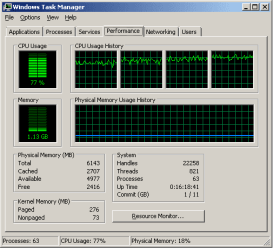
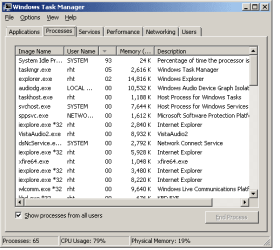
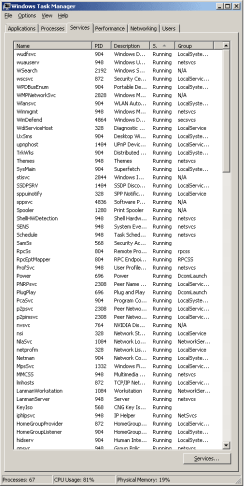
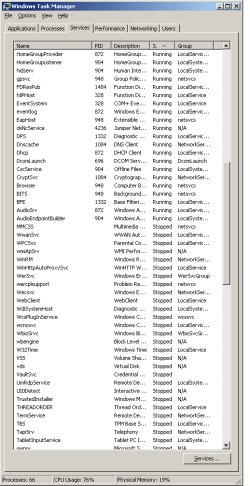
Could it be firefox? I haven't been too impressed with Firefox in sometime. Guess I could give IE 8 a try. No AV running since I told Norton to go away after setting up the pc. Note the processes tab is sorted by CPU usage not Memory.
 

Attachments

  • perftab.png
    perftab.png
    6.8 KB · Views: 62
  • proctab.png
    proctab.png
    8 KB · Views: 37
  • serv1.png
    serv1.png
    13.5 KB · Views: 35
  • serv2.png
    serv2.png
    13.2 KB · Views: 29

My Computer

OS
Win 7 build 7100
Thats unusual. I can't really tell anything by those screenshots, since it isn't really showing what is using that much of your CPU. Try opening up the resource monitor and see if it's a service that is doing it. I doubt it's firefox. if It was firefox it would show up on your task list and show that it is using a high percentage of your CPU cycles.
 

My Computer

Computer Manufacturer/Model Number
Compaq SR1630NX
OS
Windows 7 Build 7100 x64
CPU
Athlon 64 3500+
Motherboard
ASUS Amberine M sckt939
Memory
2GB DDR400
Graphics Card(s)
eVGA 7900GS 256mb
Sound Card
Creative Audigy SE
Monitor(s) Displays
Emprex 17" LCD
Screen Resolution
1280x1024
Hard Drives
Western Digital Caviar 160gb
PSU
600w Ultra Power Supply
Case
Compaq Mini Tower
Cooling
2 Stock fans+Antec VGA slot cooler
Keyboard
Microsoft Digital Media Keyboard 3000
Mouse
Logitech MX518
Internet Speed
16mbps/2mbps comcast
Other Info
I bought it at Frys, the only components I haven't upgraded or replaced are the CPU, mobo, and case.
As the prophet said a screenshot of the cpu tab from resource manager might shed some light. Make sure you sort it by the cpu labelled column so we can see the highest cpu item listed.
 

My Computer

Computer Manufacturer/Model Number
self built
OS
Windows 7 Professional 64-bit
CPU
Intel E8400 3GHz
Motherboard
Intel DX48BT2
Memory
Kingston PC3-10700H 4Gb
Graphics Card(s)
XFX Radeon HD 5850 BlackEd.
Sound Card
Asus Xonar DG
Monitor(s) Displays
2x Samsung SM-T220HD 22"
Screen Resolution
1680x1050 on two monitors
Hard Drives
OCZ Vertex 2 120gb 3.5" (OS)
Seagate Momentus XT 500gb
Samsung F3 1Tb (games)
2x Samsung F1 1Tb
PSU
Thermaltake ToughPower 850w
Case
Thermaltake Armor
Cooling
Scythe Mugen II
Keyboard
Microsoft Comfort Curve USB
Mouse
Razer Diamondback 3G
Internet Speed
8128/443
I used the process monitor from sysinternals but it lists way too much stuff to be very useful and I don't seem to be able to sort by anything or see a cpu column. If there's a good guide out there or you have any tips on using that tool, please share (I've never used the sysinternals tools before).

Using Resource monitor (the built in one, never seen/used it before) seems to indicate that "System Interupts" has 70% or so of my cpu cycles but that doesn't seem very helpful (as far as I can tell).

*UPDATE* I used systinternals' process explorer and Deferred Procedure Calls seems to be what is pegged at 60% but there doesn't seem to be more information available (right clicked on it and looked through the properties window).
 

Attachments

  • resourcemon.png
    resourcemon.png
    12.4 KB · Views: 83
Last edited:

My Computer

OS
Win 7 build 7100
hmm your system interrupts are somewhat high, mines usually around 1 or 2.

This IRQ level is usually a symptom of some hardware fault OR a bad
driver so you could try removing some hardware to see if it goes away.

You could try find IRQ monitoring software.

Try booting into safe mode and see if the problem goes away (that could be a sign of bad drivers). If it does go away try disabling various hardware in the device manager.

If it does not go away try move your ram sticks around or reduce them to 1 to test if you have more than one stick.
 

My Computer

Computer Manufacturer/Model Number
self built
OS
Windows 7 Professional 64-bit
CPU
Intel E8400 3GHz
Motherboard
Intel DX48BT2
Memory
Kingston PC3-10700H 4Gb
Graphics Card(s)
XFX Radeon HD 5850 BlackEd.
Sound Card
Asus Xonar DG
Monitor(s) Displays
2x Samsung SM-T220HD 22"
Screen Resolution
1680x1050 on two monitors
Hard Drives
OCZ Vertex 2 120gb 3.5" (OS)
Seagate Momentus XT 500gb
Samsung F3 1Tb (games)
2x Samsung F1 1Tb
PSU
Thermaltake ToughPower 850w
Case
Thermaltake Armor
Cooling
Scythe Mugen II
Keyboard
Microsoft Comfort Curve USB
Mouse
Razer Diamondback 3G
Internet Speed
8128/443
Back
Top