Explorer Border and Transparency

Rand Marks

Banned
Local time
1:24 PM
Messages
96
Hi,

This is how my Explorer looks right now. The theme in the screenshot is called 7.5.

shot13.png

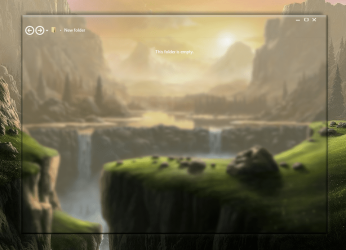
This is how I want Explorer to look in 7.5. The theme in the screenshot is called Chameleon 2.
shot2.png

Note the border and transparency differences. I would like to edit 7.5 to make Explorer look like Chameleon 2’s Explorer (excluding the minimize, maximize, and close buttons). Can someone help me accomplish this? I have Windows 7 Style Builder.

Rand Marks
 

My Computer

OS
Windows 7 Ultimate SP1 64-bit
The easiest way to do that would be to export the images from Chameleon 2 and import them back into 7.5

Here would be the Explorer frame
Windows and Caption Buttons > Aero > Dwm Window > Frames > Normal > Top, bottom, left, right

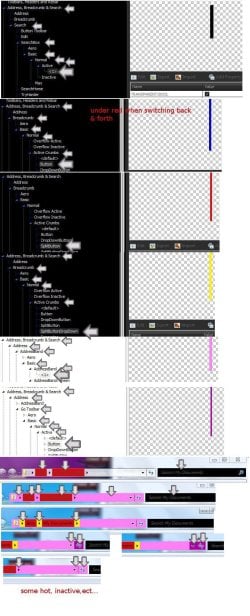
Look at my screenshot should help you with the locations of the breadcrumbs. They are color-coded

Jerry
Breadcrumbs.jpg
 

My Computer

Computer type
Laptop
Computer Manufacturer/Model Number
Sager NP9170
OS
Win 7 Pro x64 / Win 10 Pro
CPU
Intel(R) Core(TM) i7-3630QM CPU @ 2.40GHz
Motherboard
CLEVO P170EM
Memory
12 GB
Graphics Card(s)
(1) Intel(R) HD Graphics 4000 (2) NVIDIA GeForce GTX 675M
Sound Card
(1) Realtek High Definition Audio (2) Intel(R) Display Aud
Monitor(s) Displays
17.3
Screen Resolution
1920x1080
Hard Drives
(1) Samsung 860 EVO 500GB(OS) (1) Samsung 860 EVO 500GB(Data)
Keyboard
Backlite
Antivirus
MSE, Malwarebytes Pro
Browser
Firefox
Other Info
DESKTOP: Custom-built.
OS: Win 10 Pro x64.
CASE: Rosewill R5.
CPU: Intel I5 4670K CPU @ 3.40GHz.
CPU COOLER: Cool Master Hyper 212 EVO.
MOTHERBOARD: Asus Z87-A.
MEMORY: Kingston HyperX 2x4 GB.
GPU: Nvidia Geforce 650 TI.
PSU: Corsair TX750.
DRIVES: (1) Samsung 840 120 GB SSD (2) Western Digital blue 500 GB 7200 RPM.
Thanks, Jerry! Worked wonders. I have two more things to do in Explorer. Can you help me once again? I’m still getting a hang of finding things in WSB. :o

You know the line below the address bar? Well, in my theme, that line is still there but very faded. Do you know how to get rid of it? Here’s a screenshot. You should see it if you look very closely.

shot23.png

Also, I want to remove the arrow circled in the screenshot below, since I never use it.

shot1.png
 

My Computer

OS
Windows 7 Ultimate SP1 64-bit
I don't think there's much you can do about that slight line that I know of sorry. I will have a look and see but I'm not promising anything.

The little arrow is part of bitmap #281 in the ExplorerFrame.dll

Jerry
 

My Computer

Computer type
Laptop
Computer Manufacturer/Model Number
Sager NP9170
OS
Win 7 Pro x64 / Win 10 Pro
CPU
Intel(R) Core(TM) i7-3630QM CPU @ 2.40GHz
Motherboard
CLEVO P170EM
Memory
12 GB
Graphics Card(s)
(1) Intel(R) HD Graphics 4000 (2) NVIDIA GeForce GTX 675M
Sound Card
(1) Realtek High Definition Audio (2) Intel(R) Display Aud
Monitor(s) Displays
17.3
Screen Resolution
1920x1080
Hard Drives
(1) Samsung 860 EVO 500GB(OS) (1) Samsung 860 EVO 500GB(Data)
Keyboard
Backlite
Antivirus
MSE, Malwarebytes Pro
Browser
Firefox
Other Info
DESKTOP: Custom-built.
OS: Win 10 Pro x64.
CASE: Rosewill R5.
CPU: Intel I5 4670K CPU @ 3.40GHz.
CPU COOLER: Cool Master Hyper 212 EVO.
MOTHERBOARD: Asus Z87-A.
MEMORY: Kingston HyperX 2x4 GB.
GPU: Nvidia Geforce 650 TI.
PSU: Corsair TX750.
DRIVES: (1) Samsung 840 120 GB SSD (2) Western Digital blue 500 GB 7200 RPM.
I don't think there's much you can do about that slight line that I know of sorry. I will have a look and see but I'm not promising anything.

The little arrow is part of bitmap #281 in the ExplorerFrame.dll

Jerry
Thanks, Jerry. One more thing, if I may.

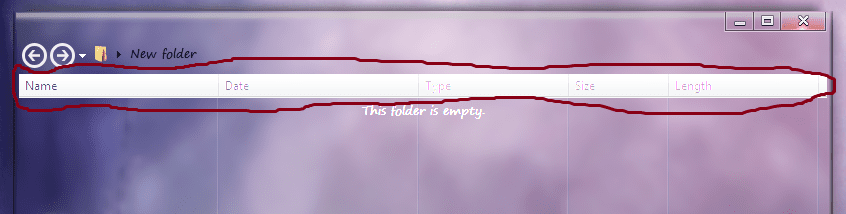
When a folder is set to view files in Details mode, these ugly things appear:

shot1.png

I want to remove them, but I can’t find them in WSB. Do you know where they are? Thanks.
 

My Computer

OS
Windows 7 Ultimate SP1 64-bit
Try enabling the menu bar and then right-click on it and make sure it is locked then try it again, that's all I can think of for right now.
2_1_2013 , 1_30_37 PM , 2_1_2013 , 1_30_37 PM - local date_time.png

Jerry
 

My Computer

Computer type
Laptop
Computer Manufacturer/Model Number
Sager NP9170
OS
Win 7 Pro x64 / Win 10 Pro
CPU
Intel(R) Core(TM) i7-3630QM CPU @ 2.40GHz
Motherboard
CLEVO P170EM
Memory
12 GB
Graphics Card(s)
(1) Intel(R) HD Graphics 4000 (2) NVIDIA GeForce GTX 675M
Sound Card
(1) Realtek High Definition Audio (2) Intel(R) Display Aud
Monitor(s) Displays
17.3
Screen Resolution
1920x1080
Hard Drives
(1) Samsung 860 EVO 500GB(OS) (1) Samsung 860 EVO 500GB(Data)
Keyboard
Backlite
Antivirus
MSE, Malwarebytes Pro
Browser
Firefox
Other Info
DESKTOP: Custom-built.
OS: Win 10 Pro x64.
CASE: Rosewill R5.
CPU: Intel I5 4670K CPU @ 3.40GHz.
CPU COOLER: Cool Master Hyper 212 EVO.
MOTHERBOARD: Asus Z87-A.
MEMORY: Kingston HyperX 2x4 GB.
GPU: Nvidia Geforce 650 TI.
PSU: Corsair TX750.
DRIVES: (1) Samsung 840 120 GB SSD (2) Western Digital blue 500 GB 7200 RPM.
OK, thanks.

Every time I turn around, there’s a new problem to address in Explorer.

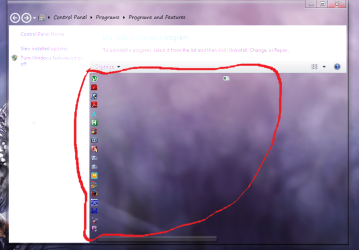
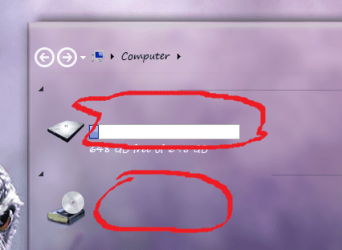
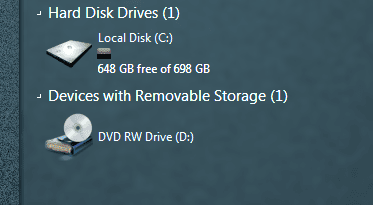
Do you know how to change the text color in Programs and Features and Computer (where drives are)? I assume it would be done in shellstyle.dll.
 

My Computer

OS
Windows 7 Ultimate SP1 64-bit
Post a couple screenshots with arrows pointing to the text and I will let you know.

Jerry
 

My Computer

Computer type
Laptop
Computer Manufacturer/Model Number
Sager NP9170
OS
Win 7 Pro x64 / Win 10 Pro
CPU
Intel(R) Core(TM) i7-3630QM CPU @ 2.40GHz
Motherboard
CLEVO P170EM
Memory
12 GB
Graphics Card(s)
(1) Intel(R) HD Graphics 4000 (2) NVIDIA GeForce GTX 675M
Sound Card
(1) Realtek High Definition Audio (2) Intel(R) Display Aud
Monitor(s) Displays
17.3
Screen Resolution
1920x1080
Hard Drives
(1) Samsung 860 EVO 500GB(OS) (1) Samsung 860 EVO 500GB(Data)
Keyboard
Backlite
Antivirus
MSE, Malwarebytes Pro
Browser
Firefox
Other Info
DESKTOP: Custom-built.
OS: Win 10 Pro x64.
CASE: Rosewill R5.
CPU: Intel I5 4670K CPU @ 3.40GHz.
CPU COOLER: Cool Master Hyper 212 EVO.
MOTHERBOARD: Asus Z87-A.
MEMORY: Kingston HyperX 2x4 GB.
GPU: Nvidia Geforce 650 TI.
PSU: Corsair TX750.
DRIVES: (1) Samsung 840 120 GB SSD (2) Western Digital blue 500 GB 7200 RPM.
Sure.

Here’s 7.5.

xx.png
shot2.png

Here’s Chameleon 2.

shot1.png
shot3.png
 

My Computer

OS
Windows 7 Ultimate SP1 64-bit
Try
Explorer & Shell > Explorer > Items View > ItemsView > Subheader > Normal > TEXTCOLOR:COLOR


Explorer & Shell > Explorer > Items View > ListView > GroupHeader > HEADING1TEXTCOLOR:COLOR


Fonts, Colors & System Metrics > Fonts & System Metrics > WINDOWTEXT:COLOR

I know that last one is going to change a lot of other text color, and I'm not sure if it's possible to change those in the shellstyle.dll.

Jerry
 

My Computer

Computer type
Laptop
Computer Manufacturer/Model Number
Sager NP9170
OS
Win 7 Pro x64 / Win 10 Pro
CPU
Intel(R) Core(TM) i7-3630QM CPU @ 2.40GHz
Motherboard
CLEVO P170EM
Memory
12 GB
Graphics Card(s)
(1) Intel(R) HD Graphics 4000 (2) NVIDIA GeForce GTX 675M
Sound Card
(1) Realtek High Definition Audio (2) Intel(R) Display Aud
Monitor(s) Displays
17.3
Screen Resolution
1920x1080
Hard Drives
(1) Samsung 860 EVO 500GB(OS) (1) Samsung 860 EVO 500GB(Data)
Keyboard
Backlite
Antivirus
MSE, Malwarebytes Pro
Browser
Firefox
Other Info
DESKTOP: Custom-built.
OS: Win 10 Pro x64.
CASE: Rosewill R5.
CPU: Intel I5 4670K CPU @ 3.40GHz.
CPU COOLER: Cool Master Hyper 212 EVO.
MOTHERBOARD: Asus Z87-A.
MEMORY: Kingston HyperX 2x4 GB.
GPU: Nvidia Geforce 650 TI.
PSU: Corsair TX750.
DRIVES: (1) Samsung 840 120 GB SSD (2) Western Digital blue 500 GB 7200 RPM.
Try
Explorer & Shell > Explorer > Items View > ItemsView > Subheader > Normal > TEXTCOLOR:COLOR


Explorer & Shell > Explorer > Items View > ListView > GroupHeader > HEADING1TEXTCOLOR:COLOR


Fonts, Colors & System Metrics > Fonts & System Metrics > WINDOWTEXT:COLOR

I know that last one is going to change a lot of other text color, and I'm not sure if it's possible to change those in the shellstyle.dll.

Jerry
Thanks, Jerry, but I just found out how to do it in shellstyle.dll. It was line 663. :party:
 

My Computer

OS
Windows 7 Ultimate SP1 64-bit
Cool, I will have to check it out.

Jerry
 

My Computer

Computer type
Laptop
Computer Manufacturer/Model Number
Sager NP9170
OS
Win 7 Pro x64 / Win 10 Pro
CPU
Intel(R) Core(TM) i7-3630QM CPU @ 2.40GHz
Motherboard
CLEVO P170EM
Memory
12 GB
Graphics Card(s)
(1) Intel(R) HD Graphics 4000 (2) NVIDIA GeForce GTX 675M
Sound Card
(1) Realtek High Definition Audio (2) Intel(R) Display Aud
Monitor(s) Displays
17.3
Screen Resolution
1920x1080
Hard Drives
(1) Samsung 860 EVO 500GB(OS) (1) Samsung 860 EVO 500GB(Data)
Keyboard
Backlite
Antivirus
MSE, Malwarebytes Pro
Browser
Firefox
Other Info
DESKTOP: Custom-built.
OS: Win 10 Pro x64.
CASE: Rosewill R5.
CPU: Intel I5 4670K CPU @ 3.40GHz.
CPU COOLER: Cool Master Hyper 212 EVO.
MOTHERBOARD: Asus Z87-A.
MEMORY: Kingston HyperX 2x4 GB.
GPU: Nvidia Geforce 650 TI.
PSU: Corsair TX750.
DRIVES: (1) Samsung 840 120 GB SSD (2) Western Digital blue 500 GB 7200 RPM.
Try enabling the menu bar and then right-click on it and make sure it is locked then try it again, that's all I can think of for right now.
Jerry
Found it in WSB! I searched for "Details" and replaced the results with blank PNGs.
 

My Computer

OS
Windows 7 Ultimate SP1 64-bit
Which "Details" was it, after you click on the Details in the tree then backspace the search and the tree will open the the Details that you clicked on, then right click on it in the tree and copy to clipboard and paste it here.

Jerry
 

My Computer

Computer type
Laptop
Computer Manufacturer/Model Number
Sager NP9170
OS
Win 7 Pro x64 / Win 10 Pro
CPU
Intel(R) Core(TM) i7-3630QM CPU @ 2.40GHz
Motherboard
CLEVO P170EM
Memory
12 GB
Graphics Card(s)
(1) Intel(R) HD Graphics 4000 (2) NVIDIA GeForce GTX 675M
Sound Card
(1) Realtek High Definition Audio (2) Intel(R) Display Aud
Monitor(s) Displays
17.3
Screen Resolution
1920x1080
Hard Drives
(1) Samsung 860 EVO 500GB(OS) (1) Samsung 860 EVO 500GB(Data)
Keyboard
Backlite
Antivirus
MSE, Malwarebytes Pro
Browser
Firefox
Other Info
DESKTOP: Custom-built.
OS: Win 10 Pro x64.
CASE: Rosewill R5.
CPU: Intel I5 4670K CPU @ 3.40GHz.
CPU COOLER: Cool Master Hyper 212 EVO.
MOTHERBOARD: Asus Z87-A.
MEMORY: Kingston HyperX 2x4 GB.
GPU: Nvidia Geforce 650 TI.
PSU: Corsair TX750.
DRIVES: (1) Samsung 840 120 GB SSD (2) Western Digital blue 500 GB 7200 RPM.
Search "Details" in WSB.

Header > HeaderItem
ItemsView::Header > HeaderItem

Replace with transparent PNGs.
 

My Computer

OS
Windows 7 Ultimate SP1 64-bit
Back
Top