Explorer.exe keeps crashing

JohnnyIce

New member
Local time
3:13 PM
Messages
36
Every about 20-30 minutes explorer.exe crashes telling me to restart it. Every once in a while I also get an Out of Memory exception preceding this. Which doesn't make sense because I get no where near reaching all my ram used. Also right before explorer.exe crashes my windows move really sluggishly even if they are separate programs from explorer.exe I have included the crash report file for this here which was originally a .wer but I changed it to a .txt because it won't let me upload it otherwise.
I would really appreciate the help.

Thank you
 

Attachments

My Computer

Computer type
PC/Desktop
Computer Manufacturer/Model Number
Custom Build
OS
Windows 7 Ultimate x64
CPU
AMD FX 8350
Motherboard
ECS A990FXM-A
Memory
12GB
Graphics Card(s)
nVidia Geforce GTX 550 ti 2GB
Hard Drives
1x 500GB
Antivirus
Microsoft Security Essentials
Browser
Chrome

My Computer

Computer type
Laptop
Computer Manufacturer/Model Number
ASUS
OS
Microsoft Windows 7 Home Premium 64-bit 7601 Multiprocessor Free Service Pack 1
CPU
AMD C-60 APU with Radeon(tm) HD Graphics
Motherboard
ASUSTeK COMPUTER INC. X501U
Memory
4.00 GB
Graphics Card(s)
AMD Radeon HD 6290 Graphics
Sound Card
(1) AMD High Definition Audio Device (2) Realtek High Defi
Screen Resolution
1366 x 768 x 32 bits (4294967296 colors) @ 60 Hz
Hard Drives
Hitachi HTS545050A7E380 SATA Disk Device
Antivirus
Comodo CIS & FW, SecureAplus App Whitelisting, Threatfire
Browser
Cyberfox 64bit, Opera 64bit, Airfox
Other Info
Spy-The-Spy, HitmanPro.Alert, Norton Connect Safe, MJRegWatcher, BitDefender TrafficLight, Voodoo Shield, Zemana AntiMalware
Okay I just did download and install that registry file but it didn't put anything in that localdumps folder after explorer crashed... What should I do?
 

My Computer

Computer type
PC/Desktop
Computer Manufacturer/Model Number
Custom Build
OS
Windows 7 Ultimate x64
CPU
AMD FX 8350
Motherboard
ECS A990FXM-A
Memory
12GB
Graphics Card(s)
nVidia Geforce GTX 550 ti 2GB
Hard Drives
1x 500GB
Antivirus
Microsoft Security Essentials
Browser
Chrome
I've never known it not to work. Check that Windows Error Reporting service is enabled.

Start> Run

then type

services.msc

Press Enter

Scroll down to Windows Error Reporting and set startup to Automatic

Also confirm that you did reboot after merging the reg file?
 
Last edited:

My Computer

Computer type
Laptop
Computer Manufacturer/Model Number
ASUS
OS
Microsoft Windows 7 Home Premium 64-bit 7601 Multiprocessor Free Service Pack 1
CPU
AMD C-60 APU with Radeon(tm) HD Graphics
Motherboard
ASUSTeK COMPUTER INC. X501U
Memory
4.00 GB
Graphics Card(s)
AMD Radeon HD 6290 Graphics
Sound Card
(1) AMD High Definition Audio Device (2) Realtek High Defi
Screen Resolution
1366 x 768 x 32 bits (4294967296 colors) @ 60 Hz
Hard Drives
Hitachi HTS545050A7E380 SATA Disk Device
Antivirus
Comodo CIS & FW, SecureAplus App Whitelisting, Threatfire
Browser
Cyberfox 64bit, Opera 64bit, Airfox
Other Info
Spy-The-Spy, HitmanPro.Alert, Norton Connect Safe, MJRegWatcher, BitDefender TrafficLight, Voodoo Shield, Zemana AntiMalware
Oh that would probably be the problem.. I didn't restart. I've known that some registry keys work without restarting and some don't so I wasn't sure. I'll restart now and wait for it to crash again
 

My Computer

Computer type
PC/Desktop
Computer Manufacturer/Model Number
Custom Build
OS
Windows 7 Ultimate x64
CPU
AMD FX 8350
Motherboard
ECS A990FXM-A
Memory
12GB
Graphics Card(s)
nVidia Geforce GTX 550 ti 2GB
Hard Drives
1x 500GB
Antivirus
Microsoft Security Essentials
Browser
Chrome
Well I restarted, explorer crashed, and yet I still have no folder called Localdump. What now?
 

My Computer

Computer type
PC/Desktop
Computer Manufacturer/Model Number
Custom Build
OS
Windows 7 Ultimate x64
CPU
AMD FX 8350
Motherboard
ECS A990FXM-A
Memory
12GB
Graphics Card(s)
nVidia Geforce GTX 550 ti 2GB
Hard Drives
1x 500GB
Antivirus
Microsoft Security Essentials
Browser
Chrome
Okay a few questions. Do you have a page file on your windows partition which is larger than the size of your RAM? Do you have plenty of free space (25Gb+) ?

Check that your system is configured to write out crash dumps:
Right-click My Computer, and then click Properties. Click the Advanced tab, and then under Startup and Recovery, click Settings (or Startup and Recovery). Under write debugging information select full memory dump. If you still don't get a crash dump you can try selecting small memory dump instead to have your system write out crash dump files that are smaller.

If you can't get a crash dump for Explorer then really the options are:

Disable shell extensions (non-microsoft)

Remove any software that installed a shell extension if you no longer use that software.

Check for updates for all software that you have installed that also installed a shell extension.

In the meantime instead of using Explorer to browse files try Explorer++ portable. If it doesn't crash then it is definitely a software issue. You can pin Explorer++ to the taskbar for quick access.

Also would you download UVK Portable version and use it to create a log as it will show the main shell extensions that integrate with explorer? Then upload the log (text format)

Settings needed:

UVK Scan Settings.jpg

Right Click UVK icon and choose run as administrator. From the welcome screen choose "Scan & create log"

Don't mess about with any built in UVK fixes as they can cause serious problems if not needed.

If nothing obvious shows up it will mean downloading some software that can show all shell extensions.
 

My Computer

Computer type
Laptop
Computer Manufacturer/Model Number
ASUS
OS
Microsoft Windows 7 Home Premium 64-bit 7601 Multiprocessor Free Service Pack 1
CPU
AMD C-60 APU with Radeon(tm) HD Graphics
Motherboard
ASUSTeK COMPUTER INC. X501U
Memory
4.00 GB
Graphics Card(s)
AMD Radeon HD 6290 Graphics
Sound Card
(1) AMD High Definition Audio Device (2) Realtek High Defi
Screen Resolution
1366 x 768 x 32 bits (4294967296 colors) @ 60 Hz
Hard Drives
Hitachi HTS545050A7E380 SATA Disk Device
Antivirus
Comodo CIS & FW, SecureAplus App Whitelisting, Threatfire
Browser
Cyberfox 64bit, Opera 64bit, Airfox
Other Info
Spy-The-Spy, HitmanPro.Alert, Norton Connect Safe, MJRegWatcher, BitDefender TrafficLight, Voodoo Shield, Zemana AntiMalware
Will check back here tomorrow.
 

My Computer

Computer type
Laptop
Computer Manufacturer/Model Number
ASUS
OS
Microsoft Windows 7 Home Premium 64-bit 7601 Multiprocessor Free Service Pack 1
CPU
AMD C-60 APU with Radeon(tm) HD Graphics
Motherboard
ASUSTeK COMPUTER INC. X501U
Memory
4.00 GB
Graphics Card(s)
AMD Radeon HD 6290 Graphics
Sound Card
(1) AMD High Definition Audio Device (2) Realtek High Defi
Screen Resolution
1366 x 768 x 32 bits (4294967296 colors) @ 60 Hz
Hard Drives
Hitachi HTS545050A7E380 SATA Disk Device
Antivirus
Comodo CIS & FW, SecureAplus App Whitelisting, Threatfire
Browser
Cyberfox 64bit, Opera 64bit, Airfox
Other Info
Spy-The-Spy, HitmanPro.Alert, Norton Connect Safe, MJRegWatcher, BitDefender TrafficLight, Voodoo Shield, Zemana AntiMalware
Tracking down problems can be tricky. As you can see from the tutorial linked in Post #2 there can be many reasons for the problem. If you have not scanned with UVK and created the requested log yet - try this first:

Download Autoruns then extract the files to a folder on your desktop and right click autoruns.exe then choose run as administrator. Wait for the scan to complete and you should then see the word "ready" appear at the bottom of the window.

Click the "Explorer" tab and disable all context menu handers by unchecking the boxes. Then restart Explorer via task manager.

If the problem persists then it rules out those context menu handlers as the cause. You can re-enable those checkboxes.

If the problem seems to have vanished - re-enable those context menu handlers a few at a time and restart explorer until the problem returns.

If the above does not help there are still more things to try.
 

My Computer

Computer type
Laptop
Computer Manufacturer/Model Number
ASUS
OS
Microsoft Windows 7 Home Premium 64-bit 7601 Multiprocessor Free Service Pack 1
CPU
AMD C-60 APU with Radeon(tm) HD Graphics
Motherboard
ASUSTeK COMPUTER INC. X501U
Memory
4.00 GB
Graphics Card(s)
AMD Radeon HD 6290 Graphics
Sound Card
(1) AMD High Definition Audio Device (2) Realtek High Defi
Screen Resolution
1366 x 768 x 32 bits (4294967296 colors) @ 60 Hz
Hard Drives
Hitachi HTS545050A7E380 SATA Disk Device
Antivirus
Comodo CIS & FW, SecureAplus App Whitelisting, Threatfire
Browser
Cyberfox 64bit, Opera 64bit, Airfox
Other Info
Spy-The-Spy, HitmanPro.Alert, Norton Connect Safe, MJRegWatcher, BitDefender TrafficLight, Voodoo Shield, Zemana AntiMalware
Alright so for the first thing, I don't remember how to check my page file it's been a long time since I did that. Also yes I have 248GB free. Secondly, when I go to the write debugging information, I only get kernel dump and small dump, there is no full dump. I set it to small dump because it was on kernel but I'm not sure if that's right. I then used the Autoruns program and disabled what you said. Something strange is that when I was disabling them a few gave me errors saying "Error changing item state: The system cannot find the file specified". This happened with about 6 different ones curiously they were either from WinRAR or WinCDEmu. If you don't know WinCDEmu it just lets me mount .iso files. I guess I am now waiting to see if it crashes again. I will let you know if it does.
 
Last edited:

My Computer

Computer type
PC/Desktop
Computer Manufacturer/Model Number
Custom Build
OS
Windows 7 Ultimate x64
CPU
AMD FX 8350
Motherboard
ECS A990FXM-A
Memory
12GB
Graphics Card(s)
nVidia Geforce GTX 550 ti 2GB
Hard Drives
1x 500GB
Antivirus
Microsoft Security Essentials
Browser
Chrome
Alright so for the first thing, I don't remember how to check my page file it's been a long time since I did that. Also yes I have 248GB free. Secondly, when I go to the write debugging information, I only get kernel dump and small dump, there is no full dump. I set it to small dump because it was on kernel but I'm not sure if that's right.

Small dump will be fine. Strangely I just checked and I do not get a full dump option either.

Re: Page file.

Start> Run

type sysdm.cpl and press Enter

Advanced tab> Performance> Settings> Advanced> Virtual Memory> Change

Just check the size of the page file on your windows partition. If it is set to "system managed" it should be fine anyway.

Edit:

RE: File not found error when disabling context menu handlers. It would be interesting to see what UVK finds as it may report the same problem.

There are other more advanced tools that can enable/ disable context menu handlers but lets see if you get another crash.

Am I correct in thinking that explorer crashes at random times and not when you are right clicking something or opening a particular type of folder or library? Music, video. documents etc.

I just mention it because another reason for explorer crashing can be the presence of a corrupt media file somewhere on your hard drive.
 
Last edited:

My Computer

Computer type
Laptop
Computer Manufacturer/Model Number
ASUS
OS
Microsoft Windows 7 Home Premium 64-bit 7601 Multiprocessor Free Service Pack 1
CPU
AMD C-60 APU with Radeon(tm) HD Graphics
Motherboard
ASUSTeK COMPUTER INC. X501U
Memory
4.00 GB
Graphics Card(s)
AMD Radeon HD 6290 Graphics
Sound Card
(1) AMD High Definition Audio Device (2) Realtek High Defi
Screen Resolution
1366 x 768 x 32 bits (4294967296 colors) @ 60 Hz
Hard Drives
Hitachi HTS545050A7E380 SATA Disk Device
Antivirus
Comodo CIS & FW, SecureAplus App Whitelisting, Threatfire
Browser
Cyberfox 64bit, Opera 64bit, Airfox
Other Info
Spy-The-Spy, HitmanPro.Alert, Norton Connect Safe, MJRegWatcher, BitDefender TrafficLight, Voodoo Shield, Zemana AntiMalware
Alright yeah the page file is system managed. And okay it did crash again and I just ran the UVK and I'll attach it here. And yes it crashes randomly no matter what I'm doing.
 

Attachments

My Computer

Computer type
PC/Desktop
Computer Manufacturer/Model Number
Custom Build
OS
Windows 7 Ultimate x64
CPU
AMD FX 8350
Motherboard
ECS A990FXM-A
Memory
12GB
Graphics Card(s)
nVidia Geforce GTX 550 ti 2GB
Hard Drives
1x 500GB
Antivirus
Microsoft Security Essentials
Browser
Chrome
Okay here is something to test. Would you mind disabling Pushbullet from startup? You can undo the change - it's just a test.

Start> Run then type msconfig

Press Enter

On the startup tab uncheck Pushbullet. Click OK. Reboot and test.

You also seem to have a startup entry that points to 3RVX in your downloads folder. Is that the volume control icon program or something else?

John\Run> | 3RVX | File not found: C:\Users\John\Downloads\3

Also since WinRAR is free and can be installed anytime would you mind removing the context menu handlers?

Copy and paste the following into a text file (create with notepad)

Code:
 <CreateRestorePoint>
 <SDelete>
<FileContextMenu> | WinRAR32 |  | No description | Hash error: File not found | Unsigned :  No publisher
<FolderContextMenu> | WinRAR32 |  | No description | Hash error: File not found | Unsigned :  No publisher

Save the file to your desktop as a text file with .txt extension then once saved rename with .uvk extension.

So basically save as something like UVK Fix.txt then rename to UVK Fix.uvk

Run UVK as administrator and from the selcome screen choose "Run Scripts" then "Import Commands From File"

Browse to UVK Fix.uvk on your desktop and open it.

Then choose Run/ Fix Listed.

Reboot when finished.

You can also use Autoruns to re-enable those other context menu handlers that you disabled since the issue persists.
 

My Computer

Computer type
Laptop
Computer Manufacturer/Model Number
ASUS
OS
Microsoft Windows 7 Home Premium 64-bit 7601 Multiprocessor Free Service Pack 1
CPU
AMD C-60 APU with Radeon(tm) HD Graphics
Motherboard
ASUSTeK COMPUTER INC. X501U
Memory
4.00 GB
Graphics Card(s)
AMD Radeon HD 6290 Graphics
Sound Card
(1) AMD High Definition Audio Device (2) Realtek High Defi
Screen Resolution
1366 x 768 x 32 bits (4294967296 colors) @ 60 Hz
Hard Drives
Hitachi HTS545050A7E380 SATA Disk Device
Antivirus
Comodo CIS & FW, SecureAplus App Whitelisting, Threatfire
Browser
Cyberfox 64bit, Opera 64bit, Airfox
Other Info
Spy-The-Spy, HitmanPro.Alert, Norton Connect Safe, MJRegWatcher, BitDefender TrafficLight, Voodoo Shield, Zemana AntiMalware
Alright I disabled Pushbullet on startup and ran that thing with UVK. And then restarted. Also yes 3RVX is the volume control pop up thing. So I'm guessing I'm just waiting now to see if it worked then.
 

My Computer

Computer type
PC/Desktop
Computer Manufacturer/Model Number
Custom Build
OS
Windows 7 Ultimate x64
CPU
AMD FX 8350
Motherboard
ECS A990FXM-A
Memory
12GB
Graphics Card(s)
nVidia Geforce GTX 550 ti 2GB
Hard Drives
1x 500GB
Antivirus
Microsoft Security Essentials
Browser
Chrome
If it's not fixed there are still a lot more things to try unfortunately. I also note that you have Open Hardware Monitor Beta v7 installed. Beta software often has bugs so on that basis it might be an idea to test with it disabled. Again it seems to be running from your downloads folder.

The usual way to run software is to install it or if it's a portable app move it out of your downloads folder into it's own folder.

Portable Apps.jpg

I would think that it's not a good idea to run apps directly from your downloads folder but maybe other members have ideas on that as I'm not entirely sure that it would actually cause problems. :)
 

My Computer

Computer type
Laptop
Computer Manufacturer/Model Number
ASUS
OS
Microsoft Windows 7 Home Premium 64-bit 7601 Multiprocessor Free Service Pack 1
CPU
AMD C-60 APU with Radeon(tm) HD Graphics
Motherboard
ASUSTeK COMPUTER INC. X501U
Memory
4.00 GB
Graphics Card(s)
AMD Radeon HD 6290 Graphics
Sound Card
(1) AMD High Definition Audio Device (2) Realtek High Defi
Screen Resolution
1366 x 768 x 32 bits (4294967296 colors) @ 60 Hz
Hard Drives
Hitachi HTS545050A7E380 SATA Disk Device
Antivirus
Comodo CIS & FW, SecureAplus App Whitelisting, Threatfire
Browser
Cyberfox 64bit, Opera 64bit, Airfox
Other Info
Spy-The-Spy, HitmanPro.Alert, Norton Connect Safe, MJRegWatcher, BitDefender TrafficLight, Voodoo Shield, Zemana AntiMalware
I really do appreciate your help with this, man. I've never had anything like this happen to me before so it's quite frustrating haha. But as far as the Open Hardware Monitor goes, I'll keep it not running for the moment. Also do you have a better suggestion for a program that can show me my cpu temperature and fan speeds if it happens to be a problem with it? Because that's all I use it for.
 

My Computer

Computer type
PC/Desktop
Computer Manufacturer/Model Number
Custom Build
OS
Windows 7 Ultimate x64
CPU
AMD FX 8350
Motherboard
ECS A990FXM-A
Memory
12GB
Graphics Card(s)
nVidia Geforce GTX 550 ti 2GB
Hard Drives
1x 500GB
Antivirus
Microsoft Security Essentials
Browser
Chrome
Well I'm not saying that I can solve the problem. I have had issues with explorer crashing in the past and fixed them. I wish I could work out why you don't see explorer crash dumps.

Open Hardware Monitor is probably not the culprit but it is Beta software so might be buggy.

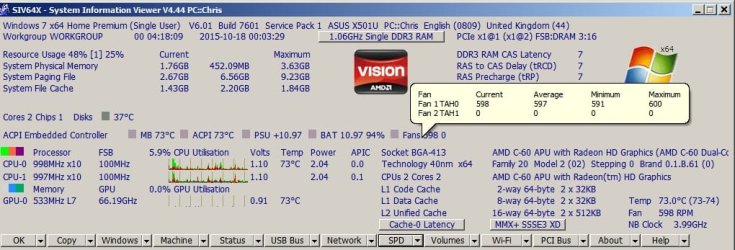
I don't use any real time monitoring software that does the same thing. I use SIV to check when I need to but it's not exactly user friendly.

System Information Viewer.jpg

I suspect that other members could offer suggestions on an alternative with real time monitoring.
 

My Computer

Computer type
Laptop
Computer Manufacturer/Model Number
ASUS
OS
Microsoft Windows 7 Home Premium 64-bit 7601 Multiprocessor Free Service Pack 1
CPU
AMD C-60 APU with Radeon(tm) HD Graphics
Motherboard
ASUSTeK COMPUTER INC. X501U
Memory
4.00 GB
Graphics Card(s)
AMD Radeon HD 6290 Graphics
Sound Card
(1) AMD High Definition Audio Device (2) Realtek High Defi
Screen Resolution
1366 x 768 x 32 bits (4294967296 colors) @ 60 Hz
Hard Drives
Hitachi HTS545050A7E380 SATA Disk Device
Antivirus
Comodo CIS & FW, SecureAplus App Whitelisting, Threatfire
Browser
Cyberfox 64bit, Opera 64bit, Airfox
Other Info
Spy-The-Spy, HitmanPro.Alert, Norton Connect Safe, MJRegWatcher, BitDefender TrafficLight, Voodoo Shield, Zemana AntiMalware
Yeah it is really weird that it doesn't work. Maybe I could change the registry keys manually that the .reg files changes? Would you happen to know what they were? Also a possible work-around if nothing here works. Is there like a program that replaces the desktop? Because I have Actual Multiple Monitors and I noticed that if I end the explorer process I can still continue to use both of the task bars that it creates, the only thing that stops working are my desktop icons. Just an idea haha. Also explorer just crashed again. So apparently problem not solved so far.
 

My Computer

Computer type
PC/Desktop
Computer Manufacturer/Model Number
Custom Build
OS
Windows 7 Ultimate x64
CPU
AMD FX 8350
Motherboard
ECS A990FXM-A
Memory
12GB
Graphics Card(s)
nVidia Geforce GTX 550 ti 2GB
Hard Drives
1x 500GB
Antivirus
Microsoft Security Essentials
Browser
Chrome
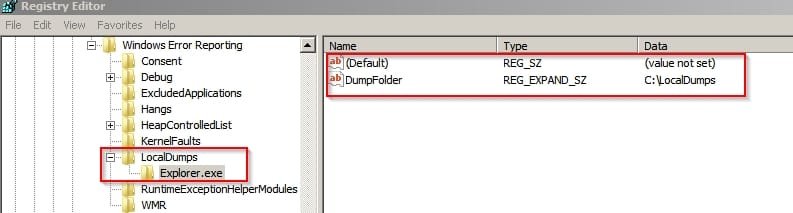
RE: Registry entries for Explorer Crash Dumps. I never tried creating them manually but if you want to try - it would appear that you will need to create a folder here:

C:\LocalDumps

and add these entries to your registry:

Registry Editor.jpg

[HKEY_LOCAL_MACHINE\SOFTWARE\Microsoft\Windows\Windows Error Reporting\LocalDumps\Explorer.exe]

I'm not sure that manually creating those entries would actually work. Here's the contents of the reg file:

Code:
Windows Registry Editor Version 5.00

[HKEY_LOCAL_MACHINE\SOFTWARE\Microsoft\Windows\Windows Error Reporting\LocalDumps\Explorer.exe]
"DumpFolder"=hex(2):43,00,3a,00,5c,00,4c,00,6f,00,63,00,61,00,6c,00,44,00,75,\
  00,6d,00,70,00,73,00,00,00

As for replacing Windows Desktop I've only ever tried using Classic Shell once in the past.

Do you have folders containing video or image files on your desktop? If so - try temporarily moving them onto an external drive.

If you end the explorer process you should really restart it from Task Manager.

File> New Task (Run)

then type

explorer.exe and press Enter.

Exit task manager and right click your desktop. Choose "Refresh"
 

My Computer

Computer type
Laptop
Computer Manufacturer/Model Number
ASUS
OS
Microsoft Windows 7 Home Premium 64-bit 7601 Multiprocessor Free Service Pack 1
CPU
AMD C-60 APU with Radeon(tm) HD Graphics
Motherboard
ASUSTeK COMPUTER INC. X501U
Memory
4.00 GB
Graphics Card(s)
AMD Radeon HD 6290 Graphics
Sound Card
(1) AMD High Definition Audio Device (2) Realtek High Defi
Screen Resolution
1366 x 768 x 32 bits (4294967296 colors) @ 60 Hz
Hard Drives
Hitachi HTS545050A7E380 SATA Disk Device
Antivirus
Comodo CIS & FW, SecureAplus App Whitelisting, Threatfire
Browser
Cyberfox 64bit, Opera 64bit, Airfox
Other Info
Spy-The-Spy, HitmanPro.Alert, Norton Connect Safe, MJRegWatcher, BitDefender TrafficLight, Voodoo Shield, Zemana AntiMalware
Okay so randomly that Localdumps folder is all of a sudden there and it has like 5 files in it. I'm assuming that you'd just need the newest one so I'll attach that here. Weird that it would randomly show up but good thing I don't have to go manually add it myself!
 

Attachments

My Computer

Computer type
PC/Desktop
Computer Manufacturer/Model Number
Custom Build
OS
Windows 7 Ultimate x64
CPU
AMD FX 8350
Motherboard
ECS A990FXM-A
Memory
12GB
Graphics Card(s)
nVidia Geforce GTX 550 ti 2GB
Hard Drives
1x 500GB
Antivirus
Microsoft Security Essentials
Browser
Chrome
Back
Top