You may only find a few tracking cookies at best while that would be the first move to see if anything else comes up. Finding out just what that item is as far as software drivers and the registry entry would be the larger part however of seeing this cleaned up. That could involved uninstalling the game entirely due to one thing hanging on you when going to exit the game.
W7 Ultimate x64/W10 Pro x64/W11 Pro Triple Boot - Main PC W7 Remote PC Micro ATX W7 Pro x64/W11 Pro
CPU
AMD Phenom II X4 975 Deneb 3.6ghz - 965 2nd remote pc
Motherboard
Gigabyte GA-790XTA-UD4-Gigabyte GA-880GM-D2H remote pc
Memory
Kingston Hyper X DDR3 1600 1.5v 16gb - Hyper X Fury 8gb 2nd
Graphics Card(s)
MSI HD Radeon 5750 1gb - MSI HD Radeon 6450 on mini tower
Sound Card
Creative Labs X-Fi Xtreme Audio P - Realtek onooard 2nd case
Monitor(s) Displays
ASUS VW199T-P 19" HP 2082a Main-HP 2082a 20" remote pc
Screen Resolution
Asus 1440x900 - HP 1600x900
Hard Drives
WD Black 1TB HD per OS W7, W10, and pending W11 presently on 500gb OS Drive - Pending Triple 1TB HDs for Spanned Storage/backup volume
Single 2TB external USB enclosure, single 1TB System 7 Host/Boot drive, Pending 8TB external HD for system image b
PSU
Corsair 750TX - primary / Corsair CX600 - second
Case
Antec 900-2 - SSD compatible / NZXT Vulcan mini tower
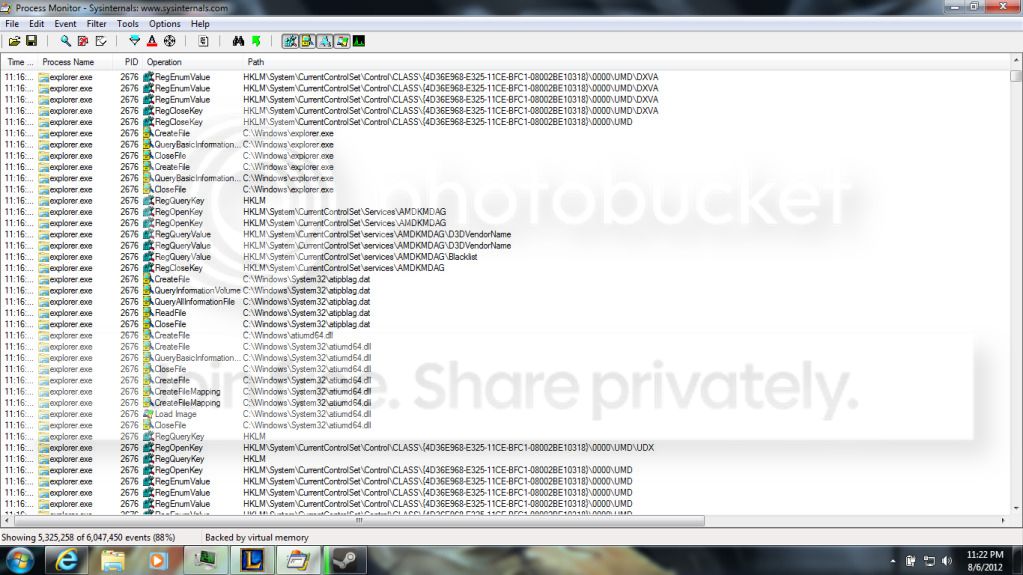
Thats the thing though i was playing the game while this happend and ewhen i came out my computer was runnning a little slow and i checked.See
LEague has the main client and the in-game client that boots up when you enter a match and the in-game client boots up and exits alot so wouldn't it start the problem on the first exit?
I strongly suspect there's one or two processes left running you need to id and close out to get back to normal. Some part of the game could still be trying to stay logged on even after a session where you have to end the process right there before the need to reboot each time.
The registry value being set from 1 to 0 or removed would prevent it but may not allow the game to run any longer which would of course force you to uninstall and try a fresh install. If something went buggy from the initial install you may have to try that out anyways to see if a good reinstall will solve it. That would be a reinstall to repair.
W7 Ultimate x64/W10 Pro x64/W11 Pro Triple Boot - Main PC W7 Remote PC Micro ATX W7 Pro x64/W11 Pro
CPU
AMD Phenom II X4 975 Deneb 3.6ghz - 965 2nd remote pc
Motherboard
Gigabyte GA-790XTA-UD4-Gigabyte GA-880GM-D2H remote pc
Memory
Kingston Hyper X DDR3 1600 1.5v 16gb - Hyper X Fury 8gb 2nd
Graphics Card(s)
MSI HD Radeon 5750 1gb - MSI HD Radeon 6450 on mini tower
Sound Card
Creative Labs X-Fi Xtreme Audio P - Realtek onooard 2nd case
Monitor(s) Displays
ASUS VW199T-P 19" HP 2082a Main-HP 2082a 20" remote pc
Screen Resolution
Asus 1440x900 - HP 1600x900
Hard Drives
WD Black 1TB HD per OS W7, W10, and pending W11 presently on 500gb OS Drive - Pending Triple 1TB HDs for Spanned Storage/backup volume
Single 2TB external USB enclosure, single 1TB System 7 Host/Boot drive, Pending 8TB external HD for system image b
PSU
Corsair 750TX - primary / Corsair CX600 - second
Case
Antec 900-2 - SSD compatible / NZXT Vulcan mini tower
Ok got the laptop replaced becuase of a keyboard issue. ANyeays the problem is back and its worse, It is although triggered by League of legends
it does the reading of the atiumd.cap
then it does a regEnumValue HKLM\System\CurrentControlSet\Control\CLASS\{4D36E968-E325-11CE-BFC1-08002BE10318}\0000\UMD
then it does the same regenumValue HKLM\System\CurrentControlSet\Control\CLASS\{4D36E968-E325-11CE-BFC1-08002BE10318}\0000\UMD\DXVA
Then well see for yourself
Also when i boot up the computer i get you amd driver is not installed or is not functioning properply please install a driver for you AMD hardware. I looked on device managedr and it says its working properly ive heard that when you uninstall a driver AMD is known for not cleaning up is there any program i can use to make sur ethe uinstall is "clean"
If you were on a desktop with a separate expansion card I would advise going into the ATI folder and look in the sub folders for the uninstaticat.exe type file which would remove the registry entries as well as the main drivers.
There however I would say you might have to use a driver cleaner once the drivers and Catalyst if present are removed. Or going into the Device Manager>Display adapter to right click and check off the delete drivers box once the Catalyst part is first uninstalled.
Once the drivers and Catalyst are gone you then go back into the registry to track down those two entries only to manually delete both if found. That will take care of any duplication errors which seems to be why you are seeing the Cat. drivers missing or not responding type messages despite the drivers being present and active.
You could simply remove one of the two entries now but which of the two? This is why the uninstall first and then manual edit would be advised as well as creating a restore point manually right before this is tried. If all goes well when seeing the reinstall afterwards with a fresh driver set make a few more good restore points.
As far as TeamViewer I would only be seeing that set up between the main Ultimate x64 case and another Pro x64 case I finished up a few remote desktop projects but on a closed network. All that will behind a firewall already inplace. I downloaded the TeamViewer program itself for a look once I get the two configured to work together.
W7 Ultimate x64/W10 Pro x64/W11 Pro Triple Boot - Main PC W7 Remote PC Micro ATX W7 Pro x64/W11 Pro
CPU
AMD Phenom II X4 975 Deneb 3.6ghz - 965 2nd remote pc
Motherboard
Gigabyte GA-790XTA-UD4-Gigabyte GA-880GM-D2H remote pc
Memory
Kingston Hyper X DDR3 1600 1.5v 16gb - Hyper X Fury 8gb 2nd
Graphics Card(s)
MSI HD Radeon 5750 1gb - MSI HD Radeon 6450 on mini tower
Sound Card
Creative Labs X-Fi Xtreme Audio P - Realtek onooard 2nd case
Monitor(s) Displays
ASUS VW199T-P 19" HP 2082a Main-HP 2082a 20" remote pc
Screen Resolution
Asus 1440x900 - HP 1600x900
Hard Drives
WD Black 1TB HD per OS W7, W10, and pending W11 presently on 500gb OS Drive - Pending Triple 1TB HDs for Spanned Storage/backup volume
Single 2TB external USB enclosure, single 1TB System 7 Host/Boot drive, Pending 8TB external HD for system image b
PSU
Corsair 750TX - primary / Corsair CX600 - second
Case
Antec 900-2 - SSD compatible / NZXT Vulcan mini tower
W7 Ultimate x64/W10 Pro x64/W11 Pro Triple Boot - Main PC W7 Remote PC Micro ATX W7 Pro x64/W11 Pro
CPU
AMD Phenom II X4 975 Deneb 3.6ghz - 965 2nd remote pc
Motherboard
Gigabyte GA-790XTA-UD4-Gigabyte GA-880GM-D2H remote pc
Memory
Kingston Hyper X DDR3 1600 1.5v 16gb - Hyper X Fury 8gb 2nd
Graphics Card(s)
MSI HD Radeon 5750 1gb - MSI HD Radeon 6450 on mini tower
Sound Card
Creative Labs X-Fi Xtreme Audio P - Realtek onooard 2nd case
Monitor(s) Displays
ASUS VW199T-P 19" HP 2082a Main-HP 2082a 20" remote pc
Screen Resolution
Asus 1440x900 - HP 1600x900
Hard Drives
WD Black 1TB HD per OS W7, W10, and pending W11 presently on 500gb OS Drive - Pending Triple 1TB HDs for Spanned Storage/backup volume
Single 2TB external USB enclosure, single 1TB System 7 Host/Boot drive, Pending 8TB external HD for system image b
PSU
Corsair 750TX - primary / Corsair CX600 - second
Case
Antec 900-2 - SSD compatible / NZXT Vulcan mini tower