explorer.exe

scouse58

New member
Member
Local time
12:34 AM
Messages
19
Location
out their!!
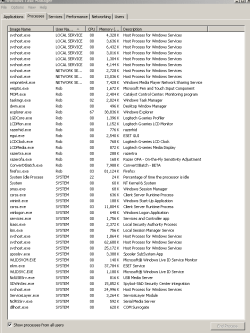
Hi all, not sure if this is the right place to post this, if not am sure a mod will move it to the relevant section, right this is my prob, have been using win7 build 7100 for a few months now and generally find it very good apart from one thing on occasions it slows down quite a bit, so when i go into task manger to see what is using the cpu up i find that i have more than one explorer.exe open using different amounts of memory i have had several explorer.exe.s open at any one time, so i close all but the one using the most mem, all the others i can safety close without the pc crashing or locking up has anyone else had this prob or is it just mine.

Specs

AMD64 athlon
3gig mem
asus mobo
asus ati graphics card
3 hd's 1ide, 2sata
ext hd
habu mouse
g15 keyboard
hp printer

if u need any more info just ask.

tia.
 

My Computer

OS
I'm a PC
Hi and welcome to the Forums. Could you post a screen shot of task manager (Processes tab)?
 

My Computer

Computer Manufacturer/Model Number
Samsung NP530U4B-S02IN
OS
Windows® 8 Pro (64-bit)
CPU
Intel® Core™ i5 Processor 2467M (1.60GHz, 3MB L3 Cache)
Motherboard
Samsung Electronics
Memory
6GB DDR3 System Memory at 1,333MHz (on BD 4GB + 2GB x 1)
Graphics Card(s)
AMD Radeon™ HD7550M 1GB DDR3 (Ext. Graphic)
Sound Card
Realtek High Definition Audio
Monitor(s) Displays
35.56cm (14.0) SuperBright 300nit HD LED Display
Screen Resolution
1366x768
Hard Drives
1TB S-ATA II Hard Drive (5400RPM) with ExpressCache 16GB SSD
Internet Speed
sucks
Antivirus
Microsoft Security Essentials
Browser
Google Chrome (Sync enabled)

My Computer

Computer type
PC/Desktop
Computer Manufacturer/Model Number
DELL VOSTRO 3650
OS
Windows 8.1 PRO
CPU
3rd Generation Intel Core i7‐3612QM CPU @ 2.10GHZ
Memory
8GB DDR3
Graphics Card(s)
NVIDIA GeForce GT 525M (128 bit), 1GB Grpahics
Screen Resolution
1920X1080
Hard Drives
750GB 5400RPM
@dinesh will do m8


@TGSoldier, have eset32 v4, antivirus installed as well as malwareantibytes1.4 and spybot search and destroy 1.6.2 have run scans with all three programs apart form usual cookies pc is clean as whistle, i do run regular scan every week with S&D and Antibytes Nod32 runs everynight at 2 in morning.
 

My Computer

OS
I'm a PC
I dont think this is an infection. Something is fishy.
 

My Computer

Computer Manufacturer/Model Number
Samsung NP530U4B-S02IN
OS
Windows® 8 Pro (64-bit)
CPU
Intel® Core™ i5 Processor 2467M (1.60GHz, 3MB L3 Cache)
Motherboard
Samsung Electronics
Memory
6GB DDR3 System Memory at 1,333MHz (on BD 4GB + 2GB x 1)
Graphics Card(s)
AMD Radeon™ HD7550M 1GB DDR3 (Ext. Graphic)
Sound Card
Realtek High Definition Audio
Monitor(s) Displays
35.56cm (14.0) SuperBright 300nit HD LED Display
Screen Resolution
1366x768
Hard Drives
1TB S-ATA II Hard Drive (5400RPM) with ExpressCache 16GB SSD
Internet Speed
sucks
Antivirus
Microsoft Security Essentials
Browser
Google Chrome (Sync enabled)
@Dinesh how do u mean something fishy?? please elaborate!!

if by that u mean a dodgy copy of win7 then you would be wrong i downloaded it from the MS web site and got the key from them direct.
 

My Computer

OS
I'm a PC
No i mean that i was suspecting that it could be because of some virus. But when you said that you've got NOD32, Spybot and MBAM, i guess that its not a virus. Use Snipping tool and capture a screenshot of Task manager and upload it here.

To use snipping tool, open task manager and click on Processes tab. Now click start, in the search box, type snip and press Enter. Using your mouse, cut the taskmanager and save it.

Then click on the pin and upload it here. (See screen shot below)

Capture.PNG
 

My Computer

Computer Manufacturer/Model Number
Samsung NP530U4B-S02IN
OS
Windows® 8 Pro (64-bit)
CPU
Intel® Core™ i5 Processor 2467M (1.60GHz, 3MB L3 Cache)
Motherboard
Samsung Electronics
Memory
6GB DDR3 System Memory at 1,333MHz (on BD 4GB + 2GB x 1)
Graphics Card(s)
AMD Radeon™ HD7550M 1GB DDR3 (Ext. Graphic)
Sound Card
Realtek High Definition Audio
Monitor(s) Displays
35.56cm (14.0) SuperBright 300nit HD LED Display
Screen Resolution
1366x768
Hard Drives
1TB S-ATA II Hard Drive (5400RPM) with ExpressCache 16GB SSD
Internet Speed
sucks
Antivirus
Microsoft Security Essentials
Browser
Google Chrome (Sync enabled)
ok m8 my mistake.

here is screen shot of process
 

Attachments

  • Task Capture.PNG
    Task Capture.PNG
    14.8 KB · Views: 248

My Computer

OS
I'm a PC
I only see one explorer.exe running...
 

My Computer

Computer type
PC/Desktop
Computer Manufacturer/Model Number
DELL VOSTRO 3650
OS
Windows 8.1 PRO
CPU
3rd Generation Intel Core i7‐3612QM CPU @ 2.10GHZ
Memory
8GB DDR3
Graphics Card(s)
NVIDIA GeForce GT 525M (128 bit), 1GB Grpahics
Screen Resolution
1920X1080
Hard Drives
750GB 5400RPM
yea that becasue i closed a lot down will upload another screener when their are more running, i forgot i closed them down:o
 

My Computer

OS
I'm a PC
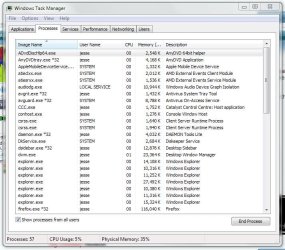
I'm also using RC build 7100 (x64), and I've had the same issue for a while now, been trying to resolve it for a few weeks, no luck yet though. Screenshot attached for an example.

Here's what I have figured out so far:

- Every instance of explorer (as file manager) that you open adds an instance of explorer.exe to the task manager.

- Whether I have set "launch folder windows in a seperate process" to enabled or not makes no difference - I still get a new instance for each window opened (the seperate process setting simply means that if one of them crashes, it won't bring down all the explorer windows with it).

- From what I can gather, the behaviours above are completely normal.

- However, the PROBLEM is that frequently (usually, in fact), the explorer instances -don't- close in task manager when you close their windows. So for example, if I close all my explorer windows, I should be left with only one instance of explorer.exe in task manager (the windows shell). This does happen occasionally (if I open a window and close it immediately afterward), but most of the time it doesn't, I have no idea why. So I frequently have the issue you can see in the attachment.

I've run Ad-Aware, Malware Bytes, Spybot, I use Avira, have done full scans, I come up clean (and generally I'm quite diligent when it comes to malware and the like).
 

Attachments

  • taskmanager.jpg
    taskmanager.jpg
    84.8 KB · Views: 147

My Computer

OS
Windows 7 RTM x64
CPU
Q6600 2.4ghz
Motherboard
Intel DP35DP
Memory
4GB DDR2
Graphics Card(s)
ATI Radeon 4850
Sound Card
Realtek onboard / CMedia PCI
Monitor(s) Displays
BenQ E2200 HD
Screen Resolution
1920x1080
Hard Drives
Samsung HD250HJ
Samsung HD501LJ
Seagate ST3500418AS
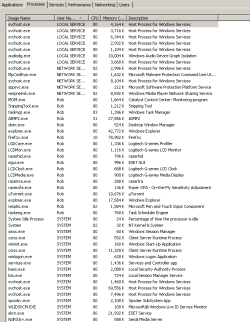
@lyle, yea i still have the same prob m8, seems to slow my pc down to a crawl have to sheck TM to find out what it is alsways seems to be explorer.exe as the pic shows
 

Attachments

  • Capture.PNG
    Capture.PNG
    13.3 KB · Views: 60

My Computer

OS
I'm a PC
S

Im going to ask a dumb question. You dont have a shortcut for explorer anywhere do you?

K
 

My Computer

Computer Manufacturer/Model Number
HP Pavillion dv-7 1005 Tx
OS
Win 8 Release candidate 8400
CPU
[email protected]
Memory
4 gigs
Graphics Card(s)
Nvidia 9600M
Sound Card
HD built-in
Monitor(s) Displays
17" Wxga
Screen Resolution
1440x900
Cooling
none
Internet Speed
45Mb down 5Mb up
@lyle

I have the exact same problem. I've actually had the same problem since Vista. Have been looking for a solution for the past couple years with no luck. A bit depressing, but still hopeful. :confused:
 

My Computer

OS
Windows 7 x86 Build 7100
@agent4054,

Yeah, I've seen the odd thread in my searches on this talking about vista. In a sense, it reminds me a bit of explorer appcrashes, where the behaviour can be uniform, but the causes widely varying. So it may be that it's not a Windows 7 problem exclusively, or maybe it's just some other software (non-malware) affecting explorer, like shell extensions do.

I did a new install to test, and it was still happening, so if it's something else to blame, maybe it's hardware related? Just as a check, here's what I am running, maybe we have something in common?

ATI Radeon 4850 (I upgrade my Catalysts fairly regularly)
Intel DP35DP board (I use it's chipset drivers and Management Engine Interface)
Linksys Compact Wireless-G USB wireless adapter (just using Windows default driver)
Winfast DTV Dongle Gold (driver v8.6.24.1)

I also set up Acronis True Image Echo Workstation fairly immediately upon an install...


@zigzag3143,

I use a shortcut for explorer, would that affect anything?
 

My Computer

OS
Windows 7 RTM x64
CPU
Q6600 2.4ghz
Motherboard
Intel DP35DP
Memory
4GB DDR2
Graphics Card(s)
ATI Radeon 4850
Sound Card
Realtek onboard / CMedia PCI
Monitor(s) Displays
BenQ E2200 HD
Screen Resolution
1920x1080
Hard Drives
Samsung HD250HJ
Samsung HD501LJ
Seagate ST3500418AS
@zigzag3143,

Wow, I thought that was a left-field question, but I went and did some checking...

I use an explorer shortcut in a toolbar on the taskbar (got used to this in WinXP and just kept doing it) rather than the by default already pinned explorer.

The shortcut has the properties:
%windir%\explorer.exe /n, c:\

Everytime I use that, I get a new instance of explorer.exe, like I mentioned. But just now, reverting to the default explorer shortcut in the start menu, I noticed that I -don't- get more explorer instances in task manager. If I enable launching folder views in a separate process, I get two instances, -maximum-, no matter how many I open. And it appears to be closing consistently when I close all the windows!

I really think you've solved this. Seeing as you obviously knew to ask the question, can I ask what it is about the other shortcut (which by default opens explorer at the root of c drive rather than in the libraries) that causes that behaviour? Is there another way I can do that (it's not great loss if I can't, just curious)?

Many thanks, mate.
 

My Computer

OS
Windows 7 RTM x64
CPU
Q6600 2.4ghz
Motherboard
Intel DP35DP
Memory
4GB DDR2
Graphics Card(s)
ATI Radeon 4850
Sound Card
Realtek onboard / CMedia PCI
Monitor(s) Displays
BenQ E2200 HD
Screen Resolution
1920x1080
Hard Drives
Samsung HD250HJ
Samsung HD501LJ
Seagate ST3500418AS
I don't know why a shortcut would have any relevance on the issue. I have it pinned to the taskbar though.

as for background processes:
ATI Radeon 4770 Catalyst software (but had an nvidia card before that; no difference in problem)
Kensington trackball software
Avast

It is possible that some third party program is causing issues, just unsure of what. I used to use the blackbox shell in Vista and used to think that was my problem, but ever since I started having this issue in W7 (which, was right from the beginning) I ruled that out.

*shrug*
 

My Computer

OS
Windows 7 x86 Build 7100
@zigzag3143,
The shortcut has the properties:
%windir%\explorer.exe /n, c:\

Hmm... I also use a similar shortcut cmd:
%SystemRoot%\explorer.exe /e,F:\

I really like that command, but if it will fix the problem, I might as well try it. =/
 

My Computer

OS
Windows 7 x86 Build 7100
I've been looking for information about this for a while now. I was also using a switch (which I found via google) at the end of the shortcut to make it open in Computer instead of Libraries. After a week or so of normal use I would end up with a bunch of explorer.exe processes that wouldn't get released. Interesting.
 

My Computer

OS
Windows 7 Ultimate x64
Back
Top