Solved Explorer - How to open parent folder in a new window?

boren

New member
Local time
12:54 PM
Messages
11
In Windows XP, I used to Ctrl+click the Parent Folder button (folder icon with a green arrow pointing up). There's no such button in Windows 7 and I can't find a way to do it using the keyboard. Is it possible?

Thanks,
Oren
 

My Computer My Computer

OS
Windows 7 Ultimate 32-bit
CPU
i5-750
Memory
3GB
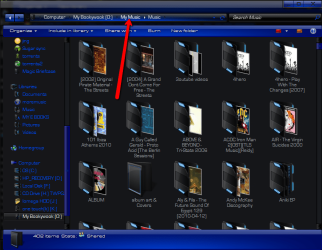
The big up arrow icon is gone, but the feature to access the parent folder is not gone
2011-09-18_1410.png

the address bar at the top is the way to reach the parent folder it is a feature in any explorer window.
 

My Computer My Computer

Computer Manufacturer/Model Number
Hewlett packard/p6512uk
OS
Microsoft Windows 7 Home Premium 64-bit 7600
CPU
IIx4 amd athelon 635 processor
Motherboard
FOXCONN 2AA9
Memory
2x2gb
Graphics Card(s)
ati radeon HD 5450
Sound Card
(1) Realtek High Definition Audio (2) AMD High Definition
Monitor(s) Displays
samsung lcd tv 32"
Screen Resolution
1360x 768
Hard Drives
(1) WDC WD10 01FAES-60Z2A0 SATA Disk Device (2) Maxtor OneTouch USB Device (3) ST310003 33AS USB Device (4) WD My Book 1111 USB Device
PSU
?
Cooling
air!
Keyboard
wireless hp
Mouse
wireless Hp,optical
Internet Speed
1.10mb/s
Antivirus
MSE
Browser
Firefox
Yes, I know that. But I want to open it in a new separate window, while still having the current window display the current folder. It seems that to do this in Windows 7 I have to open the parent folder, then look for the previous folder and Ctrl+click its name to re-open it in a separate window. This is more cumbersome than the Windows XP method, which only required Ctrl+clicking the Parent Folder icon.
 

My Computer My Computer

OS
Windows 7 Ultimate 32-bit
CPU
i5-750
Memory
3GB
ok . i have never used vista so im out.
 

My Computer My Computer

Computer Manufacturer/Model Number
Hewlett packard/p6512uk
OS
Microsoft Windows 7 Home Premium 64-bit 7600
CPU
IIx4 amd athelon 635 processor
Motherboard
FOXCONN 2AA9
Memory
2x2gb
Graphics Card(s)
ati radeon HD 5450
Sound Card
(1) Realtek High Definition Audio (2) AMD High Definition
Monitor(s) Displays
samsung lcd tv 32"
Screen Resolution
1360x 768
Hard Drives
(1) WDC WD10 01FAES-60Z2A0 SATA Disk Device (2) Maxtor OneTouch USB Device (3) ST310003 33AS USB Device (4) WD My Book 1111 USB Device
PSU
?
Cooling
air!
Keyboard
wireless hp
Mouse
wireless Hp,optical
Internet Speed
1.10mb/s
Antivirus
MSE
Browser
Firefox
Actually, I was referring to Windows XP. I think that, like Windows 7, Vista also didn't offer a straightforward way to open the parent folder in a new window. I didn't stick around for too long to check, as it was poor in so many other ways. Windows 7 is better, but I find Windows Explorer to be pretty annoying compared to the Windows XP version.
 

My Computer My Computer

OS
Windows 7 Ultimate 32-bit
CPU
i5-750
Memory
3GB
yeah sorry i meant to say windows xp,
had a brainfart. it was a late night. :o
 

My Computer My Computer

Computer Manufacturer/Model Number
Hewlett packard/p6512uk
OS
Microsoft Windows 7 Home Premium 64-bit 7600
CPU
IIx4 amd athelon 635 processor
Motherboard
FOXCONN 2AA9
Memory
2x2gb
Graphics Card(s)
ati radeon HD 5450
Sound Card
(1) Realtek High Definition Audio (2) AMD High Definition
Monitor(s) Displays
samsung lcd tv 32"
Screen Resolution
1360x 768
Hard Drives
(1) WDC WD10 01FAES-60Z2A0 SATA Disk Device (2) Maxtor OneTouch USB Device (3) ST310003 33AS USB Device (4) WD My Book 1111 USB Device
PSU
?
Cooling
air!
Keyboard
wireless hp
Mouse
wireless Hp,optical
Internet Speed
1.10mb/s
Antivirus
MSE
Browser
Firefox

My Computer My Computer

Computer Manufacturer/Model Number
HP Pavillion dv5t (generation 1)
OS
Vista 64 bit and 32 bit (SP2)
CPU
Intel(R) Core(TM)2 Duo Processor T9400 (2.53 GHz
Memory
4GB DDR2 System Memory (2 Dimm)
Graphics Card(s)
512 MB NVIDIA GeForce 9600M GT
Monitor(s) Displays
15.4" diagonal WSXGA+ High-Definition HP BrightView Widescre
Screen Resolution
1680 x 1050
Hard Drives
320GB 5400RPM SATA Hard Drive with HP ProtectSmart Hard Drive Protection
Keyboard
Built-in HP
Mouse
Built in - Synaptics TouchPad V6.5 on PS/2 Port
Internet Speed
Max
Other Info
~ Intel Next-Gen Wireless-N Mini-card w/Bluetooth ~ Blu-Ray ROM DVD+/-R/RW ~ Integ. HDTV Hybrid Tuner ~ 12 Cell Battery ~ MS Office (Home Premium) 2007 ~
But how do I control whether Explorer opens a folder in a new window or in the same window? In XP Ctrl+click (on the Parent Folder icon) did the former, while a simple click did the latter? What's the equivalent separation in Windows 7 (if any)?
 

My Computer My Computer

OS
Windows 7 Ultimate 32-bit
CPU
i5-750
Memory
3GB
Barman58 (in another thread) helped me find a solution for this issue: Classic Shell
 

My Computer My Computer

OS
Windows 7 Ultimate 32-bit
CPU
i5-750
Memory
3GB
good , thanks for the update
 

My Computer My Computer

Computer Manufacturer/Model Number
Hewlett packard/p6512uk
OS
Microsoft Windows 7 Home Premium 64-bit 7600
CPU
IIx4 amd athelon 635 processor
Motherboard
FOXCONN 2AA9
Memory
2x2gb
Graphics Card(s)
ati radeon HD 5450
Sound Card
(1) Realtek High Definition Audio (2) AMD High Definition
Monitor(s) Displays
samsung lcd tv 32"
Screen Resolution
1360x 768
Hard Drives
(1) WDC WD10 01FAES-60Z2A0 SATA Disk Device (2) Maxtor OneTouch USB Device (3) ST310003 33AS USB Device (4) WD My Book 1111 USB Device
PSU
?
Cooling
air!
Keyboard
wireless hp
Mouse
wireless Hp,optical
Internet Speed
1.10mb/s
Antivirus
MSE
Browser
Firefox
But how do I control whether Explorer opens a folder in a new window or in the same window? In XP Ctrl+click (on the Parent Folder icon) did the former, while a simple click did the latter? What's the equivalent separation in Windows 7 (if any)?

Open each Folder in the Same or Own Separate New Window
How to Open a Folder Window in a New Process in Windows 7

Try either or both of these settings:

1. Open Windows Explorer, Tools, Folder Options, General, and under Browse Folders check: "Open each folder in its own window."

2. Open Windows Explorer, Tools, Folder Options, View, Advanced Settings, under Files and Folders, check: "Launch folder windows in a separate process."
 

My Computer My Computer

Computer Manufacturer/Model Number
HP Pavillion dv5t (generation 1)
OS
Vista 64 bit and 32 bit (SP2)
CPU
Intel(R) Core(TM)2 Duo Processor T9400 (2.53 GHz
Memory
4GB DDR2 System Memory (2 Dimm)
Graphics Card(s)
512 MB NVIDIA GeForce 9600M GT
Monitor(s) Displays
15.4" diagonal WSXGA+ High-Definition HP BrightView Widescre
Screen Resolution
1680 x 1050
Hard Drives
320GB 5400RPM SATA Hard Drive with HP ProtectSmart Hard Drive Protection
Keyboard
Built-in HP
Mouse
Built in - Synaptics TouchPad V6.5 on PS/2 Port
Internet Speed
Max
Other Info
~ Intel Next-Gen Wireless-N Mini-card w/Bluetooth ~ Blu-Ray ROM DVD+/-R/RW ~ Integ. HDTV Hybrid Tuner ~ 12 Cell Battery ~ MS Office (Home Premium) 2007 ~
Thanks, but these settings don't allow me to decide when to open the parent folder as a separate window and when to open it in the same window. I'll stick with Classic Shell :)
 

My Computer My Computer

OS
Windows 7 Ultimate 32-bit
CPU
i5-750
Memory
3GB
Back
Top