

These issues started about a week ago, and a reboot temporarily solves it (which isn't convenient for me).
When I open Windows Explorer, everything shows fine. Then when I open it again a short while later, the main part of the windows is empty and the side bar only shows the Favorites, Libraries and (I think it's) Network (though it may be Homegroup, can't remember), and I can't expand any of those three to show their contents (so basically I can't browse my drives, my documents, anything). If I kill explorer.exe with task manager and then re-start the process, when I click on the Windows Explorer icon on my taskbar or any explorer link in the start menu, it'll pop up with a box about remote process call failed.
The odd think is (or, at least, I think it's odd) is that I can still access stuff, such as opening the Save As dialogue in MS Word, or a program such as iTunes or uTorrent, I can open an explorer window (iTunes showed album contents folder but didn't want to load the side bar fully, uTorrent-instigated folder openings display a bit more).
With peripherals, the latest firmware update to my Android HTC device featured HTC changing the identity from mass storage like a flash drive to an MTP device (meaning I can access files simultaneously on the phone and PC), which often seems to annoy explorer as it doesn't appear to allow me to do two file operations at once. Also, I resurrected my Windows Phone 7 handset, which when trying to sync with Zune it gets to a certain percentage syncing and just stops, even if I unplug the phone it still says, say, 13% sync progress, and restarting phone, Zune, and re-plugging it back in do little to help. I'm just mentioning these two things because I have a feeling they may be related to Explorer consistently giving up.
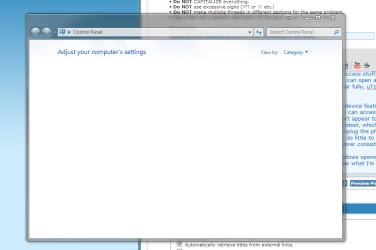
At the moment, if I hit Control Panel on the Start Menu, the windows opens, but no control panel items/categories display... I'll just attach an image below to show what I'm seeing, it's clearer than trying to explain it.
Sorry I can't really explain it very well, but it's a really frustrating issue that isn't quite killing the computer, but it's making it nearly unusable and incredibly unreliable.
For the record, disk defrangmenter says that C: is 17% fragmented and Soluto gives a similar figure. Could this be the cause, or just one of the many going wrong?
When I open Windows Explorer, everything shows fine. Then when I open it again a short while later, the main part of the windows is empty and the side bar only shows the Favorites, Libraries and (I think it's) Network (though it may be Homegroup, can't remember), and I can't expand any of those three to show their contents (so basically I can't browse my drives, my documents, anything). If I kill explorer.exe with task manager and then re-start the process, when I click on the Windows Explorer icon on my taskbar or any explorer link in the start menu, it'll pop up with a box about remote process call failed.
The odd think is (or, at least, I think it's odd) is that I can still access stuff, such as opening the Save As dialogue in MS Word, or a program such as iTunes or uTorrent, I can open an explorer window (iTunes showed album contents folder but didn't want to load the side bar fully, uTorrent-instigated folder openings display a bit more).
With peripherals, the latest firmware update to my Android HTC device featured HTC changing the identity from mass storage like a flash drive to an MTP device (meaning I can access files simultaneously on the phone and PC), which often seems to annoy explorer as it doesn't appear to allow me to do two file operations at once. Also, I resurrected my Windows Phone 7 handset, which when trying to sync with Zune it gets to a certain percentage syncing and just stops, even if I unplug the phone it still says, say, 13% sync progress, and restarting phone, Zune, and re-plugging it back in do little to help. I'm just mentioning these two things because I have a feeling they may be related to Explorer consistently giving up.
At the moment, if I hit Control Panel on the Start Menu, the windows opens, but no control panel items/categories display... I'll just attach an image below to show what I'm seeing, it's clearer than trying to explain it.
Sorry I can't really explain it very well, but it's a really frustrating issue that isn't quite killing the computer, but it's making it nearly unusable and incredibly unreliable.
For the record, disk defrangmenter says that C: is 17% fragmented and Soluto gives a similar figure. Could this be the cause, or just one of the many going wrong?
Attachments
Last edited:
My Computer
- Computer type
- PC/Desktop
- Computer Manufacturer/Model Number
- HP Pavilion p6565uk
- OS
- Windows 7 Home Premium 64bit
- CPU
- AMD Phenom II X6 1035T @2.6GHz (hexacore) (=15.6GHz)
- Motherboard
- FOXCONN (2AA9)
- Memory
- 6GB DDR3-1333 (running at 1066)
- Graphics Card(s)
- NVIDIA/MSI GeForce GTX 770 (2GB)
- Sound Card
- Realtek HD Audio (with 5.1 surround sound always on)
- Monitor(s) Displays
- HP 2311x (secondary-workspace), Sharp LL-T1620-H (primary)
- Screen Resolution
- 1924x1080
- Hard Drives
- 480GB Crucial M500 SSD
1TB internal WD Caviar Black
3TB Seagate Barracude 7200rpm (for media storage)
4TB Seagate Desktop drive (mirrored backup)
2TB Apple AirPort Time Capsule
1TB Seagate FreeAgent Desk
500GB Seagate External Desktop Drive
- PSU
- XCase Dolphin, 700W
- Case
- Stock HP one that came with it, mid-size ATX
- Cooling
- Stock fans, they're fairly quiet.
- Keyboard
- Microsoft Wireless Keyboard 2000+ HP Media Centre Remote
- Mouse
- Microsoft Wireless Mouse 2000
- Internet Speed
- 20 Mbps down, 50 Mbps up
- Antivirus
- MSE
- Browser
- Chrome Beta
- Other Info
- Also:
- 13" Apple MacBook Air, 2013, i7 @ 1.7GHz, 8GB DDR3, 256GB SSD
- HP Deskjet 3050A
- Two HP ZV5000 laptops (the better of the two recently broke)
- A Compaq Evo D310 (has 2GB RAM and a 2.53GHz P4 but is curiously extremely slow)
- A desk fan - this weather is warm ;)
- A fair few retro consoles
- Too many cables behind the desk, probably a fire hazard.


