Explorer Problem (opens in new window)

Arvencis

New member
Local time
7:38 AM
Messages
9
Is there any way to fix this? :sarc:

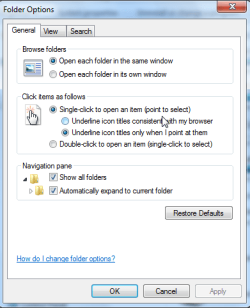
When I open Computer in the start menu and double click on an item it opens in a new window. :sarc: I tried to open `Organize`, press `Folder and search options` and select `Open each folder in the same window`, but it doesn`t work! :cry: I can still use explorer, but it`s quite annoying because I have to right click to open things or close all the windows I`ve opened when I`m done. :confused: Windows 7 Ultimate 32-bit.

Thanks :D
 

My Computer

Computer Manufacturer/Model Number
Apple MacBook White 2007
OS
Mac OS X Leopard, Windows 7 Ultimate x64
CPU
Intel Core 2 Duo 2GHz
Motherboard
Apple Motherboard
Memory
2,00 GB RAM
Graphics Card(s)
NVIDIA GeForce 9400M
Sound Card
Integrated
Monitor(s) Displays
13 Inch Built in Display
Screen Resolution
1280 by 800
Hard Drives
Hitachi 120 GB (47 GB (Mac OS X), 64 GB (Windows))
PSU
Apple Power Adapter
Case
MacBook White Unibody
Cooling
Integrated
Keyboard
Built in Keyboard
Mouse
Built in Touchpad (with a button)
Internet Speed
350 kB/s
Other Info
Bought summer 2008. Even though it's not the newest Macbook on the market, it works pretty well!
Hi Arvencis, welcome to the forums.

The best I can suggest is to open the folder properties (Organize -> Folder and Search options) and reset all to default in each tab. In addition try the 'Reset Folders' in the 'View' tab too.

Hope this helps :)


OS
 

My Computer

Computer Manufacturer/Model Number
Compaq Desktop
OS
Windows 7 Ultimate x64
CPU
AMD Sempron Dual Core
Memory
3GB
Graphics Card(s)
NVIDIA GeForce 6150SE nForce 430
Screen Resolution
1024x768
Hard Drives
150GB Sata
I've done it, it doesn't make a difference.
 

My Computer

Computer Manufacturer/Model Number
Apple MacBook White 2007
OS
Mac OS X Leopard, Windows 7 Ultimate x64
CPU
Intel Core 2 Duo 2GHz
Motherboard
Apple Motherboard
Memory
2,00 GB RAM
Graphics Card(s)
NVIDIA GeForce 9400M
Sound Card
Integrated
Monitor(s) Displays
13 Inch Built in Display
Screen Resolution
1280 by 800
Hard Drives
Hitachi 120 GB (47 GB (Mac OS X), 64 GB (Windows))
PSU
Apple Power Adapter
Case
MacBook White Unibody
Cooling
Integrated
Keyboard
Built in Keyboard
Mouse
Built in Touchpad (with a button)
Internet Speed
350 kB/s
Other Info
Bought summer 2008. Even though it's not the newest Macbook on the market, it works pretty well!
When I open Computer in the start menu and double click on an item it opens in a new window. :sarc:
Welcome Arvencis.

I personally don't have this specific problem,

but having just posted this pic in my comrade "off-topic" area,

maybe these last 2 settings might help ?

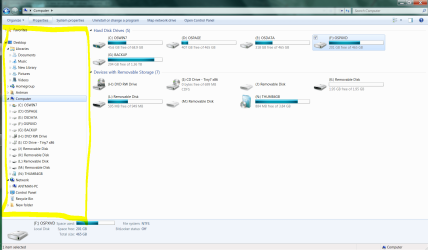
(Don't know what 'Navigation Pane' really means...)
 

Attachments

  • Ant_Dbl_Clk.png
    Ant_Dbl_Clk.png
    15.3 KB · Views: 813

My Computer

Computer Manufacturer/Model Number
Gateway GT5056
OS
XP_Pro, W7_7201, W7RC.vhd, SciLinux5.3, Fedora12, Fedora9_2x, OpenSolaris_09-06
CPU
AMD 64x2
Motherboard
Yes
Memory
1 gig
Graphics Card(s)
Dunno
Sound Card
Realtek something
Monitor(s) Displays
Samsung SyncMaster 940MW w/TV
Screen Resolution
1280x1024
Hard Drives
250 GB WD, USB Seagate Freedesk 1.5 T
Internet Speed
Cable modem
Other Info
1 + 1 = 10b,
7 + 7 = 16o,
a + b = 15h.
I don't really see how this is going to fix the problem. The navigation pane settings isn't stopping folders from opening in new windows.
 

My Computer

Computer Manufacturer/Model Number
Apple MacBook White 2007
OS
Mac OS X Leopard, Windows 7 Ultimate x64
CPU
Intel Core 2 Duo 2GHz
Motherboard
Apple Motherboard
Memory
2,00 GB RAM
Graphics Card(s)
NVIDIA GeForce 9400M
Sound Card
Integrated
Monitor(s) Displays
13 Inch Built in Display
Screen Resolution
1280 by 800
Hard Drives
Hitachi 120 GB (47 GB (Mac OS X), 64 GB (Windows))
PSU
Apple Power Adapter
Case
MacBook White Unibody
Cooling
Integrated
Keyboard
Built in Keyboard
Mouse
Built in Touchpad (with a button)
Internet Speed
350 kB/s
Other Info
Bought summer 2008. Even though it's not the newest Macbook on the market, it works pretty well!
I don't really see how this is going to fix the problem. The navigation pane settings isn't stopping folders from opening in new windows.
ChuckR understands that now.

When you right click a drive or folder, which word is in bold?
 
Open
open in new window

It still opens in a new window! I have to right click and select "Open" (in bold) to open in the same. Isn't there any command or something i can type in to fix it?
 

My Computer

Computer Manufacturer/Model Number
Apple MacBook White 2007
OS
Mac OS X Leopard, Windows 7 Ultimate x64
CPU
Intel Core 2 Duo 2GHz
Motherboard
Apple Motherboard
Memory
2,00 GB RAM
Graphics Card(s)
NVIDIA GeForce 9400M
Sound Card
Integrated
Monitor(s) Displays
13 Inch Built in Display
Screen Resolution
1280 by 800
Hard Drives
Hitachi 120 GB (47 GB (Mac OS X), 64 GB (Windows))
PSU
Apple Power Adapter
Case
MacBook White Unibody
Cooling
Integrated
Keyboard
Built in Keyboard
Mouse
Built in Touchpad (with a button)
Internet Speed
350 kB/s
Other Info
Bought summer 2008. Even though it's not the newest Macbook on the market, it works pretty well!
Just started experiencing the exact same issue. Have a desktop with Windows 7 that is having this issue, and a laptop that is not. It is set to re-use folders and has been fine since install. Yesterday it stopped. Right click and the Open is bolded and if I choose it then it will re-use, but double click opens a new folder each time. Any registry entries that we could look at? Any additional help would be greatly appreciated.
 

My Computer

OS
Windows 7 Ultimate 32-bit
Double post!

So I found my problem. It ends up it was a piece of software I installed. It was a software test tool that we use at work. A co-worker had a similar issue and after doing a system restore the folder views were back to normal. I'm not sure what component of the software causes the issues, but if you've installed anything recently, maybe do a system restore back before that and see if it's a particular software package.

I tried just uninstalling the software but that didn't do the trick. I had just installed it earlier this week so there were no other changes on my system. That's what I know, hope that helps.
 

My Computer

OS
Windows 7 Ultimate 32-bit
I dit manage to fix it, but it`s probably not caused by a special kind of software. As i mentioned above, i did try to reinstall the OS once, but it didn`t help. The second time it worked, so it`s probably just some random stuff. I won`t be posting any more now, but good luck to everyone that has the same problem.
 

My Computer

Computer Manufacturer/Model Number
Apple MacBook White 2007
OS
Mac OS X Leopard, Windows 7 Ultimate x64
CPU
Intel Core 2 Duo 2GHz
Motherboard
Apple Motherboard
Memory
2,00 GB RAM
Graphics Card(s)
NVIDIA GeForce 9400M
Sound Card
Integrated
Monitor(s) Displays
13 Inch Built in Display
Screen Resolution
1280 by 800
Hard Drives
Hitachi 120 GB (47 GB (Mac OS X), 64 GB (Windows))
PSU
Apple Power Adapter
Case
MacBook White Unibody
Cooling
Integrated
Keyboard
Built in Keyboard
Mouse
Built in Touchpad (with a button)
Internet Speed
350 kB/s
Other Info
Bought summer 2008. Even though it's not the newest Macbook on the market, it works pretty well!
I had this issue along with IE8 open in tab not working, and this fixed it for me

I got the solution from
Explorer windows always open in new window?

Re-posting here just in case:
Put the following in a batch file, start task manager, close IE and windows explorer (ctrl shift right click on blank area of start menu, select exit explorer). Then run the batch file (use task manager file run) then run explorer.exe and it should be fixed (or at least you probably wont be any worse off than you started).

Code:
@echo off
echo.
echo IEREREG Version 1.07 for IE8 27.03.2009
echo by Kai Schaetzl [URL="http://iefaq.info/"]http://iefaq.info[/URL]
echo installs and registers (if suitable) all DLLs known to be used by IE8.
echo should only take a few seconds, but please be patient
echo.
REM ******************************
echo registering IE files
REM IE files (= part of setup)
regsvr32 /s /i browseui.dll
REM regsvr32 /s /i browseui.dll,NI (unnecessary)
regsvr32 /s corpol.dll
regsvr32 /s dxtmsft.dll
regsvr32 /s dxtrans.dll
REM simple HTML Mail API
regsvr32 /s "%ProgramFiles%\internet explorer\hmmapi.dll"
REM group policy snap-in
regsvr32 /s ieaksie.dll
REM smart screen
regsvr32 /s ieapfltr.dll
REM ieak branding
regsvr32 /s iedkcs32.dll
REM dev tools
regsvr32 /s "%ProgramFiles%\internet explorer\iedvtool.dll"
regsvr32 /s iepeers.dll
REM Symptom: IE8 closes immediately on launch, missing from IE7
regsvr32 /s "%ProgramFiles%\internet explorer\ieproxy.dll"
REM no install point anymore
REM regsvr32 /s /i iesetup.dll
REM no reg point anymore
REM regsvr32 /s imgutil.dll
regsvr32 /s /i /n inetcpl.cpl
REM no install point anymore
REM regsvr32 /s /i inseng.dll
regsvr32 /s jscript.dll
REM license manager
regsvr32 /s licmgr10.dll
REM regsvr32 /s msapsspc.dll
REM regsvr32 /s mshta.exe
REM VS debugger
regsvr32 /s msdbg2.dll
REM no install point anymore
REM regsvr32 /s /i mshtml.dll
regsvr32 /s mshtmled.dll
regsvr32 /s msident.dll
REM no reg point anymore
REM regsvr32 /s msrating.dll
REM multimedia timer
regsvr32 /s mstime.dll
REM no install point anymore
REM regsvr32 /s /i occache.dll
REM process debug manager
regsvr32 /s "%ProgramFiles%\internet explorer\pdm.dll"
REM no reg point anymore
REM regsvr32 /s pngfilt.dll
REM regsvr32 /s /i setupwbv.dll (not there anymore!)
regsvr32 /s tdc.ocx
regsvr32 /s /i urlmon.dll
REM regsvr32 /s /i urlmon.dll,NI,HKLM
regsvr32 /s vbscript.dll
REM VML renderer
regsvr32 /s "%CommonProgramFiles%\microsoft shared\vgx\vgx.dll"
REM no install point anymore
REM regsvr32 /s /i webcheck.dll
regsvr32 /s /i /n wininet.dll
REM ******************************
echo registering system files
REM additional system dlls known to be used by IE
REM added 11.05.2006 Symptom: Add-Ons-Manager menu entry is present but nothing happens
regsvr32 /s extmgr.dll
REM added 12.05.2006 Symptom: Javascript links don't work (Robin Walker) .NET hub file
regsvr32 /s mscoree.dll
REM added 23.03.2009 Symptom: Find on this page is blank
regsvr32 /s oleacc.dll
REM added 24.03.2009 Symptom: Printing problems, open in new window
regsvr32 /s ole32.dll
REM mscorier.dll
REM mscories.dll
REM Symptom: open in new tab/window not working
regsvr32 /s actxprxy.dll
regsvr32 /s asctrls.ocx
regsvr32 /s cdfview.dll
regsvr32 /s comcat.dll
regsvr32 /s /i /n comctl32.dll
regsvr32 /s cryptdlg.dll
regsvr32 /s /i /n digest.dll
regsvr32 /s dispex.dll
regsvr32 /s hlink.dll
regsvr32 /s mlang.dll
regsvr32 /s mobsync.dll
regsvr32 /s /i msieftp.dll
REM regsvr32 /s msnsspc.dll #no entry point
regsvr32 /s msr2c.dll
regsvr32 /s msxml.dll
regsvr32 /s oleaut32.dll
REM regsvr32 /s plugin.ocx #no entry point
regsvr32 /s proctexe.ocx
REM plus DllRegisterServerEx ExA ExW ... ?
regsvr32 /s /i scrobj.dll
REM shdocvw.dll hasn't been updated for IE7 and IE8, it still registers itself for the Windows Internet Controls
regsvr32 /s /i shdocvw.dll
regsvr32 /s sendmail.dll
REM ******************************
REM PKI/crypto functionality
REM initpki can take very long to run and is rarely a problem
REM if there are problems with crypto, SSL, certificates
REM remove the three following REMs from the lines
REM echo We are almost done except one crypto file
REM echo but this will take very long, be patient!
REM regsvr32 /s /i:A initpki.dll
REM ******************************
REM tabbed browser, do at the end, why originally with /n ?
regsvr32 /s /i ieframe.dll
REM ******************************
echo correcting bugs in the registry
REM do some corrective work
REM Symptom: new tabs page cannot display content because it cannot access the controls (added 27. 3.2009)
REM This is a result of a bug in shdocvw.dll (see above), probably only on Windows XP
reg add "HKCR\TypeLib\{EAB22AC0-30C1-11CF-A7EB-0000C05BAE0B}\1.1\0\win32" /ve /t REG_SZ /d %systemroot%\system32\ieframe.dll /f
REM ******************************
echo all tasks have been finished
echo.
pause

 

My Computer

Computer Manufacturer/Model Number
Toshiba Satelite A300/U01
OS
Windows 7 (32bit)
Trendy Tim's suggestion worked for me - Nothing else Did and I tried a bunch of things - I hope this forum/thread makes it to the top of the list on google, but the weird thing to me is I found a lot of other people saying a lot of other things worked for them.... however this was the only one that worked for me... oddities

cheers, thanks TrendyTim because as I said.. your 1 post haha worked for me.
 

My Computer

Computer Manufacturer/Model Number
HP
OS
Windows 7 64bit
CPU
Intel
Motherboard
HP - ish
Memory
9gb
Graphics Card(s)
nvidia 260gt
Sound Card
sb
Monitor(s) Displays
1 samsung - 1 hp
Hard Drives
tb
PSU
stocker
Case
hp
Cooling
stocker
Hi all, are you still there?
Now am starting to experience this same problem, am using WIN7HPx32, tried to run the above batch, but it gives me an error stating that access is denied despite running it as an admn.
Any ideas?
 

My Computer

OS
Windows 7 Home Premium x32
Back
Top