Extending my Windows 7 Partition

DarkDavil

Avatar thanks to BFK :D
Power User
Local time
11:19 AM
Messages
432
Location
Illinois...India?
Okay :P Lets see how i can do this :D I have Vista Home Prem. x64 on my C: drive. That was my original OS. I shrank(shrunk?) that by 40 GB. My Windows 7 Ultimate x64 is now on my 40 GB partition X:. I now wanna give my X: drive more space from my C: drive. I have 37.2 GB free on my C: drive. How can i give 20 of those 37.2 free GB into my X: drive(Which is my Windows 7 one)
:P Thansk ^^
 

My Computer My Computer

At a glance

7 x64/ Back-Track 4Intel Core 2 Duo CPU 8300@ 2.4 Ghz4096 MB DDR2Nvidia 8400M GS
Computer Manufacturer/Model Number
HP dv6000t CTO Entertainment Lappy |My Desktop @ Bottom
OS
7 x64/ Back-Track 4
CPU
Intel Core 2 Duo CPU 8300@ 2.4 Ghz
Motherboard
HP's Own
Memory
4096 MB DDR2
Graphics Card(s)
Nvidia 8400M GS
Sound Card
Altec Lansing (The usual on Laptops )
Monitor(s) Displays
Laptop Screen. 17' Wide.
Screen Resolution
1280 x 800
Hard Drives
150 GB HDD.
Cooling
2 External Fans, Undervolted, Coolant
Keyboard
Norm. Cheap Random Keyboard
Mouse
Norm. Cheap Random Mouse
Other Info
This is my Homemade Desktop :)
HDD: Western Digital Caviar Blue 320GB 16MB 7200RPM SATA2
And more to come in a bit! :D
Okay :P Lets see how i can do this :D I have Vista Home Prem. x64 on my C: drive. That was my original OS. I shrank(shrunk?) that by 40 GB. My Windows 7 Ultimate x64 is now on my 40 GB partition X:. I now wanna give my X: drive more space from my C: drive. I have 37.2 GB free on my C: drive. How can i give 20 of those 37.2 free GB into my X: drive(Which is my Windows 7 one)
:P Thansk ^^
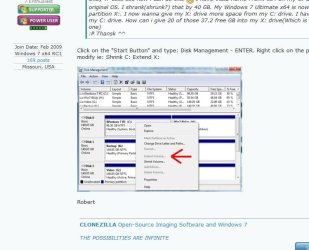
Click on the "Start Button" and type: Disk Management - ENTER. Right click on the partition you want to modify ie: Shrink C: Extend X:

picture.php


Robert
 

My Computer My Computer

At a glance

...
OS
...
it may take a long time though, particularly if the partitions are badly defragmented - defrag them first.

(although i have often wondered whether it's worth defragging before doing this sort of thing - it seems a good idea, the partitions will be resized faster if defragged, but as it takes a long time to defrag in the first place....how much time (if any) do you gain?)

(sorry if i'm rambling, it's 1.42 am and i've had most of a bottle of red :))
 

My Computer My Computer

At a glance

ultimate 64 sp1i5 2500K [email protected]8 gigs GSkill Ripjaws 1600amd hd6950
Computer Manufacturer/Model Number
mickey megabyte 1234
OS
ultimate 64 sp1
CPU
i5 2500K [email protected]
Motherboard
MSI P67A-GD53
Memory
8 gigs GSkill Ripjaws 1600
Graphics Card(s)
amd hd6950
Sound Card
creative x-fi gamer
Monitor(s) Displays
samsung 24"
Screen Resolution
1920x1080
Hard Drives
ocz vertex 2e 60 gig, samsung f3 1tb, buffalo 2tb ext
PSU
antec 550
Case
antec three hundred
Cooling
i'm a cooling fan
Keyboard
saitek eclipse ii
Mouse
logitech g3
Internet Speed
about 4 Mbps
Other Info
i love win7
You'll run right into problems attempting to shrink the Vista primary any further especially if booted in the Vista installation when trying to start off. First you may run into the lack of memory error when booting into the Vista installation later simply from possibly not having enough free drive space if you should add anything further as far as programs, files.

The second would be the obvious recommendation to back everything up from the drive since the resizing if that should go bad will effect the entire drive. If you manage to shrink the Vista C primary while booted in 7 to use the Disk Management tool there you will still need to move the 7 primary forward afterwards where that will not only take some time but usually need the use of a 3rd party drive tool to start with.

While the 17+gb should still leave enough drive space for Vista a 3rd party tool for seeing this done would allow one operation to follow the other instead of booting into one to do something with the other. If you need a free drive tool for this GParted live for cd can shrink the Vista primary, move the 7 primary forward to fill in the then empty drive space(gap between primaries), and later expand the 7 primary to fill in the space it was moved back from at the rear of the drive.

GParted information and instructions,
GPARTED DOCUMENTATION - GENERALITIES

Latest release in iso disk image form,
Browse GParted Files on SourceForge.net

Some additional screenshots can be looked over at GParted -- Screenshots

For multibooting on multiple drives and resizing, moving partitions GParted has been quite reliable here.
 

My Computers My Computers

  • At a glance

    W7 Ultimate x64/W10 Pro x64/W11 Pro Triple Bo...AMD Phenom II X4 975 Deneb 3.6ghz - 965 2nd r...Kingston Hyper X DDR3 1600 1.5v 16gb - Hyper ...MSI HD Radeon 5750 1gb - MSI HD Radeon 6450 o...
    Computer type
    PC/Desktop
    Computer Manufacturer/Model Number
    Custom builds = 2
    OS
    W7 Ultimate x64/W10 Pro x64/W11 Pro Triple Boot - Main PC W7 Remote PC Micro ATX W7 Pro x64/W11 Pro
    CPU
    AMD Phenom II X4 975 Deneb 3.6ghz - 965 2nd remote pc
    Motherboard
    Gigabyte GA-790XTA-UD4-Gigabyte GA-880GM-D2H remote pc
    Memory
    Kingston Hyper X DDR3 1600 1.5v 16gb - Hyper X Fury 8gb 2nd
    Graphics Card(s)
    MSI HD Radeon 5750 1gb - MSI HD Radeon 6450 on mini tower
    Sound Card
    Creative Labs X-Fi Xtreme Audio P - Realtek onooard 2nd case
    Monitor(s) Displays
    ASUS VW199T-P 19" HP 2082a Main-HP 2082a 20" remote pc
    Screen Resolution
    Asus 1440x900 - HP 1600x900
    Hard Drives
    WD Black 1TB HD per OS W7, W10, and pending W11 presently on 500gb OS Drive - Pending Triple 1TB HDs for Spanned Storage/backup volume
    Single 2TB external USB enclosure, single 1TB System 7 Host/Boot drive, Pending 8TB external HD for system image b
    PSU
    Corsair 750TX - primary / Corsair CX600 - second
    Case
    Antec 900-2 - SSD compatible / NZXT Vulcan mini tower
    Cooling
    Zalman CNPS9900A
    Keyboard
    AZIO L70 Backlit Letters Gaming - ONN Cordless/USB
    Mouse
    MSI DS200 Programmable, Logitech Cordless
    Internet Speed
    30mbps upgrade - primary hard wired - mini tower usb WiFi
    Antivirus
    GFI VIPRE Internet Security 2014 on W7 2016 beta on W10,
    Browser
    Cyberfox, WaterFox 64bit FF variants, FireFox x64, Pale Moon
    Other Info
    Accomdata fan cooled usb 2.0 PIDE/Sata II, III external enclosure.
    Sambient usb/eSata PATA/Sata II, III external enclosure.
  • At a glance

    W7 Pro x64/W11 ProAMD Deneb 3.6ghz - 965Kingston Hyper X Fury 8gbMSI HD Radeon 6450 DVI Output
    Computer type
    PC/Desktop
    System Manufacturer/Model Number
    CUSTOM ASSEMBLY
    OS
    W7 Pro x64/W11 Pro
    CPU
    AMD Deneb 3.6ghz - 965
    Motherboard
    Gigabyte GA-880GM-D2H remote pc
    Memory
    Kingston Hyper X Fury 8gb
    Graphics Card(s)
    MSI HD Radeon 6450 DVI Output
    Sound Card
    Realtek onooard Creative or Other separate PENDING
    Monitor(s) Displays
    VIZIO 32" LCD TV Separate LCD Pending
    Screen Resolution
    1600x1080
    Hard Drives
    WD 500GB OS Host/Boot WD Green 1TB Storage/Backup
    PSU
    Corsair 600W - THERMALTAKE 600W spare case
    Case
    NZXT Vulcan mini tower
    Cooling
    Twin 120mm Top Fans - 240mm Side Cover
    Keyboard
    ONN Cordless/USB Logitech Cordless
    Mouse
    ONN USB/Cordless - Logitech Cordless
    Internet Speed
    DSL 5G
    Browser
    MS Edge, FireFox, WaterFox x64, FireFox Nightly
    Other Info
    OS Testing-Remote Access to Main TeamViewer
Hmmmm. Im not sure about using that Gparted stuff. But I will resort to that if worst comes to worst :) Here are the(my) facts.
1. My C: drive and also my X: drive are fully defragged, courtesy of Auslogics :P
2. WHen i went in to shrink my C: drive, it would only let me shrink my C: drive (Size of 37.2 GB) by 9113 MB so thats only like.. 8.899 or 8.9 GB. (1024 MB = 1 GB yea? :P)
3. Now i have created a new partition. How can i expand my X: drive into that space of 8.9 GB? Help would all be appreciated :0
But anyway, rep for you all ^^


massive :P
 

Attachments

  • Wowsers.JPG
    Wowsers.JPG
    61.4 KB · Views: 109

My Computer My Computer

At a glance

7 x64/ Back-Track 4Intel Core 2 Duo CPU 8300@ 2.4 Ghz4096 MB DDR2Nvidia 8400M GS
Computer Manufacturer/Model Number
HP dv6000t CTO Entertainment Lappy |My Desktop @ Bottom
OS
7 x64/ Back-Track 4
CPU
Intel Core 2 Duo CPU 8300@ 2.4 Ghz
Motherboard
HP's Own
Memory
4096 MB DDR2
Graphics Card(s)
Nvidia 8400M GS
Sound Card
Altec Lansing (The usual on Laptops )
Monitor(s) Displays
Laptop Screen. 17' Wide.
Screen Resolution
1280 x 800
Hard Drives
150 GB HDD.
Cooling
2 External Fans, Undervolted, Coolant
Keyboard
Norm. Cheap Random Keyboard
Mouse
Norm. Cheap Random Mouse
Other Info
This is my Homemade Desktop :)
HDD: Western Digital Caviar Blue 320GB 16MB 7200RPM SATA2
And more to come in a bit! :D
GParted works without Windows being loaded and won't run into any unmovable system file problems if you are trying to shrink the Vista primary while booted in Vista. Once you have worked with it a few times you won't be going back to the disk management except for taking some screenshots. That's the difference seen there.

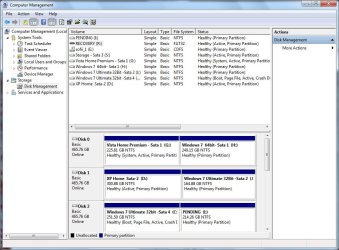
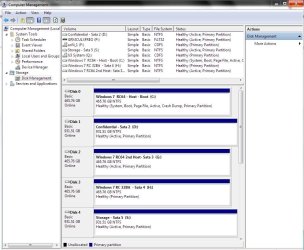
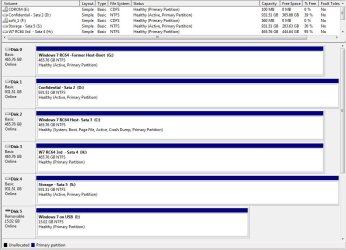
For what you are trying to see done there you will likely end up needing a 3rd party drive partitioning program. When first running the 7 beta builds you can see how the hard drives here looked where XP and Vista were still seen in a "quadruple boot" setup at the time.

From there once the RCs first became available XP was the first to go followed by Vista when installed on a virtual machine. That was followed by the present when focusing on custom setups seeing the 32bit RC on another virual machine with the eventual two main 64bit installations and one temp to be removed to restore Vista there.

That amounted to quite a bit of repartitioning and even resizing the former XP/Vista dual boot to allow for the 32bit and 64bit beta builds initially.
 

Attachments

  • PARTITIONS PAST.jpg
    PARTITIONS PAST.jpg
    102.7 KB · Views: 60
  • PARTITIONS PRESENT.jpg
    PARTITIONS PRESENT.jpg
    108.4 KB · Views: 47
  • PARTITIONS LATEST.jpg
    PARTITIONS LATEST.jpg
    102.5 KB · Views: 40

My Computers My Computers

  • At a glance

    W7 Ultimate x64/W10 Pro x64/W11 Pro Triple Bo...AMD Phenom II X4 975 Deneb 3.6ghz - 965 2nd r...Kingston Hyper X DDR3 1600 1.5v 16gb - Hyper ...MSI HD Radeon 5750 1gb - MSI HD Radeon 6450 o...
    Computer type
    PC/Desktop
    Computer Manufacturer/Model Number
    Custom builds = 2
    OS
    W7 Ultimate x64/W10 Pro x64/W11 Pro Triple Boot - Main PC W7 Remote PC Micro ATX W7 Pro x64/W11 Pro
    CPU
    AMD Phenom II X4 975 Deneb 3.6ghz - 965 2nd remote pc
    Motherboard
    Gigabyte GA-790XTA-UD4-Gigabyte GA-880GM-D2H remote pc
    Memory
    Kingston Hyper X DDR3 1600 1.5v 16gb - Hyper X Fury 8gb 2nd
    Graphics Card(s)
    MSI HD Radeon 5750 1gb - MSI HD Radeon 6450 on mini tower
    Sound Card
    Creative Labs X-Fi Xtreme Audio P - Realtek onooard 2nd case
    Monitor(s) Displays
    ASUS VW199T-P 19" HP 2082a Main-HP 2082a 20" remote pc
    Screen Resolution
    Asus 1440x900 - HP 1600x900
    Hard Drives
    WD Black 1TB HD per OS W7, W10, and pending W11 presently on 500gb OS Drive - Pending Triple 1TB HDs for Spanned Storage/backup volume
    Single 2TB external USB enclosure, single 1TB System 7 Host/Boot drive, Pending 8TB external HD for system image b
    PSU
    Corsair 750TX - primary / Corsair CX600 - second
    Case
    Antec 900-2 - SSD compatible / NZXT Vulcan mini tower
    Cooling
    Zalman CNPS9900A
    Keyboard
    AZIO L70 Backlit Letters Gaming - ONN Cordless/USB
    Mouse
    MSI DS200 Programmable, Logitech Cordless
    Internet Speed
    30mbps upgrade - primary hard wired - mini tower usb WiFi
    Antivirus
    GFI VIPRE Internet Security 2014 on W7 2016 beta on W10,
    Browser
    Cyberfox, WaterFox 64bit FF variants, FireFox x64, Pale Moon
    Other Info
    Accomdata fan cooled usb 2.0 PIDE/Sata II, III external enclosure.
    Sambient usb/eSata PATA/Sata II, III external enclosure.
  • At a glance

    W7 Pro x64/W11 ProAMD Deneb 3.6ghz - 965Kingston Hyper X Fury 8gbMSI HD Radeon 6450 DVI Output
    Computer type
    PC/Desktop
    System Manufacturer/Model Number
    CUSTOM ASSEMBLY
    OS
    W7 Pro x64/W11 Pro
    CPU
    AMD Deneb 3.6ghz - 965
    Motherboard
    Gigabyte GA-880GM-D2H remote pc
    Memory
    Kingston Hyper X Fury 8gb
    Graphics Card(s)
    MSI HD Radeon 6450 DVI Output
    Sound Card
    Realtek onooard Creative or Other separate PENDING
    Monitor(s) Displays
    VIZIO 32" LCD TV Separate LCD Pending
    Screen Resolution
    1600x1080
    Hard Drives
    WD 500GB OS Host/Boot WD Green 1TB Storage/Backup
    PSU
    Corsair 600W - THERMALTAKE 600W spare case
    Case
    NZXT Vulcan mini tower
    Cooling
    Twin 120mm Top Fans - 240mm Side Cover
    Keyboard
    ONN Cordless/USB Logitech Cordless
    Mouse
    ONN USB/Cordless - Logitech Cordless
    Internet Speed
    DSL 5G
    Browser
    MS Edge, FireFox, WaterFox x64, FireFox Nightly
    Other Info
    OS Testing-Remote Access to Main TeamViewer
Hmmmm. Im not sure about using that Gparted stuff. But I will resort to that if worst comes to worst :) Here are the(my) facts.
1. My C: drive and also my X: drive are fully defragged, courtesy of Auslogics :P
2. WHen i went in to shrink my C: drive, it would only let me shrink my C: drive (Size of 37.2 GB) by 9113 MB so thats only like.. 8.899 or 8.9 GB. (1024 MB = 1 GB yea? :P)
3. Now i have created a new partition. How can i expand my X: drive into that space of 8.9 GB? Help would all be appreciated :0
But anyway, rep for you all ^^


massive :P
Yes, when you use the Windows 7 Disk Management utility to shrink a partition, it will not allow you to shrink it too much and cause problems. It only allowed you to shrink C: by less than 10GB. When you did that, you did not create a new partition, you created empty space, or unallocated space. Now, right click on the X: partition and "Extend" it and it will absorb the empty space you just created.

You are doing good!

Robert
 

My Computer My Computer

At a glance

...
OS
...
Well... It wont let me extend my X: drive, Only will let me extend my C: drive.. I'll show screen's. Im on my Vista when taking this :P I dont kno how to take the screen shot of me right-clicking my X: drive, using the sniping tool. Maybe this lil' issue will show it?
Yo Faceums.JPG

See how my C: drive says System Boot and Pagefile.. etc. etc.
my X: Drive says none of that, it only says Healthy Partition. Any Idea wuts up?
 

My Computer My Computer

At a glance

7 x64/ Back-Track 4Intel Core 2 Duo CPU 8300@ 2.4 Ghz4096 MB DDR2Nvidia 8400M GS
Computer Manufacturer/Model Number
HP dv6000t CTO Entertainment Lappy |My Desktop @ Bottom
OS
7 x64/ Back-Track 4
CPU
Intel Core 2 Duo CPU 8300@ 2.4 Ghz
Motherboard
HP's Own
Memory
4096 MB DDR2
Graphics Card(s)
Nvidia 8400M GS
Sound Card
Altec Lansing (The usual on Laptops )
Monitor(s) Displays
Laptop Screen. 17' Wide.
Screen Resolution
1280 x 800
Hard Drives
150 GB HDD.
Cooling
2 External Fans, Undervolted, Coolant
Keyboard
Norm. Cheap Random Keyboard
Mouse
Norm. Cheap Random Mouse
Other Info
This is my Homemade Desktop :)
HDD: Western Digital Caviar Blue 320GB 16MB 7200RPM SATA2
And more to come in a bit! :D
That's because once you shrink the Vista primary down you have to "move" the 7 primary towards the front of the drive in order to first fill in that space. Once that is done you now see vacant drive space at the back end of the drive you fill in by expanding the 7 primary at that time.

To simplify things here when having to shrink the former XP primary down a bit while still running the 32bit beta on the second primary initially created for that the same thing had to be done in order to grow the 7 beta primary into the empty space seen once the primary was moved forward on the drive. And that's what takes the real time moving partitions!
 

My Computers My Computers

  • At a glance

    W7 Ultimate x64/W10 Pro x64/W11 Pro Triple Bo...AMD Phenom II X4 975 Deneb 3.6ghz - 965 2nd r...Kingston Hyper X DDR3 1600 1.5v 16gb - Hyper ...MSI HD Radeon 5750 1gb - MSI HD Radeon 6450 o...
    Computer type
    PC/Desktop
    Computer Manufacturer/Model Number
    Custom builds = 2
    OS
    W7 Ultimate x64/W10 Pro x64/W11 Pro Triple Boot - Main PC W7 Remote PC Micro ATX W7 Pro x64/W11 Pro
    CPU
    AMD Phenom II X4 975 Deneb 3.6ghz - 965 2nd remote pc
    Motherboard
    Gigabyte GA-790XTA-UD4-Gigabyte GA-880GM-D2H remote pc
    Memory
    Kingston Hyper X DDR3 1600 1.5v 16gb - Hyper X Fury 8gb 2nd
    Graphics Card(s)
    MSI HD Radeon 5750 1gb - MSI HD Radeon 6450 on mini tower
    Sound Card
    Creative Labs X-Fi Xtreme Audio P - Realtek onooard 2nd case
    Monitor(s) Displays
    ASUS VW199T-P 19" HP 2082a Main-HP 2082a 20" remote pc
    Screen Resolution
    Asus 1440x900 - HP 1600x900
    Hard Drives
    WD Black 1TB HD per OS W7, W10, and pending W11 presently on 500gb OS Drive - Pending Triple 1TB HDs for Spanned Storage/backup volume
    Single 2TB external USB enclosure, single 1TB System 7 Host/Boot drive, Pending 8TB external HD for system image b
    PSU
    Corsair 750TX - primary / Corsair CX600 - second
    Case
    Antec 900-2 - SSD compatible / NZXT Vulcan mini tower
    Cooling
    Zalman CNPS9900A
    Keyboard
    AZIO L70 Backlit Letters Gaming - ONN Cordless/USB
    Mouse
    MSI DS200 Programmable, Logitech Cordless
    Internet Speed
    30mbps upgrade - primary hard wired - mini tower usb WiFi
    Antivirus
    GFI VIPRE Internet Security 2014 on W7 2016 beta on W10,
    Browser
    Cyberfox, WaterFox 64bit FF variants, FireFox x64, Pale Moon
    Other Info
    Accomdata fan cooled usb 2.0 PIDE/Sata II, III external enclosure.
    Sambient usb/eSata PATA/Sata II, III external enclosure.
  • At a glance

    W7 Pro x64/W11 ProAMD Deneb 3.6ghz - 965Kingston Hyper X Fury 8gbMSI HD Radeon 6450 DVI Output
    Computer type
    PC/Desktop
    System Manufacturer/Model Number
    CUSTOM ASSEMBLY
    OS
    W7 Pro x64/W11 Pro
    CPU
    AMD Deneb 3.6ghz - 965
    Motherboard
    Gigabyte GA-880GM-D2H remote pc
    Memory
    Kingston Hyper X Fury 8gb
    Graphics Card(s)
    MSI HD Radeon 6450 DVI Output
    Sound Card
    Realtek onooard Creative or Other separate PENDING
    Monitor(s) Displays
    VIZIO 32" LCD TV Separate LCD Pending
    Screen Resolution
    1600x1080
    Hard Drives
    WD 500GB OS Host/Boot WD Green 1TB Storage/Backup
    PSU
    Corsair 600W - THERMALTAKE 600W spare case
    Case
    NZXT Vulcan mini tower
    Cooling
    Twin 120mm Top Fans - 240mm Side Cover
    Keyboard
    ONN Cordless/USB Logitech Cordless
    Mouse
    ONN USB/Cordless - Logitech Cordless
    Internet Speed
    DSL 5G
    Browser
    MS Edge, FireFox, WaterFox x64, FireFox Nightly
    Other Info
    OS Testing-Remote Access to Main TeamViewer
Hi all

I'd attempt this another way.

1)
Use Acronis True Image to backup your partitions (don't forget that sometimes there's a small "hidden" system one as well).

2) create the bootable acronis backup media so you can boot from a CD / DVD / USB stick.

3) run the restore from the CD.

In this you can delete existing partitions when you restore and can change sizes.

NOTE - if you have the small hidden partition this must be restored as type ACTIVE whilst the others are PRIMARY.

If there isn't a "hidden" partition then your Windows partition should be set to ACTIVE.

It's all quite easy in the Acronis restore program.

Whilst the program is not free its a good robust backup and recovery program -- and you should be taking backups shouldn't you anyway.

A typical 30 GB W7 partition on reasonable hardware only takes around 15 mins to backup / restore so it doesn't take a lot of time.


Cheers
jimbo
 

My Computer My Computer

At a glance

Linux CENTOS 7 / various Windows OS'es and se...Intel i7 Intel i58GB, 16GBOn Motherboard
Computer type
PC/Desktop
Computer Manufacturer/Model Number
Custom built, several laptops HP/ASUS
OS
Linux CENTOS 7 / various Windows OS'es and servers
CPU
Intel i7 Intel i5
Memory
8GB, 16GB
Graphics Card(s)
On Motherboard
Sound Card
Realtek HD audio
Monitor(s) Displays
Apple Cinema display, Samsung LCD
Screen Resolution
1920 X 1080
Hard Drives
4 X 1TB SATA
Mouse
Toshiba wireless laser
Internet Speed
> 20MB up
Macrium's Reflect and a new one called ToDo are both seeing free system imaging programs for that purpose.

If there's nothing on the 7 installation quite yet an even faster method of seeing 7 use up the remaining drive space since the Vista primary has been reduced would be simply nuking the 7 primary rather then moving it for a new where a fresh install of 7 would go on that much faster.

Some here report a clean install of 7 in as little as 12 minutes while the average is right around 20. Now compare that to the time required to move the 7 primary forward and expand it afterwards or the 39-45 minutes typical of an XP or Vista fresh install. New primary to replace first for 7 only no need to move or resize simply created in the total empty space.

As far as imaging the drive you would want to do something like that once you have both Vista and 7 the way you want to see them and in top working order first. Then you would have the optimum backup image created at that time. A general data backup for anything you want to prevent from being lost would be the first step in case you run into any big problem where either Windows won't run.
 

My Computers My Computers

  • At a glance

    W7 Ultimate x64/W10 Pro x64/W11 Pro Triple Bo...AMD Phenom II X4 975 Deneb 3.6ghz - 965 2nd r...Kingston Hyper X DDR3 1600 1.5v 16gb - Hyper ...MSI HD Radeon 5750 1gb - MSI HD Radeon 6450 o...
    Computer type
    PC/Desktop
    Computer Manufacturer/Model Number
    Custom builds = 2
    OS
    W7 Ultimate x64/W10 Pro x64/W11 Pro Triple Boot - Main PC W7 Remote PC Micro ATX W7 Pro x64/W11 Pro
    CPU
    AMD Phenom II X4 975 Deneb 3.6ghz - 965 2nd remote pc
    Motherboard
    Gigabyte GA-790XTA-UD4-Gigabyte GA-880GM-D2H remote pc
    Memory
    Kingston Hyper X DDR3 1600 1.5v 16gb - Hyper X Fury 8gb 2nd
    Graphics Card(s)
    MSI HD Radeon 5750 1gb - MSI HD Radeon 6450 on mini tower
    Sound Card
    Creative Labs X-Fi Xtreme Audio P - Realtek onooard 2nd case
    Monitor(s) Displays
    ASUS VW199T-P 19" HP 2082a Main-HP 2082a 20" remote pc
    Screen Resolution
    Asus 1440x900 - HP 1600x900
    Hard Drives
    WD Black 1TB HD per OS W7, W10, and pending W11 presently on 500gb OS Drive - Pending Triple 1TB HDs for Spanned Storage/backup volume
    Single 2TB external USB enclosure, single 1TB System 7 Host/Boot drive, Pending 8TB external HD for system image b
    PSU
    Corsair 750TX - primary / Corsair CX600 - second
    Case
    Antec 900-2 - SSD compatible / NZXT Vulcan mini tower
    Cooling
    Zalman CNPS9900A
    Keyboard
    AZIO L70 Backlit Letters Gaming - ONN Cordless/USB
    Mouse
    MSI DS200 Programmable, Logitech Cordless
    Internet Speed
    30mbps upgrade - primary hard wired - mini tower usb WiFi
    Antivirus
    GFI VIPRE Internet Security 2014 on W7 2016 beta on W10,
    Browser
    Cyberfox, WaterFox 64bit FF variants, FireFox x64, Pale Moon
    Other Info
    Accomdata fan cooled usb 2.0 PIDE/Sata II, III external enclosure.
    Sambient usb/eSata PATA/Sata II, III external enclosure.
  • At a glance

    W7 Pro x64/W11 ProAMD Deneb 3.6ghz - 965Kingston Hyper X Fury 8gbMSI HD Radeon 6450 DVI Output
    Computer type
    PC/Desktop
    System Manufacturer/Model Number
    CUSTOM ASSEMBLY
    OS
    W7 Pro x64/W11 Pro
    CPU
    AMD Deneb 3.6ghz - 965
    Motherboard
    Gigabyte GA-880GM-D2H remote pc
    Memory
    Kingston Hyper X Fury 8gb
    Graphics Card(s)
    MSI HD Radeon 6450 DVI Output
    Sound Card
    Realtek onooard Creative or Other separate PENDING
    Monitor(s) Displays
    VIZIO 32" LCD TV Separate LCD Pending
    Screen Resolution
    1600x1080
    Hard Drives
    WD 500GB OS Host/Boot WD Green 1TB Storage/Backup
    PSU
    Corsair 600W - THERMALTAKE 600W spare case
    Case
    NZXT Vulcan mini tower
    Cooling
    Twin 120mm Top Fans - 240mm Side Cover
    Keyboard
    ONN Cordless/USB Logitech Cordless
    Mouse
    ONN USB/Cordless - Logitech Cordless
    Internet Speed
    DSL 5G
    Browser
    MS Edge, FireFox, WaterFox x64, FireFox Nightly
    Other Info
    OS Testing-Remote Access to Main TeamViewer
Well... It wont let me extend my X: drive, Only will let me extend my C: drive.. I'll show screen's. Im on my Vista when taking this :P I dont kno how to take the screen shot of me right-clicking my X: drive, using the sniping tool. Maybe this lil' issue will show it?
View attachment 23959

See how my C: drive says System Boot and Pagefile.. etc. etc.
my X: Drive says none of that, it only says Healthy Partition. Any Idea wuts up?


The currently booted OS will show that it is the "System Boot and Pagefile.. etc. etc.", thats Vista now, when you boot into win7 it will then show it's drive as "System Boot and Pagefile.. etc. etc.". Win7 will call itself drive C: also. At least it does on mine.

This has no effect as to where the partition is physically on Disk0. That will not change.

Actually haven't tried this on Win7, but previous windows including Vista, Disk management will not 'extend' a partition to the left, only to the right. This is why X: won't go to the left. As far as I could tell, MS disk management is restricted due to anti-trust suits.

Try Partition Wizard Home Edition from this site:

FREE Great Programs for Window 7

Works on 32 and 64 bit and Win7. I used it to move my OS partitions and it worked flawlessly.
Be sure to backup everything first. Acronis is the best, but several 'free' programs work very well, DiscWizard from Seagate (if you have a seagate HD and is a limited functionality version of Acronis), Macrium reflect, Paragon is said to be good also.

Download some of the help and how to info from the Partition Wizard home page. It will explain everything.
It's quite easy to run. You can select the moves you want to do, see what they will look like, then close all open programs except Partition Wizard, and then click "Apply" and it will shut down your OS and preform the changes and restart your OS, complete them and it's done.

Good luck,
Dave
 

My Computer My Computer

At a glance

Windows 7 Ult x64 - SP1/ Windows 8 Pro x64Intel Core i5-3570K 4.6GHz8GB (2X4GB) DDR3 1600 Corsair Vengeance CL8 1.5vSapphire HD 7770 Vapor-X OC 1GB DDR5
Computer type
PC/Desktop
Computer Manufacturer/Model Number
76~2.0
OS
Windows 7 Ult x64 - SP1/ Windows 8 Pro x64
CPU
Intel Core i5-3570K 4.6GHz
Motherboard
Gigabyte GA-Z77X UD3H, f18
Memory
8GB (2X4GB) DDR3 1600 Corsair Vengeance CL8 1.5v
Graphics Card(s)
Sapphire HD 7770 Vapor-X OC 1GB DDR5
Sound Card
Onboard VIA VT2021
Monitor(s) Displays
22" LCD Dell
Screen Resolution
1680x1050
Hard Drives
Samsung 840Pro 128GB SSD,
Seagate Barracuda 500GB SATA2 7200rpm 32MB cache, Seagate Barracuda 1TB SATA2 7200rpm 32MB cache,
PSU
Corsair HX650W
Case
Cooler Master Storm Scout
Cooling
Corsair H80 2x12cm Noctua NF P12 , 2x14cm case fans
Keyboard
Logitech Wave
Mouse
CM Sentinel
Internet Speed
Dismal
Antivirus
Avast
Browser
Opera Next
Other Info
Haswell laptop: HP Envy 17t-j, i7-4700MQ, GeForce 740M 2GB DDR3, 17.3" Full HD 1920x1080, 16GB RAM, Samsung 840 Pro 128GB, 1TB Hitachi 7200 HDD,
Desktop: eSATA ports,
External eSATA Seagate 500GB SATA2 7200rpm,
External WD USB 500GB
Well... It wont let me extend my X: drive, Only will let me extend my C: drive.. I'll show screen's. Im on my Vista when taking this :P I dont kno how to take the screen shot of me right-clicking my X: drive, using the sniping tool. Maybe this lil' issue will show it?
View attachment 23959

See how my C: drive says System Boot and Pagefile.. etc. etc.
my X: Drive says none of that, it only says Healthy Partition. Any Idea wuts up?
OK wow ... Everybody is right! (can everybody be right? hehehe )

Dave is right in that the Windows 7 Disk Management utility will not extend a partition to the left ... Douh!!

Night Hawk is right in that the simplest way to proceed from here is to use GParted to finish this the way you want it.

Jimbo is right in that it is always a good idea to back everything up.

Here is what I suggest you do. Go to this web site and download "System Rescue CD". It is an ISO or when you burn it to a CD (do a burn image to disc in Windows 7) the CD will boot. While you are doing that, I will make some screen shots so you can use GParted to extend your X: partition.

picture.php


picture.php


System Rescue CD is a "Live" CD in that it will run from the CD and not install anything to the hard drive. GParted is one of the programs on the CD so you can easily finish extending the X: partition.

Robert
 

My Computer My Computer

At a glance

...
OS
...
Well... It wont let me extend my X: drive, Only will let me extend my C: drive.. I'll show screen's. Im on my Vista when taking this :P I dont kno how to take the screen shot of me right-clicking my X: drive, using the sniping tool.
While I'm waiting for the screenshots to cure, here is a quick easy way to make a picture (worth 1000 words!) and include in posts:

Have what you want to show visible on your screen. TYPE: Ctrl (hold) then press: Prt Scr. Now open "Paint" (every Windows has it) and "Paste". Find paste in the menu or just TYPE: Ctrl (hold) then press: v

picture.php


You have just captured the image on your screen, placed it on the "Clipboard", and pasted it into "Paint". Now you can "Select" and "Crop" small areas, add arrows, circles, and text or what ever?

You can add the screenshot as an attachment directly to the post by clicking the "Attachment Paper Clip" in the tool bar above: Then browse for the screenshot and up load. Finally click the "Attachment Paper Clip" again and select the screenshot you just uploaded and you are done!

picture.php


Or, you can create an album and upload your pictures there and reuse them as needed:

picture.php


picture.php


Just make sure your pics are less than 600 X600

Robert
 

My Computer My Computer

At a glance

...
OS
...
Last edited:

My Computer My Computer

At a glance

...
OS
...
Okay, Im jusst about to do the GParted thing, but do i absolutly have to use the erm.. SystemRescueCD thing? I mean worst case scenario.. i have to re-format my laptop, but honestly i wouldnt mind it that much as i have already backed all my important data files etc.

EDIT: More rep for you all XD
 
Last edited:

My Computer My Computer

At a glance

7 x64/ Back-Track 4Intel Core 2 Duo CPU 8300@ 2.4 Ghz4096 MB DDR2Nvidia 8400M GS
Computer Manufacturer/Model Number
HP dv6000t CTO Entertainment Lappy |My Desktop @ Bottom
OS
7 x64/ Back-Track 4
CPU
Intel Core 2 Duo CPU 8300@ 2.4 Ghz
Motherboard
HP's Own
Memory
4096 MB DDR2
Graphics Card(s)
Nvidia 8400M GS
Sound Card
Altec Lansing (The usual on Laptops )
Monitor(s) Displays
Laptop Screen. 17' Wide.
Screen Resolution
1280 x 800
Hard Drives
150 GB HDD.
Cooling
2 External Fans, Undervolted, Coolant
Keyboard
Norm. Cheap Random Keyboard
Mouse
Norm. Cheap Random Mouse
Other Info
This is my Homemade Desktop :)
HDD: Western Digital Caviar Blue 320GB 16MB 7200RPM SATA2
And more to come in a bit! :D
Okay, Im jusst about to do the GParted thing, but do i absolutly have to use the erm.. SystemRescueCD thing? I mean worst case scenario.. i have to re-format my laptop, but honestly i wouldnt mind it that much as i have already backed all my important data files etc.

EDIT: More rep for you all XD
Well ... no one can make that decision for you. But if you are already prepared to reformat and reinstall everything (all day project?) it seems to me that you have nothing to loose (maybe an hour?) and might enjoy the learning experience for the next time? I made pictures of every step and it is all windows type gui. If you can shrink in Vista and 7 you should have no trouble extending with this software?

Its up to you.

Robert
 

My Computer My Computer

At a glance

...
OS
...
Yay!! I did it :) Thanks for all of your help everyone. Time to giv ya'll some rep :) Thanks a bunch everyone...
SOLVED!!
 

My Computer My Computer

At a glance

7 x64/ Back-Track 4Intel Core 2 Duo CPU 8300@ 2.4 Ghz4096 MB DDR2Nvidia 8400M GS
Computer Manufacturer/Model Number
HP dv6000t CTO Entertainment Lappy |My Desktop @ Bottom
OS
7 x64/ Back-Track 4
CPU
Intel Core 2 Duo CPU 8300@ 2.4 Ghz
Motherboard
HP's Own
Memory
4096 MB DDR2
Graphics Card(s)
Nvidia 8400M GS
Sound Card
Altec Lansing (The usual on Laptops )
Monitor(s) Displays
Laptop Screen. 17' Wide.
Screen Resolution
1280 x 800
Hard Drives
150 GB HDD.
Cooling
2 External Fans, Undervolted, Coolant
Keyboard
Norm. Cheap Random Keyboard
Mouse
Norm. Cheap Random Mouse
Other Info
This is my Homemade Desktop :)
HDD: Western Digital Caviar Blue 320GB 16MB 7200RPM SATA2
And more to come in a bit! :D
Yay!! I did it :) Thanks for all of your help everyone. Time to giv ya'll some rep :) Thanks a bunch everyone...
SOLVED!!
Excellent work! Nice job. Now you have some experience you can pass on to someone else, huh?

Robert
 

My Computer My Computer

At a glance

...
OS
...
Hah yea :) Once again Thank You all :) :thumbsup:
 

My Computer My Computer

At a glance

7 x64/ Back-Track 4Intel Core 2 Duo CPU 8300@ 2.4 Ghz4096 MB DDR2Nvidia 8400M GS
Computer Manufacturer/Model Number
HP dv6000t CTO Entertainment Lappy |My Desktop @ Bottom
OS
7 x64/ Back-Track 4
CPU
Intel Core 2 Duo CPU 8300@ 2.4 Ghz
Motherboard
HP's Own
Memory
4096 MB DDR2
Graphics Card(s)
Nvidia 8400M GS
Sound Card
Altec Lansing (The usual on Laptops )
Monitor(s) Displays
Laptop Screen. 17' Wide.
Screen Resolution
1280 x 800
Hard Drives
150 GB HDD.
Cooling
2 External Fans, Undervolted, Coolant
Keyboard
Norm. Cheap Random Keyboard
Mouse
Norm. Cheap Random Mouse
Other Info
This is my Homemade Desktop :)
HDD: Western Digital Caviar Blue 320GB 16MB 7200RPM SATA2
And more to come in a bit! :D
Back
Top