External Display Issues

MattLoaf

New member
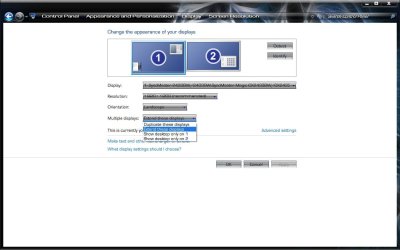
Hi, I'm having an issue extending my desktop to a second monitor. I really don't understand why but I have been using the monitor for some time with no major problems but now I am having a major problem. I can make the external monitor display the same image as my laptops monitor but I can not extend the desktop to it for some reason.

Any help is appreciated.
 

My Computer

Computer Manufacturer/Model Number
Sumsung R60+
OS
Windows 7
CPU
Intel Core 2 Duo T5750
Memory
2GB
Graphics Card(s)
ATI
Monitor(s) Displays
Two.
Hard Drives
1 150GB
Are you using the Catalyst Control Center (CCC), or windows itself to do this? By default, when you connect an external monitor to a laptop, the same image (mirror image) of your desktop appears on the external monitor. A Guy

Windows:

Start> Control Panel> Appearance and Personalization> Display> Screen Resolution

If the second monitor is not on list, press the Detect button.

ExtendLT.jpg

A Guy
 

My Computer

Computer type
PC/Desktop
OS
Windows 10 Home x64
CPU
INTEL Core i5-750 Quad-Core 3.37GHz
Motherboard
ASUS P7P55D
Memory
HyperX Fury Black Series 8GB (2 x 4GB) 1866Mhz
Graphics Card(s)
EVGA GeForce GTX 750 Superclocked 1GB 128-Bit GDDR5
Monitor(s) Displays
LG 32MA68HY 32" IPS
Screen Resolution
1920 x 1080
Hard Drives
Samsung 840 Evo 120GB, SEAGATE 500GB Barracuda® 7200.12, SATA 3 Gb/s, 7200 RPM, 16MB cache
PSU
ANTEC TruePower New TP-550, 80 PLUS, 550W
Case
ANTEC Three Hundred Illusion
Cooling
COOLER MASTER Hyper 212 Plus, 4 x 120mm 1 x 140mm Noctua's
Internet Speed
85 + Mbps
Antivirus
Avast
Browser
Vivaldi
Are you using the Catalyst Control Center (CCC), or windows itself to do this?A Guy

I am using Windows. Observe the below images for more.

MI1.png


MI2.png


My Computer

Computer Manufacturer/Model Number
Sumsung R60+
OS
Windows 7
CPU
Intel Core 2 Duo T5750
Memory
2GB
Graphics Card(s)
ATI
Monitor(s) Displays
Two.
Hard Drives
1 150GB
OK, you want the "extend these displays" to make one big desktop, with your current desktop on the laptop, and the ability to move windows over to the 2nd display. Is that what you are looking to do?

A Guy
 

My Computer

Computer type
PC/Desktop
OS
Windows 10 Home x64
CPU
INTEL Core i5-750 Quad-Core 3.37GHz
Motherboard
ASUS P7P55D
Memory
HyperX Fury Black Series 8GB (2 x 4GB) 1866Mhz
Graphics Card(s)
EVGA GeForce GTX 750 Superclocked 1GB 128-Bit GDDR5
Monitor(s) Displays
LG 32MA68HY 32" IPS
Screen Resolution
1920 x 1080
Hard Drives
Samsung 840 Evo 120GB, SEAGATE 500GB Barracuda® 7200.12, SATA 3 Gb/s, 7200 RPM, 16MB cache
PSU
ANTEC TruePower New TP-550, 80 PLUS, 550W
Case
ANTEC Three Hundred Illusion
Cooling
COOLER MASTER Hyper 212 Plus, 4 x 120mm 1 x 140mm Noctua's
Internet Speed
85 + Mbps
Antivirus
Avast
Browser
Vivaldi
on your multidisplay tab,click on it and choose extend and you can drag your 2nd monitor either to be on the right or left side but make sure to click apply to make it works
 

My Computer

OS
window's 7
CPU
core 2 quad
Motherboard
gigabyte
Memory
2gb corsair
Graphics Card(s)
ati hd4850
Monitor(s) Displays
lg
Screen Resolution
1600 X 900
Case
power logic
Other Info
none of the spec above is accurate
OK, you want the "extend these displays" to make one big desktop, with your current desktop on the laptop, and the ability to move windows over to the 2nd display. Is that what you are looking to do?

A Guy

Yes this is what I want to achieve and I have done it before but it has stopped working for some reason. I can duplicate the displays and change which monitor to display the image on but I can not extend the desktop any more.

The images I posted above are all that I can do.
 

My Computer

Computer Manufacturer/Model Number
Sumsung R60+
OS
Windows 7
CPU
Intel Core 2 Duo T5750
Memory
2GB
Graphics Card(s)
ATI
Monitor(s) Displays
Two.
Hard Drives
1 150GB
does that mean you don't have the "extend display" function in your multidisplay tab?
 

My Computer

OS
window's 7
CPU
core 2 quad
Motherboard
gigabyte
Memory
2gb corsair
Graphics Card(s)
ati hd4850
Monitor(s) Displays
lg
Screen Resolution
1600 X 900
Case
power logic
Other Info
none of the spec above is accurate
You are likely using video built into your notebook computer and have reduced the amount of system memory available to it in your BIOS. As a result your computer does not have enough video memory available to display the extended desktop.
 

My Computer

Computer type
Laptop
Computer Manufacturer/Model Number
Apple
OS
El Capitan / Windows 10
CPU
i7-4980HQ
Memory
16GB
Graphics Card(s)
Iris 5200
You are likely using video built into your notebook computer and have reduced the amount of system memory available to it in your BIOS. As a result your computer does not have enough video memory available to display the extended desktop.

Yep, I had tweaked some BIOS Settings. Got it working now, thanks for the help!
 

My Computer

Computer Manufacturer/Model Number
Sumsung R60+
OS
Windows 7
CPU
Intel Core 2 Duo T5750
Memory
2GB
Graphics Card(s)
ATI
Monitor(s) Displays
Two.
Hard Drives
1 150GB
Back
Top