Solved External Hard Drives cause temporary display shutdown during startup

mnorman

New member
Local time
11:33 PM
Messages
9
After weeks of trouble shooting, I finally discovered that my problem - my displays shut down for eight/nine seconds during both startup and restart before pickup up the boot routine - is likely being caused by one or all three of my external USB connected hard drives. Trying to find a cure for this. It is NOT the display driver. But clearly the display driver is competing during boot with the USB controllers. Any advice or insight?

SPECS:
Win7Pro/64/SP1

VideoController1
Matrox M9120 PCIe x16
1920 x 1080 x 32 bits (4294967296 colors) @ 60 Hz
1920 x 1080 x 4294967296 colors
59 Hz 85 Hz
2.4.3.2 driver version
9/10/2013 driver date

Bios: Dell 980: Phoenix ROM BIOS PLUS Version 1.10 A17
Release date 5/10/2017

CPU Intel(R) Core(TM) i5 CPU 650 @ 3.20GHz
64 Bit
L2 cache 512 KB
Clock: 3193 MHz
Cores 2
Logical processors 4
L3 cache 4096 KB

Intel(R) 5 Series/3400 Series Chipset Family USB Enhanced Host Controller - 3B34 PCI\VEN_8086&DEV_3B34&SUBSYS_02DA1028&REV_05\3&172E68DD&0&E8
Intel(R) 5 Series/3400 Series Chipset Family USB Enhanced Host Controller - 3B3C PCI\VEN_8086&DEV_3B3C&SUBSYS_02DA1028&REV_05\3&172E68DD&0&D0
 

My Computer My Computer

Computer type
PC/Desktop
Computer Manufacturer/Model Number
Dell 980 Optiplex Win7/64
OS
Microsoft Windows 7 Professional 64-bit
CPU
Intel(R) Core(TM) i5 CPU 650 @ 3.20GHz
Motherboard
Dell Base Board 0D441T A01
Memory
8.00 GB
Graphics Card(s)
Matrox M9120 PCIe x16 1920 x 1080 x 32 bits
Sound Card
Realtek High Definition Audio
Monitor(s) Displays
Dell S2340M x2
Screen Resolution
1920x1080
Hard Drives
C:\ WDC WD5000AAKS-75V0A0 500G
F:\ Hitachi HTS727550A9E364 500G
Y:\ Studio ST2000DM001-1ER164 2T
X:\ G-Drive HGST HUS726020ALE614
Case
Mini Tower
Keyboard
PS2
Antivirus
Nod 32
Browser
FF, IE, Chrome

My Computer My Computer

Computer type
PC/Desktop
Computer Manufacturer/Model Number
Home made Desktop
OS
Windows 10 Pro. 64/ version 1709 Windows 7 Pro/64
CPU
Intel i7-6800K @ 4.3
Motherboard
ASUS X-99 Deluxe II
Memory
Corsair Platinum 16 gig @2400
Graphics Card(s)
EVGA GTX 1070 OC
Monitor(s) Displays
Asus 27" LED LCD/VE278Q
Screen Resolution
1920-1080 or 1280-720 HDMI
Hard Drives
INTEL SSD 730-240 Gb Sata 3.0/
PSU
EVGA Platium 1200W
Case
Phanteks Luxe Tempered Glass 8 fans/ one radiator
Cooling
XSPC/ Water Cooled CPU
Keyboard
Das 4 Professional
Mouse
Logitech M705/MX Anywhere 2-S
Internet Speed
100 mbits
Antivirus
Microsoft Security Essentials/ Malwarebytes Premium 3.0/ SAS
Browser
I.E. 11 default/Firefox/ ISP Time Warner Cable/Spectrum
Other Info
LG BluRay Burner/
Sound system-KLipsch-THX/
Icy Dock ssd Hot Swap bays.
Information supplied

Here's the disk management images:

Capture 1.JPG
Capture2.JPG

System Specs filled in.

Thanks.
 

My Computer My Computer

Computer type
PC/Desktop
Computer Manufacturer/Model Number
Dell 980 Optiplex Win7/64
OS
Microsoft Windows 7 Professional 64-bit
CPU
Intel(R) Core(TM) i5 CPU 650 @ 3.20GHz
Motherboard
Dell Base Board 0D441T A01
Memory
8.00 GB
Graphics Card(s)
Matrox M9120 PCIe x16 1920 x 1080 x 32 bits
Sound Card
Realtek High Definition Audio
Monitor(s) Displays
Dell S2340M x2
Screen Resolution
1920x1080
Hard Drives
C:\ WDC WD5000AAKS-75V0A0 500G
F:\ Hitachi HTS727550A9E364 500G
Y:\ Studio ST2000DM001-1ER164 2T
X:\ G-Drive HGST HUS726020ALE614
Case
Mini Tower
Keyboard
PS2
Antivirus
Nod 32
Browser
FF, IE, Chrome
It can be that, with 3 external USB disks, it's draining, during speed up, 5V current more than the PS can deliver and it gives a screen blackout.
Try to boot with one disk at a time. Then two.
Why do you have 3 external disks?
 

My Computers My Computers

System One System Two

  • Computer type
    PC/Desktop
    Computer Manufacturer/Model Number
    custom build
    OS
    Windows 7 HP 64
    CPU
    i5 6600K - 800MHz to 4200MHz
    Motherboard
    GA-Z170-HD3P
    Memory
    4+4G GSkill DDR4 3000
    Graphics Card(s)
    IG - Intel 530
    Monitor(s) Displays
    Samsung 226BW
    Screen Resolution
    1680x1050
    Hard Drives
    (1) -1 SM951 – 128GB M.2 AHCI PCIe SSD drive for Windows 7 and Lubuntu
    (2) -1 WD SATA 3 - 1T for Data
    (3) -1 WD SATA 3 - 1T for backup
    PSU
    Thermaltake 450W TR2 gold
    Keyboard
    Old and good Chicony mechanical keyboard
    Mouse
    Logitech mX performance - 9 buttons (had to disable some)
    Internet Speed
    500Mb/s
    Browser
    Firefox 64
    Other Info
    TinyWall firewall
  • Computer type
    Laptop
    System Manufacturer/Model Number
    Asus Q550LF
    OS
    Windows 7 Pro
    CPU
    i7-4500U 800MHz to 3.0GHz
    Motherboard
    Asus Q550LF
    Memory
    (4+4)G DDR3 1600
    Graphics Card(s)
    IG intel 4400 + NVIDIA GeForce GT 745M
    Sound Card
    Realtek
    Monitor(s) Displays
    LG Display LP156WF4-SPH1
    Screen Resolution
    1920 x 1080
    Hard Drives
    BX500 120G SSD for Windows and programs +
    1T HDD for data
    Internet Speed
    500 Mb/s
    Browser
    Firefox
    Other Info
    TinyWall firewall
From what I can tell that few seconds of delay could be caused by your system looking for Drive '0' and partitions 'C' (System) to boot from. In your bios do you have Disk '0' as your first boot? If not your system is checking other drives to see if they will boot and then booting 'C'.

What is on Disk 6? It shows (EFI Systems)

Jack
 

My Computer My Computer

Computer type
PC/Desktop
Computer Manufacturer/Model Number
Home made Desktop
OS
Windows 10 Pro. 64/ version 1709 Windows 7 Pro/64
CPU
Intel i7-6800K @ 4.3
Motherboard
ASUS X-99 Deluxe II
Memory
Corsair Platinum 16 gig @2400
Graphics Card(s)
EVGA GTX 1070 OC
Monitor(s) Displays
Asus 27" LED LCD/VE278Q
Screen Resolution
1920-1080 or 1280-720 HDMI
Hard Drives
INTEL SSD 730-240 Gb Sata 3.0/
PSU
EVGA Platium 1200W
Case
Phanteks Luxe Tempered Glass 8 fans/ one radiator
Cooling
XSPC/ Water Cooled CPU
Keyboard
Das 4 Professional
Mouse
Logitech M705/MX Anywhere 2-S
Internet Speed
100 mbits
Antivirus
Microsoft Security Essentials/ Malwarebytes Premium 3.0/ SAS
Browser
I.E. 11 default/Firefox/ ISP Time Warner Cable/Spectrum
Other Info
LG BluRay Burner/
Sound system-KLipsch-THX/
Icy Dock ssd Hot Swap bays.
Disk 6 just has data and a SVI folder and a Recycle folder. And it is shared across the LAN.

Also, I did indeed disconnect all EXT HDs. With everything disconnected, displays did NOT power down during startup. Then I connected the oldest of the HDs, Disk 5 above. It's a USB 2.0 HD and was the only ext HD I had on board prior to this point, there was no problem with startup. Now, when I reconnect only that drive, I get the display power-off. Here's how all this began:

1. I installed an ioGear USB 3.0 2-port card, this to accommodate the two new 2T drives I bought. The card worked after I installed the driver and restarted. Then I went to uninstall some program, the uninstall required a restart, and when I restarted, I got a BSOD with a memory error message. At first I thought it was the software (this is me not believing the message on the screen that there's a hardware problem) and I restored a ShadowProtect image of the drive. All that did was to change Win7 normal boot splash to a rolling Microsoft bar and a number of black screens before the welcome screen chain started. Called tech support at StorageCraft and they said sometimes that happens on a restore. On restart I was still getting a BSOD etc. So I pulled the new USB 3.0 ports card...and the BSODs were gone. But when I connected the two USB 3.0 HDs to USB 2.0 ports, I started to get the display power off and re-power.

2. I've run diagnostics (several) on the machine. Memory, CPU, display card, all fine. Clearly, inserting the USB 3.0 card and my efforts to troubleshoot the BSOD have done something. I should also note that I attempted to get another USB 3.0 card and took my full specs, including details of the chipset, to MicroExchange. There a tech looked at the chipset and said it was simply too out of date to accommodate 3.0. So I bought a hub for one of the 2.0 slots. NB: I tested with that too.

3. I have three external disks because my C: 500GB is 3/4 full. One of the new 2T drives is used to store weeks worth of system images (alas I think I first imaged after the trouble started). The other 2T drive is a shared drive for a huge work in progress. I tried hooking it to our NAS but the connection was too slow.

Finally, a question. I checked the bios SATA is set to SATA1. I've read where some folks with boot problems have set their bios to legacy. When I simply test out the option, I get a warning that the change affect the ability of Win to load.

Also checked bios and disk 0 is indeed first in the boot order.

Thanks for thinking about this.
 

My Computer My Computer

Computer type
PC/Desktop
Computer Manufacturer/Model Number
Dell 980 Optiplex Win7/64
OS
Microsoft Windows 7 Professional 64-bit
CPU
Intel(R) Core(TM) i5 CPU 650 @ 3.20GHz
Motherboard
Dell Base Board 0D441T A01
Memory
8.00 GB
Graphics Card(s)
Matrox M9120 PCIe x16 1920 x 1080 x 32 bits
Sound Card
Realtek High Definition Audio
Monitor(s) Displays
Dell S2340M x2
Screen Resolution
1920x1080
Hard Drives
C:\ WDC WD5000AAKS-75V0A0 500G
F:\ Hitachi HTS727550A9E364 500G
Y:\ Studio ST2000DM001-1ER164 2T
X:\ G-Drive HGST HUS726020ALE614
Case
Mini Tower
Keyboard
PS2
Antivirus
Nod 32
Browser
FF, IE, Chrome
Does your system allow you to hood up the extra drives directly to the motherboard sata ports?


Many system will need external hard drives to have their own power connection other than a usb port.

What power supply is in use?

I know of no reason to set bios to legacy.

Jack
 

My Computer My Computer

Computer type
PC/Desktop
Computer Manufacturer/Model Number
Home made Desktop
OS
Windows 10 Pro. 64/ version 1709 Windows 7 Pro/64
CPU
Intel i7-6800K @ 4.3
Motherboard
ASUS X-99 Deluxe II
Memory
Corsair Platinum 16 gig @2400
Graphics Card(s)
EVGA GTX 1070 OC
Monitor(s) Displays
Asus 27" LED LCD/VE278Q
Screen Resolution
1920-1080 or 1280-720 HDMI
Hard Drives
INTEL SSD 730-240 Gb Sata 3.0/
PSU
EVGA Platium 1200W
Case
Phanteks Luxe Tempered Glass 8 fans/ one radiator
Cooling
XSPC/ Water Cooled CPU
Keyboard
Das 4 Professional
Mouse
Logitech M705/MX Anywhere 2-S
Internet Speed
100 mbits
Antivirus
Microsoft Security Essentials/ Malwarebytes Premium 3.0/ SAS
Browser
I.E. 11 default/Firefox/ ISP Time Warner Cable/Spectrum
Other Info
LG BluRay Burner/
Sound system-KLipsch-THX/
Icy Dock ssd Hot Swap bays.
As Jack has mentioned on post #5, Disk 6 shows an EFI System partition.
EFI system partition has the boot loader for an OS. Did you had an OS on disk 6 and then cleaned by formatting the OS partition?
 

My Computers My Computers

System One System Two

  • Computer type
    PC/Desktop
    Computer Manufacturer/Model Number
    custom build
    OS
    Windows 7 HP 64
    CPU
    i5 6600K - 800MHz to 4200MHz
    Motherboard
    GA-Z170-HD3P
    Memory
    4+4G GSkill DDR4 3000
    Graphics Card(s)
    IG - Intel 530
    Monitor(s) Displays
    Samsung 226BW
    Screen Resolution
    1680x1050
    Hard Drives
    (1) -1 SM951 – 128GB M.2 AHCI PCIe SSD drive for Windows 7 and Lubuntu
    (2) -1 WD SATA 3 - 1T for Data
    (3) -1 WD SATA 3 - 1T for backup
    PSU
    Thermaltake 450W TR2 gold
    Keyboard
    Old and good Chicony mechanical keyboard
    Mouse
    Logitech mX performance - 9 buttons (had to disable some)
    Internet Speed
    500Mb/s
    Browser
    Firefox 64
    Other Info
    TinyWall firewall
  • Computer type
    Laptop
    System Manufacturer/Model Number
    Asus Q550LF
    OS
    Windows 7 Pro
    CPU
    i7-4500U 800MHz to 3.0GHz
    Motherboard
    Asus Q550LF
    Memory
    (4+4)G DDR3 1600
    Graphics Card(s)
    IG intel 4400 + NVIDIA GeForce GT 745M
    Sound Card
    Realtek
    Monitor(s) Displays
    LG Display LP156WF4-SPH1
    Screen Resolution
    1920 x 1080
    Hard Drives
    BX500 120G SSD for Windows and programs +
    1T HDD for data
    Internet Speed
    500 Mb/s
    Browser
    Firefox
    Other Info
    TinyWall firewall
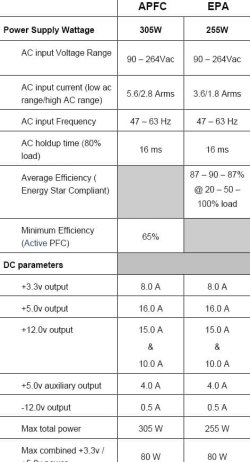
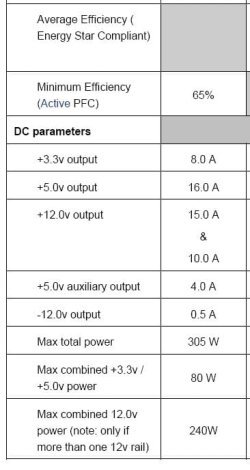
1. Each 2T drive has a power adapter which I have plugged in. The 500GB USB 2.0 drive draws its power from the 2.0 port or I can plug that in as well.

2. Power specs:
Capture 1.JPG
Capture2.JPG

3. Disk 6 did NOT have an OS on it. Just data. When the problem started, I copied the data to my internal HD, formatted the disk with exFat (just troubleshooting) and when that made no difference, formatted back to NTFS, and moved the files from the internal HD back to Disk 6. Was the EFI partition created during my formatting, reformatting of that drive? When I unplug that drive and restart, I still get the display 10-second shutdown. Should I try to remove the EFI partition? Not sure how.

4. Finally the anomalies: when I uninstall my graphics driver and reboot in VGA, or when I boot into simple safe mode, or when I pull all ext HDs, the displays stay on during startup.
 
Last edited:

My Computer My Computer

Computer type
PC/Desktop
Computer Manufacturer/Model Number
Dell 980 Optiplex Win7/64
OS
Microsoft Windows 7 Professional 64-bit
CPU
Intel(R) Core(TM) i5 CPU 650 @ 3.20GHz
Motherboard
Dell Base Board 0D441T A01
Memory
8.00 GB
Graphics Card(s)
Matrox M9120 PCIe x16 1920 x 1080 x 32 bits
Sound Card
Realtek High Definition Audio
Monitor(s) Displays
Dell S2340M x2
Screen Resolution
1920x1080
Hard Drives
C:\ WDC WD5000AAKS-75V0A0 500G
F:\ Hitachi HTS727550A9E364 500G
Y:\ Studio ST2000DM001-1ER164 2T
X:\ G-Drive HGST HUS726020ALE614
Case
Mini Tower
Keyboard
PS2
Antivirus
Nod 32
Browser
FF, IE, Chrome
How you got a EFI partition on your old system confuses me.

All hard drives should have it's own 12 volt power. Either from the computer power supply or a external 12 volt supply. USB port alone is not good enough.

Your 305 watt power supply wasn't much good when it was new. Now it's very old.

I can't find much information on your old system (motherboard) so I'm unable to look up much.

It appears to me, you are trying to get a grandpa computer to do the job of a modern computer.

If this old computer was mine and I wanted to keep it going, the things I would do.
Replace the power supply and then do these.

1. Clean install of Windows 7 on disk '0'
2. Install the drive with all your backup data externally. (Must have 12 volt power._
3. If possible install your other drives internally. Use them as you see fit.
If those drives have nothing of value, format them to NTSF.
4. I would keep my back up drive hooked externally when in use, otherwise unhooked.
5. All other drives hooked internal to the motherboard and computer power supply.

***How many sata ports does your motherboard have?***

Jack
 
Last edited:

My Computer My Computer

Computer type
PC/Desktop
Computer Manufacturer/Model Number
Home made Desktop
OS
Windows 10 Pro. 64/ version 1709 Windows 7 Pro/64
CPU
Intel i7-6800K @ 4.3
Motherboard
ASUS X-99 Deluxe II
Memory
Corsair Platinum 16 gig @2400
Graphics Card(s)
EVGA GTX 1070 OC
Monitor(s) Displays
Asus 27" LED LCD/VE278Q
Screen Resolution
1920-1080 or 1280-720 HDMI
Hard Drives
INTEL SSD 730-240 Gb Sata 3.0/
PSU
EVGA Platium 1200W
Case
Phanteks Luxe Tempered Glass 8 fans/ one radiator
Cooling
XSPC/ Water Cooled CPU
Keyboard
Das 4 Professional
Mouse
Logitech M705/MX Anywhere 2-S
Internet Speed
100 mbits
Antivirus
Microsoft Security Essentials/ Malwarebytes Premium 3.0/ SAS
Browser
I.E. 11 default/Firefox/ ISP Time Warner Cable/Spectrum
Other Info
LG BluRay Burner/
Sound system-KLipsch-THX/
Icy Dock ssd Hot Swap bays.
I would also do:
- Copy all disk Y: (disk 6) to another drive.
- Open disk management and delete ALL disk 6 partitions, then create new and format as NTFS.
- Rename the drive letter back to Y:
- Copy data back to Y:
 

My Computers My Computers

System One System Two

  • Computer type
    PC/Desktop
    Computer Manufacturer/Model Number
    custom build
    OS
    Windows 7 HP 64
    CPU
    i5 6600K - 800MHz to 4200MHz
    Motherboard
    GA-Z170-HD3P
    Memory
    4+4G GSkill DDR4 3000
    Graphics Card(s)
    IG - Intel 530
    Monitor(s) Displays
    Samsung 226BW
    Screen Resolution
    1680x1050
    Hard Drives
    (1) -1 SM951 – 128GB M.2 AHCI PCIe SSD drive for Windows 7 and Lubuntu
    (2) -1 WD SATA 3 - 1T for Data
    (3) -1 WD SATA 3 - 1T for backup
    PSU
    Thermaltake 450W TR2 gold
    Keyboard
    Old and good Chicony mechanical keyboard
    Mouse
    Logitech mX performance - 9 buttons (had to disable some)
    Internet Speed
    500Mb/s
    Browser
    Firefox 64
    Other Info
    TinyWall firewall
  • Computer type
    Laptop
    System Manufacturer/Model Number
    Asus Q550LF
    OS
    Windows 7 Pro
    CPU
    i7-4500U 800MHz to 3.0GHz
    Motherboard
    Asus Q550LF
    Memory
    (4+4)G DDR3 1600
    Graphics Card(s)
    IG intel 4400 + NVIDIA GeForce GT 745M
    Sound Card
    Realtek
    Monitor(s) Displays
    LG Display LP156WF4-SPH1
    Screen Resolution
    1920 x 1080
    Hard Drives
    BX500 120G SSD for Windows and programs +
    1T HDD for data
    Internet Speed
    500 Mb/s
    Browser
    Firefox
    Other Info
    TinyWall firewall
Thanks, Jack. That EFI partition is not on the system drive. It's on a 2TGlyph external drive. I assume I can delete it from the external drive, yes.?

I've been dodging getting a new machine for several years. I'm in the middle of a project under contract and deadline. But your list made me think I should just bite the bullet, get a new rig, take a few days and migrate my applications from Windows 7 to Windows 10.

And thanks M7. Will do as you suggest.
 

My Computer My Computer

Computer type
PC/Desktop
Computer Manufacturer/Model Number
Dell 980 Optiplex Win7/64
OS
Microsoft Windows 7 Professional 64-bit
CPU
Intel(R) Core(TM) i5 CPU 650 @ 3.20GHz
Motherboard
Dell Base Board 0D441T A01
Memory
8.00 GB
Graphics Card(s)
Matrox M9120 PCIe x16 1920 x 1080 x 32 bits
Sound Card
Realtek High Definition Audio
Monitor(s) Displays
Dell S2340M x2
Screen Resolution
1920x1080
Hard Drives
C:\ WDC WD5000AAKS-75V0A0 500G
F:\ Hitachi HTS727550A9E364 500G
Y:\ Studio ST2000DM001-1ER164 2T
X:\ G-Drive HGST HUS726020ALE614
Case
Mini Tower
Keyboard
PS2
Antivirus
Nod 32
Browser
FF, IE, Chrome
The bad news are that new computers only come with Win 10.
Your hardware is good.
My sugestion:
- Backup your data on another disk.
- Disconnect all other disks, leaving only the Dell OS drive.
- Do a factory recover (it will format the drive and install the OS from an image on the Recover partition)
- Install the updates - MS releases SP2 for Windows 7 - Windows 7 Help Forums
- Reinstall all programs.
- Recover your data from the backup.
 

My Computers My Computers

System One System Two

  • Computer type
    PC/Desktop
    Computer Manufacturer/Model Number
    custom build
    OS
    Windows 7 HP 64
    CPU
    i5 6600K - 800MHz to 4200MHz
    Motherboard
    GA-Z170-HD3P
    Memory
    4+4G GSkill DDR4 3000
    Graphics Card(s)
    IG - Intel 530
    Monitor(s) Displays
    Samsung 226BW
    Screen Resolution
    1680x1050
    Hard Drives
    (1) -1 SM951 – 128GB M.2 AHCI PCIe SSD drive for Windows 7 and Lubuntu
    (2) -1 WD SATA 3 - 1T for Data
    (3) -1 WD SATA 3 - 1T for backup
    PSU
    Thermaltake 450W TR2 gold
    Keyboard
    Old and good Chicony mechanical keyboard
    Mouse
    Logitech mX performance - 9 buttons (had to disable some)
    Internet Speed
    500Mb/s
    Browser
    Firefox 64
    Other Info
    TinyWall firewall
  • Computer type
    Laptop
    System Manufacturer/Model Number
    Asus Q550LF
    OS
    Windows 7 Pro
    CPU
    i7-4500U 800MHz to 3.0GHz
    Motherboard
    Asus Q550LF
    Memory
    (4+4)G DDR3 1600
    Graphics Card(s)
    IG intel 4400 + NVIDIA GeForce GT 745M
    Sound Card
    Realtek
    Monitor(s) Displays
    LG Display LP156WF4-SPH1
    Screen Resolution
    1920 x 1080
    Hard Drives
    BX500 120G SSD for Windows and programs +
    1T HDD for data
    Internet Speed
    500 Mb/s
    Browser
    Firefox
    Other Info
    TinyWall firewall
Back
Top