Windows 7: Disk 2 (external hard disk) is Unknown, Not Initialized

Hyo

New member
Local time
1:08 AM
Messages
3
Hello,

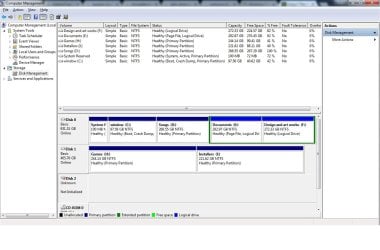
I have run into a problem that has been causing me quite a bit of headache as of late. A week ago, my WD Elements External Hard Disk is not displaying under hard disk drives, but does display under Devices and Printers. This is what it shows under computer management:
sjpcH


I have tried to initialize the disk using MBR and GPT options but failed receiving I/O Disk Error.

Please help, thank you.
 

My Computer

Computer type
PC/Desktop
Computer Manufacturer/Model Number
Custom Build
OS
Windows 7 Ultimate x64
CPU
Intel Core i7-3770k
Motherboard
Biostar
Memory
16 GB
Graphics Card(s)
Nvidia GT 670
Browser
Chrome
Welcome to the forum a io error is a faulty disk or USB connection does it show in disk manager
 

My Computer

Computer type
PC/Desktop
OS
win 8 32 bit
Open Disk Management (right click on Computer - Manage - Disk Management), expand columns and take a snapshot. Post as an attachment.
 

My Computers

System One System Two

  • Computer type
    PC/Desktop
    Computer Manufacturer/Model Number
    custom build
    OS
    Windows 7 HP 64
    CPU
    i5 6600K - 800MHz to 4200MHz
    Motherboard
    GA-Z170-HD3P
    Memory
    4+4G GSkill DDR4 3000
    Graphics Card(s)
    IG - Intel 530
    Monitor(s) Displays
    Samsung 226BW
    Screen Resolution
    1680x1050
    Hard Drives
    (1) -1 SM951 – 128GB M.2 AHCI PCIe SSD drive for Windows 7 and Lubuntu
    (2) -1 WD SATA 3 - 1T for Data
    (3) -1 WD SATA 3 - 1T for backup
    PSU
    Thermaltake 450W TR2 gold
    Keyboard
    Old and good Chicony mechanical keyboard
    Mouse
    Logitech mX performance - 9 buttons (had to disable some)
    Internet Speed
    500Mb/s
    Browser
    Firefox 64
    Other Info
    TinyWall firewall
  • Computer type
    Laptop
    System Manufacturer/Model Number
    Asus Q550LF
    OS
    Windows 7 Pro
    CPU
    i7-4500U 800MHz to 3.0GHz
    Motherboard
    Asus Q550LF
    Memory
    (4+4)G DDR3 1600
    Graphics Card(s)
    IG intel 4400 + NVIDIA GeForce GT 745M
    Sound Card
    Realtek
    Monitor(s) Displays
    LG Display LP156WF4-SPH1
    Screen Resolution
    1920 x 1080
    Hard Drives
    BX500 120G SSD for Windows and programs +
    1T HDD for data
    Internet Speed
    500 Mb/s
    Browser
    Firefox
    Other Info
    TinyWall firewall
Hi Hyo,

You perhaps didn't know the how-to, to post the Windows Disk Management screenshot.

Please read the tutorials below and post the screenshot of Windows Disk Management.

Windows Disk Management: Disk Management - Post a Screen Capture Image
Snipping Tool: How to Use the Snipping Tool in Vista
Upload to Seven Forums: Screenshots and Files - Upload and Post in Seven Forums

What is the capacity of your WD Elements external HDD? How many partitions did you have in it?
It is not enough if you say the HDD shows as Unknown, Not initialized, Does WDM show the disk capacity or does not show? That is also important. The WDM picture will help to present all data.
 

My Computer

OS
Windows 7 Home Premium 32 bit
Hello guys,

Sorry for the late reply. I went out of the country for a few days and had minimum access to internet. So to pick off from where we left it:

Capacity of HDD is 500 GB, no partitions. I am sorry I couldn't post a screenshot properly last time. Re-posting now. Untitled1.jpg

Thank you all for taking time and replying to the thread. I appreciate it!
 

My Computer

Computer type
PC/Desktop
Computer Manufacturer/Model Number
Custom Build
OS
Windows 7 Ultimate x64
CPU
Intel Core i7-3770k
Motherboard
Biostar
Memory
16 GB
Graphics Card(s)
Nvidia GT 670
Browser
Chrome
Does it show up under Win7 USB plug symbol in lower right as 'Eject Elements' or some such ?

First thing is to make sure it is properly recognized USB device, try diff USB ports/cables/PCs before thinking it is bad - but it might be dead.

GL!
 

My Computer

Computer Manufacturer/Model Number
Me
OS
win7-64
CPU
Intel i7 980x
Motherboard
gigabyte
Memory
16gb
Graphics Card(s)
ATI hd5980
Sound Card
MB
Monitor(s) Displays
20" LCD
Hard Drives
3x 750gb
PSU
800w
Case
ATX
Cooling
quiet fans
It does show up under Win7 USB plug symbol. I've tried using different ports, even tried it on my new laptop which has Win10, but same results.
 

My Computer

Computer type
PC/Desktop
Computer Manufacturer/Model Number
Custom Build
OS
Windows 7 Ultimate x64
CPU
Intel Core i7-3770k
Motherboard
Biostar
Memory
16 GB
Graphics Card(s)
Nvidia GT 670
Browser
Chrome
You have used partition tools such as Minitool Partition or such ? It can actually show files and such even if not visible to M$ OS.

Best Free Partition Manager for Windows | MiniTool Partition Free

If you have fully checked the hdd using shell tools - looking for signs that it is functioning, ie can see folders and such, can mount, demount, etc - then I think it is dead OR the USB interface to the hdd is dead.

If mine and I thoroughly checked via both shell tools and GUI tools and simply see no folders/files using the USB interface & are convinced it is dead so far - I would then take it out of the case (save it as much as possible) to get the 'internal' hdd out and test the hdd other ways, I hate losing files/hdd even if backup of a backup !

You can then put into your desktop pc and see if it is truly not dead OR,

I use a very cheap SATA/IDE tool kit $7 to test internal hdd out of pc - it turns them into a usb device but since lots of wires and vulnerable NOT for permanent use - but allows full use of a working hdd quickly. (great to test new hdd also - can read/write fully!)

Also if you have a spare working hdd, hook up to the old Essential case to see if USB is truly dead - thus you now know the condition of both the USB i/f and hdd - can re-use the case if USB is working - so tear apart carefully !! ;)

Good luck !
 

My Computer

Computer Manufacturer/Model Number
Me
OS
win7-64
CPU
Intel i7 980x
Motherboard
gigabyte
Memory
16gb
Graphics Card(s)
ATI hd5980
Sound Card
MB
Monitor(s) Displays
20" LCD
Hard Drives
3x 750gb
PSU
800w
Case
ATX
Cooling
quiet fans
Hyo, do you know if this WD Elements is one of those HDs with on-board/circuit-level encryption? Jumanji, if it is, could that be a contributory cause for the problem described in this thread?
 

My Computer

Computer type
PC/Desktop
Computer Manufacturer/Model Number
Antec desktop; Acer Aspire laptops
OS
Windows 7 Professional 64-bit
CPU
Desktop i5; Acers i5 & i7
Memory
desktop 16GB; 1 Acer 8GB & 1 Acer 16GB
Hard Drives
1TB split into 2 equal partitions [OS and data] usable by RJS
Internet Speed
AT&T DSL
Browser
FF, GChrome, msIE
Other Info
Windows 7 Firewall, Emsisoft AM/AV, MSE [scan-only], SpywareBlaster, Ruiware/BillP combine
No Sir, WD elements is not hardware encrypted. (In fact only WD Elements both desktop and portable is not hardware encrypted). But in the Elements portable as also Passport and Passport ultra the USB to SATA interface bridge electronics is usually integrated into the HDD inside and the HDD doesn't have the usual SATA connectors on it. So it may not be possible to separate the HDD and connect it as an internal drive.

In this case, I would think the OP's external is dead. He may check it running WD Data Lifeguard Diagnostic for Windows. Software and Firmware Downloads | WD Support

If it fails the tests he should only seek Professional Data Recovery Service. No DIY data Recovery possible when the hardware is faulty.

In this case he need not specifically go to WD Data Recovery Partners since the drive is not encrypted. He may go to any competent data recovery professional.
 

My Computer

OS
Windows 7 Home Premium 32 bit
Back
Top