External hard disk not initialized (case 2: unknown/)

drhmeal

New member
Local time
6:26 PM
Messages
4
Hello,

I'm a doctor, I have some idea about these things but I don't wanto loose my data, so help needed.

Got a case of bad hard disk, disk status: unknown/not initialized/not migrated/asking to do GPT or MBR to initialize et al.
It's getting detected in 'Computer Management' but not as a hard drive.
I've checked quite many forums and this case is the case 2 where drive is unknown, can't read but can only get detected.


OPTIONS:
1. Can I encase it and use it as internal HD to recover all the data?
2. Partition and recover what's possible off it? If Y, then GPT or MBR? Any free software good enough for the purpose or recommendation to buy (only if all purposes are served)?
3. It's f'd completely, get it replaced cos it's under warranty (last few months remaining), but NO data recovery at all?

I WANTO recover the data, got my cases and journals and other random trip pictures and beautiful f'n memories with the ex and all, ****!

Appreciate any input.
Thanks.
Cheers.
 

Attachments

  • Clipboard01.jpg
    Clipboard01.jpg
    117.6 KB · Views: 5

My Computer

Computer type
PC/Desktop
Computer Manufacturer/Model Number
Dell Inspiron
OS
Windows 10
Antivirus
Avast free
From my readings of DR specialists posting in various forums, I gathered this advice:
If affordable, if possible, usb or dvd boot Macrium Reflect or anything similar, do a one-pass, sector by sector clone of the source HD as-is onto any trusted external HD. Put the clone target HD away in a safe place, in case more drastic DR is needed.
At this point, there is a fork in the road: Either send the HD to a Data Recovery company/specialist, or if you want to attempt DIY DR -- follow carefully the advice of any DR specialist or data restoration specialist in any forum you trust. Here in sevenforums, Jumanji is one of those. Me? I'm not there yet, have lots more reading and experience to get under my belt.
Remember, DIY attempts, if un-successful, can lead to DR operations much more difficult, much less success possibility, and much more expensive.
 

My Computer

Computer type
PC/Desktop
Computer Manufacturer/Model Number
Antec desktop; Acer Aspire laptops
OS
Windows 7 Professional 64-bit
CPU
Desktop i5; Acers i5 & i7
Memory
desktop 16GB; 1 Acer 8GB & 1 Acer 16GB
Hard Drives
1TB split into 2 equal partitions [OS and data] usable by RJS
Internet Speed
AT&T DSL
Browser
FF, GChrome, msIE
Other Info
Windows 7 Firewall, Emsisoft AM/AV, MSE [scan-only], SpywareBlaster, Ruiware/BillP combine
Thanks Roland!
I'd like to know whether creating a partition would help? I'd loose some data OR there'll be an unsuccessful attempt if I, myself do GPT or MBR?

The DR guy told me it would take time and $ to recover, with no guarantee!
 

My Computer

Computer type
PC/Desktop
Computer Manufacturer/Model Number
Dell Inspiron
OS
Windows 10
Antivirus
Avast free
Hello,........OPTIONS:
1. Can I encase it and use it as internal HD to recover all the data?
2. Partition and recover what's possible off it? If Y, then GPT or MBR? Any free software good enough for the purpose or recommendation to buy (only if all purposes are served)?
3. It's f'd completely, get it replaced cos it's under warranty (last few months remaining), but NO data recovery at all?

I WANTO recover the data, got my cases and journals and other random trip pictures and beautiful f'n memories with the ex and all, ****!

Appreciate any input.
Thanks.
Cheers.

1. Can I encase it and use it as internal HD to recover all the data?

This question can be answered only if you provide complete details of the external HDD. manufacturer/ Model No/Name, capacity. Whether a portable external or Desktop variety?

Also past history of the HDD may help.1. For how long was it being used? 2. When was it working as it should, last? 3. Do you leave the external HDD always plugged in? 4.Can you relate any event that lead to the present failure condition? For example a sudden power failure when the PC was on with the external HDD plugged in 4. Did you get any clue/notification of an impending failure or it happened all of a sudden?

Do you not take the past history of a patient when he comes up with some major complaint? :)

By the way, what is f'd and f'n?!!!!!! There are many dumbheads like me here who can't understand even such simple things :D.
 
Last edited:

My Computer

OS
Windows 7 Home Premium 32 bit
From post #4
By the way, what is f'd and f'n?!!!!!! There are many dumbheads like me here who can't understand even such simple things
biggrin.png
.
I'm also one of those dumb heads. I have no idea what they mean.

Jack
 

My Computer

Computer type
PC/Desktop
Computer Manufacturer/Model Number
Home made Desktop
OS
Windows 10 Pro. 64/ version 1709 Windows 7 Pro/64
CPU
Intel i7-6800K @ 4.3
Motherboard
ASUS X-99 Deluxe II
Memory
Corsair Platinum 16 gig @2400
Graphics Card(s)
EVGA GTX 1070 OC
Monitor(s) Displays
Asus 27" LED LCD/VE278Q
Screen Resolution
1920-1080 or 1280-720 HDMI
Hard Drives
INTEL SSD 730-240 Gb Sata 3.0/
PSU
EVGA Platium 1200W
Case
Phanteks Luxe Tempered Glass 8 fans/ one radiator
Cooling
XSPC/ Water Cooled CPU
Keyboard
Das 4 Professional
Mouse
Logitech M705/MX Anywhere 2-S
Internet Speed
100 mbits
Antivirus
Microsoft Security Essentials/ Malwarebytes Premium 3.0/ SAS
Browser
I.E. 11 default/Firefox/ ISP Time Warner Cable/Spectrum
Other Info
LG BluRay Burner/
Sound system-KLipsch-THX/
Icy Dock ssd Hot Swap bays.
1. Can I encase it and use it as internal HD to recover all the data?

This question can be answered only if you provide complete details of the external HDD. manufacturer/ Model No/Name, capacity. Whether a portable external or Desktop variety?

Also past history of the HDD may help.1. For how long was it being used? 2. When was it working as it should, last? 3. Do you leave the external HDD always plugged in? 4.Can you relate any event that lead to the present failure condition? For example a sudden power failure when the PC was on with the external HDD plugged in 4. Did you get any clue/notification of an impending failure or it happened all of a sudden?

Do you not take the past history of a patient when he comes up with some major complaint? :)

By the way, what is f'd and f'n?!!!!!! There are many dumbheads like me here who can't understand even such simple things :D.

Sirs,
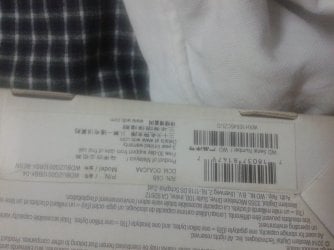
I am attaching the HDD details as given on the box sticker. I don't know technically what all input is required.

1. Had bought it almost 3 years back, the warranty is going to end in 3-4 months.
But that will be replacement warranty, excluding any data recovery.
So attempting DR myself or I'll give to specialist. In attempting myself, I have a huge problem because the hard disk ain't recognized in those softwares like Minitool or Yodot Recovery, then how can I retrieve data! I'll give to a specialist only. Your suggestions for DIY would be valuable!

2. It was working well last month! In frustration, I hit it once or twice. :'(

3. Nop, I never keep it plugged in!

4. No power failure or anything, it just gave up, no trauma!

5. No clue at all.


Everyone is a dumbhead with respect to something or other ;) I am too.

Apologies for those terms, f'd = ****ed and f'n = ****ing.
I'm too stressed with this! This is happening second time, I had lost all my dental journals and cases and articles and what not then AND my beloved music collection AND all those pics with family +friends, so the frustration cos I'll have to build up everything from scratch! Some which might get lost.
 

Attachments

  • 20170425_142234 (1).jpg
    20170425_142234 (1).jpg
    366.4 KB · Views: 2

My Computer

Computer type
PC/Desktop
Computer Manufacturer/Model Number
Dell Inspiron
OS
Windows 10
Antivirus
Avast free
OK Doc, It is a Western Digital portable Elements 1TB drive. Model no: WDBUZG0010BBK -BESN Model Name: Elements

Unfortunately the SATA to USB Bridge Electronics is integrated into the HDD inside and therefore you cannot separate the HDD from the electronics board to try it as an internal drive.( the HDD does not have a SATA connector. The electronics is directly soldered to the HDD). So no DIY data recovery is possible.

In all probability it is the SATA to USB Bridge electronics failure ( the HDD itself may be good).For the abovesaid reason, you may need to seek Professional data recovery only, who may be able to replace the board - if they can manage to get one- and try to recover the data.

As a first stop you may avail the free consultation of the WD Data Recovery partners. http://support.wdc.com/warranty/datarecovery.aspx?selregion=apac&lang=en
28-04-2017 11-24-52.jpg


http://support.wdc.com/warranty/datarecovery.aspx?selregion=apac&lang=en
 
Last edited:

My Computer

OS
Windows 7 Home Premium 32 bit
Thank you Sir _/\_
I'll give it to professional DR man, after trying that WD link.


P.S.: You can ask if any Qs regarding dental health and treatment! I'll be much obliged.
Got my clinic 'SereneSmiles Dental Care' in Vashi, New Bombay.

Good day.
 

My Computer

Computer type
PC/Desktop
Computer Manufacturer/Model Number
Dell Inspiron
OS
Windows 10
Antivirus
Avast free
Back
Top