External Hard Drive Constant Auto Play

BigHildy53

New member
Local time
9:26 AM
Messages
4
Location
Richmond, VA USA
I have two Seagate GoFlex 2TB drives which I alternate and use for backup. They are connected using USB 3.0. I recently swapped the drives (one stays off site). The Windows AutoPlay box (Open Folders, Use for Backup, etcetera) pops up at a regular internal. I have disconnected and re-connected. I've uninstalled the device and re-installed. This hasn't happened in the past. Just suddenly started. The drive is fully functional.

Any ideas?
 

My Computer

OS
Windows 7 Ultimate x64
CPU
Intel Core i7 950
Motherboard
ASUS P6X58D-Premium
Memory
Corsair DDR3 1600 (12G)
Graphics Card(s)
XFX GeForce GTS 250
Sound Card
Sound Blaster X-Fi Xtreme
Monitor(s) Displays
Dell
Hard Drives
Seagate Barracuda 1TB (Raid-1)
Western Digital Caviar 1.5TB (Raid-1)
Misc External HD's for backup
PSU
Thermaltake Toughpower XT W0229RU (750W)
Case
Thermaltak Element G
Cooling
XIGMATEK Thor's Hammer HDT-S126384
Welcome to Seven Forums BigHildy53. Try this:

Start> In search box type Device Manager and press enter> When Device Manager open, expand the Universal Serial Bus Connectors section> Right click on the USB Root Hub entries, and choose properties

1.jpg

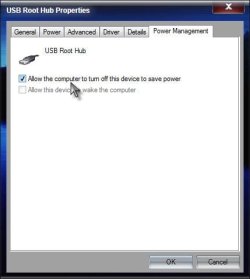
Power Management tab> Uncheck Allow the computer to turn off this device to save power

2.jpg

See if this helps with your problem. A Guy
 

My Computer

Computer type
PC/Desktop
OS
Windows 10 Home x64
CPU
INTEL Core i5-750 Quad-Core 3.37GHz
Motherboard
ASUS P7P55D
Memory
HyperX Fury Black Series 8GB (2 x 4GB) 1866Mhz
Graphics Card(s)
EVGA GeForce GTX 750 Superclocked 1GB 128-Bit GDDR5
Monitor(s) Displays
LG 32MA68HY 32" IPS
Screen Resolution
1920 x 1080
Hard Drives
Samsung 840 Evo 120GB, SEAGATE 500GB Barracuda® 7200.12, SATA 3 Gb/s, 7200 RPM, 16MB cache
PSU
ANTEC TruePower New TP-550, 80 PLUS, 550W
Case
ANTEC Three Hundred Illusion
Cooling
COOLER MASTER Hyper 212 Plus, 4 x 120mm 1 x 140mm Noctua's
Internet Speed
85 + Mbps
Antivirus
Avast
Browser
Vivaldi
Back
Top