
External hard drive "hanging" or infinite loading.

notsotechsavvy

New member
Local time
7:27 PM
Messages
6
So I have a pretty, well not old, but it's not a product they carry anymore external hard drive and I had some issues with it in the past (mainly the usb port not being soldered on properly and falling off); so I just received all my replacement cords for it and ran it, it took *forever* for it to load up, which I felt was understandable seeing as there's like 200+ GB on it but when I go to like drag one item from it, it'll take more than 10 minutes and if I cancel it, it just loads.. and loads and loads; I don't know what it's doing but when it's like that, I can't do anything with it and to actually make it browse-able again, I have to force a shut down. (hold the power button)

And the files I am trying to move are just 2.5MB so they shouldn't even be taking this long..

I have quite a few files I wish to save otherwise I'd just format the whole thing but I can't when it just hangs onto the loading.

Is there a way for me to save these files?
I tried to upload them a hosting but it freezes when I do; same with dragging the images into windows paint.

Please help! :(

I just tried to upload some of the pictures to mediafire and it literally froze my web browser.

I stand corrected, apparently this portable hard drive is not done frustrating me just yet.
Pretty sure I forgot to mention what portable hard drive I have and here it is.
The problem I'm having now is that I managed to save the files I needed from it and I formatted it just a few moments ago, but now if I access say like a picture or a video from my hard drive (there is only one file there so there is absolutely NO reason for this hard drive to be slow); it will take forever for it to load/open (my windows picture preview thing actually stops responding and so does any other opener)

bTaY0TV.png

That's what it's sitting at currently and will stay like that.

If I were to save that video onto my C: drive and open it there, it would not have any issues; but anything has issues opening from the hard drive.

I have to often restart it so it stops loading and so I can use explorer without it not responding.

I figured, maybe I don't have the drivers or something, so I went to the Seagate website and downloaded their driver software thing; it allowed me to check my hard drive for any issues and such. It came up clean and apparently my hard drive is functioning properly.

So I don't have an answer for this.
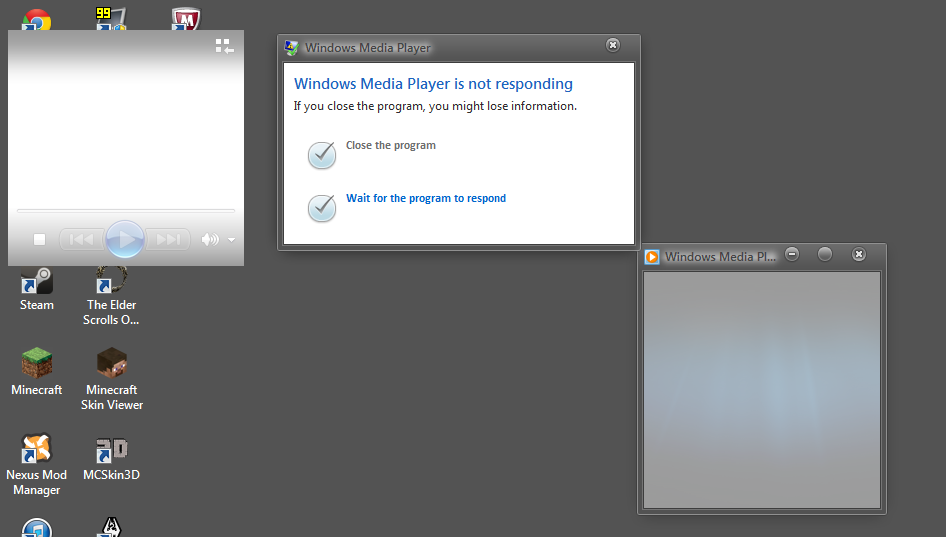
Allow me to show you what my Windows Media Player currently looks like and how it'll stay until I force my computer to restart:
CzGOjDZ.png
 
Last edited:

My Computer My Computer

Computer type
PC/Desktop
Computer Manufacturer/Model Number
eMachine
OS
Windows 7 Home Premium 64bit
CPU
AMD Athlon II X2 250
Motherboard
ET1331G
Memory
4096MB RAM
Graphics Card(s)
AMD Radeon HD 7700 Series
Sound Card
Realtek Digital Output
Monitor(s) Displays
Generic PnP Monitor (1440x900 32bit, 60Hz)
Screen Resolution
1440 x 900
PSU
N/A
Case
N/A
Cooling
N/A
Keyboard
Gearhead KBU5002
Mouse
Logitech M-SBF96
Internet Speed
N/A
Antivirus
AVG
Browser
Chrome
Fill out all of the System Specs in the lower left hand corner of your message. If we know what is in your PC it will help to better figure out the problem.
 

My Computer My Computer

Computer type
PC/Desktop
Computer Manufacturer/Model Number
Custom Build
OS
Windows 7 Home Premium 32-Bit - Build 7600 SP1
CPU
Intel Core i3-2120 3.30Ghz
Motherboard
Asus P8Z68-V LX Intel Z68 Socket H2 ATX
Memory
Kingston 4 GB DDR3 1333 mhz
Graphics Card(s)
AMD Radeon HD6670
Sound Card
Sound Blaster Audigy SE 24-Bit
Monitor(s) Displays
Asus VE228
Screen Resolution
1440 X 900
Hard Drives
OCZ Vertex 3 120 GB Sata 3 SSD ==
Kingston SH103/S3 120 G Hyper X 120 GB SSD ==
Western Digital 500 GB Caviar Green 7200 RPM ==
PSU
Corsair CX600M == 600 Watt
Case
NZXT Apollo - Silver with Clear Side Panel
Cooling
Three 120 mm Fans
Keyboard
Microsoft Natural 4000
Mouse
Microsoft Custom Optical 3000
Internet Speed
AT&T Fiber Optic Wireless Network
Antivirus
Microsoft Security Essentials
Browser
Chrome
Other Info
120 mm Blue LED Fan -- Three Blue LED Lazer Light Sticks
Fill out all of the System Specs in the lower left hand corner of your message. If we know what is in your PC it will help to better figure out the problem.

There, updated to the best of my knowledge, sorry if some things aren't correct/filled.

I'd also like to point out that the hard drive was never this way before and I used to use it daily and it was perfectly fine.
Now it's suddenly acting up; so I'm not sure if it's my computer or what.
 

My Computer My Computer

Computer type
PC/Desktop
Computer Manufacturer/Model Number
eMachine
OS
Windows 7 Home Premium 64bit
CPU
AMD Athlon II X2 250
Motherboard
ET1331G
Memory
4096MB RAM
Graphics Card(s)
AMD Radeon HD 7700 Series
Sound Card
Realtek Digital Output
Monitor(s) Displays
Generic PnP Monitor (1440x900 32bit, 60Hz)
Screen Resolution
1440 x 900
PSU
N/A
Case
N/A
Cooling
N/A
Keyboard
Gearhead KBU5002
Mouse
Logitech M-SBF96
Internet Speed
N/A
Antivirus
AVG
Browser
Chrome
Thanks for filling in the specs on your PC, but the most important one, the CPU only says "4.5" which means nothing. See if you can download this so we can know what kind of CPU you have. This will give you the specs on everything in your PC Speccy - System Information - Free Download If your CPU is very slow, then that could be the problem
 

My Computer My Computer

Computer type
PC/Desktop
Computer Manufacturer/Model Number
Custom Build
OS
Windows 7 Home Premium 32-Bit - Build 7600 SP1
CPU
Intel Core i3-2120 3.30Ghz
Motherboard
Asus P8Z68-V LX Intel Z68 Socket H2 ATX
Memory
Kingston 4 GB DDR3 1333 mhz
Graphics Card(s)
AMD Radeon HD6670
Sound Card
Sound Blaster Audigy SE 24-Bit
Monitor(s) Displays
Asus VE228
Screen Resolution
1440 X 900
Hard Drives
OCZ Vertex 3 120 GB Sata 3 SSD ==
Kingston SH103/S3 120 G Hyper X 120 GB SSD ==
Western Digital 500 GB Caviar Green 7200 RPM ==
PSU
Corsair CX600M == 600 Watt
Case
NZXT Apollo - Silver with Clear Side Panel
Cooling
Three 120 mm Fans
Keyboard
Microsoft Natural 4000
Mouse
Microsoft Custom Optical 3000
Internet Speed
AT&T Fiber Optic Wireless Network
Antivirus
Microsoft Security Essentials
Browser
Chrome
Other Info
120 mm Blue LED Fan -- Three Blue LED Lazer Light Sticks
Thanks for filling in the specs on your PC, but the most important one, the CPU only says "4.5" which means nothing. See if you can download this so we can know what kind of CPU you have. This will give you the specs on everything in your PC Speccy - System Information - Free Download If your CPU is very slow, then that could be the problem

Well I can tell you right now my computer is not very slow without the need of specs.

But I'll download this and update it.

There, it's updated.
If it's wrong again, sorry.
 

My Computer My Computer

Computer type
PC/Desktop
Computer Manufacturer/Model Number
eMachine
OS
Windows 7 Home Premium 64bit
CPU
AMD Athlon II X2 250
Motherboard
ET1331G
Memory
4096MB RAM
Graphics Card(s)
AMD Radeon HD 7700 Series
Sound Card
Realtek Digital Output
Monitor(s) Displays
Generic PnP Monitor (1440x900 32bit, 60Hz)
Screen Resolution
1440 x 900
PSU
N/A
Case
N/A
Cooling
N/A
Keyboard
Gearhead KBU5002
Mouse
Logitech M-SBF96
Internet Speed
N/A
Antivirus
AVG
Browser
Chrome
Thank you for the support.
I have solved this issue on my own, I had to go into safe mode to retrieve the files.
 

My Computer My Computer

Computer type
PC/Desktop
Computer Manufacturer/Model Number
eMachine
OS
Windows 7 Home Premium 64bit
CPU
AMD Athlon II X2 250
Motherboard
ET1331G
Memory
4096MB RAM
Graphics Card(s)
AMD Radeon HD 7700 Series
Sound Card
Realtek Digital Output
Monitor(s) Displays
Generic PnP Monitor (1440x900 32bit, 60Hz)
Screen Resolution
1440 x 900
PSU
N/A
Case
N/A
Cooling
N/A
Keyboard
Gearhead KBU5002
Mouse
Logitech M-SBF96
Internet Speed
N/A
Antivirus
AVG
Browser
Chrome
I stand corrected, apparently this portable hard drive is not done frustrating me just yet.
Pretty sure I forgot to mention what portable hard drive I have and here it is.
The problem I'm having now is that I managed to save the files I needed from it and I formatted it just a few moments ago, but now if I access say like a picture or a video from my hard drive (there is only one file there so there is absolutely NO reason for this hard drive to be slow); it will take forever for it to load/open (my windows picture preview thing actually stops responding and so does any other opener)
bTaY0TV.png

That's what it's sitting at currently and will stay like that.

If I were to save that video onto my C: drive and open it there, it would not have any issues; but anything has issues opening from the hard drive.

I have to often restart it so it stops loading and so I can use explorer without it not responding.

I figured, maybe I don't have the drivers or something, so I went to the Seagate website and downloaded their driver software thing; it allowed me to check my hard drive for any issues and such. It came up clean and apparently my hard drive is functioning properly.

So I don't have an answer for this.
 

My Computer My Computer

Computer type
PC/Desktop
Computer Manufacturer/Model Number
eMachine
OS
Windows 7 Home Premium 64bit
CPU
AMD Athlon II X2 250
Motherboard
ET1331G
Memory
4096MB RAM
Graphics Card(s)
AMD Radeon HD 7700 Series
Sound Card
Realtek Digital Output
Monitor(s) Displays
Generic PnP Monitor (1440x900 32bit, 60Hz)
Screen Resolution
1440 x 900
PSU
N/A
Case
N/A
Cooling
N/A
Keyboard
Gearhead KBU5002
Mouse
Logitech M-SBF96
Internet Speed
N/A
Antivirus
AVG
Browser
Chrome
Back
Top