External hard drive has delayed opening and can no longer play files

Katy3003

New member
Local time
10:27 AM
Messages
3
My external hard drive (Elements WD 1042) recently stopped working after my computer (Samsung Netbook N145) froze and restarted itself. At first I could only see it in 'devices and printers' and not in 'computer', but after several attempts it then appeared in 'computer' as Local Disk (E) and not the usual 'Elements', and I wasn't able to view or open any files. Now, however, it will appear as 'Elements' after a few minutes of being connected to my computer and I am able to view and open my files, but none of the files (music/ films) play properly, they freeze and stutter. Every time I connect it to my computer again it goes through the same process of only appearing in 'devices', then after a few minutes appearing as 'Local disk E' and the eventually as 'Elements'. I also eventually get the option to 'check disk options' but this just causes the computer to freeze with the 'Checking disk elements' window open.

I've tried plugging it into other computers and using a different connecting cable, but I still get the same result!

Please help, I've no idea where to go next with this problem!
Thanks in advance
 

My Computer My Computer

At a glance

windows 7 starter
OS
windows 7 starter
Hello Katy and welcome to Seven Forums.

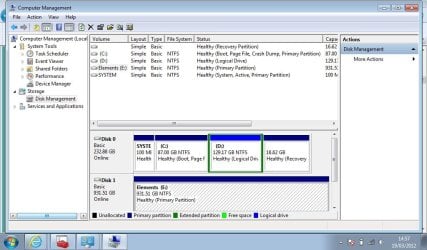
The fact that you've tried plugging the external HD into other computers with a different cable leads me to believe something happened to the HD when the netbook froze and restarted. (Did you ever find out why the netbook froze?) Couple of things you can try. First, with the Elements plugged in, can you post a screen shot of Disk Management? This might give a clue as to how the Elements is being seen by Windows 7.

Disk Management Windows 7 - How To Access Disk Management in Windows 7

Also, with the Elements still plugged in, try opening Device Manager. A quick way is to type devmgmt.msc into RUN or the start menu search box and pressing enter. When Device Manager dialog box opens, click the + sign next to Disk Drives. That should show you the netbook drive and the Elements drive. Double click on the Elements drive and another dialog box with several tabs should open. The General tab should indicate if the Elements is working properly. If it's not try using the Troubleshooting button. Please post back what you find out.
 

My Computer My Computer

At a glance

Win 7 Pro 64-bitIntel i5 2.4 Ghz8GB DDR3Intel HD 3000
Computer type
Laptop
Computer Manufacturer/Model Number
Sony Vaio VPCEB47GM Laptop
OS
Win 7 Pro 64-bit
CPU
Intel i5 2.4 Ghz
Memory
8GB DDR3
Graphics Card(s)
Intel HD 3000
Sound Card
IDT High Definition
Monitor(s) Displays
15.6 WGXA Anti-Glare LED
Screen Resolution
1280x800
Hard Drives
640Gb 7200rpm
Antivirus
MSE
Browser
Opera (primary) with IE9 backup
Thanks for getting back to me.
I followed your instructions and the general tab in device manager says that the device is working properly.
I also went into disk management and Windows 7 seems to view the device as healthy also
scrnsht.jpg

Despite this my hard drive is still acting in exactly the same way

thanks for your help
 

My Computer My Computer

At a glance

windows 7 starter
OS
windows 7 starter
if you can see the external hard drive in "computer" right click on it and select properties/tools then click the error check button under the error checking box.
this may help,
it will ask if you want it to fix any errors found ,select ok.
 

My Computer My Computer

At a glance

Microsoft Windows 7 Home Premium 64-bit 7600IIx4 amd athelon 635 processor2x2gbati radeon HD 5450
Computer Manufacturer/Model Number
Hewlett packard/p6512uk
OS
Microsoft Windows 7 Home Premium 64-bit 7600
CPU
IIx4 amd athelon 635 processor
Motherboard
FOXCONN 2AA9
Memory
2x2gb
Graphics Card(s)
ati radeon HD 5450
Sound Card
(1) Realtek High Definition Audio (2) AMD High Definition
Monitor(s) Displays
samsung lcd tv 32"
Screen Resolution
1360x 768
Hard Drives
(1) WDC WD10 01FAES-60Z2A0 SATA Disk Device (2) Maxtor OneTouch USB Device (3) ST310003 33AS USB Device (4) WD My Book 1111 USB Device
PSU
?
Cooling
air!
Keyboard
wireless hp
Mouse
wireless Hp,optical
Internet Speed
1.10mb/s
Antivirus
MSE
Browser
Firefox
I tried to check for errors, and windows began 'scanning and checking for error's but it just froze and 'computer' stop responding also.
I tried copying new files to the hard drive and got a message saying that this task could not be performed beacause of an i/o device error (error code 0x8007045d)
any ideas?
 

My Computer My Computer

At a glance

windows 7 starter
OS
windows 7 starter
Back
Top