External Hard drive has changed to RAW file system

TestDisk Step By Step - CGSecurity section "NTFS Boot sector recovery". Is Boot sector OK? Backup Boot sector OK? Are they the same?

Recovering An NTFS Boot Sector On An NTFS Partition Using Its Backup

TestDisk can use the backup boot sector to fix a corrupted NTFS boot sector. The primary boot sector is sector zero of the filesystem and the backup NTFS boot sector is located near the end of the filesystem. Even if the boot sector is accidentally overwritten, the backup should be intact. TestDisk checks the boot sector and the backup boot sector. If the boot sector and backup boot sector mismatch, you can
  • restore the NTFS boot sector from its backup (Backup BS) or;
  • update the backup NTFS boot sector with the current boot sector (Org. BS).
Dump can used to display the boot sector content in both hexadecimal and ASCII. If there is no valid boot sector available, TestDisk can still rebuild an NTFS boot sector.
Rebuilding An NTFS Boot Sector On An NTFS Partition

If both NTFS boot sectors are corrupted and you need to rebuild the NTFS boot sector, TestDisk searches the MFT (Master File Table: $MFT) and its backup ($MFTMirr). It reads the MFT record size, it computes the cluster size, and it reads the size of the Index Allocation Entry in the root directory index. Using all these values, TestDisk can provide a new boot sector. Finally it lets the user list the files before writing.
Repair An NTFS MFT

The MFT (Master File Table) is sometimes corrupted. If Microsoft's Checkdisk (chkdsk) failed to repair the MFT, run TestDisk. In the Advanced menu, select your NTFS partition, choose Boot, then Repair MFT. TestDisk will compare the MFT and MFT mirror (its backup). If the MFT is damaged, it will try to repair the MFT using the backup. If the MFT backup is damaged, it will use the main MFT.
 

My Computer My Computer

At a glance

Microsoft Windows 7 Home Premium 64-bits 7601...Intel(R) Core(TM) i3 CPU M 370 @ 2.40GHz4,00 GBATI Mobility Radeon HD 5400 Series
Computer type
Laptop
Computer Manufacturer/Model Number
ACER ASPIRE 5742G
OS
Microsoft Windows 7 Home Premium 64-bits 7601 Multiprocessor Free Service Pack 1
CPU
Intel(R) Core(TM) i3 CPU M 370 @ 2.40GHz
Motherboard
Acer Aspire 5742G
Memory
4,00 GB
Graphics Card(s)
ATI Mobility Radeon HD 5400 Series
Sound Card
(1) AMD High Definition Audio Device (2) Realtek High Defi
Screen Resolution
1366 x 768 x 32 bits (4294967296 colors) @ 60 Hz
Hard Drives
WDC WD5000BEVT-22ZAT0
Type=07 so NTFS. All diskpart output is as expected. No problems at all. It even has a drive letter J.
Only problem it is RAW.....
 

My Computer My Computer

At a glance

Microsoft Windows 7 Home Premium 64-bits 7601...Intel(R) Core(TM) i3 CPU M 370 @ 2.40GHz4,00 GBATI Mobility Radeon HD 5400 Series
Computer type
Laptop
Computer Manufacturer/Model Number
ACER ASPIRE 5742G
OS
Microsoft Windows 7 Home Premium 64-bits 7601 Multiprocessor Free Service Pack 1
CPU
Intel(R) Core(TM) i3 CPU M 370 @ 2.40GHz
Motherboard
Acer Aspire 5742G
Memory
4,00 GB
Graphics Card(s)
ATI Mobility Radeon HD 5400 Series
Sound Card
(1) AMD High Definition Audio Device (2) Realtek High Defi
Screen Resolution
1366 x 768 x 32 bits (4294967296 colors) @ 60 Hz
Hard Drives
WDC WD5000BEVT-22ZAT0
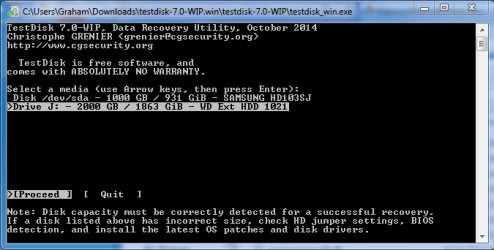
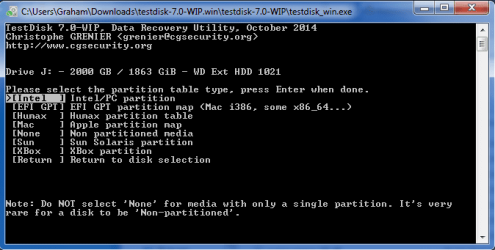
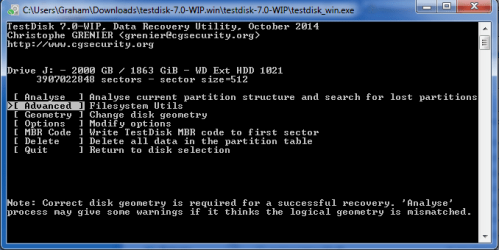
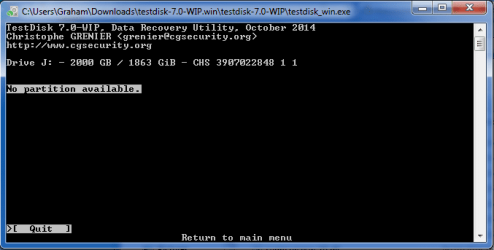
Its the Advanced menu I can't seem to gain access to. Below are the screens I go through in the order I have listed them, the option I chose on each screen is the one highlighted in white.
 

Attachments

  • testdiskA.PNG
    testdiskA.PNG
    15.2 KB · Views: 20
  • testdiskB.PNG
    testdiskB.PNG
    14 KB · Views: 20
  • testdiskC.PNG
    testdiskC.PNG
    14.1 KB · Views: 20
  • testdiskD.PNG
    testdiskD.PNG
    12.1 KB · Views: 20

My Computer My Computer

At a glance

Windows 7 Home Premium 32 bitIntel I34GB
Computer type
PC/Desktop
Computer Manufacturer/Model Number
custom built
OS
Windows 7 Home Premium 32 bit
CPU
Intel I3
Memory
4GB
Very strange.... never seen that. Maybe try the linux version of testdisk (?) Or post in a testdisk forum
 

My Computer My Computer

At a glance

Microsoft Windows 7 Home Premium 64-bits 7601...Intel(R) Core(TM) i3 CPU M 370 @ 2.40GHz4,00 GBATI Mobility Radeon HD 5400 Series
Computer type
Laptop
Computer Manufacturer/Model Number
ACER ASPIRE 5742G
OS
Microsoft Windows 7 Home Premium 64-bits 7601 Multiprocessor Free Service Pack 1
CPU
Intel(R) Core(TM) i3 CPU M 370 @ 2.40GHz
Motherboard
Acer Aspire 5742G
Memory
4,00 GB
Graphics Card(s)
ATI Mobility Radeon HD 5400 Series
Sound Card
(1) AMD High Definition Audio Device (2) Realtek High Defi
Screen Resolution
1366 x 768 x 32 bits (4294967296 colors) @ 60 Hz
Hard Drives
WDC WD5000BEVT-22ZAT0
Boot to http://www.sevenforums.com/tutorials/666-advanced-boot-options.html then "repair your computer" then command prompt.

Code:
diskpart
select disk 5
select part 1
detail part
[B][COLOR=red]--- only continue if this is the RAW partition? ---[/COLOR][/B] 
exit
 
bootsect /nt60  Q:
[B][COLOR=red]--- replace Q with actual drive letter of RAW partition found above ---[/COLOR][/B]
Post results
 

My Computer My Computer

At a glance

Microsoft Windows 7 Home Premium 64-bits 7601...Intel(R) Core(TM) i3 CPU M 370 @ 2.40GHz4,00 GBATI Mobility Radeon HD 5400 Series
Computer type
Laptop
Computer Manufacturer/Model Number
ACER ASPIRE 5742G
OS
Microsoft Windows 7 Home Premium 64-bits 7601 Multiprocessor Free Service Pack 1
CPU
Intel(R) Core(TM) i3 CPU M 370 @ 2.40GHz
Motherboard
Acer Aspire 5742G
Memory
4,00 GB
Graphics Card(s)
ATI Mobility Radeon HD 5400 Series
Sound Card
(1) AMD High Definition Audio Device (2) Realtek High Defi
Screen Resolution
1366 x 768 x 32 bits (4294967296 colors) @ 60 Hz
Hard Drives
WDC WD5000BEVT-22ZAT0
When using repair computer command prompt there are no disk partitions to show. When using list disk it looks like my drive becomes disk 1 (disks 2,3,4,5 state no media). I have tried the following:

Disk part
list disk

Disk ### Statuss Size Free Dyn Gpt
Disk 0 Online 931 GB 1116 MB
Disk 1 Online 0 GB 0 GB
Disk 2 No Media 0 GB 0 GB
Disk 3 No Media 0 GB 0 GB
Disk 4 No Media 0 GB 0 GB
Disk 5 No Media 0 GB 0 GB


select disk 1
Disk 1 is now the selected disk

list part
There are no partitions on this disk to show.

Repeated the above for disk 5 and same results occur

Edit if I type select part 1 error appears as follows:

Virtual Disk service error:
The disk is not initialised.
 

My Computer My Computer

At a glance

Windows 7 Home Premium 32 bitIntel I34GB
Computer type
PC/Desktop
Computer Manufacturer/Model Number
custom built
OS
Windows 7 Home Premium 32 bit
CPU
Intel I3
Memory
4GB
Very strange. Still in recovery environment->command prompt:
Code:
dir/s  X:\bootsect.exe
Where is bootsect.exe ? For example in x:\windows\blabla . then
Code:
copy  x:\windows\blabla\bootsect.exe  c:\
Succesfull? If so, boot in win7 normally. Now http://www.sevenforums.com/tutorials/783-elevated-command-prompt.html then:
Code:
c:\bootsect.exe /nt60  j:  /force
post results
 

My Computer My Computer

At a glance

Microsoft Windows 7 Home Premium 64-bits 7601...Intel(R) Core(TM) i3 CPU M 370 @ 2.40GHz4,00 GBATI Mobility Radeon HD 5400 Series
Computer type
Laptop
Computer Manufacturer/Model Number
ACER ASPIRE 5742G
OS
Microsoft Windows 7 Home Premium 64-bits 7601 Multiprocessor Free Service Pack 1
CPU
Intel(R) Core(TM) i3 CPU M 370 @ 2.40GHz
Motherboard
Acer Aspire 5742G
Memory
4,00 GB
Graphics Card(s)
ATI Mobility Radeon HD 5400 Series
Sound Card
(1) AMD High Definition Audio Device (2) Realtek High Defi
Screen Resolution
1366 x 768 x 32 bits (4294967296 colors) @ 60 Hz
Hard Drives
WDC WD5000BEVT-22ZAT0
Very strange. Still in recovery environment->command prompt:
Code:
dir/s  X:\bootsect.exe

Sorry don't know if I can do screen shots from this mode. The first command brings up the following:

Code:
Volume in drive X is Boot
Volume serial number is D60A-0DC2

Directory of x:\Windows\System32

07/13/2009  05:14 PM  97,280 bootsect.exe
1 file(s) 97,280

Directory of x:\Windows\winsxs\x86_microsoft-windows-winpe_tools_31bf3856ad364e
35_6.1.7600.16385_none_fad5f90498336010

07/13/2009 05:14 PM 97,280 bootsect.exe
2 file(s) 194,560 bytes
0 dir(s) 30,629,888 bytes free

Based on the above, what would I type for 2nd command?
 

My Computer My Computer

At a glance

Windows 7 Home Premium 32 bitIntel I34GB
Computer type
PC/Desktop
Computer Manufacturer/Model Number
custom built
OS
Windows 7 Home Premium 32 bit
CPU
Intel I3
Memory
4GB
Screenshots are impossible in that mode.

Please do:
Code:
copy  x:\Windows\System32\bootsect.exe  c:\
 

My Computer My Computer

At a glance

Microsoft Windows 7 Home Premium 64-bits 7601...Intel(R) Core(TM) i3 CPU M 370 @ 2.40GHz4,00 GBATI Mobility Radeon HD 5400 Series
Computer type
Laptop
Computer Manufacturer/Model Number
ACER ASPIRE 5742G
OS
Microsoft Windows 7 Home Premium 64-bits 7601 Multiprocessor Free Service Pack 1
CPU
Intel(R) Core(TM) i3 CPU M 370 @ 2.40GHz
Motherboard
Acer Aspire 5742G
Memory
4,00 GB
Graphics Card(s)
ATI Mobility Radeon HD 5400 Series
Sound Card
(1) AMD High Definition Audio Device (2) Realtek High Defi
Screen Resolution
1366 x 768 x 32 bits (4294967296 colors) @ 60 Hz
Hard Drives
WDC WD5000BEVT-22ZAT0
Screenshots are impossible in that mode.

Please do:
Code:
copy  x:\Windows\System32\bootsect.exe  c:\

The above worked fine, advised that 1 file successfully copied

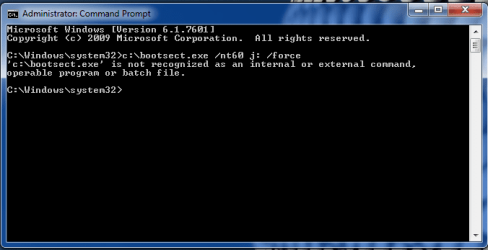
Next step in Windows 7 however:
 

Attachments

  • bootsect.PNG
    bootsect.PNG
    12.5 KB · Views: 18

My Computer My Computer

At a glance

Windows 7 Home Premium 32 bitIntel I34GB
Computer type
PC/Desktop
Computer Manufacturer/Model Number
custom built
OS
Windows 7 Home Premium 32 bit
CPU
Intel I3
Memory
4GB
So you did copy "x:\Windows\System32\bootsect.exe c:\" in recovery environment.
Please boot to recovery environment ->command prompt again
Code:
dir  c:\bootsect.exe
dir c:\
dir c:\users

Is bootsect realy there? In users folder is your account name? So C is really the OS partition?
 

My Computer My Computer

At a glance

Microsoft Windows 7 Home Premium 64-bits 7601...Intel(R) Core(TM) i3 CPU M 370 @ 2.40GHz4,00 GBATI Mobility Radeon HD 5400 Series
Computer type
Laptop
Computer Manufacturer/Model Number
ACER ASPIRE 5742G
OS
Microsoft Windows 7 Home Premium 64-bits 7601 Multiprocessor Free Service Pack 1
CPU
Intel(R) Core(TM) i3 CPU M 370 @ 2.40GHz
Motherboard
Acer Aspire 5742G
Memory
4,00 GB
Graphics Card(s)
ATI Mobility Radeon HD 5400 Series
Sound Card
(1) AMD High Definition Audio Device (2) Realtek High Defi
Screen Resolution
1366 x 768 x 32 bits (4294967296 colors) @ 60 Hz
Hard Drives
WDC WD5000BEVT-22ZAT0
In winre ->command prompt do:
Code:
move  c:\bootsect.exe  d:\

Reboot normally and do
Code:
c:\bootsect.exe /nt60 J:

OS drive is called C in win7 and D in windows recovery!
 

My Computer My Computer

At a glance

Microsoft Windows 7 Home Premium 64-bits 7601...Intel(R) Core(TM) i3 CPU M 370 @ 2.40GHz4,00 GBATI Mobility Radeon HD 5400 Series
Computer type
Laptop
Computer Manufacturer/Model Number
ACER ASPIRE 5742G
OS
Microsoft Windows 7 Home Premium 64-bits 7601 Multiprocessor Free Service Pack 1
CPU
Intel(R) Core(TM) i3 CPU M 370 @ 2.40GHz
Motherboard
Acer Aspire 5742G
Memory
4,00 GB
Graphics Card(s)
ATI Mobility Radeon HD 5400 Series
Sound Card
(1) AMD High Definition Audio Device (2) Realtek High Defi
Screen Resolution
1366 x 768 x 32 bits (4294967296 colors) @ 60 Hz
Hard Drives
WDC WD5000BEVT-22ZAT0
It looks like bootsect.exe is there for first 2 commands.

For c:\users however it says File not found.

When in Windows 7 normal mode my OS is installed on C:
 

My Computer My Computer

At a glance

Windows 7 Home Premium 32 bitIntel I34GB
Computer type
PC/Desktop
Computer Manufacturer/Model Number
custom built
OS
Windows 7 Home Premium 32 bit
CPU
Intel I3
Memory
4GB
Do #32
 

My Computer My Computer

At a glance

Microsoft Windows 7 Home Premium 64-bits 7601...Intel(R) Core(TM) i3 CPU M 370 @ 2.40GHz4,00 GBATI Mobility Radeon HD 5400 Series
Computer type
Laptop
Computer Manufacturer/Model Number
ACER ASPIRE 5742G
OS
Microsoft Windows 7 Home Premium 64-bits 7601 Multiprocessor Free Service Pack 1
CPU
Intel(R) Core(TM) i3 CPU M 370 @ 2.40GHz
Motherboard
Acer Aspire 5742G
Memory
4,00 GB
Graphics Card(s)
ATI Mobility Radeon HD 5400 Series
Sound Card
(1) AMD High Definition Audio Device (2) Realtek High Defi
Screen Resolution
1366 x 768 x 32 bits (4294967296 colors) @ 60 Hz
Hard Drives
WDC WD5000BEVT-22ZAT0
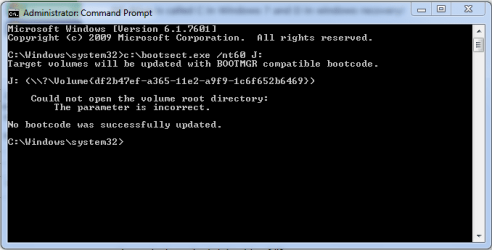
Managed to do that, results as follows:
 

Attachments

  • bootsect2.PNG
    bootsect2.PNG
    10.5 KB · Views: 19

My Computer My Computer

At a glance

Windows 7 Home Premium 32 bitIntel I34GB
Computer type
PC/Desktop
Computer Manufacturer/Model Number
custom built
OS
Windows 7 Home Premium 32 bit
CPU
Intel I3
Memory
4GB
You can delete c:\bootsect.exe later if you wish.

Try to make a linux boot cd with testdisk. I'm almost sure it's a faulty ntfs boot sector or faulty $MFT. testdisk can fix that.... normally
 

My Computer My Computer

At a glance

Microsoft Windows 7 Home Premium 64-bits 7601...Intel(R) Core(TM) i3 CPU M 370 @ 2.40GHz4,00 GBATI Mobility Radeon HD 5400 Series
Computer type
Laptop
Computer Manufacturer/Model Number
ACER ASPIRE 5742G
OS
Microsoft Windows 7 Home Premium 64-bits 7601 Multiprocessor Free Service Pack 1
CPU
Intel(R) Core(TM) i3 CPU M 370 @ 2.40GHz
Motherboard
Acer Aspire 5742G
Memory
4,00 GB
Graphics Card(s)
ATI Mobility Radeon HD 5400 Series
Sound Card
(1) AMD High Definition Audio Device (2) Realtek High Defi
Screen Resolution
1366 x 768 x 32 bits (4294967296 colors) @ 60 Hz
Hard Drives
WDC WD5000BEVT-22ZAT0
You can delete c:\bootsect.exe later if you wish.

Try to make a linux boot cd with testdisk. I'm almost sure it's a faulty ntfs boot sector or faulty $MFT. testdisk can fix that.... normally

OK thanks, I'll look into that. I have never used Linux so will have to research into it more, so it may be a few days before I post anything further on this. Thanks very much for your help so far with this, much appreciated.
 

My Computer My Computer

At a glance

Windows 7 Home Premium 32 bitIntel I34GB
Computer type
PC/Desktop
Computer Manufacturer/Model Number
custom built
OS
Windows 7 Home Premium 32 bit
CPU
Intel I3
Memory
4GB
Just a boot disk with testdisk on it. Can be anything. Download the ISO, burn and boot from it.

TestDisk on Live rescue CDs

TestDisk (not always the latest version) is included on the following free rescue CDs:
 

My Computer My Computer

At a glance

Microsoft Windows 7 Home Premium 64-bits 7601...Intel(R) Core(TM) i3 CPU M 370 @ 2.40GHz4,00 GBATI Mobility Radeon HD 5400 Series
Computer type
Laptop
Computer Manufacturer/Model Number
ACER ASPIRE 5742G
OS
Microsoft Windows 7 Home Premium 64-bits 7601 Multiprocessor Free Service Pack 1
CPU
Intel(R) Core(TM) i3 CPU M 370 @ 2.40GHz
Motherboard
Acer Aspire 5742G
Memory
4,00 GB
Graphics Card(s)
ATI Mobility Radeon HD 5400 Series
Sound Card
(1) AMD High Definition Audio Device (2) Realtek High Defi
Screen Resolution
1366 x 768 x 32 bits (4294967296 colors) @ 60 Hz
Hard Drives
WDC WD5000BEVT-22ZAT0

My Computer My Computer

At a glance

Microsoft Windows 7 Home Premium 64-bits 7601...Intel(R) Core(TM) i3 CPU M 370 @ 2.40GHz4,00 GBATI Mobility Radeon HD 5400 Series
Computer type
Laptop
Computer Manufacturer/Model Number
ACER ASPIRE 5742G
OS
Microsoft Windows 7 Home Premium 64-bits 7601 Multiprocessor Free Service Pack 1
CPU
Intel(R) Core(TM) i3 CPU M 370 @ 2.40GHz
Motherboard
Acer Aspire 5742G
Memory
4,00 GB
Graphics Card(s)
ATI Mobility Radeon HD 5400 Series
Sound Card
(1) AMD High Definition Audio Device (2) Realtek High Defi
Screen Resolution
1366 x 768 x 32 bits (4294967296 colors) @ 60 Hz
Hard Drives
WDC WD5000BEVT-22ZAT0

I have tried using this over the weekend but still no luck:(

First I followed Create a Bootable USB Flash Drive to make a bootable USB flash drive, it wouldn't boot from it (bootmgr missing) so I burned it to a blank DVD.

From the DVD I was able to boot into ubunto program and I managed to find test disk on there. The bad news however is that my faulty drive is not listed in the test disk list of drives (2nd screen).

Any idea how to get this to appear?

If possible does anyone have a basic step by step guide for someone who has no experience of doing this?

Also do you have a list of basic commands for using the ubunto software, I found the test disk one but cant seem to find any others, not even to exit the program.

I was going to ask in the forums on the above site but no one has posted in them in almost 3 years.
 

My Computer My Computer

At a glance

Windows 7 Home Premium 32 bitIntel I34GB
Computer type
PC/Desktop
Computer Manufacturer/Model Number
custom built
OS
Windows 7 Home Premium 32 bit
CPU
Intel I3
Memory
4GB
Back
Top