External hard drive has grey circle on its icon after formatting.

tDwtp

New member
Local time
1:05 PM
Messages
4
Hello sevenforums!


I mostly use this page for reference, and would like to thank all members for the content they provide.


However, I came across a problem I could not find any documentation about:

I bought a 5TB Seagate external hard drive. The drive comes with some preloaded Software for registering and some offer for goodies. So I just format them.


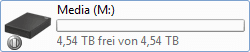
After formatting I got a grey circle with a white vertical bar over the icon and it wont go away. Changeing the icon of the drive will still show the circle on top of the chosen icon. So this does not work.


I can not find any reference for drive icons or anything that would give me a hint of what this icon could mean. I tried my best but only found shared, system, network and exclamationmark symbol references.


Does any have any idea what it means or even better, has a reference on what the different overlays mean on drives?
 

Attachments

  • Festplatte.png
    Festplatte.png
    1.7 KB · Views: 45
  • Festplatte2.png
    Festplatte2.png
    872 bytes · Views: 43
  • Festplatte3.png
    Festplatte3.png
    2 KB · Views: 43

My Computer My Computer

At a glance

Windows 7 Ultimate x64
OS
Windows 7 Ultimate x64
Windows Enhanced Storage overlay symbol

Hi tDwtp ,

Welcome to SevenForums.

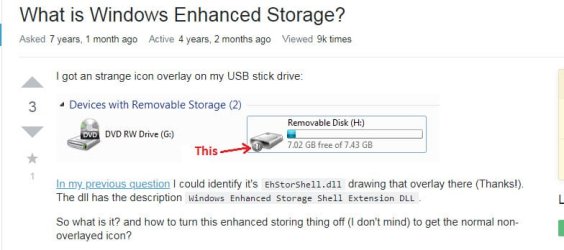
That symbol no doubt is new to me as it would be to many others. But my search for an answer led me here dll - What is Windows Enhanced Storage? - Super User

06-Aug-19 9-50-39 AM.jpg

You may do further research on it :D and post your findings here.

Just for my curiosity I would like to know the exact model number of Seagate 5TB drive. Does its specifications say that it is a Windows enhanced storage device?

How did you format it ? Full details about how you formatted it - assume that I am a novice and teach me how to format it step by step as you did :D

I would also like to see a full screenshot of Windows Disk Management - no truncated screenshot

Disk Management - Post a Screen Capture Image

Does it show the same overlay symbol when plugged into another Windows system (seven and above)?

All that for my further research - time permitting :-)
 
Last edited:

My Computer My Computer

At a glance

Windows 7 Home Premium 32 bit
OS
Windows 7 Home Premium 32 bit
Thanks for the link. I was not able to find anything like that! At least I have something to go for now!


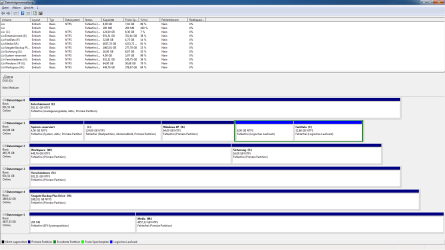
The screencap from diskmgmt is in the attachments. If you need a full explanation on what is goin on in the drive management, let me know.


So now: Modelnumber is STHP5000400 (Seagate Backup Plus Portable black 2019 Model). This model does not offer any kind of encryption unlike the Touch variant (just has a piece of cloth on it and maxed out at 2TB). An enhancment was not stated anywhere in any documentation that I found. I did not apply custom firmware I just formatted it (See below for how I did that).


The drive has a GPT with an EFI partition as it should due to its size (>2TB does not work properly with a MBR).
I noticed however, that having 2 drives of the same model (2017; one 4TB and one 2TB) seem to mess up the Bus (idk why, they randomly have cachedrops and USB wont respond for a ms). Before I formatted it it did not have that overlay AND it has appared eventhough it should not. It does not state anything in the device information so far (left click > properties > doubleclick the drive > Details). Digging deeper I could not find any relevant difference to the same model of an earlier version.


I checked it on a Windows 10 device, but no symbol. Windows 7 seeminlgy chose to put it there randomly.
I am currently formatting it on the Windows 10 device without the fast formatting option (so it is running for ~ 2h now)


How I formatted - I did the fast formatting option:
1. Backup the stuff on the drive
2. Left-click > Format...
3. Keep settings ("Schnellformatierung"/"fast formatting" option is ticked)
4. Start
5. Wait....
6. Done


When I run into a problem (like this)
I format it without the fast formatting option and press cancel and wait till it stopps (usually 5 minutes in and need to wait the same amount of time) This most of the time grants me with ~ 0.01% - 0.1% more capacity and fixes most problems (as the any records will be fixed this way).
NOTE: Wait until it cancels by it self. It WILL NOT correct the records elsewise and may damage the device!
DO NOT touch the "My Computer" when it cancels by itselft, or it will preload a cached/default record and apply it! Wait until it asks for the auto play stuff.

DO NOT kill explorer.exe when canyling ANY formatting, even to have less Drive access! This will kill the cached record, but try to create a default record when you start the explorer again...
 

Attachments

  • diskmgmt.png
    diskmgmt.png
    46.7 KB · Views: 5

My Computer My Computer

At a glance

Windows 7 Ultimate x64
OS
Windows 7 Ultimate x64
tDwtp,

"Thanks for the link. I was not able to find anything like that!" Google with search term - Circle with a vertical line next to the HDD icon - and you will get it :-)

I have taken note of the Windows Disk Management screenshot.

There is no need for the 200MB EFI System Partition on your Seagate 5 TB external HDD. ( I am still wondering how it came about on that HDD but shall not discuss it further now, since you are already formatting the HDD on a Windows 10 machine. You may check your other Seagate 4TB HDD(2017) and tell us whether you find the EFI System Partition in it. )

After you format that 5TB HDD, plug it into your Windows 7 system and let us know whether you still get the Windows Enhanced Storage overlay symbol.(If possible plugin your 4TB external HDD also alongwith the 5TB HDD)

Post a screenshot of Windows Disk Management. (Please expand the column-widths in the Drives list above the disk map such that all information in it is visible and not obscured. This is well-explained in the tutorial Disk Management - Post a Screen Capture Image )

You seem to be the only second person reporting this overlay icon :-) ( the first one being that OP in Superuser forum)
 

My Computer My Computer

At a glance

Windows 7 Home Premium 32 bit
OS
Windows 7 Home Premium 32 bit
Hello jumanji


Full Formatting is done... and it did not do anything.
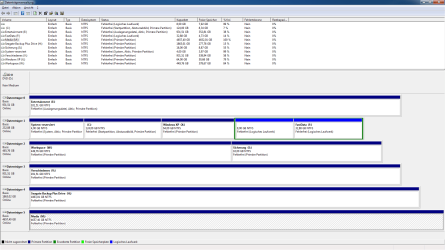
I removed the EFI partition and optimized the formatting a bit and got the 500MB that were "used" due to something unknown (pobably non-allocatable sectors) + the 5GB that the system bloats with something in the ?:\$Log file.
This did not remove the "Ehanced Storage" thing. (I read both superuser threads and i do not just want to deactivate the overlay icon)


The (actually) 5TB 2017 model does not have that (and no EFI partition). I found out that both should not use an EFI-partition but a GPT... I just assumed that was that... and glossed over that.
On the 2019 model the EFI Partition was seemingly used by Seagate for testing. At least trying to recover data from that drive gave me sourcecode for testing drives and various other data as well as a mini unix system (i guess custom linux, might be minified netBSD... sourcecode is written for both and the system does not state anything about either system?)
As well as UEFI related stuff. I also found the same code on the 2017 model and the 2TB drive.


Upon further inspection of the API of the Enhanced Storage, the drive should issue a certificate to the system, which the drive does not do. All Enhanced Options are not accessible/available! I tested in on a different Windows 7 device and it also showed the overlay. Due to not being able to get the testing suite from microsoft (links are dead), i cannot further inspect the drive.


Windows 10 does not show such an icon nor does it recognize the Enhanced Storage. It is unique to windows 7 (I do have a Windows 8 device, but not with USB 3)


New screencap is in the attachments. Sorry for the inconvineance. I am used to use a console and logfiles and not a screenshot...
 

Attachments

  • diskmgmt2.png
    diskmgmt2.png
    49.1 KB · Views: 3

My Computer My Computer

At a glance

Windows 7 Ultimate x64
OS
Windows 7 Ultimate x64
^Greek, Latin and German for me :D

Would you like to talk with Seagate Tech Support on it?

Keep posting any new info on it as you discover. May be, some gurus here may want to probe further on this.
 

My Computer My Computer

At a glance

Windows 7 Home Premium 32 bit
OS
Windows 7 Home Premium 32 bit
Back
Top