External hard drive is not accessible

Neo10

New member
Local time
2:32 PM
Messages
3
Hi,
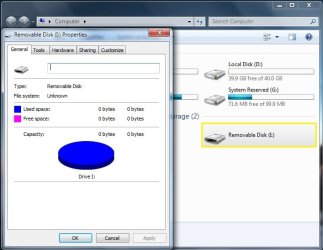
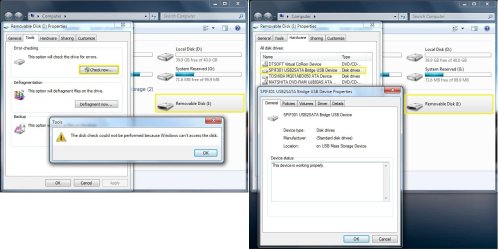
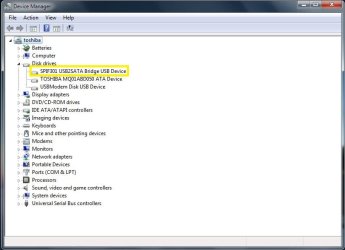
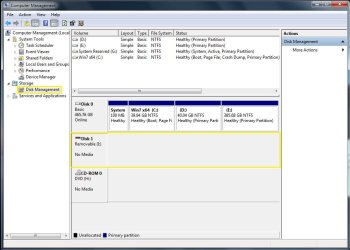
I have external usb hard drive (SATA) 1Tb. It was working flawlessly before. But now I can't access it. However, my laptop recognizes it and can be seen in 'My Computer, Device Manager and Disk management'.
What should I do?
Any help would be appreciated.
 

Attachments

  • my computer.jpg
    my computer.jpg
    50.6 KB · Views: 0
  • properties.jpg
    properties.jpg
    41.1 KB · Views: 0
  • device properties.jpg
    device properties.jpg
    108.9 KB · Views: 4
  • device manager.jpg
    device manager.jpg
    39.6 KB · Views: 0
  • diskmgnt.jpg
    diskmgnt.jpg
    69.8 KB · Views: 1

My Computer

Computer type
Laptop
Computer Manufacturer/Model Number
Toshiba Satellite L300 PSLB8E
OS
Windows 7 Ultimate x64
CPU
2.10 gigahertz Intel Pentium Dual-Core
Memory
4 Gb
Hard Drives
TOSHIBA MQ01ABD050 (500.11 GB)
Antivirus
McAfee VirusScan Enterprise Version 8.8.0.777
Hello Neo10!

This is quite unpleasant of a situation you have.
Is this an external device by design or an internal hard drive connected via USB?
This could be a driver issue. Make sure you have updated the drivers for the device and the USB drivers of your PC.
Also, has the drive always shown with this drive number (I: ) or is this a first? This may actually be another device or slot of the PC and your drive may actually not be seen at all. Connect it to another computer and see what happens.

CK_WD
 
Last edited:

My Computer

Computer type
PC/Desktop
OS
Windows 7 Home Premium x64
Looks like you're going through an external USB-to-SATA converter/adapter or external enclosure?

Could you be having a hardware failure in that adapter? Not the drive itself?

Perhaps you could try an alternate external adapter, like this one from Kingwin http://www.newegg.com/Product/Product.aspx?Item=N82E16817990027 (USB 3.0 compatible). That would point to either your current external adapter or the drive itself as being the source of the problem.
 

My Computer

Computer type
PC/Desktop
Computer Manufacturer/Model Number
Home-built, two systems (1) and (2)
OS
Windows 7 Pro x64 (1), Win7 Pro X64 (2)
CPU
i5-3350p 3.1Ghz/6MB-cache (1); E8400 3.0Ghz/6MB-cache (2)
Motherboard
ASUS P8Z77-V Pro (1); ASUS P5Q3 (2)
Memory
8GB PC3-12800 DDR3 (1); 4GB PC3-10600 DDR3 (2)
Graphics Card(s)
ATI HD7750 (1), (see TV cards); ATI R7 250 (2)
Sound Card
Realtek ALC892 HD Audio (1); Realtek ALC1200 HD Audio (2)
Monitor(s) Displays
Eizo HD2441W LCD, Eizo S2433W (1); Eizo 24" S2433W (2)
Screen Resolution
1920x1200, 1920x1200 (1); 1920x1200 (2)
Hard Drives
(1) 1TB SATA-II (7200RPM), 2x2TB SATA-III (7200RPM), 250GB SATA-III (10000RPM) for OS; 2x2TB external USB 3.0

(2) 320GB SATA-II (7200RPM), 750GB SATA-II (7200RPM), 150GB SATA-II (10000RPM) for OS; 2TB external USB 3.0
PSU
Nesteq ECS-6001 600W (1); Nesteq ECS-5001 500W (2)
Case
Acousti-Case 360 (1) and (2)
Cooling
Noctua NH-U12P SE2 for CPU, 2x120mm case fans (1) and (2)
Keyboard
IBM PS/2 (1) and (2)
Mouse
Logitech MX Revolution wireless (1); Microsoft wired (2)
Internet Speed
100mbps down / 10mbps up
Antivirus
Microsoft Security Essentials; Malwarebyte Anti-Malware Pro
Browser
Firefox
Other Info
Ceton InfiniTV 4-tuner cablecard-enabled TV card as well as Hauppauge HVR-2250 OTA/ATSC 2-tuner TV card in (1), running under Win7 WMC
Hello Neo10!

This is quite unpleasant of a situation you have.
Is this an external device by design or an internal hard drive connected via USB?
This could be a driver issue. Make sure you have updated the drivers for the device and the USB drivers of your PC.
Also, has the drive always shown with this drive number (I: ) or is this a first? This may actually be another device or slot of the PC and your drive may actually not be seen at all. Connect it to another computer and see what happens.

CK_WD

Hi CK_WD,

Thanks for reply.
- It is ''PACKARD BELL Carbon'' external hard drive - 1 TB, connected via USB (external power supply needed).
- I have updated USB drivers of my laptop but it doesn't solve the issue.
- Though my laptop never asked specific driver for this device in the past, I tried to search the drivers for device on Google, but did not find.
- Yes, this is the only and correct drive that always shown with this drive number (I: ).
- I have also tried to connect it to another laptop but still got the same error.

I have lot of important data in it. :(
 

My Computer

Computer type
Laptop
Computer Manufacturer/Model Number
Toshiba Satellite L300 PSLB8E
OS
Windows 7 Ultimate x64
CPU
2.10 gigahertz Intel Pentium Dual-Core
Memory
4 Gb
Hard Drives
TOSHIBA MQ01ABD050 (500.11 GB)
Antivirus
McAfee VirusScan Enterprise Version 8.8.0.777
Looks like you're going through an external USB-to-SATA converter/adapter or external enclosure?

Could you be having a hardware failure in that adapter? Not the drive itself?

Perhaps you could try an alternate external adapter, like this one from Kingwin (USB 3.0 compatible). That would point to either your current external adapter or the drive itself as being the source of the problem.

Hi dsperber,

Thanks for reply.
- Yes it is ''PACKARD BELL Carbon'' external hard drive - 1 TB, connected via USB (external power supply needed).
- The hard drive is having small LED light and it was blinking with little bit feeling like something is rotating inside the device. And now that LED light is still turn on/off but does not blink anymore.
 

My Computer

Computer type
Laptop
Computer Manufacturer/Model Number
Toshiba Satellite L300 PSLB8E
OS
Windows 7 Ultimate x64
CPU
2.10 gigahertz Intel Pentium Dual-Core
Memory
4 Gb
Hard Drives
TOSHIBA MQ01ABD050 (500.11 GB)
Antivirus
McAfee VirusScan Enterprise Version 8.8.0.777
Hi again Neo10!

I would suggest you this link from the Microsoft support page, when hardware devices are not working or are not detected in Windows:
Hardware devices are not working or are not detected in Windows

To make sure that your external drive doesn't have or has any drivers, you should check the manufacturer's site, in this case – Choose your country | Packard Bell.

But since your drive has shown the same error on another computer, it's probably the device that's failed.

If you are not able to fix the issue with the two steps from above, your best chance for your information would be a Data Recovery Company.

Good luck!

CK_WD
 

My Computer

Computer type
PC/Desktop
OS
Windows 7 Home Premium x64
Sounds like the power controller has gone south and you can remove the actual hard drive inside the enclosure and connect it direct as an internal hard drive if you have access to a desktop and either use it as a secondary drive or just get the data on it transferred to another medium. Getting a data recovery company as CKWD said is also an option but an expensive one. Have a look here for how to remove hard drives from their enclosure and even though it's a different one then yours they are mostly very similar
https://www.youtube.com/watch?v=kCS8ui-6WZY
 

My Computer

Computer type
PC/Desktop
Computer Manufacturer/Model Number
Home Made
OS
Windows 7 Ultimate x64
CPU
Q6600 3.1ghz
Motherboard
Gigabyte GA-P35-DS3L
Memory
Kingston DDR2 6400 8GB
Graphics Card(s)
Gigabyte Radeon HD 6850 1GB 256-Bit
Sound Card
On board
Monitor(s) Displays
Acer X243H
Screen Resolution
1920x1080
Hard Drives
Intel 330 120GB SSD
WD 2TB 7200
PSU
Thermaltake Toughpower 750W Semi Modular
Case
Modified Alienware
Keyboard
A4Tech
Mouse
Gigabyte ECO600
Antivirus
Comodo
Browser
Cyberfox
Back
Top