Solved External Hard Drive is unlocated

psychopotato

New member
Local time
6:13 AM
Messages
9
Hi,

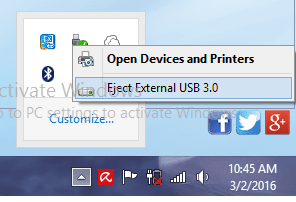
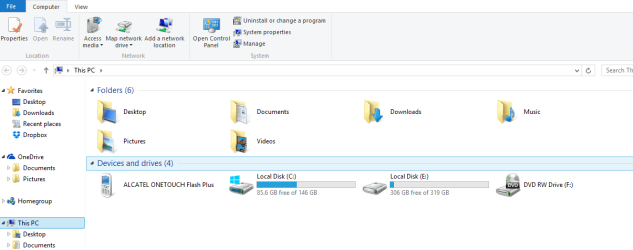
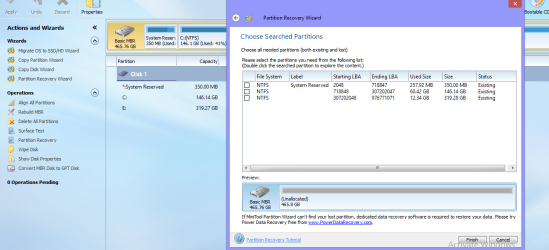
I've been browsing threads here to fix my external hard drive but unfortunately, no success at all. Every time I plug the hard drive, it is not showing in my PC, but it I can see that is plugged because it is showing in the "Safely Remove Hardware" section at the bottom right. I also tried the Mini Partition Wizard Tool but still I cannot resolve the issue. The tool cannot locate the hard drive.
 

Attachments
  • Partition.png
    Partition.png
    106.7 KB · Views: 3

My Computer My Computer

Computer type
Laptop
Computer Manufacturer/Model Number
Acer
OS
Windows 8.1 Enterprise 64 bit
CPU
Intel(R) Celeron(R) CPU N2940 @ 1.83 GHz
Memory
2048 MB
It seems to have partitions but those are not shown in all cases. Try to run a chkdsk /r on it. Maybe it gets fixed.
 

My Computer My Computer

Computer Manufacturer/Model Number
HP, Dell, Gateway, Toshiba - 4 laptops and 2 desktops
OS
Vista, Windows7, Mint Mate, Zorin, Windows 8
CPU
from 1.6GHz Duo to i7
Monitor(s) Displays
2x HP w2207
Hard Drives
5x HDD, 7x SSD, 12x Externals
Keyboard
with trackball - no mices
Mouse
Trackball mice
Internet Speed
DSL 6000
Would you mind to walk me through on how to do that?
 

My Computer My Computer

Computer type
Laptop
Computer Manufacturer/Model Number
Acer
OS
Windows 8.1 Enterprise 64 bit
CPU
Intel(R) Celeron(R) CPU N2940 @ 1.83 GHz
Memory
2048 MB
Your unallocated drive needs a Partition letter.
 

My Computer My Computer

Computer type
PC/Desktop
Computer Manufacturer/Model Number
Home made Desktop
OS
Windows 10 Pro. 64/ version 1709 Windows 7 Pro/64
CPU
Intel i7-6800K @ 4.3
Motherboard
ASUS X-99 Deluxe II
Memory
Corsair Platinum 16 gig @2400
Graphics Card(s)
EVGA GTX 1070 OC
Monitor(s) Displays
Asus 27" LED LCD/VE278Q
Screen Resolution
1920-1080 or 1280-720 HDMI
Hard Drives
INTEL SSD 730-240 Gb Sata 3.0/
PSU
EVGA Platium 1200W
Case
Phanteks Luxe Tempered Glass 8 fans/ one radiator
Cooling
XSPC/ Water Cooled CPU
Keyboard
Das 4 Professional
Mouse
Logitech M705/MX Anywhere 2-S
Internet Speed
100 mbits
Antivirus
Microsoft Security Essentials/ Malwarebytes Premium 3.0/ SAS
Browser
I.E. 11 default/Firefox/ ISP Time Warner Cable/Spectrum
Other Info
LG BluRay Burner/
Sound system-KLipsch-THX/
Icy Dock ssd Hot Swap bays.

My Computer My Computer

Computer type
Laptop
Computer Manufacturer/Model Number
Acer
OS
Windows 8.1 Enterprise 64 bit
CPU
Intel(R) Celeron(R) CPU N2940 @ 1.83 GHz
Memory
2048 MB

My Computer My Computer

Computer type
PC/Desktop
Computer Manufacturer/Model Number
Home made Desktop
OS
Windows 10 Pro. 64/ version 1709 Windows 7 Pro/64
CPU
Intel i7-6800K @ 4.3
Motherboard
ASUS X-99 Deluxe II
Memory
Corsair Platinum 16 gig @2400
Graphics Card(s)
EVGA GTX 1070 OC
Monitor(s) Displays
Asus 27" LED LCD/VE278Q
Screen Resolution
1920-1080 or 1280-720 HDMI
Hard Drives
INTEL SSD 730-240 Gb Sata 3.0/
PSU
EVGA Platium 1200W
Case
Phanteks Luxe Tempered Glass 8 fans/ one radiator
Cooling
XSPC/ Water Cooled CPU
Keyboard
Das 4 Professional
Mouse
Logitech M705/MX Anywhere 2-S
Internet Speed
100 mbits
Antivirus
Microsoft Security Essentials/ Malwarebytes Premium 3.0/ SAS
Browser
I.E. 11 default/Firefox/ ISP Time Warner Cable/Spectrum
Other Info
LG BluRay Burner/
Sound system-KLipsch-THX/
Icy Dock ssd Hot Swap bays.


I tried the tutorials you povided ..still no luck :(
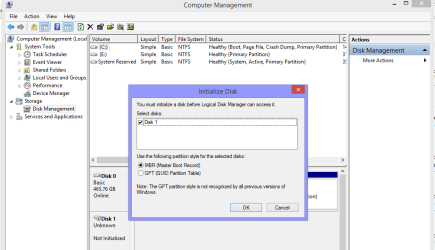
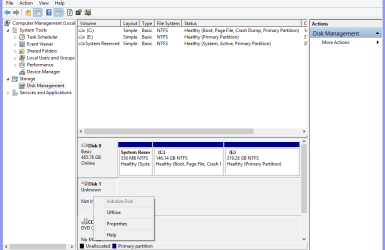
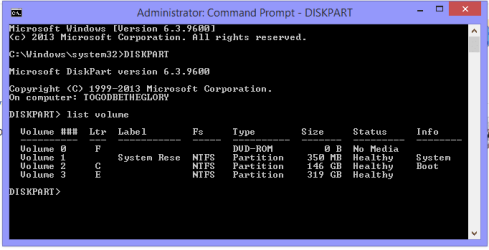
In the Computer Management, the drive is not listed. While in the command prompt, there is no volume for Data Back up or Removable Storage.
 

Attachments

  • disk mgmt.png
    disk mgmt.png
    21.9 KB · Views: 1
  • drive not found.png
    drive not found.png
    19.5 KB · Views: 2
  • offline.png
    offline.png
    18.4 KB · Views: 2
  • diskpart.PNG
    diskpart.PNG
    5.8 KB · Views: 17

My Computer My Computer

Computer type
Laptop
Computer Manufacturer/Model Number
Acer
OS
Windows 8.1 Enterprise 64 bit
CPU
Intel(R) Celeron(R) CPU N2940 @ 1.83 GHz
Memory
2048 MB
I think the screen print in post #1 is displaying info for the Internal HD (Disk 1), where Windows is installed.
I don't see a 2nd physical HD listed, for the External Drive.

Assuming the External HD is USB, i would try a different USB port.
If you're connected with USB3, can you try a USB2 port?

Can you connect this External HD to a different PC, and see if it has the same problem ?

Is this a new External HD, and nothing on it that needs to be saved ?
Or is it a new problem, and it worked before on this PC ?

For problems like this a proper Disk Management screen print helps:
http://www.sevenforums.com/tutorials/274797-disk-management-post-screen-capture-image.html
 

My Computer My Computer

Computer type
PC/Desktop
Computer Manufacturer/Model Number
home built
OS
Multi-Boot W7_Pro_x64 W8.1_Pro_x64 W10_Pro_x64 +Linux_VMs +Chromium_VM
CPU
AMD Athlon II x4 620
Motherboard
Gigabyte GA-MA785G-UD3H
Memory
6GB GSkill DDR2 800
Graphics Card(s)
AMD 4670 GPU + AMD 4200 IGP
Sound Card
on board Realtek ALC889A
Monitor(s) Displays
RCA 40" LCD TV, Insignia 32" LCD TV, HP 15" LCD monitor
Screen Resolution
1680 x 1050
Hard Drives
OCZ Vertex 3 120GB,
Samsung F3 1TB (3),
Several others - WD, Seagate, Hitachi, ...
PSU
Corsair 500 W
Case
Rosewill mid tower
Cooling
CM 90mm rifle
Keyboard
Gyration wireless, Logitech wireless, Dell USB wired
Mouse
Gyration wireless, Logitech wireless, V7 USB wired
Internet Speed
Spectrum - 100Mbps D / 10Mbps U
Antivirus
Avast, MBAM3, EMET, WinPatrol
Browser
Pale Moon, Firefox, IE
Other Info
2 multi-boot PC's
Mainly HTPC/Office/Gen purpose (no gaming).
Trendnet USB KVM.
LG DVD burner/Blue Ray Player.
Tray system for removable SATA backup drives.

Not currently OCd, under-volted.
I use Hybrid sleep, rarely re-boot or shutdown.

Hauppauge HD-PVR, Avermedia PCIe TV Tuner, Hauppauge PCI TV Tuner.
I think the screen print in post #1 is displaying info for the Internal HD (Disk 1), where Windows is installed.
I don't see a 2nd physical HD listed, for the External Drive.

Assuming the External HD is USB, i would try a different USB port.
If you're connected with USB3, can you try a USB2 port?

Can you connect this External HD to a different PC, and see if it has the same problem ?

Is this a new External HD, and nothing on it that needs to be saved ?
Or is it a new problem, and it worked before on this PC ?

For problems like this a proper Disk Management screen print helps:
http://www.sevenforums.com/tutorials/274797-disk-management-post-screen-capture-image.html

I already tried to connect it to different ports and used other computers as well. There is a sound every time it is plugged but it is not showing in my PC.
 

Attachments

  • sefely remove.png
    sefely remove.png
    12.5 KB · Views: 17
  • PC.png
    PC.png
    24.8 KB · Views: 1

My Computer My Computer

Computer type
Laptop
Computer Manufacturer/Model Number
Acer
OS
Windows 8.1 Enterprise 64 bit
CPU
Intel(R) Celeron(R) CPU N2940 @ 1.83 GHz
Memory
2048 MB
If it's a new HD, i would RMA it and get a new HD.
If it's not new and has data you need, see if a data recovery expert can help.
 

My Computer My Computer

Computer type
PC/Desktop
Computer Manufacturer/Model Number
home built
OS
Multi-Boot W7_Pro_x64 W8.1_Pro_x64 W10_Pro_x64 +Linux_VMs +Chromium_VM
CPU
AMD Athlon II x4 620
Motherboard
Gigabyte GA-MA785G-UD3H
Memory
6GB GSkill DDR2 800
Graphics Card(s)
AMD 4670 GPU + AMD 4200 IGP
Sound Card
on board Realtek ALC889A
Monitor(s) Displays
RCA 40" LCD TV, Insignia 32" LCD TV, HP 15" LCD monitor
Screen Resolution
1680 x 1050
Hard Drives
OCZ Vertex 3 120GB,
Samsung F3 1TB (3),
Several others - WD, Seagate, Hitachi, ...
PSU
Corsair 500 W
Case
Rosewill mid tower
Cooling
CM 90mm rifle
Keyboard
Gyration wireless, Logitech wireless, Dell USB wired
Mouse
Gyration wireless, Logitech wireless, V7 USB wired
Internet Speed
Spectrum - 100Mbps D / 10Mbps U
Antivirus
Avast, MBAM3, EMET, WinPatrol
Browser
Pale Moon, Firefox, IE
Other Info
2 multi-boot PC's
Mainly HTPC/Office/Gen purpose (no gaming).
Trendnet USB KVM.
LG DVD burner/Blue Ray Player.
Tray system for removable SATA backup drives.

Not currently OCd, under-volted.
I use Hybrid sleep, rarely re-boot or shutdown.

Hauppauge HD-PVR, Avermedia PCIe TV Tuner, Hauppauge PCI TV Tuner.
If it's a new HD, i would RMA it and get a new HD.
If it's not new and has data you need, see if a data recovery expert can help.

it is okay if the files will not be recovered, the hard drive is more important to be fixed than the data in it. :)
 

My Computer My Computer

Computer type
Laptop
Computer Manufacturer/Model Number
Acer
OS
Windows 8.1 Enterprise 64 bit
CPU
Intel(R) Celeron(R) CPU N2940 @ 1.83 GHz
Memory
2048 MB
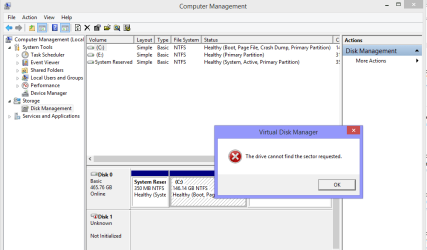
Sorry to say that your HDD is dead as a dodo. When you try to initialise it says it can't find the sector requested. In this case it is the all important sector 0 - the very first sector on your HDD. The initialisation process writes the MBR code in sector 0. If it cannot read/write into that sector that is the end of the story.

Sector 0 is the heart of the HDD. When that sector has gone bad, nothing can be done.
 

My Computer My Computer

OS
Windows 7 Home Premium 32 bit
Sorry to say that your HDD is dead as a dodo. When you try to initialise it says it can't find the sector requested. In this case it is the all important sector 0 - the very first sector on your HDD. The initialisation process writes the MBR code in sector 0. If it cannot read/write into that sector that is the end of the story.

Sector 0 is the heart of the HDD. When that sector has gone bad, nothing can be done.

Oh! that's bad news! :( But thank you everyone for your help! much appreciated! :)
 

My Computer My Computer

Computer type
Laptop
Computer Manufacturer/Model Number
Acer
OS
Windows 8.1 Enterprise 64 bit
CPU
Intel(R) Celeron(R) CPU N2940 @ 1.83 GHz
Memory
2048 MB
Hello!

Unfortunately, it does look like your drive has suffered damage and the system cannot recognize it correctly, and give access to it. :/

Did you try connecting the drive in another USB port and on another PC, like DavidE suggested? Was the result the same? Youc ould try one last thing, to boot to a Live Linux-based CD and see if the drive would be recognized there.

Tutorial to create live Peppermint CD by Golden:
http://www.sevenforums.com/tutorials/256518-peppermint-live-cd-dvd-usb-create-emergency-backup.html

If it's not, then you should replace it, because as Jumanji said, it's sectors 0 even cannot eb found, meaning the drive is dead. :/

CK_WD
 

My Computer My Computer

Computer type
PC/Desktop
OS
Windows 7 Home Premium x64
Sorry to say that your HDD is dead as a dodo. When you try to initialise it says it can't find the sector requested. In this case it is the all important sector 0 - the very first sector on your HDD. The initialisation process writes the MBR code in sector 0. If it cannot read/write into that sector that is the end of the story.

Sector 0 is the heart of the HDD. When that sector has gone bad, nothing can be done.

May I know by the way what caused this problem?
 

My Computer My Computer

Computer type
Laptop
Computer Manufacturer/Model Number
Acer
OS
Windows 8.1 Enterprise 64 bit
CPU
Intel(R) Celeron(R) CPU N2940 @ 1.83 GHz
Memory
2048 MB
The most common cause is ageing and loss of magnetic properties in the platter. Wear and tear of the mechanical parts also can cause the heads scrape the platter. Any impact - like dropping the HDD- also can do that.

When a HDD starts developing bad sectors on its own accord, usually there will be some warning signs and symptoms. Even the OS can alert you to backup all the data.. But when Sector 0 becomes a bad sector it will be a sudden death.Here today, gone tomorrow.
 

My Computer My Computer

OS
Windows 7 Home Premium 32 bit
The most common cause is ageing and loss of magnetic properties in the platter. Wear and tear of the mechanical parts also can cause the heads scrape the platter. Any impact - like dropping the HDD- also can do that.

When a HDD starts developing bad sectors on its own accord, usually there will be some warning signs and symptoms. Even the OS can alert you to backup all the data.. But when Sector 0 becomes a bad sector it will be a sudden death.Here today, gone tomorrow.

Thank you for the info! Now my HDD can rest in peace. :D
 

My Computer My Computer

Computer type
Laptop
Computer Manufacturer/Model Number
Acer
OS
Windows 8.1 Enterprise 64 bit
CPU
Intel(R) Celeron(R) CPU N2940 @ 1.83 GHz
Memory
2048 MB
Back
Top