Solved External Hard drive not detecting in Windows 7

allen2013

New member
Local time
7:50 AM
Messages
6
Hi, I have a Windows 7 Ultimate 32 bit. I have 2 external hard drives. I can use the first one but the second one, I can't use it. It works in Windows XP, but not on this one.
When I insert it, the green light on the HD is on but I can hear no sound, the sound I usually hear when I insert the other HD. There is no activity on the computer, neither can I see the HD from the My computer.
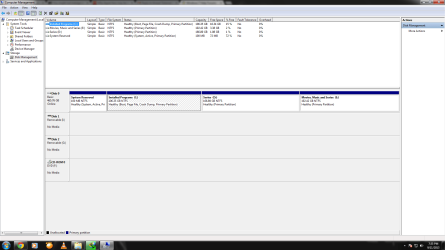
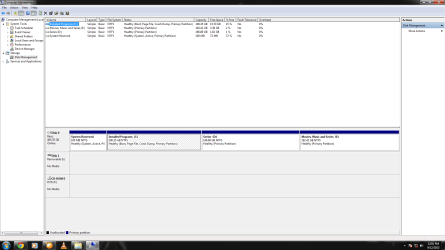
I tried looking for solutions online but none of them helped. Attached are the screenshots which might help. I cannot delete the content nor can I move it to my computer as I have no space. Thank you for helping me.
 

Attachments

  • 1.png
    1.png
    41.1 KB · Views: 11
  • 2.png
    2.png
    44 KB · Views: 5

My Computer My Computer

Computer type
PC/Desktop
Computer Manufacturer/Model Number
LG
OS
Windows 7 Ultimate 32 bit
CPU
Dell
Motherboard
Intel
Memory
2 GB
Hard Drives
500 gb
Antivirus
Microsoft Security Essentials
Browser
Google Chrome
Hi allen2013,

Welcome onboard.

Forget about the first one which can be seen and worked with on both XP and Windows 7. Please pull that out and keep it far away beyond your reach.:)

Now tell us the manufacturer/make/ model/ capacity of the problem drive - the second drive.

Tell us whether it worked on Windows 7 before.

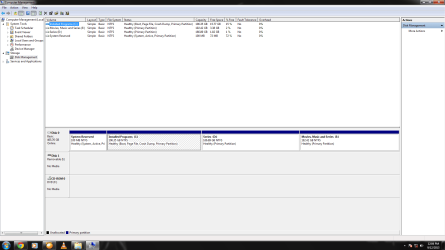
Safely remove all other USB drives/Card Readers on your Windows 7 PC - I presume it is a desktop. Just plugin your problem drive only and post a fresh screenshot of how it looks in Windows Management.
 

My Computer My Computer

OS
Windows 7 Home Premium 32 bit
The External HD is Serial ATA-1.5GBps eSATA-3Gbps, 500 GB and there is 'Windows 7' written on the Hard drive. I guess it does support Windows 7. I haven't tried this on any other Windows 7 computer.
 

Attachments

  • now.png
    now.png
    45.7 KB · Views: 6

My Computer My Computer

Computer type
PC/Desktop
Computer Manufacturer/Model Number
LG
OS
Windows 7 Ultimate 32 bit
CPU
Dell
Motherboard
Intel
Memory
2 GB
Hard Drives
500 gb
Antivirus
Microsoft Security Essentials
Browser
Google Chrome
No manufacturer's name?? No model Number?? Can you not read the label on the external drive and give all the details? Please furnish the details asked for.

Your screenshot doesn't help in anyway for I do not know what is Disk1 and what is Disk2.

Do you have a card reader plugged in?

Now please do the following.

Pull out all USB drives/card readers(safely remove) and post a screenshot of Windows Disk Management of just the PC.

Then connect your first external drive - which works - and post a screenshot of Windows Disk Management.

Then connect your second external drive - which you say does not work - and post the screenshot.

So in all you will be posting three screenshots.

Let me see whether I can decipher something.

Also update your System Specs with correct details.
 

My Computer My Computer

OS
Windows 7 Home Premium 32 bit
The 2nd screen print in post #1 shows there are 2 devices with errors.
I think you need to get your MB SM Bus controller driver installed...
I can't tell from your system specs what you have...
 

My Computer My Computer

Computer type
PC/Desktop
Computer Manufacturer/Model Number
home built
OS
Multi-Boot W7_Pro_x64 W8.1_Pro_x64 W10_Pro_x64 +Linux_VMs +Chromium_VM
CPU
AMD Athlon II x4 620
Motherboard
Gigabyte GA-MA785G-UD3H
Memory
6GB GSkill DDR2 800
Graphics Card(s)
AMD 4670 GPU + AMD 4200 IGP
Sound Card
on board Realtek ALC889A
Monitor(s) Displays
RCA 40" LCD TV, Insignia 32" LCD TV, HP 15" LCD monitor
Screen Resolution
1680 x 1050
Hard Drives
OCZ Vertex 3 120GB,
Samsung F3 1TB (3),
Several others - WD, Seagate, Hitachi, ...
PSU
Corsair 500 W
Case
Rosewill mid tower
Cooling
CM 90mm rifle
Keyboard
Gyration wireless, Logitech wireless, Dell USB wired
Mouse
Gyration wireless, Logitech wireless, V7 USB wired
Internet Speed
Spectrum - 100Mbps D / 10Mbps U
Antivirus
Avast, MBAM3, EMET, WinPatrol
Browser
Pale Moon, Firefox, IE
Other Info
2 multi-boot PC's
Mainly HTPC/Office/Gen purpose (no gaming).
Trendnet USB KVM.
LG DVD burner/Blue Ray Player.
Tray system for removable SATA backup drives.

Not currently OCd, under-volted.
I use Hybrid sleep, rarely re-boot or shutdown.

Hauppauge HD-PVR, Avermedia PCIe TV Tuner, Hauppauge PCI TV Tuner.
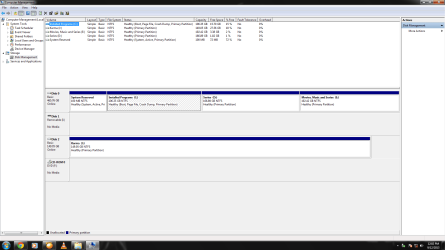
I'm sorry as it seems I didn't answer all that you asked. After close inspection, I found out that brand of the 2nd HD(which is not working) is FC CE (Freecom), which is also the model of the 1st HD(which is working). You'll have to believe me when I say that there is no model no. written on the HD. I have no card reader and it's a desktop. Attached are the three screenshots.
1. The first screenshot is of the PC without any USB HD attached.
2. The second screenshot is of the 1st HD which is working, 160 GB Freecom.
3. The third screenshot is that of the 2nd HD which is not working, 500 GB Freecom.

I hope it helps and thanks for replying to my post.
 

Attachments

  • ScrnShot of the PC.png
    ScrnShot of the PC.png
    40.5 KB · Views: 5
  • Scrnshot of the 1st HD which is working.png
    Scrnshot of the 1st HD which is working.png
    44 KB · Views: 4
  • Scrnshot of the 2nd HD which is not working.png
    Scrnshot of the 2nd HD which is not working.png
    40.6 KB · Views: 4

My Computer My Computer

Computer type
PC/Desktop
Computer Manufacturer/Model Number
LG
OS
Windows 7 Ultimate 32 bit
CPU
Dell
Motherboard
Intel
Memory
2 GB
Hard Drives
500 gb
Antivirus
Microsoft Security Essentials
Browser
Google Chrome
My desktop is Windows 7 Ultimate 32 bit, 2 GB ram and 500 Gb hard disk. Intel(R) Celeron(R) CPU G550T @2.20 GHz. It's HP.
 

My Computer My Computer

Computer type
PC/Desktop
Computer Manufacturer/Model Number
LG
OS
Windows 7 Ultimate 32 bit
CPU
Dell
Motherboard
Intel
Memory
2 GB
Hard Drives
500 gb
Antivirus
Microsoft Security Essentials
Browser
Google Chrome
It is now clear that it is still not clear (read I don't know :)) what could be that Disk1 and Disk2 in the screenshot in your posts # 1 and 3. And one of it seems to have mysteriously disappeared in your screenshots in post #6. Do you have any idea what these could be or anyone? Are you connected to any network? Or any software that can create virtual drives and mount?

Your second drive does not show up in Windows Disk Managemet but according to you it works with an XP machine. *scratching my head*

Let us do a drive cleanup and see whether those mysterious drives with No media disappear, unless you/anyone have/has anything by way of explanation on it.

Remove all USB drives and do a drive cleanup as in http://www.sevenforums.com/hardware...-recognised-not-drive-letter.html#post2477076 . If you can post a screenshot of all non-present devices removed that will be good.

After the drive cleanup take a screenshot of Windows Disk Management (before connecting any of the USB drives). Post the screenshot.

Once you have taken that screenshot, connect your non-working external drive and check whether a driver is getting installed. Note down the error message if any.

Edit: Since you said that drive works on a Windows XP machine, you should back it up to another drive as a matter of abundant caution.
 
Last edited:

My Computer My Computer

OS
Windows 7 Home Premium 32 bit
So you have an HP computer, right?
Do you know what Model it is?
Hopefully it's shown on a sticker on the PC.

I would get the device errors fixed.
If you are missing device drivers for the SM Bus and/or Chipset it can cause problems.
Maybe fixing the device errors will correct the HD issue???

Without knowing the Model/Number of the PC I can't help you find missing drivers.
Here is a link to USA HP Support for Drivers and Downloads.
You can go there and try and find drivers for your PC.
If you don't know the Model or Number, click on the "Find Now" button.
HP Drivers and Downloads for Printers, Scanners and More | HP ® Support

If you can't find the pci simple communications controller (or any) driver on the HP site see this tutorial:
http://www.sevenforums.com/tutorials/49350-driver-selection-your-hardware-devices.html

Your SF specs show the Manufacturer/Model is LG, and the CPU is Dell.
Change the manufacturer to HP and add the Model.
Change the CPU to Intel Celeron G550T.

Did the PC come with Win 7 Ultimate pre-installed from the factory (HP)?
Or, did you or someone else install Win 7 Ultimate?
Is the OS activated and fully updated?
 

My Computer My Computer

Computer type
PC/Desktop
Computer Manufacturer/Model Number
home built
OS
Multi-Boot W7_Pro_x64 W8.1_Pro_x64 W10_Pro_x64 +Linux_VMs +Chromium_VM
CPU
AMD Athlon II x4 620
Motherboard
Gigabyte GA-MA785G-UD3H
Memory
6GB GSkill DDR2 800
Graphics Card(s)
AMD 4670 GPU + AMD 4200 IGP
Sound Card
on board Realtek ALC889A
Monitor(s) Displays
RCA 40" LCD TV, Insignia 32" LCD TV, HP 15" LCD monitor
Screen Resolution
1680 x 1050
Hard Drives
OCZ Vertex 3 120GB,
Samsung F3 1TB (3),
Several others - WD, Seagate, Hitachi, ...
PSU
Corsair 500 W
Case
Rosewill mid tower
Cooling
CM 90mm rifle
Keyboard
Gyration wireless, Logitech wireless, Dell USB wired
Mouse
Gyration wireless, Logitech wireless, V7 USB wired
Internet Speed
Spectrum - 100Mbps D / 10Mbps U
Antivirus
Avast, MBAM3, EMET, WinPatrol
Browser
Pale Moon, Firefox, IE
Other Info
2 multi-boot PC's
Mainly HTPC/Office/Gen purpose (no gaming).
Trendnet USB KVM.
LG DVD burner/Blue Ray Player.
Tray system for removable SATA backup drives.

Not currently OCd, under-volted.
I use Hybrid sleep, rarely re-boot or shutdown.

Hauppauge HD-PVR, Avermedia PCIe TV Tuner, Hauppauge PCI TV Tuner.
I received this external hard disk a few weeks back from my cousin. I called him today and told him the problem which I'm facing. He said it happened to him also, he said it's not the problem of the computer, it's the problem of the USB port of The HD. I also realised that the USB port of the HD is quite unstable.

He said, he once couldn't use the HD for over a month. He asked me to change the USB cable, which I did, because I have a spare and tried connecting it, it still did not work.

He assured me that it was not a computer nor an O.S problem because he used the same HD on a Windows 7 PC also. I guess the port of the HD needs to be repaired.

In any case, I am thankful to you guys for helping me out. I wouldn't have asked for your help if the green light was not switched on when I connected to the computer, which led me to believe that it was a computer problem.

Thanks a lot guys. And I apologize if I've wasted our time. We were on the same boat.
 

My Computer My Computer

Computer type
PC/Desktop
Computer Manufacturer/Model Number
LG
OS
Windows 7 Ultimate 32 bit
CPU
Dell
Motherboard
Intel
Memory
2 GB
Hard Drives
500 gb
Antivirus
Microsoft Security Essentials
Browser
Google Chrome
Never mind. These things happen. The only thing that made us suspect your Windows 7 System is that you indicated that it worked perfectly on Windows XP.

Does it still work consistently on Windows XP or was it just a fluke?
 

My Computer My Computer

OS
Windows 7 Home Premium 32 bit
Now that I think of, it was just a fluke because I tried it only once on the XP computer. Guess I'm not that lucky after all. Thank you for everything.
 

My Computer My Computer

Computer type
PC/Desktop
Computer Manufacturer/Model Number
LG
OS
Windows 7 Ultimate 32 bit
CPU
Dell
Motherboard
Intel
Memory
2 GB
Hard Drives
500 gb
Antivirus
Microsoft Security Essentials
Browser
Google Chrome
External Hard Drive

I'm having the same problem. Migrated from XP over a year ago & no problems with Windows 7 until now.
I'm using IOMEGA QuikProtect software. I did eject the drive & then put in a new external (Seagate) - no problem. Did an eject & and the re-inserted IOMEGA - not recognized by Windows as a viable drive.
All Windows does is ask if I want to format the drive. I even tried that, since I do have another B/U drive -
Western Digital, Windfows told me that it wouldn't work.
 

My Computer My Computer

Computer type
PC/Desktop
Computer Manufacturer/Model Number
SONY VAIO
OS
Windows 7 Home Premium 32bit.
Antivirus
VERIZON INTERNET SECURITY SUITE
Browser
MOZILLA FIREFOX
Back
Top