Solved External Hard Drive stops working after 16GB

quadrplax

New member
Member
Local time
3:09 PM
Messages
92
I have an external hard drive - ClickFree 527B3, 500GB. It doesn't have warranty. Whenever I try to write files to it it will stop working, and show up as empty, after 16GB have been written. I reformatted it and the same thing happened. I tried creating two (primary) NTFS partitions and only one worked in Disk Managment. Is there any hope for this drive?
 

My Computer My Computer

At a glance

Windows 7 Home Premium 64bitAMD Phenom II X4 965 AM3 3.4Ghz 512KB 45NM 12...Mushkin 997008 DDR3 UDIMM (2x4GB) 8GB PC3-149...HIS Radeon HD 7870 2 GB (256-Bit) GDDR5 2x Mi...
Computer type
PC/Desktop
Computer Manufacturer/Model Number
custom build
OS
Windows 7 Home Premium 64bit
CPU
AMD Phenom II X4 965 AM3 3.4Ghz 512KB 45NM 125W 4000MHZ
Motherboard
GIGABYTE GA-990FXA-UD3 AM3+ AMD 990FX SATA 6Gb/s USB 3.0 ATX
Memory
Mushkin 997008 DDR3 UDIMM (2x4GB) 8GB PC3-14900 1866MHZ 9-10
Graphics Card(s)
HIS Radeon HD 7870 2 GB (256-Bit) GDDR5 2x Mini-Displayport
Monitor(s) Displays
Dell U2414H, Dell E2014H
Screen Resolution
16:9 1920x1080, 16:9 1600x900
Hard Drives
Kingston HyperX 3K 120 GB SATA III 2.5-Inch 6.0 Gb/s Solid State Drive SH103S3/120G
Keyboard
Some old PS/2 one
Mouse
USB Kensignton
Internet Speed
5Mb/s Download, 1Mb/s Upload
Antivirus
Avast! Free Antivirus
Browser
Mozilla Firefox
Your ClickFree is a speciality product used to automatically backup the content of the PC to which it is plugged in. We may not know how it is configured to achieve that goal.

In general,

You may have to stick to the procedures laid down for the device on how to format it through ClickFree interface and how to use it.

I also understand you have a Master Reset facility that will reset the drive to factory defaults.

If all these do not resolve your problem you may have to take up the matter with the Tech Support for ClickFree.

You may also check Clickfree and Kooboodle Forums on some troubleshooting tips and other discussions.

You may also post a screenshot of how your ClickFree shows up in Windows Disk Management. ( Please click on the Show/Hide Console Tree and Show/Hide Action Pane icons on the tool bar of Windows Disk Management screen so that we get a full screen view without any truncation.)
 
Last edited:

My Computer My Computer

At a glance

Windows 7 Home Premium 32 bit
OS
Windows 7 Home Premium 32 bit
It shows up as both a read-only CD Drive (probably tricked to use AutoRun) and the actual hard drive. Both had files to make the software run. This 16GB limit started happening when using the intended software (on a different computer). I have since reformatted the hard drive. The CD drive is the same as before, but the computer I am using does not have AutoRun enabled so it shouldn't be doing anything. How do you want it to be formatted for a Disk Manager screenshot? Right now it's a full FAT32 drive. ClickFree forums does not look like it is a very active place.
 

My Computer My Computer

At a glance

Windows 7 Home Premium 64bitAMD Phenom II X4 965 AM3 3.4Ghz 512KB 45NM 12...Mushkin 997008 DDR3 UDIMM (2x4GB) 8GB PC3-149...HIS Radeon HD 7870 2 GB (256-Bit) GDDR5 2x Mi...
Computer type
PC/Desktop
Computer Manufacturer/Model Number
custom build
OS
Windows 7 Home Premium 64bit
CPU
AMD Phenom II X4 965 AM3 3.4Ghz 512KB 45NM 125W 4000MHZ
Motherboard
GIGABYTE GA-990FXA-UD3 AM3+ AMD 990FX SATA 6Gb/s USB 3.0 ATX
Memory
Mushkin 997008 DDR3 UDIMM (2x4GB) 8GB PC3-14900 1866MHZ 9-10
Graphics Card(s)
HIS Radeon HD 7870 2 GB (256-Bit) GDDR5 2x Mini-Displayport
Monitor(s) Displays
Dell U2414H, Dell E2014H
Screen Resolution
16:9 1920x1080, 16:9 1600x900
Hard Drives
Kingston HyperX 3K 120 GB SATA III 2.5-Inch 6.0 Gb/s Solid State Drive SH103S3/120G
Keyboard
Some old PS/2 one
Mouse
USB Kensignton
Internet Speed
5Mb/s Download, 1Mb/s Upload
Antivirus
Avast! Free Antivirus
Browser
Mozilla Firefox
Does the drive show up as a single 500GB partition in Disk Management? You may need to remove the drive from that enclosure to get the full use of it as the CD emulation may be due to firmware residing in the drive enclosure itself. You could use a SATA to USB adapter, or another enclosure or even a drive dock instead.
 

My Computer My Computer

At a glance

W10 Pro desktop, W11 laptop, W11 Pro tablet (...3.7Ghz 8700K i7, i7-11800H, i7-1065G716G desktop, 16G laptop, 4G tabletAMD Radeon RX580, RTX 3060, Intel Iris Plus
Computer type
PC/Desktop
Computer Manufacturer/Model Number
Home Built desktop, Dell G15 5511 Gaming laptop,MS Surface Pro 7 tablet
OS
W10 Pro desktop, W11 laptop, W11 Pro tablet (all 64-bit)
CPU
3.7Ghz 8700K i7, i7-11800H, i7-1065G7
Motherboard
ASUS TUF Z370-Pro Gaming in desktop
Memory
16G desktop, 16G laptop, 4G tablet
Graphics Card(s)
AMD Radeon RX580, RTX 3060, Intel Iris Plus
Sound Card
High Definition Audio (Built-in to mobo)
Monitor(s) Displays
Samsung U32J59 32" (2x), 15.6", 12"
Screen Resolution
3840x2160, 3840x2160, 1920x1080, 2160x1440
Hard Drives
500G SSD for OS; 2T, 10T & 15T HDDs for Data on Desktop, 1TB SSD laptop, 128G SSD tablet.
PSU
Corsair CX 750M
Case
Antec 100
Cooling
CM 212+
Keyboard
IBM Model M - used continuously since 1986
Mouse
Microsoft Pro IntelliMouse
Internet Speed
400M down 8M up
Antivirus
Windows Defender
Browser
FireFox
Other Info
Built my first computer (8Mhz 8088cpu, 640K RAM, 20MB HDD, 2 360K floppy drives) in 1985 and have been building them for myself, relatives and friends ever since.
1. Do you have the manual for your Click Free device? If not download C2 User Guide for Windows from C2 Content Backup - Clickfree This will help you to understand on how to use it.

2. You should make a sincere and concerted effort to make use of the forum. Clickfree and Kooboodle Forums
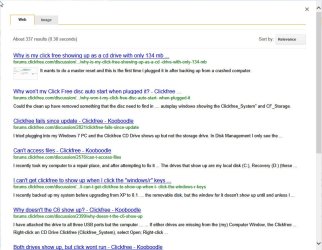
For example in the Search your issue field I typed " Why is my click free showing up as a cd drive?" And that took me here

18-08-2014 09-46-14.jpg

Click on the first one and see the suggested resolution. For any other issues too follow the same procedure.

As I told you it is a specialised device and we may not know how it is configured and the clickfree support may know and suggest resolution better. I am not a click free user but on your query played with their support and find that it is fairly comprehensive.

Follow the procedures laid down in the user manual in using it. For example I do not know whether you are permitted to create two partitions., whether you are permitted to format it as FAT32 or you should only format it as NTFS, Whether you have to have Autorun enabled to run clickfree and the like. If your concerns are not addressed in the manual, search the forum on the above lines or email them.(Please go through all that is stated here

18-08-2014 10-05-48.jpg
 

My Computer My Computer

At a glance

Windows 7 Home Premium 32 bit
OS
Windows 7 Home Premium 32 bit
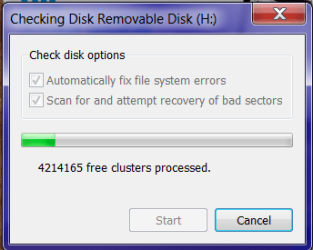
The virtual CD drive is not stored in a partition on the Hard Drive, or at least not in one Windows or Ubuntu can see. Before I tried FAT32 and the like, I tried to do one big NTFS partition twice with no success. I am not concerned about if the AutoRun will or won't work, that's not important to me. I tried to do a disk check with one empty NTFS partition.It made about 5-10% of progress rather fast and then it slowed down significantly. Eventually, it froze on cluster 4214165, and the drive showed up in computer without the size bar and unable to open, the same thing that happens after 16GB of files are written. Judging by the progress bar, it looks like it's gotten through about 16GB of the drive.
 

Attachments

  • scan.png
    scan.png
    9.9 KB · Views: 25

My Computer My Computer

At a glance

Windows 7 Home Premium 64bitAMD Phenom II X4 965 AM3 3.4Ghz 512KB 45NM 12...Mushkin 997008 DDR3 UDIMM (2x4GB) 8GB PC3-149...HIS Radeon HD 7870 2 GB (256-Bit) GDDR5 2x Mi...
Computer type
PC/Desktop
Computer Manufacturer/Model Number
custom build
OS
Windows 7 Home Premium 64bit
CPU
AMD Phenom II X4 965 AM3 3.4Ghz 512KB 45NM 125W 4000MHZ
Motherboard
GIGABYTE GA-990FXA-UD3 AM3+ AMD 990FX SATA 6Gb/s USB 3.0 ATX
Memory
Mushkin 997008 DDR3 UDIMM (2x4GB) 8GB PC3-14900 1866MHZ 9-10
Graphics Card(s)
HIS Radeon HD 7870 2 GB (256-Bit) GDDR5 2x Mini-Displayport
Monitor(s) Displays
Dell U2414H, Dell E2014H
Screen Resolution
16:9 1920x1080, 16:9 1600x900
Hard Drives
Kingston HyperX 3K 120 GB SATA III 2.5-Inch 6.0 Gb/s Solid State Drive SH103S3/120G
Keyboard
Some old PS/2 one
Mouse
USB Kensignton
Internet Speed
5Mb/s Download, 1Mb/s Upload
Antivirus
Avast! Free Antivirus
Browser
Mozilla Firefox
If you do not intend to use it as a "clickfree" backup drive as intended by the manufacturer, and if you don't care voiding any warranty, then

Open up the case, take out the drive, put it in an another external case - that works :) - and then try to format it.

(The clickfree software reportedly resides in the present interface card inside its present case and my guess is that it could have turned faulty.)
 

My Computer My Computer

At a glance

Windows 7 Home Premium 32 bit
OS
Windows 7 Home Premium 32 bit
This is a similar drive, not the exact same model but it looks about the same:
clickfree_160gb_portable_drive_details.jpg

There are no visible screws or anything like that on the drive itself. I have no experience with taking apart handware, and for that reason don't have a spare enclosure laying around. Warranty is long gone as I said in my first post. Would a drive this small have an inside? There is a seam running along the sides, should I just try and pry it apart?
 

My Computer My Computer

At a glance

Windows 7 Home Premium 64bitAMD Phenom II X4 965 AM3 3.4Ghz 512KB 45NM 12...Mushkin 997008 DDR3 UDIMM (2x4GB) 8GB PC3-149...HIS Radeon HD 7870 2 GB (256-Bit) GDDR5 2x Mi...
Computer type
PC/Desktop
Computer Manufacturer/Model Number
custom build
OS
Windows 7 Home Premium 64bit
CPU
AMD Phenom II X4 965 AM3 3.4Ghz 512KB 45NM 125W 4000MHZ
Motherboard
GIGABYTE GA-990FXA-UD3 AM3+ AMD 990FX SATA 6Gb/s USB 3.0 ATX
Memory
Mushkin 997008 DDR3 UDIMM (2x4GB) 8GB PC3-14900 1866MHZ 9-10
Graphics Card(s)
HIS Radeon HD 7870 2 GB (256-Bit) GDDR5 2x Mini-Displayport
Monitor(s) Displays
Dell U2414H, Dell E2014H
Screen Resolution
16:9 1920x1080, 16:9 1600x900
Hard Drives
Kingston HyperX 3K 120 GB SATA III 2.5-Inch 6.0 Gb/s Solid State Drive SH103S3/120G
Keyboard
Some old PS/2 one
Mouse
USB Kensignton
Internet Speed
5Mb/s Download, 1Mb/s Upload
Antivirus
Avast! Free Antivirus
Browser
Mozilla Firefox
Yes, you may have to pry it open if there are no screws visible or hidden.( I haven't done one in my life - there was no need so far. :) )

Inside you will have a 2.5" HDD and the interface PCB as shown by Anshad Edavana here http://www.sevenforums.com/hardware...ated-not-initialized-unknown.html#post2862366

If you have a proprietary connector on the HDD as shown in the left picture, you are out of luck. If you have the standard connector as in the picture at right, you may remove the HDD and put it in an enclosure or even connect it as an internal drive on a desktop and try whatever you want to try.

If the HDD itself proves to be faulty - which it can be - then you may buy a 2.5" HDD put it back in the original case with that PCB, glue the case and you will perhaps have your clickfree back. That will depend upon how carefully you could pry open that case.

You take all the risk. :)
 

My Computer My Computer

At a glance

Windows 7 Home Premium 32 bit
OS
Windows 7 Home Premium 32 bit
Ok, there is a USB to SATA adapter - Horray!
As a test I tried plugging in the adapter without the drive connected, to see if that's there the virtual CD drive was. Nothing showed up in My Computer. I don't have any computers with SATA ports laying around, I guess I can try and hook it up as an internal drive in my main computer sometime soon and see how that goes. I'll bump this thread when I get around to that.
 

My Computer My Computer

At a glance

Windows 7 Home Premium 64bitAMD Phenom II X4 965 AM3 3.4Ghz 512KB 45NM 12...Mushkin 997008 DDR3 UDIMM (2x4GB) 8GB PC3-149...HIS Radeon HD 7870 2 GB (256-Bit) GDDR5 2x Mi...
Computer type
PC/Desktop
Computer Manufacturer/Model Number
custom build
OS
Windows 7 Home Premium 64bit
CPU
AMD Phenom II X4 965 AM3 3.4Ghz 512KB 45NM 125W 4000MHZ
Motherboard
GIGABYTE GA-990FXA-UD3 AM3+ AMD 990FX SATA 6Gb/s USB 3.0 ATX
Memory
Mushkin 997008 DDR3 UDIMM (2x4GB) 8GB PC3-14900 1866MHZ 9-10
Graphics Card(s)
HIS Radeon HD 7870 2 GB (256-Bit) GDDR5 2x Mini-Displayport
Monitor(s) Displays
Dell U2414H, Dell E2014H
Screen Resolution
16:9 1920x1080, 16:9 1600x900
Hard Drives
Kingston HyperX 3K 120 GB SATA III 2.5-Inch 6.0 Gb/s Solid State Drive SH103S3/120G
Keyboard
Some old PS/2 one
Mouse
USB Kensignton
Internet Speed
5Mb/s Download, 1Mb/s Upload
Antivirus
Avast! Free Antivirus
Browser
Mozilla Firefox
I put the drive in my computer, now the limit strangely became 8.3GB, so the drive (or the PCB) is the problem. Oh well, at least I got a free SATA to USB connector out of this.
 

My Computer My Computer

At a glance

Windows 7 Home Premium 64bitAMD Phenom II X4 965 AM3 3.4Ghz 512KB 45NM 12...Mushkin 997008 DDR3 UDIMM (2x4GB) 8GB PC3-149...HIS Radeon HD 7870 2 GB (256-Bit) GDDR5 2x Mi...
Computer type
PC/Desktop
Computer Manufacturer/Model Number
custom build
OS
Windows 7 Home Premium 64bit
CPU
AMD Phenom II X4 965 AM3 3.4Ghz 512KB 45NM 125W 4000MHZ
Motherboard
GIGABYTE GA-990FXA-UD3 AM3+ AMD 990FX SATA 6Gb/s USB 3.0 ATX
Memory
Mushkin 997008 DDR3 UDIMM (2x4GB) 8GB PC3-14900 1866MHZ 9-10
Graphics Card(s)
HIS Radeon HD 7870 2 GB (256-Bit) GDDR5 2x Mini-Displayport
Monitor(s) Displays
Dell U2414H, Dell E2014H
Screen Resolution
16:9 1920x1080, 16:9 1600x900
Hard Drives
Kingston HyperX 3K 120 GB SATA III 2.5-Inch 6.0 Gb/s Solid State Drive SH103S3/120G
Keyboard
Some old PS/2 one
Mouse
USB Kensignton
Internet Speed
5Mb/s Download, 1Mb/s Upload
Antivirus
Avast! Free Antivirus
Browser
Mozilla Firefox
Can you post a screenshot of Windows Disk Management with the directly connected drive?
 

My Computer My Computer

At a glance

Windows 7 Home Premium 32 bit
OS
Windows 7 Home Premium 32 bit
It's not connected anymore, and I don't want to mess with it again, I'm pretty sure it's hopeless.
 

My Computer My Computer

At a glance

Windows 7 Home Premium 64bitAMD Phenom II X4 965 AM3 3.4Ghz 512KB 45NM 12...Mushkin 997008 DDR3 UDIMM (2x4GB) 8GB PC3-149...HIS Radeon HD 7870 2 GB (256-Bit) GDDR5 2x Mi...
Computer type
PC/Desktop
Computer Manufacturer/Model Number
custom build
OS
Windows 7 Home Premium 64bit
CPU
AMD Phenom II X4 965 AM3 3.4Ghz 512KB 45NM 125W 4000MHZ
Motherboard
GIGABYTE GA-990FXA-UD3 AM3+ AMD 990FX SATA 6Gb/s USB 3.0 ATX
Memory
Mushkin 997008 DDR3 UDIMM (2x4GB) 8GB PC3-14900 1866MHZ 9-10
Graphics Card(s)
HIS Radeon HD 7870 2 GB (256-Bit) GDDR5 2x Mini-Displayport
Monitor(s) Displays
Dell U2414H, Dell E2014H
Screen Resolution
16:9 1920x1080, 16:9 1600x900
Hard Drives
Kingston HyperX 3K 120 GB SATA III 2.5-Inch 6.0 Gb/s Solid State Drive SH103S3/120G
Keyboard
Some old PS/2 one
Mouse
USB Kensignton
Internet Speed
5Mb/s Download, 1Mb/s Upload
Antivirus
Avast! Free Antivirus
Browser
Mozilla Firefox
Back
Top