
External Hard Drive will not let me reformat it any way I try

The only way to be 100% sure is to run a scan. A fresh install 1-2 weeks ago doesn't mean a whole lot. You re-installed Win7 and you've attached a suspect drive. So who knows what's on the drive or on your system.

Viruses don't say "Gee, this is a fresh install, only 1-2 weeks ago. I won't infect this system just yet." - lol.

Better to be sure with a current scan. I'm not sure if I want to fight a virus at the same time as trying to solve the issue. Let me know what AV you're running and run the suggested scans. Thanks

Please post other actions you've taken or not taken. Is DEAMON tools still on your system?

Trouble shooting a problem is frustrating, you should try it blind from this side.

It is useful information about the ext HD not working before the install, your use of table doctor, and Win7 updates. Thanks.
Yes I am a 100% sure that I have no viruses or malware because I'm running on a recently (1-2 weeks ago) clean install of windows 7. The external hard drive didn't work even before I did the clean install. (actually, I had to do the clean install b/c of the external HDD not working and me being stupid using partition table doctor to solve the problem but then ended up screwing up my internal HDD...anyway, that's all fixed now.)

After the clean install, I also made all the major updates needed to Windows 7.
 

My Computer My Computer

At a glance

x64 (6.3.9600) Win8.1 Pro & soon dual boot x6...AMD A6-3420M APU with Radeon(tm) HD Graphics6.00 GBAMD Radeon(TM) HD 6520G
Computer type
Laptop
Computer Manufacturer/Model Number
HP Pavilion dv6-6c10us
OS
x64 (6.3.9600) Win8.1 Pro & soon dual boot x64 (6.1.7601) Win7_SP1 HomePrem
CPU
AMD A6-3420M APU with Radeon(tm) HD Graphics
Motherboard
Hewlett-Packard 1805
Memory
6.00 GB
Graphics Card(s)
AMD Radeon(TM) HD 6520G
Sound Card
(1) AMD High Definition Audio Device (2) IDT High Definiti
Monitor(s) Displays
HP W2072a 20" LCD (1600 x 900) @ 60 Hz
Screen Resolution
1366 x 768 x 32 bits (4294967296 colors) @ 60 Hz
Hard Drives
ST640LM0 00 HM641JI SATA Disk Device
Keyboard
Logitech k520 wireless KB
Mouse
Logitech m320 wireless mouse (bundled with KB)
Internet Speed
15/5 | 54 MB Wireless 'n'
Antivirus
Realtime: Defender or Avast | On-demand: Malwarebytes, ESET
Browser
IE 11 on Win8, IE 10 on win 7
Other Info
Media: [Gimp, Audacity, VLC] || Comm: [WEmail 2012, Skype] || Productivity: [OpenOffice,| Textpad] || Utils: [Sysinternals, cCleaner, Speccy, Defraggler]
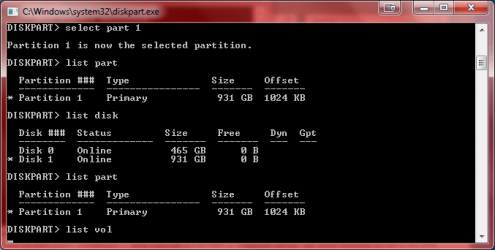
Diskpart hangs after I tried entering list vol. I've attached a screenshot of this.

And yes, I did uninstall Daemon Tools.
 

Attachments

  • diskpart1.png
    diskpart1.png
    13.5 KB · Views: 8

My Computer My Computer

At a glance

Microsoft Windows 7 Home Premium 64-bit 7601 ...Intel(R) Core(TM) i5 CPU M 430 @ 2.27GHz4.00 GB(1) Intel(R) HD Graphics (2) ATI Mobility Rad...
Computer Manufacturer/Model Number
HP DV6t-3000se
OS
Microsoft Windows 7 Home Premium 64-bit 7601 Multiprocessor Free Service Pack 1
CPU
Intel(R) Core(TM) i5 CPU M 430 @ 2.27GHz
Motherboard
Hewlett-Packard 144A
Memory
4.00 GB
Graphics Card(s)
(1) Intel(R) HD Graphics (2) ATI Mobility Radeon HD 5470
Sound Card
(1) ATI High Definition Audio Device (2) High Definition A
Screen Resolution
1366 x 768 x 32 bits (4294967296 colors) @ 60 Hz
Hard Drives
Hitachi HTS725050A9A364 ATA Device
Here's result for Malwarebytes, nothing detected.

Code:
Malwarebytes Anti-Malware 1.65.1.1000
www.malwarebytes.org

Database version: v2012.10.26.13

Windows 7 Service Pack 1 x64 NTFS
Internet Explorer 9.0.8112.16421
PARTH :: PARTH-PC [administrator]

10/26/2012 6:44:27 PM
mbam-log-2012-10-26 (18-44-27).txt

Scan type: Quick scan
Scan options enabled: Memory | Startup | Registry | File System | Heuristics/Extra | Heuristics/Shuriken | PUP | PUM
Scan options disabled: P2P
Objects scanned: 195598
Time elapsed: 2 minute(s), 8 second(s)

Memory Processes Detected: 0
(No malicious items detected)

Memory Modules Detected: 0
(No malicious items detected)

Registry Keys Detected: 0
(No malicious items detected)

Registry Values Detected: 0
(No malicious items detected)

Registry Data Items Detected: 0
(No malicious items detected)

Folders Detected: 0
(No malicious items detected)

Files Detected: 0
(No malicious items detected)

(end)
 

My Computer My Computer

At a glance

Microsoft Windows 7 Home Premium 64-bit 7601 ...Intel(R) Core(TM) i5 CPU M 430 @ 2.27GHz4.00 GB(1) Intel(R) HD Graphics (2) ATI Mobility Rad...
Computer Manufacturer/Model Number
HP DV6t-3000se
OS
Microsoft Windows 7 Home Premium 64-bit 7601 Multiprocessor Free Service Pack 1
CPU
Intel(R) Core(TM) i5 CPU M 430 @ 2.27GHz
Motherboard
Hewlett-Packard 144A
Memory
4.00 GB
Graphics Card(s)
(1) Intel(R) HD Graphics (2) ATI Mobility Radeon HD 5470
Sound Card
(1) ATI High Definition Audio Device (2) High Definition A
Screen Resolution
1366 x 768 x 32 bits (4294967296 colors) @ 60 Hz
Hard Drives
Hitachi HTS725050A9A364 ATA Device
Thanks, give me a few to think.

Good that DT-tools is gone and Malwarebytes found nothing.

Try the following - they don't require a volume. It might still hang - we'll see soon enough. If you can copy the output and post the results - that would help.

diskpart

list disk
select disk # (make sure it's the correct disk)
list disk (selected disk identified with *)

detail disk

list part
select part # (make sure it's the correct partition)
list part (selected partition identified with *)


automount scrub (clean up mount information for the disk)
remove all
remove dismount

assign letter=S

list disk (selected disk identified with *)
list part (selected partition identified with *)
list vol (selected volume identified with *)

exit (exit diskpart)
exit (exit cmd prompt)
 

My Computer My Computer

At a glance

x64 (6.3.9600) Win8.1 Pro & soon dual boot x6...AMD A6-3420M APU with Radeon(tm) HD Graphics6.00 GBAMD Radeon(TM) HD 6520G
Computer type
Laptop
Computer Manufacturer/Model Number
HP Pavilion dv6-6c10us
OS
x64 (6.3.9600) Win8.1 Pro & soon dual boot x64 (6.1.7601) Win7_SP1 HomePrem
CPU
AMD A6-3420M APU with Radeon(tm) HD Graphics
Motherboard
Hewlett-Packard 1805
Memory
6.00 GB
Graphics Card(s)
AMD Radeon(TM) HD 6520G
Sound Card
(1) AMD High Definition Audio Device (2) IDT High Definiti
Monitor(s) Displays
HP W2072a 20" LCD (1600 x 900) @ 60 Hz
Screen Resolution
1366 x 768 x 32 bits (4294967296 colors) @ 60 Hz
Hard Drives
ST640LM0 00 HM641JI SATA Disk Device
Keyboard
Logitech k520 wireless KB
Mouse
Logitech m320 wireless mouse (bundled with KB)
Internet Speed
15/5 | 54 MB Wireless 'n'
Antivirus
Realtime: Defender or Avast | On-demand: Malwarebytes, ESET
Browser
IE 11 on Win8, IE 10 on win 7
Other Info
Media: [Gimp, Audacity, VLC] || Comm: [WEmail 2012, Skype] || Productivity: [OpenOffice,| Textpad] || Utils: [Sysinternals, cCleaner, Speccy, Defraggler]
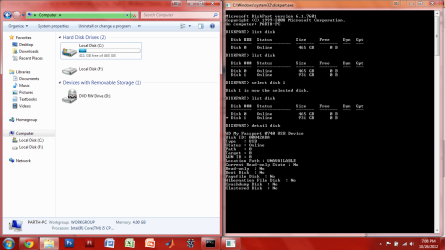
diskpart hung after detail disk.

here's a screen...
 

Attachments

  • diskpart2.png
    diskpart2.png
    71.3 KB · Views: 10

My Computer My Computer

At a glance

Microsoft Windows 7 Home Premium 64-bit 7601 ...Intel(R) Core(TM) i5 CPU M 430 @ 2.27GHz4.00 GB(1) Intel(R) HD Graphics (2) ATI Mobility Rad...
Computer Manufacturer/Model Number
HP DV6t-3000se
OS
Microsoft Windows 7 Home Premium 64-bit 7601 Multiprocessor Free Service Pack 1
CPU
Intel(R) Core(TM) i5 CPU M 430 @ 2.27GHz
Motherboard
Hewlett-Packard 144A
Memory
4.00 GB
Graphics Card(s)
(1) Intel(R) HD Graphics (2) ATI Mobility Radeon HD 5470
Sound Card
(1) ATI High Definition Audio Device (2) High Definition A
Screen Resolution
1366 x 768 x 32 bits (4294967296 colors) @ 60 Hz
Hard Drives
Hitachi HTS725050A9A364 ATA Device
Ok, I'll need to research. It might be a while. The location path is UNAVAILABLE in your screenshot. The commands should provide a path - we just have to get past the hangs. Thanks for being patient.

Try the same commands, except no detail disk. The commands that follow the select and the list part are volume centric, but you can't list or select a volume. If there is only one volume of the drive, you should gain focus to the volume by selecting the part.

I also added the detail part command. Maybe that will give us something. If it hags, run through it again without the detail part.

diskpart

list disk
select disk # (make sure it's the correct disk)
list disk (selected disk identified with *)

list part
select part # (make sure it's the correct partition)
list part (selected partition identified with *)


detail part

automount scrub (clean up mount information for the disk)
remove all
remove dismount

assign letter=S

list disk (selected disk identified with *)
list part (selected partition identified with *)


exit (exit diskpart)
exit (exit cmd prompt)
 

My Computer My Computer

At a glance

x64 (6.3.9600) Win8.1 Pro & soon dual boot x6...AMD A6-3420M APU with Radeon(tm) HD Graphics6.00 GBAMD Radeon(TM) HD 6520G
Computer type
Laptop
Computer Manufacturer/Model Number
HP Pavilion dv6-6c10us
OS
x64 (6.3.9600) Win8.1 Pro & soon dual boot x64 (6.1.7601) Win7_SP1 HomePrem
CPU
AMD A6-3420M APU with Radeon(tm) HD Graphics
Motherboard
Hewlett-Packard 1805
Memory
6.00 GB
Graphics Card(s)
AMD Radeon(TM) HD 6520G
Sound Card
(1) AMD High Definition Audio Device (2) IDT High Definiti
Monitor(s) Displays
HP W2072a 20" LCD (1600 x 900) @ 60 Hz
Screen Resolution
1366 x 768 x 32 bits (4294967296 colors) @ 60 Hz
Hard Drives
ST640LM0 00 HM641JI SATA Disk Device
Keyboard
Logitech k520 wireless KB
Mouse
Logitech m320 wireless mouse (bundled with KB)
Internet Speed
15/5 | 54 MB Wireless 'n'
Antivirus
Realtime: Defender or Avast | On-demand: Malwarebytes, ESET
Browser
IE 11 on Win8, IE 10 on win 7
Other Info
Media: [Gimp, Audacity, VLC] || Comm: [WEmail 2012, Skype] || Productivity: [OpenOffice,| Textpad] || Utils: [Sysinternals, cCleaner, Speccy, Defraggler]
I don't think UNAVAILBLE has anything to do with the issue - sorry about that. Drive attached to USB don't get this assignment.

How was this disk originally partitioned? It wasn't a raid disk / mirrored was it?


I'm hoping that it was your plain vanilla one partition, primary volume disk.


What we're trying to do is to tell Windows to forget everything it currently knows about the disk (scrub & remove), but we can't seem to get the disk to co-operate. We might have to uninstall the USB controller(s) - not sure yet if that's the way to go.

This is a different set of commands that tell windows to set the partition inactive, forget the default letter for your drive, and then scrubs information and removes all drive letters (system, boot, page, efi, and OEM are not affected).


diskpart

list disk
select disk # (make sure it's the correct disk)
list disk (selected disk identified with *)

list part
select part # (make sure it's the correct partition)
list part (selected partition identified with *)


inactive
attributes nodefaultdriveletter
exit


Elect Eject the drive
Safely remove the drive
physically disconnect the drive


reboot

diskpart
automount scrub
remove all
exit


reboot
reconnect drive


diskpart
list disk
list vol
exit

and I'll pick up tomorrow.
 
Last edited:

My Computer My Computer

At a glance

x64 (6.3.9600) Win8.1 Pro & soon dual boot x6...AMD A6-3420M APU with Radeon(tm) HD Graphics6.00 GBAMD Radeon(TM) HD 6520G
Computer type
Laptop
Computer Manufacturer/Model Number
HP Pavilion dv6-6c10us
OS
x64 (6.3.9600) Win8.1 Pro & soon dual boot x64 (6.1.7601) Win7_SP1 HomePrem
CPU
AMD A6-3420M APU with Radeon(tm) HD Graphics
Motherboard
Hewlett-Packard 1805
Memory
6.00 GB
Graphics Card(s)
AMD Radeon(TM) HD 6520G
Sound Card
(1) AMD High Definition Audio Device (2) IDT High Definiti
Monitor(s) Displays
HP W2072a 20" LCD (1600 x 900) @ 60 Hz
Screen Resolution
1366 x 768 x 32 bits (4294967296 colors) @ 60 Hz
Hard Drives
ST640LM0 00 HM641JI SATA Disk Device
Keyboard
Logitech k520 wireless KB
Mouse
Logitech m320 wireless mouse (bundled with KB)
Internet Speed
15/5 | 54 MB Wireless 'n'
Antivirus
Realtime: Defender or Avast | On-demand: Malwarebytes, ESET
Browser
IE 11 on Win8, IE 10 on win 7
Other Info
Media: [Gimp, Audacity, VLC] || Comm: [WEmail 2012, Skype] || Productivity: [OpenOffice,| Textpad] || Utils: [Sysinternals, cCleaner, Speccy, Defraggler]
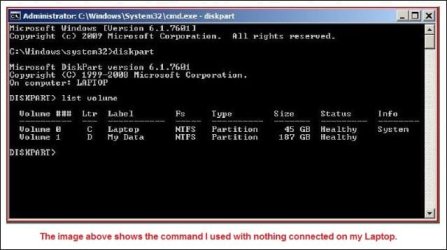
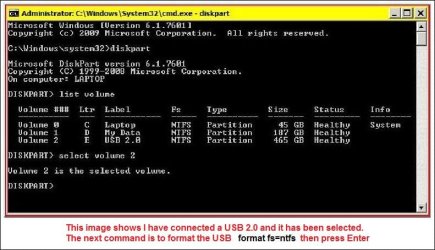
Hi dn2,
My images show how its done, click them to enlarge images.

a.JPG

b.JPG
 

My Computer My Computer

At a glance

Win7 H.Prem. 32bit+SP1
Computer Manufacturer/Model Number
Look in my Signature.
OS
Win7 H.Prem. 32bit+SP1
If the diskpart sequence I posted didn't clean up what Windows knows about the drive, follow this tutorial to allow you to see objects in Device Manager that are no longer there. Maybe a different tact is required for your system.

http://www.sevenforums.com/tutorials/165554-usb-driver-general-fix-problems.html

In step 2: search - make sure you include system directories in your search options or INFCACHE.1 will not be found.

Bill
.
 

My Computer My Computer

At a glance

x64 (6.3.9600) Win8.1 Pro & soon dual boot x6...AMD A6-3420M APU with Radeon(tm) HD Graphics6.00 GBAMD Radeon(TM) HD 6520G
Computer type
Laptop
Computer Manufacturer/Model Number
HP Pavilion dv6-6c10us
OS
x64 (6.3.9600) Win8.1 Pro & soon dual boot x64 (6.1.7601) Win7_SP1 HomePrem
CPU
AMD A6-3420M APU with Radeon(tm) HD Graphics
Motherboard
Hewlett-Packard 1805
Memory
6.00 GB
Graphics Card(s)
AMD Radeon(TM) HD 6520G
Sound Card
(1) AMD High Definition Audio Device (2) IDT High Definiti
Monitor(s) Displays
HP W2072a 20" LCD (1600 x 900) @ 60 Hz
Screen Resolution
1366 x 768 x 32 bits (4294967296 colors) @ 60 Hz
Hard Drives
ST640LM0 00 HM641JI SATA Disk Device
Keyboard
Logitech k520 wireless KB
Mouse
Logitech m320 wireless mouse (bundled with KB)
Internet Speed
15/5 | 54 MB Wireless 'n'
Antivirus
Realtime: Defender or Avast | On-demand: Malwarebytes, ESET
Browser
IE 11 on Win8, IE 10 on win 7
Other Info
Media: [Gimp, Audacity, VLC] || Comm: [WEmail 2012, Skype] || Productivity: [OpenOffice,| Textpad] || Utils: [Sysinternals, cCleaner, Speccy, Defraggler]
So I think that diskpart hangs after some time has past. Up until then, all the commands will work fine (like right after I enter the usb), but after some point it'll stop. I think this point is when windows 7 actually tries to read what's on the hard drive.I've also noticed that the results diskpart gives me are not instant. For example, Disk 0 will show up instantly, then it'll take like 10 sec before Disk 1 shows up.

I also wanted to mention that the green loading bar that comes up (you can see it at the top in the last picture I uploaded) stops after some time. It load pretty fast up until that point, then it just stops.

I haven't tried another cord (since I dont have another one) but a cord could be a possibility as something wrong.

I also just looked up whether I still have warranty on it and yes I do. If all fails, I'm just going to go with that.
 

My Computer My Computer

At a glance

Microsoft Windows 7 Home Premium 64-bit 7601 ...Intel(R) Core(TM) i5 CPU M 430 @ 2.27GHz4.00 GB(1) Intel(R) HD Graphics (2) ATI Mobility Rad...
Computer Manufacturer/Model Number
HP DV6t-3000se
OS
Microsoft Windows 7 Home Premium 64-bit 7601 Multiprocessor Free Service Pack 1
CPU
Intel(R) Core(TM) i5 CPU M 430 @ 2.27GHz
Motherboard
Hewlett-Packard 144A
Memory
4.00 GB
Graphics Card(s)
(1) Intel(R) HD Graphics (2) ATI Mobility Radeon HD 5470
Sound Card
(1) ATI High Definition Audio Device (2) High Definition A
Screen Resolution
1366 x 768 x 32 bits (4294967296 colors) @ 60 Hz
Hard Drives
Hitachi HTS725050A9A364 ATA Device
Yeah, you have lag accessing time, so I would have expected slowness. One part of the puzzle is to not try to access the drive when you do diskpart. So, letting Windows "update|search" in the Computer window (the green status bar) isn't helping. I should have said "Only run the Command Prompt Diskpart. Shut down any other windows".

It helps if you are more specific - what diskpart commands did you try, what worked, what "hung", how long did you wait before deciding it was hung.... those sort of things. With the lag time you're experiencing, it might just take Windows a while. Or are you getting a timeout where diskpart just returns to the prompt.

So it takes 10 seconds for disc 1 to appear in diskpart - that's good information. The USB cable is another good idea - if you have a USB printer see if you can borrow that cable to test the drive. It's good to know about the warranty too.

What I'm looking for from you (you're my eyes over there) is something like this:
I ran this set of commands:
diskpart

list disk
select disk # (make sure it's the correct disk)
list disk (selected disk identified with *)

list part
select part # (make sure it's the correct partition)
list part (selected partition identified with *)


inactive

and waited 5 minutes - diskpart seemed to be hung, so I (what did you do?)


or

I ran this set of commands:

diskpart
automount scrub
remove all
exit


and it took 30 minutes but they all ran
Without important information coming back from your side, this will take years. You don't have to be too technical, but if I am going to be of any help, I need to know what you tried, what failed and how, what succeeded. In this situation a little patience with the drive will help helpful - it might take 30 minutes for Windows to say "I got it, now what do you want to do with it" or Windows might say "I tried, can't get anything from the drive, here's your prompt back".

I know it's frustrating on your side too. Let's take a break from diskpart and thinking about it in a drive-centric way.

I posted this on another USB drive problem, but they haven't tried it yet. If the drive is ok and the driver is FUBAR you might have some luck.
Try following http://www.sevenforums.com/tutorials/165554-usb-driver-general-fix-problems.html.

There are some references in the comment section that help if you run into issues following the instructions.


Particularly INFCACHE.1
  • search might not find it - make sure you have "Include system directories" set in your search options or just navigate to the directory cited.
  • delete might not allow you to delete it. Pooch skipped a step when (s)he defined changing the security. You also need to give full access to Administrators. or you can follow a comment ot the take ownership tut.
  • there is an interesting comment on a known MS bug - post #5 in the tut. The direct MS reference is Binary files in some USB drivers are not updated after you install Windows 7 SP1 or Windows Server 2008 R2 SP1 - download the version specific to your machine from the resolution section.
SYMPTOMS
After you install Windows 7 Service Pack 1 (SP1) or Windows Server 2008 R2 Service Pack 1 (SP1), binary files in some USB drivers are not updated. For example, the Usbport.sys, Usbehci.sys, and Winusb.sys binary files are not updated.
There is also a reference to similar issues on MyDigitalLife, but other than some executable I don't know about (I'm always wary of .exe files when a bunch of instructions work), the information seems to be duplicated there (or here).
I'll stick with it until I run out of ideas or you decide that you'll exercise the warranty.

Bill
.
 

My Computer My Computer

At a glance

x64 (6.3.9600) Win8.1 Pro & soon dual boot x6...AMD A6-3420M APU with Radeon(tm) HD Graphics6.00 GBAMD Radeon(TM) HD 6520G
Computer type
Laptop
Computer Manufacturer/Model Number
HP Pavilion dv6-6c10us
OS
x64 (6.3.9600) Win8.1 Pro & soon dual boot x64 (6.1.7601) Win7_SP1 HomePrem
CPU
AMD A6-3420M APU with Radeon(tm) HD Graphics
Motherboard
Hewlett-Packard 1805
Memory
6.00 GB
Graphics Card(s)
AMD Radeon(TM) HD 6520G
Sound Card
(1) AMD High Definition Audio Device (2) IDT High Definiti
Monitor(s) Displays
HP W2072a 20" LCD (1600 x 900) @ 60 Hz
Screen Resolution
1366 x 768 x 32 bits (4294967296 colors) @ 60 Hz
Hard Drives
ST640LM0 00 HM641JI SATA Disk Device
Keyboard
Logitech k520 wireless KB
Mouse
Logitech m320 wireless mouse (bundled with KB)
Internet Speed
15/5 | 54 MB Wireless 'n'
Antivirus
Realtime: Defender or Avast | On-demand: Malwarebytes, ESET
Browser
IE 11 on Win8, IE 10 on win 7
Other Info
Media: [Gimp, Audacity, VLC] || Comm: [WEmail 2012, Skype] || Productivity: [OpenOffice,| Textpad] || Utils: [Sysinternals, cCleaner, Speccy, Defraggler]
Back
Top