External Hard Drive Windows Explorer Not Responding

xxorianna

New member
Local time
4:33 AM
Messages
6
Location
Canada
I have a x64 windows 7 and an iomega eGo external hard drive. The external hasn't been used in a while, it's just been sitting in my desk drawer. I'm trying to see if I have any files on it, but every time I plug it in, and try to open it, the green loading bar in Windows Explorer moves to the end but never finishes and the program (Windows Explorer) stops responding.

I don't think I have any really important files on there, I think I've moved them , so if I have to reformat it or anything it should be okay. But is there anything else I can do?
 

My Computer My Computer

At a glance

Windows 7 Home Premium x64
Computer type
Laptop
Computer Manufacturer/Model Number
Lenovo Z570
OS
Windows 7 Home Premium x64
Antivirus
Microsoft Security Essentials
Browser
Google Chrome
Other Info
Storage capacity is 1TB(ish)
Try this.

Download v 0.8.1 of the drivecleanup.zip from Drive Tools for Windows.

Unzip it to a folder, say drivecleanup.

You will have two folders Win32 and x64 each containing DriveCleanup.exe for 32 bit and 64 bit respectively.

Remove all USB storage devices/printers/card readers etc., from your system (except your Keyboard and mouse) and reboot.

Right click on the DriveCleanup.exe and run as administrator. (Use the *.exe file appropriate for your bit version of Windows.).

After the clean up act, reboot , plug in your Iomega external drive and check. ( After the drive cleanup every USB device plugged it will be installed afresh.)
 
Last edited:

My Computer My Computer

At a glance

Windows 7 Home Premium 32 bit
OS
Windows 7 Home Premium 32 bit
That worked! The device driver reinstalled and when I opened it I get the option to reformat it. I will do that, as as I said I don't think I have anything important on it.

Thank you!

EDIT: Oh but not it's saying it was unable to format it.
 

My Computer My Computer

At a glance

Windows 7 Home Premium x64
Computer type
Laptop
Computer Manufacturer/Model Number
Lenovo Z570
OS
Windows 7 Home Premium x64
Antivirus
Microsoft Security Essentials
Browser
Google Chrome
Other Info
Storage capacity is 1TB(ish)
What is the exact error message you get?

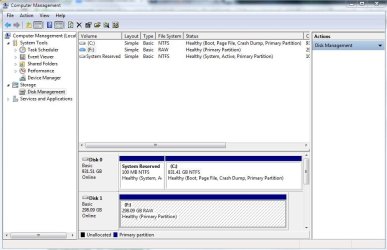
Please post a screenshot of the drive in Disk Management.
 

My Computer My Computer

At a glance

Windows 7 Home Premium 32 bit
OS
Windows 7 Home Premium 32 bit
according to this it's healthy. not sure what else could be wrong.
 

Attachments

  • Capture.JPG
    Capture.JPG
    75 KB · Views: 0

My Computer My Computer

At a glance

Windows 7 Home Premium x64
Computer type
Laptop
Computer Manufacturer/Model Number
Lenovo Z570
OS
Windows 7 Home Premium x64
Antivirus
Microsoft Security Essentials
Browser
Google Chrome
Other Info
Storage capacity is 1TB(ish)
Perhaps you missed it.

What is the exact error message you get when you try to format it?
 

My Computer My Computer

At a glance

Windows 7 Home Premium 32 bit
OS
Windows 7 Home Premium 32 bit
Perhaps you have gone to sleep. And perhaps when you return, I may be missing/gone to sleep.:)

So I leave below some of the things you can try.

1. If you want to try partition recovery to check whether you have any important data:

Download and install Minitools Partition Wizard Home Edition 8.1.1 Free download Magic Partition Manager Software, partition magic alternative, free partition magic, partition magic Windows 7 and server partition software - Partition Wizard Online and run Partition Recovery Wizard in it.

Help:Follow the recovery process under the heading "Recovery with Partition Wizard: SanDisk Cruzer Blade 16GB" in the thread Recover a flash drive turned RAW – Partition Wizard and TestDisk. ( In your case instead of the pendrive, it will be your external drive.)

2. If you are intent on straightaway formatting the drive:

1. Download HP USB Disk Storage Format Tool 2.2.3 the Swiss Army Knife at HP USB Disk Storage Format Tool Free Download . Right click on the .exe file, run as administrator and try to format it. If it fails,

2. Try to do a low-level format with HDD LLF Format Tool v4.40 (download the Windows Executable that doesn't need installation). Make sure that you select the correct drive. If the low level format goes through successfully, you have to do a regular format.


My Computer My Computer

At a glance

Windows 7 Home Premium 32 bit
OS
Windows 7 Home Premium 32 bit
1. If you want to try partition recovery to check whether you have any important data:

Download and install Minitools Partition Wizard Home Edition 8.1.1 Free download Magic Partition Manager Software, partition magic alternative, free partition magic, partition magic Windows 7 and server partition software - Partition Wizard Online and run Partition Recovery Wizard in it.

Help:Follow the recovery process under the heading "Recovery with Partition Wizard: SanDisk Cruzer Blade 16GB" in the thread Recover a flash drive turned RAW – Partition Wizard and TestDisk. ( In your case instead of the pendrive, it will be your external drive.)

I'm trying to use this, but the program stops responding every 3 minutes which is making the whole process go even slower. It still has 600 000 000 more sectors to scan.
 

My Computer My Computer

At a glance

Windows 7 Home Premium x64
Computer type
Laptop
Computer Manufacturer/Model Number
Lenovo Z570
OS
Windows 7 Home Premium x64
Antivirus
Microsoft Security Essentials
Browser
Google Chrome
Other Info
Storage capacity is 1TB(ish)
How does the drive look like in Partition Wizard?

If it says "Bad disk" then it is what it is. A bad disk. You may cancel the operation.

For your own satisfaction, you may complete the exercise trying to format with the HP tool and then the LLF tool. That is it. You have done all that you can possibly do.
 
Last edited:

My Computer My Computer

At a glance

Windows 7 Home Premium 32 bit
OS
Windows 7 Home Premium 32 bit
Back
Top