external HDD does not show?

fluidmotion

New member
Member
VIP
Local time
11:00 PM
Messages
275
i am on win7 starter with HP Mini,
connected external hdd in usb port,

auto play tab does not show up,
and
open 'computer'
ext. hdd does not exist.
 

My Computer

Computer Manufacturer/Model Number
MP Mini Netbook 110
OS
Win7 Starter 32 bits
Can you find it in Disk Management or Device Management

Disk Management:

Option One: Type in "diskmgmt.msc" in the Run box..

Option Two: Open up Control Panel, then click Administrative Tools and click Computer Management (to get to this part you can also just Right Click "My Computer" and click Manage. Under Storage click Disk Management.

Then when you see your External Hard Drive, Right Click on it and click Change Drive Letter (to something you prefer and can easily remind you which drive it is.) For example you have 3 External Hard Drives with different letters - the letters can help remind you what one is which.

If Disk Management didn't work, try this:

For Device Management. Open up Computer Management like before and click Device Management or Right Click "My Computer" and click Device Management or in the Run box type in devmgmt.msc...

And look for your external hard drive, Disable and Uninstall it and restart your computer, it should now be visible.

Good Luck.

 

My Computer

Computer Manufacturer/Model Number
iRush Pro
OS
Windows 7 Ultimate x64
CPU
Intel Core i5 2500K Processor
Motherboard
Intel H67 Chipset Motherboard (Micro ATX)
Memory
2x4GB DDR3 1333Mhz Memory
Graphics Card(s)
Novatech Radeon 6770 1GB Graphics Card
Hard Drives
1TB
PSU
Novatech 500W
Case
Novatech ATX Gaming Case
Cooling
-
Keyboard
Novatech Wired Keyboard
Mouse
Novatech Wired Mouse
Internet Speed
VirginMedia 10MB/s
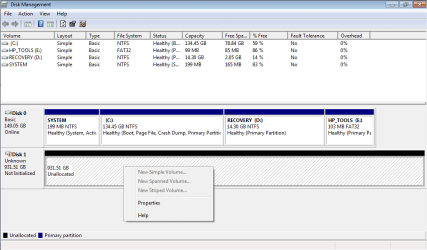
disk.magt.png

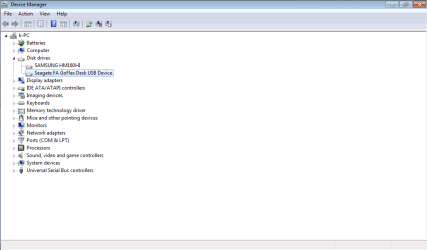
ext hdd.device.magr.png

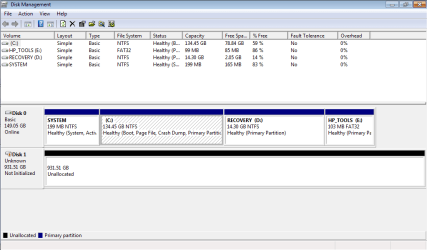
seagate usb device is not in disk management,
but
i found it in device manager.

weird...?
auto play tab used to pop right up when this drive is connected into usb port.

so,
does this device need to be uninstalled from device manager?


Can you find it in Disk Management or Device Management

Disk Management:

Option One: Type in "diskmgmt.msc" in the Run box..

Option Two: Open up Control Panel, then click Administrative Tools and click Computer Management (to get to this part you can also just Right Click "My Computer" and click Manage. Under Storage click Disk Management.

Then when you see your External Hard Drive, Right Click on it and click Change Drive Letter (to something you prefer and can easily remind you which drive it is.) For example you have 3 External Hard Drives with different letters - the letters can help remind you what one is which.

If Disk Management didn't work, try this:

For Device Management. Open up Computer Management like before and click Device Management or Right Click "My Computer" and click Device Management or in the Run box type in devmgmt.msc...

And look for your external hard drive, Disable and Uninstall it and restart your computer, it should now be visible.

Good Luck.
 

My Computer

Computer Manufacturer/Model Number
MP Mini Netbook 110
OS
Win7 Starter 32 bits
i assume it is the big Disk1. That has no partition on it. Right click on the big space of that disk in disk management and define a partition. Suggest you do not make it too big. It is easier to extend than to shrink.
 

My Computer

Computer Manufacturer/Model Number
HP, Dell, Gateway, Toshiba - 4 laptops and 2 desktops
OS
Vista, Windows7, Mint Mate, Zorin, Windows 8
CPU
from 1.6GHz Duo to i7
Monitor(s) Displays
2x HP w2207
Hard Drives
5x HDD, 7x SSD, 12x Externals
Keyboard
with trackball - no mices
Mouse
Trackball mice
Internet Speed
DSL 6000
uninstalled usb hard disk drive from device manager,
and
restart this netbook,
in the end of booting windows,
notification tab poped up,
usb hdd is installed automatically in device manager.


Can you find it in Disk Management or Device Management

Disk Management:

Option One: Type in "diskmgmt.msc" in the Run box..

Option Two: Open up Control Panel, then click Administrative Tools and click Computer Management (to get to this part you can also just Right Click "My Computer" and click Manage. Under Storage click Disk Management.

Then when you see your External Hard Drive, Right Click on it and click Change Drive Letter (to something you prefer and can easily remind you which drive it is.) For example you have 3 External Hard Drives with different letters - the letters can help remind you what one is which.

If Disk Management didn't work, try this:

For Device Management. Open up Computer Management like before and click Device Management or Right Click "My Computer" and click Device Management or in the Run box type in devmgmt.msc...

And look for your external hard drive, Disable and Uninstall it and restart your computer, it should now be visible.

Good Luck.
 

My Computer

Computer Manufacturer/Model Number
MP Mini Netbook 110
OS
Win7 Starter 32 bits
If you have data on the external drive, I'm afraid you may have lost it. the disk needs to be initialized which will delete any data on it.
 

My Computer

Computer type
PC/Desktop
Computer Manufacturer/Model Number
Home Built Desktop By DataTech
OS
Windows 7 Ultimate X64 SP1
CPU
Intel i5-2550K, Differing ~4.4-4.8GHz No built in GPU
Motherboard
ASUS P8Z68-V PRO/GEN3
Memory
16GB G.Skill Sniper 1866MHz @ 2133MHz 2x8GB
Graphics Card(s)
ASUS GTX650TIB-DC2OC-2GD5, (650TI Boost)
Sound Card
Onboard Realtek 5-1
Monitor(s) Displays
Samsung P2570HD
Screen Resolution
1920x1080
Hard Drives
Samsung 840 Pro 256GB SSD for OS, 500GB Seagate Constellation (Enterprise drive) for Data
PSU
Corsair HX650W
Case
Inwin Dragon Rider
Cooling
Hyper 212 EVO w/two Noctua fans, push-pull, @1300 RPM
Keyboard
E-Z Eyes, bright yellow keys with large characters
Mouse
steelseries SENSEI Laser Pro Gaming
Internet Speed
48-51Mbs Mbs down, 11 Mbs up Xfinity Cable
Antivirus
Norton Internet Security 2013
Browser
IE 10, Opera, Pale Moon if needed
Other Info
4 case fans, LG BluRay-RE, ASUS DVD-RW, Mr. Fusion power supply, 1.21 gigawatts.
nope,
this usb hdd has 1 TB of storage.

i assume it is the big Disk1. That has no partition on it. Right click on the big space of that disk in disk management and define a partition. Suggest you do not make it too big. It is easier to extend than to shrink.
 

My Computer

Computer Manufacturer/Model Number
MP Mini Netbook 110
OS
Win7 Starter 32 bits
data was backed up a long time ago.

If you have data on the external drive, I'm afraid you may have lost it. the disk needs to be initialized which will delete any data on it.
 

My Computer

Computer Manufacturer/Model Number
MP Mini Netbook 110
OS
Win7 Starter 32 bits
The difference btween 1TB and 931 MB is how Windows measures size and how drive makers do it, big disk is 1tb.
 

My Computer

Computer type
PC/Desktop
Computer Manufacturer/Model Number
Home Built Desktop By DataTech
OS
Windows 7 Ultimate X64 SP1
CPU
Intel i5-2550K, Differing ~4.4-4.8GHz No built in GPU
Motherboard
ASUS P8Z68-V PRO/GEN3
Memory
16GB G.Skill Sniper 1866MHz @ 2133MHz 2x8GB
Graphics Card(s)
ASUS GTX650TIB-DC2OC-2GD5, (650TI Boost)
Sound Card
Onboard Realtek 5-1
Monitor(s) Displays
Samsung P2570HD
Screen Resolution
1920x1080
Hard Drives
Samsung 840 Pro 256GB SSD for OS, 500GB Seagate Constellation (Enterprise drive) for Data
PSU
Corsair HX650W
Case
Inwin Dragon Rider
Cooling
Hyper 212 EVO w/two Noctua fans, push-pull, @1300 RPM
Keyboard
E-Z Eyes, bright yellow keys with large characters
Mouse
steelseries SENSEI Laser Pro Gaming
Internet Speed
48-51Mbs Mbs down, 11 Mbs up Xfinity Cable
Antivirus
Norton Internet Security 2013
Browser
IE 10, Opera, Pale Moon if needed
Other Info
4 case fans, LG BluRay-RE, ASUS DVD-RW, Mr. Fusion power supply, 1.21 gigawatts.
Did you see my post #4.
 

My Computer

Computer Manufacturer/Model Number
HP, Dell, Gateway, Toshiba - 4 laptops and 2 desktops
OS
Vista, Windows7, Mint Mate, Zorin, Windows 8
CPU
from 1.6GHz Duo to i7
Monitor(s) Displays
2x HP w2207
Hard Drives
5x HDD, 7x SSD, 12x Externals
Keyboard
with trackball - no mices
Mouse
Trackball mice
Internet Speed
DSL 6000
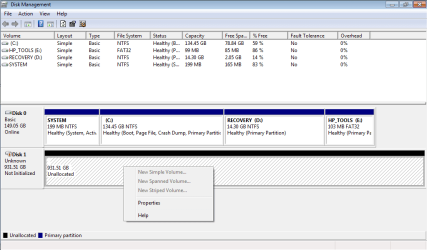
i found it.

i thought usb hdd was listed in same square where local hdd partitions were.

right clicked on big disk,
tab showed up like this,
and
define partitions?


Did you see my post #4.
 

Attachments

  • usb hdd.png
    usb hdd.png
    17.3 KB · Views: 15

My Computer

Computer Manufacturer/Model Number
MP Mini Netbook 110
OS
Win7 Starter 32 bits
Right.
 

My Computer

Computer Manufacturer/Model Number
HP, Dell, Gateway, Toshiba - 4 laptops and 2 desktops
OS
Vista, Windows7, Mint Mate, Zorin, Windows 8
CPU
from 1.6GHz Duo to i7
Monitor(s) Displays
2x HP w2207
Hard Drives
5x HDD, 7x SSD, 12x Externals
Keyboard
with trackball - no mices
Mouse
Trackball mice
Internet Speed
DSL 6000
Different physical drives will alway appear as Disk x or y in disk Management.
 

My Computer

Computer type
PC/Desktop
Computer Manufacturer/Model Number
Home Built Desktop By DataTech
OS
Windows 7 Ultimate X64 SP1
CPU
Intel i5-2550K, Differing ~4.4-4.8GHz No built in GPU
Motherboard
ASUS P8Z68-V PRO/GEN3
Memory
16GB G.Skill Sniper 1866MHz @ 2133MHz 2x8GB
Graphics Card(s)
ASUS GTX650TIB-DC2OC-2GD5, (650TI Boost)
Sound Card
Onboard Realtek 5-1
Monitor(s) Displays
Samsung P2570HD
Screen Resolution
1920x1080
Hard Drives
Samsung 840 Pro 256GB SSD for OS, 500GB Seagate Constellation (Enterprise drive) for Data
PSU
Corsair HX650W
Case
Inwin Dragon Rider
Cooling
Hyper 212 EVO w/two Noctua fans, push-pull, @1300 RPM
Keyboard
E-Z Eyes, bright yellow keys with large characters
Mouse
steelseries SENSEI Laser Pro Gaming
Internet Speed
48-51Mbs Mbs down, 11 Mbs up Xfinity Cable
Antivirus
Norton Internet Security 2013
Browser
IE 10, Opera, Pale Moon if needed
Other Info
4 case fans, LG BluRay-RE, ASUS DVD-RW, Mr. Fusion power supply, 1.21 gigawatts.
If you unplug/re-plug this drive, do you get a window that says the drive needs to be initialized? IF so go ahead and do it. Then in Disk management highlight tit and click Actions/All actions from the top menu and you will see options to do.
 

My Computer

Computer type
PC/Desktop
Computer Manufacturer/Model Number
Home Built Desktop By DataTech
OS
Windows 7 Ultimate X64 SP1
CPU
Intel i5-2550K, Differing ~4.4-4.8GHz No built in GPU
Motherboard
ASUS P8Z68-V PRO/GEN3
Memory
16GB G.Skill Sniper 1866MHz @ 2133MHz 2x8GB
Graphics Card(s)
ASUS GTX650TIB-DC2OC-2GD5, (650TI Boost)
Sound Card
Onboard Realtek 5-1
Monitor(s) Displays
Samsung P2570HD
Screen Resolution
1920x1080
Hard Drives
Samsung 840 Pro 256GB SSD for OS, 500GB Seagate Constellation (Enterprise drive) for Data
PSU
Corsair HX650W
Case
Inwin Dragon Rider
Cooling
Hyper 212 EVO w/two Noctua fans, push-pull, @1300 RPM
Keyboard
E-Z Eyes, bright yellow keys with large characters
Mouse
steelseries SENSEI Laser Pro Gaming
Internet Speed
48-51Mbs Mbs down, 11 Mbs up Xfinity Cable
Antivirus
Norton Internet Security 2013
Browser
IE 10, Opera, Pale Moon if needed
Other Info
4 case fans, LG BluRay-RE, ASUS DVD-RW, Mr. Fusion power supply, 1.21 gigawatts.
Hi, fluidmotion the 931GB Partition in Disk Management is the USB External Hard Drive, Right click on Disk 1 and select Create New Partiton or assign it a Drive Letter.
 

My Computer

Computer Manufacturer/Model Number
iRush Pro
OS
Windows 7 Ultimate x64
CPU
Intel Core i5 2500K Processor
Motherboard
Intel H67 Chipset Motherboard (Micro ATX)
Memory
2x4GB DDR3 1333Mhz Memory
Graphics Card(s)
Novatech Radeon 6770 1GB Graphics Card
Hard Drives
1TB
PSU
Novatech 500W
Case
Novatech ATX Gaming Case
Cooling
-
Keyboard
Novatech Wired Keyboard
Mouse
Novatech Wired Mouse
Internet Speed
VirginMedia 10MB/s
You might get prompted to Initialize as one of the options when you right-click, but it will be very straightforward.
 

My Computer

OS
Windows 7 Ultimate x64 SP1
CPU
Intel Core i7-2600
Motherboard
Gigabyte GA-P67A-UD3P-B3
Memory
12 GB Patriot Extreme DDR3-1333
Graphics Card(s)
Nvidia GTX 470
Monitor(s) Displays
Dell UltraSharp 2209WA
Hard Drives
OCZ Agility3 240 GB, WD5001AALS, WD7501AALS
PSU
OCZ ModStream 700W
Case
CoolerMaster HAF 912 Advanced
Cooling
CoolerMaster Hyper 212 Plus
unpluged usb hdd, and replug it,
no change?

If you unplug/re-plug this drive, do you get a window that says the drive needs to be initialized? IF so go ahead and do it. Then in Disk management highlight tit and click Actions/All actions from the top menu and you will see options to do.
 

My Computer

Computer Manufacturer/Model Number
MP Mini Netbook 110
OS
Win7 Starter 32 bits
usb hdd.png
right clicked on usb hdd,
this tab showed up,
do we expect this tab?

Hi, fluidmotion the 931GB Partition in Disk Management is the USB External Hard Drive, Right click on Disk 1 and select Create New Partiton or assign it a Drive Letter.
 

My Computer

Computer Manufacturer/Model Number
MP Mini Netbook 110
OS
Win7 Starter 32 bits

My Computer

Computer Manufacturer/Model Number
iRush Pro
OS
Windows 7 Ultimate x64
CPU
Intel Core i5 2500K Processor
Motherboard
Intel H67 Chipset Motherboard (Micro ATX)
Memory
2x4GB DDR3 1333Mhz Memory
Graphics Card(s)
Novatech Radeon 6770 1GB Graphics Card
Hard Drives
1TB
PSU
Novatech 500W
Case
Novatech ATX Gaming Case
Cooling
-
Keyboard
Novatech Wired Keyboard
Mouse
Novatech Wired Mouse
Internet Speed
VirginMedia 10MB/s
Back
Top