
External HDD malfunction/not showing up under my computer

mitch13815

New member
Local time
7:40 PM
Messages
3
Hello I am new here, fairly knowledgeable when it comes to computers, im taking a computer tech class at the moment, but disc drives seem to be my weak point.

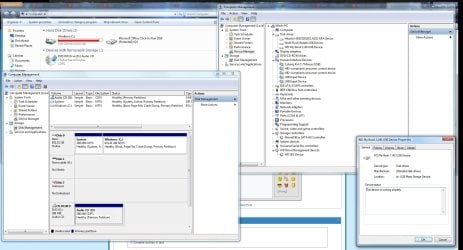
So I got a 3TB WD My Book 1140 External USB Hard Drive about a year ago, one of my friends had knocked it off my table and it had landed pretty hard on the ground, it seemed to work after that though, next time I unplugged it and plugged it back in it failed to show up under my computer (I have assigned a letter to the drive so it isn't that) however it did show up under computer management (excuse the screenshot, I tried to cram as much information in one picture as possible)

I have some valuable information I need there for school so any help would be appreciated, Thanks.
 

Attachments
  • HDD prob.jpg
    HDD prob.jpg
    211.1 KB · Views: 74

My Computer My Computer

At a glance

Windows 7 Home Premium x64AMD Phenom(tm) II X6 1100T Processor 3.30 GHz8192MB RAMNVIDIA GeForce GTX 650 Ti
Computer Manufacturer/Model Number
Gigabyte Technology Co., Ltd.
OS
Windows 7 Home Premium x64
CPU
AMD Phenom(tm) II X6 1100T Processor 3.30 GHz
Memory
8192MB RAM
Graphics Card(s)
NVIDIA GeForce GTX 650 Ti
bump?
 

My Computer My Computer

At a glance

Windows 7 Home Premium x64AMD Phenom(tm) II X6 1100T Processor 3.30 GHz8192MB RAMNVIDIA GeForce GTX 650 Ti
Computer Manufacturer/Model Number
Gigabyte Technology Co., Ltd.
OS
Windows 7 Home Premium x64
CPU
AMD Phenom(tm) II X6 1100T Processor 3.30 GHz
Memory
8192MB RAM
Graphics Card(s)
NVIDIA GeForce GTX 650 Ti
All i can suggest is try the drive on a friends computer (don't take it to the guy that knocked it off the table) see if it works on that, this would rule out your pc being at fault. If it still doesn't work you may have to open it up and check the connectors etc

Also check for sound coming from the drive, does it spin up, lights up etc...If it still fails, you may have to connect the actual hard drive to another computer (not the external box you would need some cables for this) to connect to a motherboard, it could be that the external box is at fault and not the hard drive its self.

That's all you can do really, its a process of elimination

Good Luck and let us know how you get on or if you need any more info
 

My Computer My Computer

At a glance

MS Windows 7 Professional 64-bit SP1AMD FX(tm)-6100 Six-Core Processor Socket AM3...8.00 GB Dual-Channel DDR3 @ 802MHz (11-11-11-...NVIDIA GeForce GTX 560 Ti
Computer type
PC/Desktop
Computer Manufacturer/Model Number
Self Build
OS
MS Windows 7 Professional 64-bit SP1
CPU
AMD FX(tm)-6100 Six-Core Processor Socket AM3+ (942)
Motherboard
ASUSTeK COMPUTER INC. SABERTOOTH 990FX (AM3r2)
Memory
8.00 GB Dual-Channel DDR3 @ 802MHz (11-11-11-36) 1.5Volts
Graphics Card(s)
NVIDIA GeForce GTX 560 Ti
Sound Card
Onboard Realtek HD
Monitor(s) Displays
shimian (1920x1080@60Hz)
Screen Resolution
1920*1080
Hard Drives
OCZ-AGIL ITY3 SATA Disk Device 120GB
PSU
Corsair TX 750
Case
Corsair
Cooling
WaterCooled
Keyboard
Microsoft Wired
Mouse
Logitech USB Optical TiltWheel Mouse
Internet Speed
Realtek PCIe GBE Family Controller 20MB*1MB
Antivirus
Avast
Browser
Firefox
Other Info
150GB Internal Hard Drive for Backing Up Important Files -
Hauppauge Nova-DT Dual DVB-T Tuner Device (+IR) -
USB PC Camera with Mic (SN9C105)
Which one is it supposed to be in your Disk Management screenshot, Disk 1 or 2?
 

My Computer My Computer

At a glance

Windows 7 Ultimate x64
OS
Windows 7 Ultimate x64
It's disc 1, the H drive, and thanks for the info Anthony, I'll post back if I have any more questions.
 

My Computer My Computer

At a glance

Windows 7 Home Premium x64AMD Phenom(tm) II X6 1100T Processor 3.30 GHz8192MB RAMNVIDIA GeForce GTX 650 Ti
Computer Manufacturer/Model Number
Gigabyte Technology Co., Ltd.
OS
Windows 7 Home Premium x64
CPU
AMD Phenom(tm) II X6 1100T Processor 3.30 GHz
Memory
8192MB RAM
Graphics Card(s)
NVIDIA GeForce GTX 650 Ti
It's disc 1, the H drive, and thanks for the info Anthony, I'll post back if I have any more questions.

What options do you get if you right click on the grey box labeled Disk1 (H:)?

Can you answer this:

Also check for sound coming from the drive, does it spin up, lights up etc...

Are you hearing any abnormal sounds?

One issue with quite a few WD external drive models are that the controller boards mounted on their drives are not compatible with any standard connector on typical motherboards. In other words the drive is basically installed in a "dumb" enclosure, there are no "smarts" mounted in the enclosure itself. Instead the USB/ATA converter is built into the hard drive's own controller card.

That's different than the way many other brands are built, where they just install a typical hard drive that can be directly installed internally in a laptop/desktop or in the enclosures they sell as external hard drives. These other companies use enclosures that have the USB/ATA converter built in so that they can accomodate any hard drive. So if that USB/ATA converter built into the enclosure fails you can always remove the drive from the enclosure and install it somewhere else.
 

My Computer My Computer

At a glance

Windows 7 Ultimate x64
OS
Windows 7 Ultimate x64
Back
Top