External HDD not showing up in My Computer

cupid

New member
Local time
1:57 AM
Messages
7
Few days ago my External HDD started showing some weird behavior. It will crash sometimes when I copy/paste data to/from it. Usually removing and re plugging solved the issue (safe remove never worked after it'll do the above weird stuff, I had to just pull out the USB connector).

Then after some days, it finally crashed. I got an alert saying "Drive G: Needs to be formatted". I didn't format it of course.

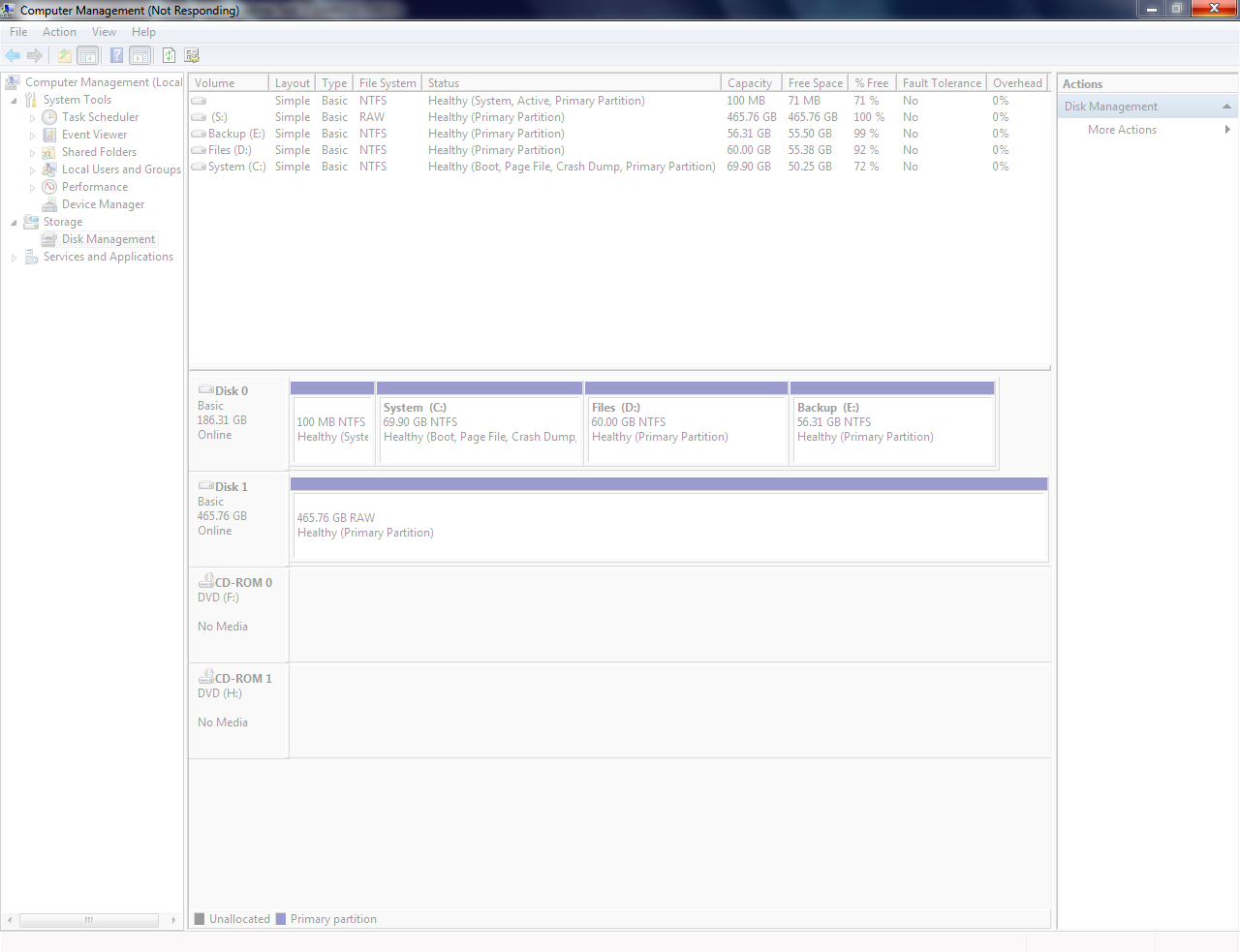
Then after that, whenever I connect it, I can see the "remove safely" icon but it doesn't show up in "My Computer", and the green loading bar in My Comp keeps on loading and gets slower and slower as it reaches the end. (I find this really hilarious). Sometimes it does show up like in screenshot below

90mfcSf.png


(My Ext HDD is "S:" in the picture, as explained below)

I tried changing the Drive letter after I read this

Here's a screenshot of Disk Management after My Ext HDD was renamed. But sadly the Disk management crashed at the end
EHTjJPn.png


Is there any way to get my data back ?
 

My Computer My Computer

At a glance

Windows 7 Ultimate x64
OS
Windows 7 Ultimate x64
You can right click it in Disk Management and assign it a drive letter, but my guess is it will want to try to format it. It sounds like the drive is failing or failed. I would download the hard drive diagnostic software from the manufacturer and run the diagnostics to see if it has died or not.
 

My Computers My Computers

  • At a glance

    Windows 11 ProRyzen 9 5900X32GB G Skill DDR4-3600EVGA RTX 3080 FTW 3 Ultra
    Computer type
    PC/Desktop
    Computer Manufacturer/Model Number
    ALWAYS UNDER CONSTRUCTION
    OS
    Windows 11 Pro
    CPU
    Ryzen 9 5900X
    Motherboard
    Asus X570 Crosshair Viii Hero
    Memory
    32GB G Skill DDR4-3600
    Graphics Card(s)
    EVGA RTX 3080 FTW 3 Ultra
    Sound Card
    On Board/Sennheiser PC37X Headset
    Monitor(s) Displays
    3 X Asus 27"
    Screen Resolution
    2560x1440
    Hard Drives
    2 X 1 TB NVME drives
    PSU
    EVGA 850
    Case
    Phanteks Eclipse P400A
    Cooling
    EVGA 280 AIO
    Keyboard
    Logitech G510s/ Logitech G13
    Mouse
    Logitech G502
    Internet Speed
    24/1
    Antivirus
    ESET/MBAM Pro/SAS Pro
    Browser
    Chrome/ Firefox/ Edge
  • At a glance

    Windows 11 ProIntel Ultra 9 288V32 GB LPDDR5X 8533
    Computer type
    Laptop
    System Manufacturer/Model Number
    Dell 16 Plus
    OS
    Windows 11 Pro
    CPU
    Intel Ultra 9 288V
    Memory
    32 GB LPDDR5X 8533
    Monitor(s) Displays
    16" Mini-LED HDR600 Touch 90 Hz
    Screen Resolution
    2560X1600
    Hard Drives
    1 TB NVME
Second that essenbe...

You could also try connecting the drive to a different system to eliminate your OS as the source of the problems; other Windows, Linux, etc., systems you could try before giving up...
 

My Computer My Computer

At a glance

Windows 7 64-bit, Windows 8.1 64-bit, OSX El ...Intel i5-3350P 3.1 GHz16 GBs GSkill SniperRadeon HD 7850
Computer type
PC/Desktop
Computer Manufacturer/Model Number
Custom built at Home
OS
Windows 7 64-bit, Windows 8.1 64-bit, OSX El Capitan, Windows 10 (VMware)
CPU
Intel i5-3350P 3.1 GHz
Motherboard
Gigabyte GA-Z77X-UP5 TH
Memory
16 GBs GSkill Sniper
Graphics Card(s)
Radeon HD 7850
Sound Card
VIA HD Audio
Monitor(s) Displays
Dell U2410 24"
Screen Resolution
1920x1200
Hard Drives
1 x Intel 520 240 GBs
1 x Seagate 1TBs SATA 2.0,
1 x Seagate 1TBs eSATA 2.0
PSU
Thermaltake 850W
Case
Antec P183
Cooling
Noctua NH-D14 Heatsink 2 x 120mm fans, 4 x 120mm case fans
Keyboard
Dell Multimedia keyboard
Mouse
Logitech Trackball
Internet Speed
28.5 Mb/s
Hi there
99.9% of the time just re-assign it another letter in disk management and it will come up visible and useable.

This type of event often occurs when you are switching external hard drives between systems.

Cheers
jimbo
 

My Computer My Computer

At a glance

Linux CENTOS 7 / various Windows OS'es and se...Intel i7 Intel i58GB, 16GBOn Motherboard
Computer type
PC/Desktop
Computer Manufacturer/Model Number
Custom built, several laptops HP/ASUS
OS
Linux CENTOS 7 / various Windows OS'es and servers
CPU
Intel i7 Intel i5
Memory
8GB, 16GB
Graphics Card(s)
On Motherboard
Sound Card
Realtek HD audio
Monitor(s) Displays
Apple Cinema display, Samsung LCD
Screen Resolution
1920 X 1080
Hard Drives
4 X 1TB SATA
Mouse
Toshiba wireless laser
Internet Speed
> 20MB up
Right clik it in DM and select Properties...Post back with the info.
My guess is it'll be reported as RAW...
 

My Computer My Computer

At a glance

Vista Ultimate X64/ Windows 7 Dual-bootQ66004G OCZ PC2 8500 PlatinumEVGA 8800GTS Vid Card
Computer Manufacturer/Model Number
Self-Built
OS
Vista Ultimate X64/ Windows 7 Dual-boot
CPU
Q6600
Motherboard
ASUS P5K
Memory
4G OCZ PC2 8500 Platinum
Graphics Card(s)
EVGA 8800GTS Vid Card
Hard Drives
500G Seagate SATA
200G Seagate SATA
100G WD Caviar SATA
80G WD Caviar IDE
PSU
OCZ Elite 800W PSU
Case
RaidMax Smilodon Case
Hi cupid,

If you are unable to give a drive letter to the RAW drive, then you should straight away get into Data Recovery using the Partition Recovery Wizard in the Partition Wizard.

The thread Recover a flash drive turned RAW – Partition Wizard and TestDisk. should help you in using TestDisk or Partition Wizard for partition recovery.

Follow the steps carefully.

I would advise that you go with Partition Wizard first.

EDIT: Run Partition Wizard and put out a screenshot as to how your external drive looks in it.
 

My Computer My Computer

At a glance

Windows 7 Home Premium 32 bit
OS
Windows 7 Home Premium 32 bit
Hi guys! Sorry for a late reply.

I did change the drive letter. Earlier it was I: and I changed it to S:.

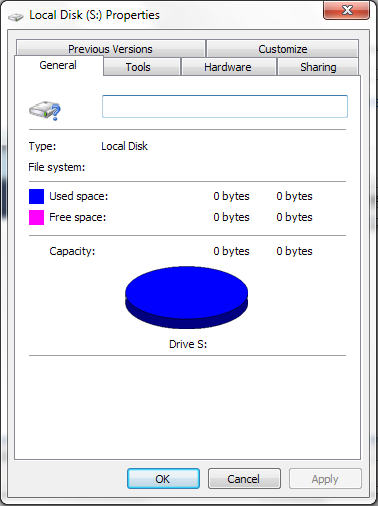
The Disk Management does show it as RAW as patio said. Here's a screenshot of its Properties

6uS0kOS.png


The DMS crashed as soon as I took screen shot of the properties. Also it takes forever to load when my Ext HDD is connected.

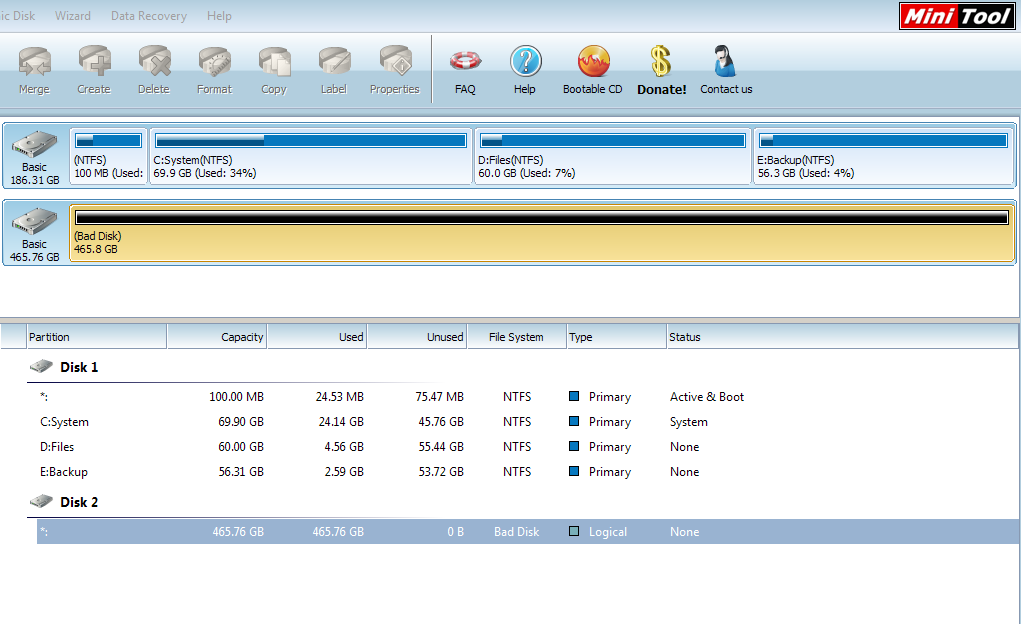
I tried MiniTools but it didn't work. Here are some screen shots:

zFI5CPH.png


The File system says "Bad Disk"

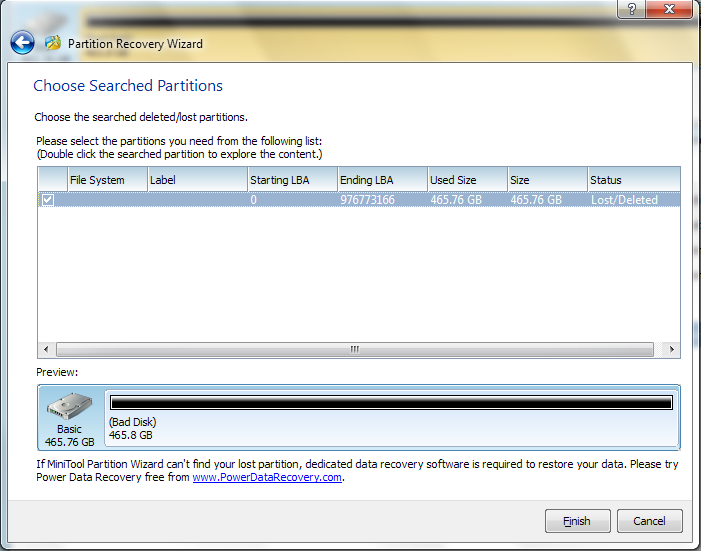
and the Partition Recovery Wizard:

RYvAACj.png


Double-clicking it doesn't show any files. Also, when I click Finish, it said "Some bad sectors ill be deleted". I don't know what that means so I cancelled the Partition Recovery Wizard :cry: . Also I noticed a weird thing, when Partition Recovery Wizard was checking sectors, it was continuously jumping between normal and not responding state. :confused:

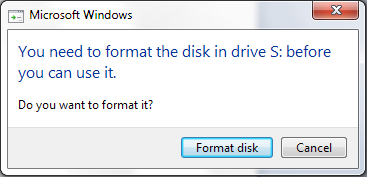
One more thing, The system shows Format notification after a few minutes of connecting the HDD

If9cLep.png


I will try Seagate Data Recovery Software and post back with info
 

My Computer My Computer

At a glance

Windows 7 Ultimate x64
OS
Windows 7 Ultimate x64
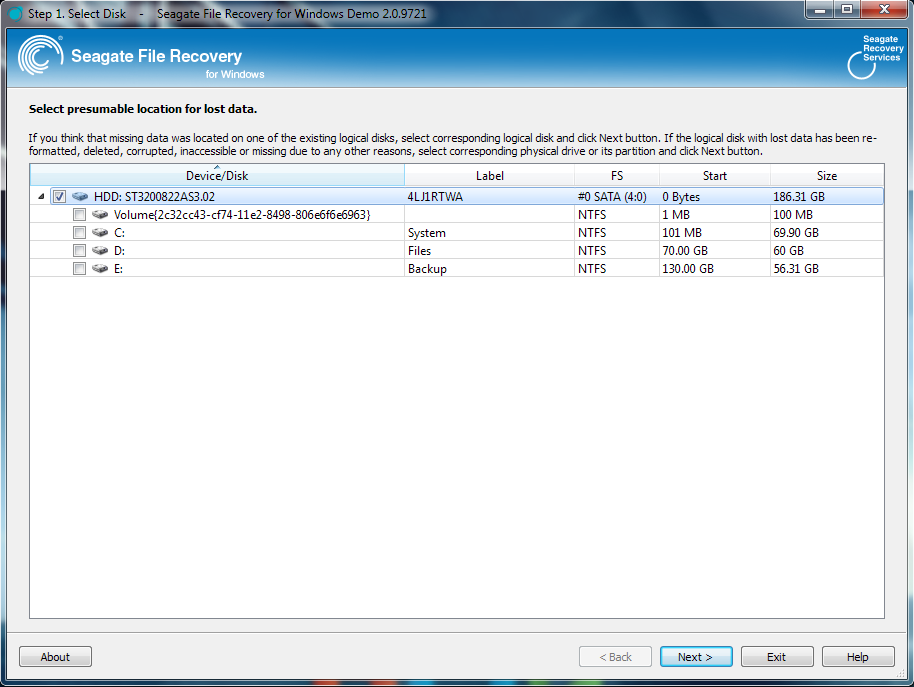
Seagate File Recovery Software diesn't even detect my Ext HDD. Here's a screenshot

Yd5lOkY.png
 

My Computer My Computer

At a glance

Windows 7 Ultimate x64
OS
Windows 7 Ultimate x64
Download Seatools for Windows. SeaTools | Seagate You can also read the guide there on using it.

Perform the long test and get the results.
 

My Computer My Computer

At a glance

Windows 7 Home Premium 32 bit
OS
Windows 7 Home Premium 32 bit
Back
Top