External HDD not working again!

Lanthus20

New member
Power User
Local time
5:05 AM
Messages
185
Location
Canada
So some of you may remember one of my previous posts. it was about an external hard drive I had connected to my computer that suddenly stopped working. It went on for a while and nobody could help me with my problem when suddenly it started working and my dvd drive stopped. Now my dvd is working but my HDD isn't.

It doesn't come up in device manager although sometimes I get the chime that indicates something has been connected. It doesn't show up in my computer and I cannot get certain files off of it. These files are mostly family photo's so understand they are very important to me. I was wondering if anybody else has experienced this problem and is there any way to fix it?

I have checked the cord. Just before anybody asks.

EDIT: Having recently got a new computer (after the previous problems) I decided to try it with one this time. It worked first try so I am sure it is my computer. The DVD drive problems made me suspect this at first but this has now verified it. I am glad I got my files but I still need this problem resolved.

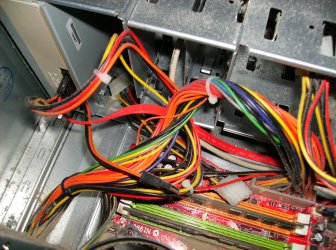
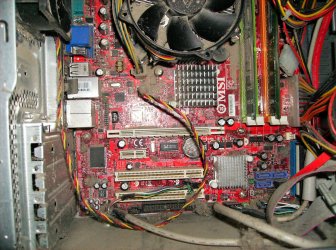
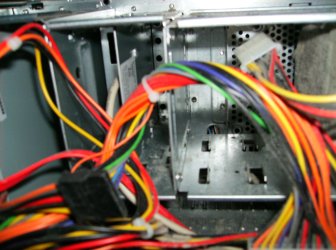
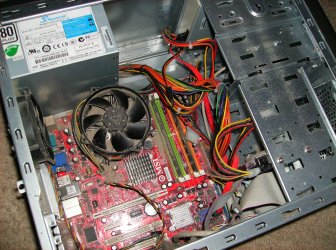
EDIT: Pics of the inside.
HPIM0937.jpg
HPIM0938.jpg
HPIM0939.jpg
HPIM0940.JPG
HPIM0941.JPG

Tell me if you see anything wrong there. I'm gonna get a can of compressed air and clean it. Could that be the problem?
 
Last edited:

My Computer

Computer Manufacturer/Model Number
Seanix Desktop PC
OS
Windows 7 Ultimate 32 bit
CPU
Intel Core 2 Duo CPU E4500 2.20 GHz
Memory
1.99 GB
Graphics Card(s)
Intel G33/G31 Express Chipset Family (256 MB)
Sound Card
Realtek ALC888/1200
Monitor(s) Displays
DELL
Screen Resolution
1280 X 1024
Hard Drives
320GB Internal
200GB External
Case
Seanix
Keyboard
Seanix USB Keyboard
Mouse
Seanix USB Keyboard
Internet Speed
Broadband
Other Info
Getting close to 3 years old.
Hook it up and go into "disk management" and see if it's "online" that may be it.....
 

My Computer

Computer Manufacturer/Model Number
Keeps changing - (Custom)
OS
Windows 7 Professional x64
CPU
Intel Core i7 860
Motherboard
Gigabyte GA-P55-UD4P
Memory
4GB DDR3 Mushkin 1600Mhz @ 7-8-7-20
Graphics Card(s)
MSI GTS250 1GB DDR3 Twin Frozr
Sound Card
Onboard realtek
Monitor(s) Displays
Samsung SyncMaster 24" P2450 + Samsung 20" 2033
Screen Resolution
1920 X 1080 and 1600 X 900 (#2 system 1440 X 900)
Hard Drives
Patriot Inferno 120GB SSD + 3 WD Blue 640GB drives
PSU
Corsair 750 HX Modular
Case
Lancool PC-K62
Cooling
Cooler Master TX3 CPU cooler and 4-140mm and 1-120mm case
Keyboard
Gigabyte USB keyboard
Mouse
Microsoft wireless laser mouse 5000
Internet Speed
7 Mb down 1.5 up
Other Info
System #2: AMD Phenom II X6 1055T (Freezer 7 Pro cooler) - Gigabyte 880GMA-UD2H - WD 500GB Black - 9500GT (1GB) 500W OCZ modular PSU - Antec 200 case. System #3 (LapTop) Core 2 Duo T6670 - 320GB 7200RPM HD - 4GB DDR3 RAM.
nate42nd, as it doesn't show up in anything. I'm pretty sure It's a fault with my computer because it worked first try in another computer.
 

My Computer

Computer Manufacturer/Model Number
Seanix Desktop PC
OS
Windows 7 Ultimate 32 bit
CPU
Intel Core 2 Duo CPU E4500 2.20 GHz
Memory
1.99 GB
Graphics Card(s)
Intel G33/G31 Express Chipset Family (256 MB)
Sound Card
Realtek ALC888/1200
Monitor(s) Displays
DELL
Screen Resolution
1280 X 1024
Hard Drives
320GB Internal
200GB External
Case
Seanix
Keyboard
Seanix USB Keyboard
Mouse
Seanix USB Keyboard
Internet Speed
Broadband
Other Info
Getting close to 3 years old.
side note: you might also want take it outside and blow the dust/dirt out of it. seriously...
 

My Computer

Computer Manufacturer/Model Number
eMachines W3502
OS
7 Ultimate
CPU
Intel® Celeron® D 3.20GHz, 512KB L2 cache, 533MHz FSB
Motherboard
Gateway Grant County
Memory
2 Gb DDR
Graphics Card(s)
Nvidia GeForce 7200
Sound Card
Onboard 6-Channel High-Definition Audio (Realtek)
Monitor(s) Displays
Changes with mood
Screen Resolution
Changes with monitor
Hard Drives
Seagate 250 Gb, 7200 RPM SATA (internal)
PSU
CoolerMaster something or other
Case
Stock
Cooling
Case, CPU and graphics coolers
Keyboard
Saitek Illuminated - USB
Mouse
Dell POS
Internet Speed
Cable
Other Info
Optical: Samsung DVD ROM, Asus CDR/W

Config changes regularly. Won't look like this for long...
nate42nd, as it doesn't show up in anything. I'm pretty sure It's a fault with my computer because it worked first try in another computer.

I wouldn't be surprised if the dust is blocking a SATA connection or something. Honestly.

But if that's not it, I will keep trying to help.
 

My Computer

Computer Manufacturer/Model Number
Keeps changing - (Custom)
OS
Windows 7 Professional x64
CPU
Intel Core i7 860
Motherboard
Gigabyte GA-P55-UD4P
Memory
4GB DDR3 Mushkin 1600Mhz @ 7-8-7-20
Graphics Card(s)
MSI GTS250 1GB DDR3 Twin Frozr
Sound Card
Onboard realtek
Monitor(s) Displays
Samsung SyncMaster 24" P2450 + Samsung 20" 2033
Screen Resolution
1920 X 1080 and 1600 X 900 (#2 system 1440 X 900)
Hard Drives
Patriot Inferno 120GB SSD + 3 WD Blue 640GB drives
PSU
Corsair 750 HX Modular
Case
Lancool PC-K62
Cooling
Cooler Master TX3 CPU cooler and 4-140mm and 1-120mm case
Keyboard
Gigabyte USB keyboard
Mouse
Microsoft wireless laser mouse 5000
Internet Speed
7 Mb down 1.5 up
Other Info
System #2: AMD Phenom II X6 1055T (Freezer 7 Pro cooler) - Gigabyte 880GMA-UD2H - WD 500GB Black - 9500GT (1GB) 500W OCZ modular PSU - Antec 200 case. System #3 (LapTop) Core 2 Duo T6670 - 320GB 7200RPM HD - 4GB DDR3 RAM.
yah It hasn't been dusted since I got it. You should see my even older one...

anyways I'm going away for the weekend but when I come back I'll get some compressed air and blow it all out.
 

My Computer

Computer Manufacturer/Model Number
Seanix Desktop PC
OS
Windows 7 Ultimate 32 bit
CPU
Intel Core 2 Duo CPU E4500 2.20 GHz
Memory
1.99 GB
Graphics Card(s)
Intel G33/G31 Express Chipset Family (256 MB)
Sound Card
Realtek ALC888/1200
Monitor(s) Displays
DELL
Screen Resolution
1280 X 1024
Hard Drives
320GB Internal
200GB External
Case
Seanix
Keyboard
Seanix USB Keyboard
Mouse
Seanix USB Keyboard
Internet Speed
Broadband
Other Info
Getting close to 3 years old.
The hard drive in question is an external one? How is connected to your PC? From the pictures the hard drive is internal. If that's the case, I see a SATA connection cable and an IDE/ATA connection cable, which looks like the IDE/ATA cable is coming from the hard drive. What is the SATA cable connecting to?

Thats a lot of dust in there, and dust is the number killer of PC components because of the heat build up due to all that dust. It's just like a partially clogged sink, with just a little blockage of the pipes the water tends to back up into the sink. This is the same with air flow inside the case of a PC. I suggest that you regularly blow out the PC case on a quarterly basis, 4 times a year. If your a heavy user you might want to consider doing it more. Also PC placement has a lot to do with it as well. Keep PC up off floor in an area that gets real good air circulation so it can breath, literally. Next comes cable management and good cable management promotes good air flow. Tie up and tuck all loose cables out of the way if at all possible. This can not all ways be done due to restrictions of the case itself. Do what you can, as a little is better than nothing.

When you do blow out the case (outside), you will probably go through alot of canned air, so start off with about 6 cans. First blow the case off with everything connected and get all the nooks and cranny's. Then one at a time and pull a cable (carefully) from mobo and hardware and blow out all the ports and connections even the ends of the cables themselves. Once this is all done, reconnect everything and turn on PC. This should rule out any over heating issue's which is what I susspect is happening.
 

My Computer

Computer Manufacturer/Model Number
Custom built
OS
Windows 7 Ultimate 64 bit
CPU
AMD Phenom II X4 965 Black Edition
Motherboard
Gigabyte GA-MA790X-DS4
Memory
GSkill 4 X 2 GB PC 8500
Graphics Card(s)
XFX Radeon HD 6790 D
Sound Card
On board RealTek HD
Monitor(s) Displays
Dual monitors:Samsung SyncMaster S20B300
Screen Resolution
1600 X 900
Hard Drives
Seagate Barracuda 1TB (primary)
Seagate Barracuda 2 X 320 GB
PSU
Ultra X4 750 watt fully modular
Case
Thermaltake Overseer RX 1 full tower
Cooling
Core-Contact 92 mm CPU Cooler
Keyboard
Logitech G510
Mouse
Razor DeathAdder
Internet Speed
50/5 Mbps UL/DL
Other Info
Optical: Super Muliti DVD burner w/lightscribe, Hauppauge WinTV HVR-1800
Back
Top