Taoufik090
New member
Good evening people!  .
.
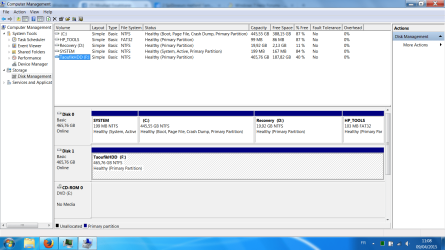
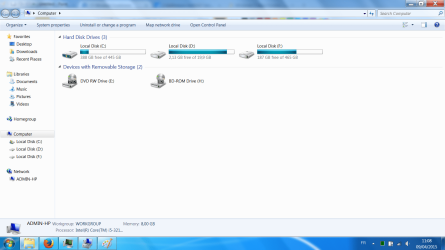
I did a clean windows 7 recovery yesterday night (left computer doing the work while I was asleep) via HP recovery manager, and today while setting it up, I plugged in my external HDD for software installers and stuff (not sure if the problem was present at the moment).Later, when I wanted to eject it and unplug it, it didn't want to eject, saying that something in it was in use, although I was sure I closed everything in relation (maybe a process was still on), but I unplugged it anyways thinking that the ejection is not crucial for mass storage devices, then when I plugged it back in later, it showed as Local Disk, and so did the recovery partition tat was entitled "Recovery" before (The external HDD, which is a Transcend, does work properly though, and when plugged, the scan options notification from ESET Smart Security display its original name).
I hope I wasn't long explaining useless stuff, and hope you guys would be of help to me, thank you so much for your time! ^^.
.I did a clean windows 7 recovery yesterday night (left computer doing the work while I was asleep) via HP recovery manager, and today while setting it up, I plugged in my external HDD for software installers and stuff (not sure if the problem was present at the moment).Later, when I wanted to eject it and unplug it, it didn't want to eject, saying that something in it was in use, although I was sure I closed everything in relation (maybe a process was still on), but I unplugged it anyways thinking that the ejection is not crucial for mass storage devices, then when I plugged it back in later, it showed as Local Disk, and so did the recovery partition tat was entitled "Recovery" before (The external HDD, which is a Transcend, does work properly though, and when plugged, the scan options notification from ESET Smart Security display its original name).
I hope I wasn't long explaining useless stuff, and hope you guys would be of help to me, thank you so much for your time! ^^.
My Computer
At a glance
Windows 7 Home Premium 64bitIntel core I5-3210m @2.50 Ghz8.1 GBIntel HD graphics 4000+AMD 7670m 1GB
- Computer type
- PC/Desktop
- Computer Manufacturer/Model Number
- HP
- OS
- Windows 7 Home Premium 64bit
- CPU
- Intel core I5-3210m @2.50 Ghz
- Memory
- 8.1 GB
- Graphics Card(s)
- Intel HD graphics 4000+AMD 7670m 1GB
- Screen Resolution
- 1600x900
- Browser
- Firefox
 , I'll attach 2 screen captures, one of the disk management, the other of "My computer" :