external Raw usb drive, clean command and restoring data

notis

New member
Member
VIP
Local time
1:59 AM
Messages
141
Hello everybody!
My "story" is a long one.. and I don't want to make you tired if it is not necessary. So I'll start from the end.
I'm speaking for an external drive connected with usb. Before it was a system drive with W7. (still there is the OS but not using it)
4 partitions oem, recovery, OS and Data. Suddenly became Raw and I cleaned also partitions by accident.. (diskpart- clean) (clever me!..)
I am only interesting for the last Data partition which was the bigest (500GB) with all my files.
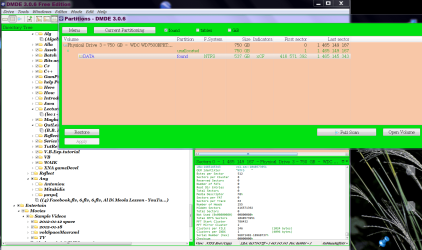
Now I am at the moment DMDE shows the image you see and in the left pane I can see all the structure of data I had.
I don't know how to continue. Is it possible to get my files back without fixing everything well (the rest 3 partitions, mbr, mft etc because I don't need them
and thats why i did the mistake with clean command not remembering that it will clean the whole drive)
So any suggestion? Can I restore them? rebuild only Data partition?
If more information need it I'm happy to give them
Thanks a lot.
 

Attachments
  • DMDE 3.0.6..PNG
    DMDE 3.0.6..PNG
    116.4 KB · Views: 5

My Computer

Computer Manufacturer/Model Number
Acer Aspire 5739G laptop, *Dell XPS L702X
OS
Windows 7 Home Premium x64, *W7 Prem. x64
CPU
Intel P7450 2cores 2,13 GHz, *Intel Core i7-2670QM 2,20 GHz
Memory
4096Mb 2slots, *8088Mb
Graphics Card(s)
Nvidia GeForce 240m, *Nvidia GeForce GT 555m
Screen Resolution
1366x768, *1920x1080
Hard Drives
TOSHIBA MK5055GSX, *WD7500BPKT-75PK4T0 750,16 G
Launch PartitionWizard, on the left Pane click on Partition Recovery Wizard > Next > Select your external drive >Next > Full Disk > Next > QuickScan > Next. Allow the quickscan to complete. At the end of the quickscan you will get a window showing all the found partitions. Post a screenshot of it. After you have taken t e screenshot click on Cancel button on that Window and close PW. You can run it again after getting further instructions from me.
 

My Computer

OS
Windows 7 Home Premium 32 bit
Thanks for reply.
So I closed DMDE and I launch Mini Tool PW. Hoping that I understand you well.
I'm already running QuickScan. It looks it will need maybe 1-2 days to finish.
It is at 604.000 sector from 1.465.149.168 sectors. (750Gb disk)
Few times "not responding", but just for a second and continue scanning (sorry for my poor english)

The disk possible has some physical damage too. That's why I got it out and put a new one in the laptop.
I couldn't run chkdsk because of Raw fs but it looks it comminicate well and I don't hear something strange.
Unfortunatelly is the only place where now are all my Data.
All my backups got infected by the ransonware cerberus out of this disk.
I thought I'm very near to recover with DMDE.... I'll wait finish scanning and upload screenshot.
At the moment it found 2 small partitions 3Mb each. Label "boot".
Thanks for your help.
 

My Computer

Computer Manufacturer/Model Number
Acer Aspire 5739G laptop, *Dell XPS L702X
OS
Windows 7 Home Premium x64, *W7 Prem. x64
CPU
Intel P7450 2cores 2,13 GHz, *Intel Core i7-2670QM 2,20 GHz
Memory
4096Mb 2slots, *8088Mb
Graphics Card(s)
Nvidia GeForce 240m, *Nvidia GeForce GT 555m
Screen Resolution
1366x768, *1920x1080
Hard Drives
TOSHIBA MK5055GSX, *WD7500BPKT-75PK4T0 750,16 G
I don't know much about DMDE and how to use it for data recovery and so I shall stick with the known devil PW. If you had done only diskpart Clean, which only writes zeros to the first 2047 sectors, then I expect Partition Recovery Wizard should easily find the partitions.

Since you are saying that PW is stumbling in Quick Scan, then as you say there may be some damage to the HDD - may be bad sectors. In such a case I shall keep my fingers crossed on the outcome. Anyway let Quick Scan complete.
 

My Computer

OS
Windows 7 Home Premium 32 bit
Hi jumanji.

Like I said my last (wrong) action it was the clean command in an already Raw drive.
Data for sure there are because I have see them in tact with two different apps.
Bad sectors sure there are but I believe not in the last DATA partition, which is the one I want back.
I cannot run chkdsk and I don't know other way to check the bad sectors which I believe are in the first sectors
that's maybe why drive went Raw...
Before I was reading other threads with the same problem and I found very interesting the actions you do with BOOTICE.
Also in my new drive inside of the laptop I have restore an image from Macrium which was exactly what is in the problematic drive that we try to fix.
So near and same that when I connect first time the Raw drive they had signature collison.
I thought that if the two drives are so much the same maybe you could help me to do restoring first sectors with Bootice.
Of course I need help to do this. eg how you back up sectors and restore and some other questions I have.
I try already and download Bootice but I found it in a Japanish site. Is that right? Will it be in English?
Also in some sites I read that there are virus in this app. Have you see anything strange? Still I haven't install it.
Of course I'm going to follow your suggestions. I am newbie in this area.

PW is still in 2.000.000 (about) sector. So is going to take a long long time..... if with the same rythm I count it needs 5 months.....:)
 

My Computer

Computer Manufacturer/Model Number
Acer Aspire 5739G laptop, *Dell XPS L702X
OS
Windows 7 Home Premium x64, *W7 Prem. x64
CPU
Intel P7450 2cores 2,13 GHz, *Intel Core i7-2670QM 2,20 GHz
Memory
4096Mb 2slots, *8088Mb
Graphics Card(s)
Nvidia GeForce 240m, *Nvidia GeForce GT 555m
Screen Resolution
1366x768, *1920x1080
Hard Drives
TOSHIBA MK5055GSX, *WD7500BPKT-75PK4T0 750,16 G
Hmmmm... I thought its going to be a child's play since I assumed that it was a good drive which became RAW after a diskpart clean. In that scenario, it would have indeed been a child's play since PW would have found the Partitions in a jiffy.

Now that the full picture has emerged that the drive was RAW even before and on that you ran clean and PW is limping, its going to be a onerous task.

Sector 0 consists of the MBR code and the partition table.The MBR code can be written at anytime. When you initialise the drive in Windows Disk Management and just stop with initialisation not proceeding further, the MBR code will be written to sector 0. You can use PW to to rebuild MBR. You can see it on the left pane under Operations. You can also write the MBR with bootice. But what is of importance is that we should find the start sector of the fourth partition and write the partition table for that into sector 0. Only then you will be able to see the partition and access it. That is why we are scanning with PW.

If it is not successful, then we shall try TestDisk next.

Now I have a question. You tried DMDE. Does it show the fourth partition start sector No.? We can then ask PW to scan only a specific range around that sector that will take much less time.

Even otherwise follow this dictum. Your 750GB drive will have approximately 1465149167 sectors. Assuming that your fourth partition is 500GB, the start sector should be at one third of that total number of sectors. approximately sector Number 488383055.So cancel the present scan and ask PRW to scan sectors from 488000000 to 48900000 or even 488300000 to 488400000. Leave it to scan this range overnight and let us see whether it can see the partition start point.

As for Bootice, what you see may be in Chinese but the program you download will be in English. There is no need to run bootice now. We know what will be in Sector 0 after the diskpart clean - only all zeros in it.

I am off to bed now - under the new split Inverter aircon that was installed just hours ago. It is still under test run to see whether it reaches the minimum set temp of 17 degree Celsius.
 
Last edited:

My Computer

OS
Windows 7 Home Premium 32 bit
Hi!
Yes in my first post the screenshot shows exactly where DATA partition starts and where ends.
I don't know what "Indicator xCF" means.
I believe DMDE reads only the NTFS partition table because was somehow quick.
The structure in left pane of the "tree" from DATA partition (folders, files etc) looks completely right!
.
So I'm going to follow your advice. Scanning that area only.
Wish to you good luck with your test and
Sweet dreams if finaly you go to sleep.
Tomorrow you might explain to me where and what I have to write in the first sectors .

Cheers
 

My Computer

Computer Manufacturer/Model Number
Acer Aspire 5739G laptop, *Dell XPS L702X
OS
Windows 7 Home Premium x64, *W7 Prem. x64
CPU
Intel P7450 2cores 2,13 GHz, *Intel Core i7-2670QM 2,20 GHz
Memory
4096Mb 2slots, *8088Mb
Graphics Card(s)
Nvidia GeForce 240m, *Nvidia GeForce GT 555m
Screen Resolution
1366x768, *1920x1080
Hard Drives
TOSHIBA MK5055GSX, *WD7500BPKT-75PK4T0 750,16 G
Yep, I see DMDE shows the start sector of fourth partition as 416 571 392. So your Partition Recovery Wizard scan range you may set as 416 500 000 to 416 600 000. If partition Wizard does find the start sector correctly it should be able to write the partition table correctly into sector 0. ( The range given by me is way off from this figure. But then this is the first time we are doing a selected range scan. Next time I should widen the range :D)

Post the screenshot of partitions found Window.
 

My Computer

OS
Windows 7 Home Premium 32 bit
Hi!
I started already yesterday but I set starting point exactly 416.571.392 as shown.
Until 2.000.000 sector it found nothing.
Then I read your last post so I stop it and gave a starting point before that like you suggest.
I'm just waiting to finish.
Yesterday I read about the architectonic of mbr, mft etc and there are few different forms eg where is the copy, relation with vbr, ebr etc. God is very complicate....
I lost again my hopes...
I'll post result.
 

My Computer

Computer Manufacturer/Model Number
Acer Aspire 5739G laptop, *Dell XPS L702X
OS
Windows 7 Home Premium x64, *W7 Prem. x64
CPU
Intel P7450 2cores 2,13 GHz, *Intel Core i7-2670QM 2,20 GHz
Memory
4096Mb 2slots, *8088Mb
Graphics Card(s)
Nvidia GeForce 240m, *Nvidia GeForce GT 555m
Screen Resolution
1366x768, *1920x1080
Hard Drives
TOSHIBA MK5055GSX, *WD7500BPKT-75PK4T0 750,16 G
No result. It finds nothing.
[When I open Wind.Disk Manag. ask me to initialize the disk before I can use it .
Do you know if I've to do it? of course it shows as unallocate drive but maybe I must initialize first for connected it?]

So what's now?
 

My Computer

Computer Manufacturer/Model Number
Acer Aspire 5739G laptop, *Dell XPS L702X
OS
Windows 7 Home Premium x64, *W7 Prem. x64
CPU
Intel P7450 2cores 2,13 GHz, *Intel Core i7-2670QM 2,20 GHz
Memory
4096Mb 2slots, *8088Mb
Graphics Card(s)
Nvidia GeForce 240m, *Nvidia GeForce GT 555m
Screen Resolution
1366x768, *1920x1080
Hard Drives
TOSHIBA MK5055GSX, *WD7500BPKT-75PK4T0 750,16 G
OK, that is surprising. Do not initialise it. We shall check with bootice whether sector 416 571 392 contains the NTFS boot data. Since you are using 64 bit Windows, install 64bit version of bootice.

On how to use bootice, see my post here http://www.sevenforums.com/hardware-devices/310295-lost-partitions.html#post2584426

Click on the sector indicator field, type 416571392 and post the screenshot of what it contains.

A valid NTFS boot sector should look like this. (Here it is the first partition beginning at sector 2048)

19-04-2016 18-00-07.jpg

If it does not show a valid boot sector, then we shall try to check with TestDisk.

I know we are going slow, but that is the way it is going to be in a data recovery exercise.
 
Last edited:

My Computer

OS
Windows 7 Home Premium 32 bit
Hello friend.
I start to think I've to forget my data...
I'd have done already (to forget...) but I was sure everyrhing is intact inside the disk and that was keeping me hoping.
I'll tell you now a secret...
In the begining I tried with EaseUs and it reads everything! I started to recover!
...but they give only 1Gb free and me I had 500Gb data so I had to pay about 80$ if I remember well.
So me (stupid always...) I wanted to get back everything for free..... so I started all the wrong actions
until to be in the situation I'm now....
I could get back everything!
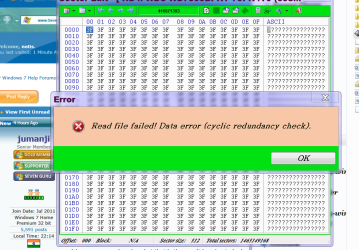
Anyway... like you see in the screenshot bootice cannot read because of cyclic redundance error which is a serious
problem I read. So first we have to check disk and close any bad sectors, then to recover the changes clean command did,
then rebuild partitions, then raw to become again ntfs and then find my data! ?
Ok if the way is the above after we'll need a psychiatric hospital!
I gave up! if you have an idea feel free to tell me
 

Attachments

  • DMDE.PNG
    DMDE.PNG
    39.7 KB · Views: 1

My Computer

Computer Manufacturer/Model Number
Acer Aspire 5739G laptop, *Dell XPS L702X
OS
Windows 7 Home Premium x64, *W7 Prem. x64
CPU
Intel P7450 2cores 2,13 GHz, *Intel Core i7-2670QM 2,20 GHz
Memory
4096Mb 2slots, *8088Mb
Graphics Card(s)
Nvidia GeForce 240m, *Nvidia GeForce GT 555m
Screen Resolution
1366x768, *1920x1080
Hard Drives
TOSHIBA MK5055GSX, *WD7500BPKT-75PK4T0 750,16 G
OK my dear friend, most of the time we try to recover the data with free software. But there are situations when free software fails to bring results. In that situation we recommend commercial software.

And most of the time the OPs when they come seeking help, have already tried so many things which they hide and don't tell us :). So we start from the beginning and the previous history unfolds as we investigate.

If you had seen the data on a drive which was not accessible, which you know was bad and going bad, you must have grabbed it at the first instance, no matter what cost if its worth more than the price you pay for it. Taxing a bad drive repeatedly can only make matters worse with more data going bad..The proper data recovery procedure in this case would be to clone the bad drive and attempt data recovery from the cloned drive.

Check now with EaseUs again and if it shows your data, buy it and get your data out.

My recommendation here is GetDataback Simple. https://www.runtime.org/data-recovery-software.htm

If it scans your drive and lists all folders and files well and good. You can preview the files and check whether those are good. Some files in bad sectors will invariably be bad. If you are happy with the data that you can recover, close your eyes and buy it to recover as much as you can.

Note: You cannot repair a drive with bad sectors. Now a comment on the DMDE screenshot you posted in your first post. During the course of this thread, I was wondering whether clicking on the Restore button there would have restored your drive. Now I know it wouldn't have. It would have probably written the correct partition table to sector 0 but your drive will still be inaccessible because of the bad sectors and the NTFS boot sector at 416571392 is not readable.
 
Last edited:

My Computer

OS
Windows 7 Home Premium 32 bit
Ok jumanji. You are RIGHT in everything you said. !
(only .... it was NOT that I wanted to hide someting... I just didn't want to make tired someone...
I just wrote "my story is long... ask me.." because happened many things, started from a virus...)

Of course DMDE was showing only the structure not the real files because scanning was
somehow very quick to be true (something like "is too good to be true!")
Now two last questions.
I was reading your long thread " Recover data from a diskpart > clean command " where you succed getting back data.
Do you think could apply in my situation or I'm going to loose my time because of bad sectors? and second
Before I put out this problematic drive I made an image of it.
This image I've restore to the new drive (of course data was not in. Data was in another partition, other backup which got infected and lost)
So my new good (inside) drive is exactly what the problematic is without the Data partition.
My question if you know is :
Could I restore the important sectors eg. with bootice and make the bad drive accessible or is not so simple?
And if yes which sectors are the important?

[I recover some files with EaseUs before just few days not long time ago, exept if you think that drive became
inaccessible and bad just in that few days... Still EaseUs find my files but I cannot be sure anymore if is only the mft]

Thank you for everything.
 

My Computer

Computer Manufacturer/Model Number
Acer Aspire 5739G laptop, *Dell XPS L702X
OS
Windows 7 Home Premium x64, *W7 Prem. x64
CPU
Intel P7450 2cores 2,13 GHz, *Intel Core i7-2670QM 2,20 GHz
Memory
4096Mb 2slots, *8088Mb
Graphics Card(s)
Nvidia GeForce 240m, *Nvidia GeForce GT 555m
Screen Resolution
1366x768, *1920x1080
Hard Drives
TOSHIBA MK5055GSX, *WD7500BPKT-75PK4T0 750,16 G
If one accidentally and by mistake runs a diskpart clean on a good drive, recovering it is pretty easy - provided the OP hadn't done any further adventures on it.:)

This however does not apply in your case since it was a bad drive already.

For your second question, Bootice cannot be used to restore the drive. ( It can restore the sector 0 and other important sectors like the NTFS boot sectors, provided you had taken a backup of those important sectors earlier and stored it elsewhere.(Each sector is 512 bytes) The bootice post I had given earlier deals with how to save the important sectors to be able to restore those sectors in case partition related problem arise due to some glitch that often happens.)

So try Getdataback Simple now and check whether you can still see the files. Preview those to check the integrity.Report the results. If you can spend $79 do that and copy the data.

If data is seen, but still you do not want to spend, we can still try TestDisk to see whether it can show the partitions. If it shows the partitions and can list the filles, you can copy the files. But nothing can be guaranteed. It all depends how bad or how good it is still.
 

My Computer

OS
Windows 7 Home Premium 32 bit
Ok. I got it!
So you advice me not to take the way in your old thread I spoke about (reconstruct partitions with "Partition Guru" and all the rest)
I don't have even a card for buying apps from internet... (never I had good relation with banks....) maybe the time came...
So if you please have sometimes a look to this thread maybe I'll be back in 1-2 days if I deside to follow the hardest way with TestDisk and so on..... Again I thank for your patience
 

My Computer

Computer Manufacturer/Model Number
Acer Aspire 5739G laptop, *Dell XPS L702X
OS
Windows 7 Home Premium x64, *W7 Prem. x64
CPU
Intel P7450 2cores 2,13 GHz, *Intel Core i7-2670QM 2,20 GHz
Memory
4096Mb 2slots, *8088Mb
Graphics Card(s)
Nvidia GeForce 240m, *Nvidia GeForce GT 555m
Screen Resolution
1366x768, *1920x1080
Hard Drives
TOSHIBA MK5055GSX, *WD7500BPKT-75PK4T0 750,16 G
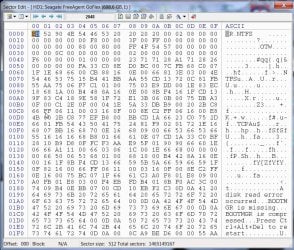
I just now noticed. I wanted the bootice picture of sector 416571392. What I see is that of sector 416571393. Any explanation?

I could understand that you may not be in a position to spend $79. All are not equally well placed as far as money is concerned.

Take your time. No problem.
 

My Computer

OS
Windows 7 Home Premium 32 bit
I tried also ............392 and some others near the beginning of the volume. All are with this Win. error (cyclic redu....)
I read a little about this error and they say that the "control" Os makes when reads data somehow finds that mismatch with
what it had to be. They say to run chkdsk which I cannot because of Raw fs.....
You told me that if there are bad sectors disk is over. But chkdsk is not just for this case? Anyway I cannot run it if disk is not ntfs.
What I don't understand is when the beginning of the volume is a mess how the tools give the structure tree of the Data
completely right? Maybe they read from somewhere where is a copy or somewhere must be.
Half-Knowing is worster than not-Knowing......
 

My Computer

Computer Manufacturer/Model Number
Acer Aspire 5739G laptop, *Dell XPS L702X
OS
Windows 7 Home Premium x64, *W7 Prem. x64
CPU
Intel P7450 2cores 2,13 GHz, *Intel Core i7-2670QM 2,20 GHz
Memory
4096Mb 2slots, *8088Mb
Graphics Card(s)
Nvidia GeForce 240m, *Nvidia GeForce GT 555m
Screen Resolution
1366x768, *1920x1080
Hard Drives
TOSHIBA MK5055GSX, *WD7500BPKT-75PK4T0 750,16 G
Normally a certain percentage of good sectors are kept in reserve to replace the bad sectors as they evolve. If Checkdisk while reading the sectors finds that a particular sector is losing its strength and is likely to go bad sooner or later, immediately retrieves the data in it and writes it to one of the reserved sectors.The weak sector is taken off the roll. The HDD controller also keeps a vigil and continuously doing this. So normally the likely to become bad sectors are mapped to the reserved sectors and this process goes on in the background without the user ever knowing it.But once the reserved sectors are exhausted, the newly developing bad sectors have no place to go and that is the point you start seeing the bad sectors and start getting CRC errors.Your data in those sectors is lost and can no longer be retrieved. Once you start seeing the bad sectors or its symptoms, that means your HDD is likely to die sooner or later. That could be tomorrow or a year later.We can't say.

The beginning of the volume is in a mess. How then do you get the structure tree of the data ? The start sector where NTFS is written is known as Volume/Partition Boot record. A backup of this boot sector also lies hidden in one of the sectors in that volume/partition. Programs like TestDisk and others can find this backup and see the data.This also implies that the Master File Table in it is still good. But will it remain the same tomorrow? if you continue to tax a drive that you know is bad/going bad, tomorrow itself the backup boot sector may become bad or your MFT can become bad. Then you have lost everything. That is why I said if you had seen the data you should have grabbed it immediately.

Don't worry about knowing and not knowing. I also know only half of everything or even less :D.
 

My Computer

OS
Windows 7 Home Premium 32 bit
Aha... Ok. now I understand (a little better...)
I had a wrong picture of how a disk get bad . So there is a limit retriving data from bad sectors..
I thought Os mark a sector off and copy its data in the next healthy sector. So that death is far far away...
I should not make you tired with knowledge I could find somewhere and read them... but often when I'm reading in detail about something in the end I'm just confused. Usually I study from Wikipedia and in the end I'm just mad and in deeper darkness....
I believe computing needs more reading than to be a doctor!
This that I don't know is if is worth to spend a life infront of a monitor....
Maybe I have to loose Data to start new and fresh!
Data is for sure past.... Why we need the past? ..is weakness....
I'm going to sleep now. Tommorow maybe I'll have new ideas to bring more mess in my system.... :)

Thank you for all the explanations and for the time you spend.
 

My Computer

Computer Manufacturer/Model Number
Acer Aspire 5739G laptop, *Dell XPS L702X
OS
Windows 7 Home Premium x64, *W7 Prem. x64
CPU
Intel P7450 2cores 2,13 GHz, *Intel Core i7-2670QM 2,20 GHz
Memory
4096Mb 2slots, *8088Mb
Graphics Card(s)
Nvidia GeForce 240m, *Nvidia GeForce GT 555m
Screen Resolution
1366x768, *1920x1080
Hard Drives
TOSHIBA MK5055GSX, *WD7500BPKT-75PK4T0 750,16 G
Back
Top