Solved External Seagate 1 TB HDD suddenly needs formatting

m1l4droid

New member
Local time
6:06 AM
Messages
16
Location
Iran
Okay, so this is how it started. I had my Android tablet (Acer A500) hooked to my x64 Windows 7 PC, to transfer a file to it. After that, I tried to safety remove it, but since it uses MTP, it was not in the connected devices list, so I accidentally safety removed my Ext HDD, a Seagate 1 TB HDD with a power outlet. Since the PC said it's safe to remove the hardware, i removed the HDD, and my tablet, and hooked the HDD back on, but ever since, my computer says it needs to be formatted... while my tablet that has a USB port, and on Linux Ubuntu on my computer, it's recognized and it works fine. I've also tried another computer, running x86 Windows 7, but it doesn't work on that one either. I tried changing USB ports, no game, I also tried a reboot... no dice. I've also tried removing it in device manager list and installing it back, but it didn't help.

Please help me, I've got over 800 GB of precious data on my HDD I can't afford to lose. Since in works on Android and Linux, I don't think it really needs a format...
 

My Computer My Computer

OS
Windows 7 Ultimate x64
CPU
AMD FX-8320
Motherboard
ASUS M5A97 R2.0
Memory
8 GB GeIL DRAGON 1600 (2x4GB)
Graphics Card(s)
Sapphire R9 280X Dual-X
Sound Card
On board
Monitor(s) Displays
Samsung BW 2253+
Screen Resolution
1680x1050
Hard Drives
1 TB Internal Seagate Barracuda, 1 TB Seagate External
PSU
Corsair VS550 80+ Gold
Case
Sentry GS-6000
Cooling
DeepCool GAMMAXX 300
Keyboard
Oscar V-K022
Mouse
E-Blue Mazer Typer-R

My Computer My Computer

Computer type
PC/Desktop
Computer Manufacturer/Model Number
Golden Mk. I.4
OS
Windows 10 Pro x64 ; Xubuntu x64
CPU
Intel i7 860 @ 2.80 GHz O/C'ed to 4.0GHz
Motherboard
Gigabyte P55A-UD3R Rev.1. Award BIOS F13
Memory
16GB Corsair Vengance DDR3 @ 661 MHz Dual Channel (9-9-9-24)
Graphics Card(s)
EVGA NVidia GTX 560 1024MB
Sound Card
Realtek Integrated
Monitor(s) Displays
Dual Samsung SyncMaster 2494HS
Screen Resolution
1920*1080 and 1920*1080
Hard Drives
1*Samsung 840 EVO 120GB SSD;
1*OCZ Vertex 2 60GB SSD;
2*Samsung F3 SpinPoint 1TB in RAID0;
1*Samsung F1 SpinPoint 1TB;
2*Western Digital 1TB External USB 3.0
1*Western Digital 500GB External USB 3.0
1*Seagate 500GB External USB 2.0
PSU
Thermaltake ToughPower QFan 750W
Case
Thermaltake Element S VK60001W2Z
Cooling
Corsair H60 Water Cooling, 2*230mm and 2*80mm case fans
Keyboard
Logitech G110
Mouse
Logitech MX518
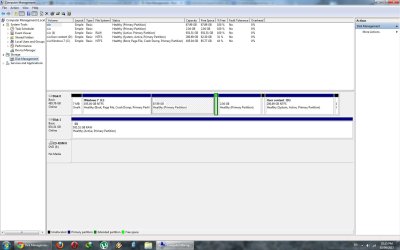
Here you go sir, it's shown as RAW. Like I said, it works fine on Linux... really weird problem.
 

Attachments

  • Untitled.jpg
    Untitled.jpg
    121.1 KB · Views: 12

My Computer My Computer

OS
Windows 7 Ultimate x64
CPU
AMD FX-8320
Motherboard
ASUS M5A97 R2.0
Memory
8 GB GeIL DRAGON 1600 (2x4GB)
Graphics Card(s)
Sapphire R9 280X Dual-X
Sound Card
On board
Monitor(s) Displays
Samsung BW 2253+
Screen Resolution
1680x1050
Hard Drives
1 TB Internal Seagate Barracuda, 1 TB Seagate External
PSU
Corsair VS550 80+ Gold
Case
Sentry GS-6000
Cooling
DeepCool GAMMAXX 300
Keyboard
Oscar V-K022
Mouse
E-Blue Mazer Typer-R
Okay, so I ran chkdsk /f for this drive and it was fixed. And all my files are there, safe and secure.
 

My Computer My Computer

OS
Windows 7 Ultimate x64
CPU
AMD FX-8320
Motherboard
ASUS M5A97 R2.0
Memory
8 GB GeIL DRAGON 1600 (2x4GB)
Graphics Card(s)
Sapphire R9 280X Dual-X
Sound Card
On board
Monitor(s) Displays
Samsung BW 2253+
Screen Resolution
1680x1050
Hard Drives
1 TB Internal Seagate Barracuda, 1 TB Seagate External
PSU
Corsair VS550 80+ Gold
Case
Sentry GS-6000
Cooling
DeepCool GAMMAXX 300
Keyboard
Oscar V-K022
Mouse
E-Blue Mazer Typer-R
Back
Top