
Extra Drives Under My Computer

ExNavy11

Member
Power User
Local time
4:52 AM
Messages
256
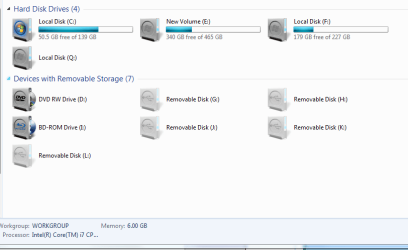
In the screen shot, C, E, and F are legit volumes/drives. I have no idea what this Local Disk 'Q' is. I try to open it, says not accessible (and it shouldnt be because it doesnt exist)

Also, Removable Storage, I have 1 DVD drive, the rest G - L are bogus. One of those is listed as a BD-ROM which I dont have either.

Why are these listed when they dont exist?
 

Attachments
  • Capture.PNG
    Capture.PNG
    19.7 KB · Views: 421

My Computer

Computer Manufacturer/Model Number
Built
OS
Windows 7 RTM
CPU
Intel I7 920 2.67 ghz
Motherboard
EVGA X58
Memory
6GB CORSAIR DOMINATOR
Graphics Card(s)
GeForce GTX 260 Core 216 896MB 448-bit GDDR3 PCI Express 2.0
The only time I've seen something like this is when a printer attached to a pc with a built in memory card reader on my parents computer.

Other than that I have no other reason why you would have so many drives.
 

My Computer

OS
vista x64
CPU
E8600 Core Duo
Motherboard
EVGA 780i Sli
Memory
8 GB
Graphics Card(s)
BFG 8800 GTX
USB devices appear like this

I use an IOGEAR extreme KVM with USB cabling to control my various computers. The KVM appears as a removable drive. USB thumb drives also appear like this. As stated in a previous posting my printer with card reader will also appear like this or an external card reader or usb hub can also appear like this.

I would look into all USB devices connected to your pc (Keybooard, mouse, gaming controller, printer, external HDD, etc)

BD-ROM is a Blue Ray disk player.
 
Last edited:

My Computer

Computer Manufacturer/Model Number
Systemax N2000 Gaming PC
OS
Windows 7 Ultimate x64
CPU
Q6600 @2.4ghz (G0 stepping)
Motherboard
XFX nforce 680i LT
Memory
8 gb OCZ vista essential sli PC-6400
Graphics Card(s)
Dual 9800gt in SLI mode
Sound Card
Integrated 8.1 High Definition Audio
Monitor(s) Displays
Dual Sceptre x246w 24 inch monitors
Screen Resolution
1920 x 1200 each monitor
Hard Drives
500 GB SATA II / 7500 rpm
PSU
Cooler Master Real Power Pro 1250W
Case
N2000 server tower
Cooling
Thermaltake Bigwater 760 is
Keyboard
MS Intelitype 6000 v2.0
Mouse
MS Intelipoint 6000
Internet Speed
Wi-power 1.5GB up / 512k down
Other Info
Windows 7 Ultimate x64, Windows 7 Pro x64, Windows Home Premium X86, Windows XP pro, Windows Home Server x86, Ubuntu 10.4 x86 and x64, Ubuntu server 10.4, SQL Server 2005, MySQL 5.0
mega dittos to you Rush lol

Yeah, its driving me nuts. I do have an explanation for one of the Removable Storages besides the legit DVD drive. One was for my printer. The rest just dont exist. I know you can hide ones that arent in use, but ive never seen them just pop up like this when they dont exist. Especially a Local Disc that doesnt exist. Its weird.
 

My Computer

Computer Manufacturer/Model Number
Built
OS
Windows 7 RTM
CPU
Intel I7 920 2.67 ghz
Motherboard
EVGA X58
Memory
6GB CORSAIR DOMINATOR
Graphics Card(s)
GeForce GTX 260 Core 216 896MB 448-bit GDDR3 PCI Express 2.0
Maybe it is the USB, but if a mouse is plugged in or a keyboard or nothing else at all, I didnt think it would show up as Removable Storage. If so, its interesting to know. Learn something new everyday.
 

My Computer

Computer Manufacturer/Model Number
Built
OS
Windows 7 RTM
CPU
Intel I7 920 2.67 ghz
Motherboard
EVGA X58
Memory
6GB CORSAIR DOMINATOR
Graphics Card(s)
GeForce GTX 260 Core 216 896MB 448-bit GDDR3 PCI Express 2.0
Right click on My Computer -> Manage -> Disk Management
Are they accessible? Can you click on them? Do they open up anything? What are they formatted as?
Can you navigate to the USB management platform and click remove them?
 
I got rid of the Removable Storage drives. But Local Disk Q is not listed under Disk Management at all.

Edit, actually I couldnt get rid of what shows as BD-ROM drive either. It even shows up under Device Manager as a GXKHGP 2ZK12R4LI3Gx SCSI CdRom Device.
 

My Computer

Computer Manufacturer/Model Number
Built
OS
Windows 7 RTM
CPU
Intel I7 920 2.67 ghz
Motherboard
EVGA X58
Memory
6GB CORSAIR DOMINATOR
Graphics Card(s)
GeForce GTX 260 Core 216 896MB 448-bit GDDR3 PCI Express 2.0
I got rid of the Removable Storage drives. But Local Disk Q is not listed under Disk Management at all.

Edit, actually I couldnt get rid of what shows as BD-ROM drive either. It even shows up under Device Manager as a GXKHGP 2ZK12R4LI3Gx SCSI CdRom Device.

Do you have CD emulation programs eg.. Daemon Tools?
That would explain the BD-ROM drive.
 

My Computer

OS
Windows 7 Ultimate 32bit, Mac OS Snow Leopard 10.6
CPU
P4 2.4ghz @ 2.56Ghz
Memory
1gb DDR
Graphics Card(s)
7600GT AGP 4X
Sound Card
Onboard
Monitor(s) Displays
19LG
Screen Resolution
1280x1024
Hard Drives
120GB WD Caviar
80 Seagate Barracuda
PSU
430W Thermaltake
Keyboard
Logitech Media Keyboard
Internet Speed
1.5MB
Yep I do, that would be the drive you are referring to. Thanks.

Now, that damn Local Disk Q. Probably something else thats simple
 

My Computer

Computer Manufacturer/Model Number
Built
OS
Windows 7 RTM
CPU
Intel I7 920 2.67 ghz
Motherboard
EVGA X58
Memory
6GB CORSAIR DOMINATOR
Graphics Card(s)
GeForce GTX 260 Core 216 896MB 448-bit GDDR3 PCI Express 2.0
Well, I read some interesting Googlege regarding phantom drives. I do not know if any of it applies to your case. Just not enough info specific to 7. Could be viral, could be virtual drive software run amock.

Just a jarhead trying to help a squid.

Thanks for all the rides.
 
Office 2010 made that disk for some reason.
 

My Computer

Computer Manufacturer/Model Number
PC
OS
Windows 7 7100 64bit
CPU
E6750
Motherboard
Asus P5KPL-E
Memory
4096
Graphics Card(s)
nVIDIA GeForce 8600 GT
Monitor(s) Displays
CRT
Hard Drives
320+80GB
Internet Speed
100/10MBps
Other Info
WEI 5.3
all of the USB drives are just vacant usb slots in your computer and your dvd drive is compatible with blu ray and so the computer reads it as two drives. some drives work that way.

local disk q was made by microsoft 'click-to-run" software, i'm guessing that you have downloaded office 2010 beta just like i did.
 

My Computer

Computer Manufacturer/Model Number
emachines e627, dell dimension 5100
OS
windows 7, windows xp
CPU
amd athlon tf-20, intel pentium 4
Memory
2g
Graphics Card(s)
ati radeon hd3200
Sound Card
realtek HDaudio, sigmtel
This is a virtual drive. E.g. Office 2010 uses one for installation and some Imaging programs will use that if you mount the image. It should disappear after reboot.
http://www.osnews.com/story/22449
 

My Computer

Computer Manufacturer/Model Number
HP, Dell, Gateway, Toshiba - 4 laptops and 2 desktops
OS
Vista, Windows7, Mint Mate, Zorin, Windows 8
CPU
from 1.6GHz Duo to i7
Monitor(s) Displays
2x HP w2207
Hard Drives
5x HDD, 7x SSD, 12x Externals
Keyboard
with trackball - no mices
Mouse
Trackball mice
Internet Speed
DSL 6000
I know this is an old topic, but it was brought to my attention that participation in the Office 2010 Beta from Microsoft has something to do with it.
 

My Computer

OS
Windows 7 Professional
Back
Top