
Extra factory image on external hard drive

tuscanva

New member
Local time
12:33 AM
Messages
11
Location
Virginia
Since upgrading from Vista to Windows 7 on HP desktop, I find one of my external drive to be now labled "Factory Image" even though Drive D is also labled "Factory Image". What should I do?:shock: The system is running fine, but I get a message that my Windows bachups "failed'.
 

My Computer My Computer

Computer Manufacturer/Model Number
HP Pavilion GX613AA-ABA a6300f
OS
windows 7 upgrade 32bit
CPU
2.00 gigahertz Intel Pentium Dual 64 kilobyte primary memory
Motherboard
FOXCONN Napa HP P/N 200 megahertz
Memory
1919 Megabytes Installed
Graphics Card(s)
NVIDIA GeForce 7100/NVIDIA nForce 630i
Monitor(s) Displays
LG E2250 21.7"vis.s/n
Hard Drives
2310.50 Gigabytes Usable Hard Drive Capacity
Hitachi HDT725050VLA360 ATA Device [Hard drive] (500.10 GB) -- drive 0, s/n
Hitachi HTS723225L9A360 USB Device [Hard drive] (250.06 GB) -- drive 11, s/n
SAMSUNG HD501LJ USB Device [Hard drive] (500.11 G
Can you run disk management and post a screenshot of your OS and external disks.
Use the windows snipping tool and the little paperclip on the seven forums toolbar.
 

My Computer My Computer

Computer type
PC/Desktop
Computer Manufacturer/Model Number
Own build
OS
Windows 7x64 Home Premium SP1
CPU
Intel i7 2600k
Motherboard
ASUS P8Z68 Deluxe
Memory
G.Skill Ripjaws (DDR3-1600) 2x4GB
Graphics Card(s)
Nvidia GeForce GTS 450; Intel HD Graphics 3000(GT2+)
Monitor(s) Displays
Dell Ultrasharp IPS panel U2311H, Samsung SyncMaster P2350
Screen Resolution
1920x1080
Hard Drives
Samsung 850 Pro SSD 256GB, Samsung SSD 840 120GB, Seagates 1TB Barracuda ST31000528AS x2
PSU
Seasonic M12II 520W
Case
Lian Li Lancool PC-K60
Cooling
Case: 1x120mm, 3x140mm CPU: Hyper 212+
Keyboard
Logitech MK520 (wireless)
Mouse
Logitech MK520
Internet Speed
6-7 Mbps
Antivirus
Norton Security Premium, Malwarebytes on 2 (MSE on 3rd PC)
Browser
FireFox
Other Info
Audio: Logitech Z523 2.1

My Computer My Computer

Computer Manufacturer/Model Number
HP Pavilion GX613AA-ABA a6300f
OS
windows 7 upgrade 32bit
CPU
2.00 gigahertz Intel Pentium Dual 64 kilobyte primary memory
Motherboard
FOXCONN Napa HP P/N 200 megahertz
Memory
1919 Megabytes Installed
Graphics Card(s)
NVIDIA GeForce 7100/NVIDIA nForce 630i
Monitor(s) Displays
LG E2250 21.7"vis.s/n
Hard Drives
2310.50 Gigabytes Usable Hard Drive Capacity
Hitachi HDT725050VLA360 ATA Device [Hard drive] (500.10 GB) -- drive 0, s/n
Hitachi HTS723225L9A360 USB Device [Hard drive] (250.06 GB) -- drive 11, s/n
SAMSUNG HD501LJ USB Device [Hard drive] (500.11 G
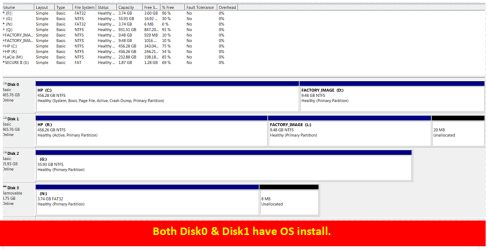
this is correct. But why do I have an external drive (disk 1/ drive F) dedicated to "factory image"? Is it necessary or redundant? I do not know how this happened. Does Windows defoult to an additional disk under some circumstances?
 

My Computer My Computer

Computer Manufacturer/Model Number
HP Pavilion GX613AA-ABA a6300f
OS
windows 7 upgrade 32bit
CPU
2.00 gigahertz Intel Pentium Dual 64 kilobyte primary memory
Motherboard
FOXCONN Napa HP P/N 200 megahertz
Memory
1919 Megabytes Installed
Graphics Card(s)
NVIDIA GeForce 7100/NVIDIA nForce 630i
Monitor(s) Displays
LG E2250 21.7"vis.s/n
Hard Drives
2310.50 Gigabytes Usable Hard Drive Capacity
Hitachi HDT725050VLA360 ATA Device [Hard drive] (500.10 GB) -- drive 0, s/n
Hitachi HTS723225L9A360 USB Device [Hard drive] (250.06 GB) -- drive 11, s/n
SAMSUNG HD501LJ USB Device [Hard drive] (500.11 G
this is correct. But why do I have an external drive (disk 1/ drive F) dedicated to "factory image"? Is it necessary or redundant? I do not know how this happened. Does Windows defoult to an additional disk under some circumstances?
 

My Computer My Computer

Computer Manufacturer/Model Number
HP Pavilion GX613AA-ABA a6300f
OS
windows 7 upgrade 32bit
CPU
2.00 gigahertz Intel Pentium Dual 64 kilobyte primary memory
Motherboard
FOXCONN Napa HP P/N 200 megahertz
Memory
1919 Megabytes Installed
Graphics Card(s)
NVIDIA GeForce 7100/NVIDIA nForce 630i
Monitor(s) Displays
LG E2250 21.7"vis.s/n
Hard Drives
2310.50 Gigabytes Usable Hard Drive Capacity
Hitachi HDT725050VLA360 ATA Device [Hard drive] (500.10 GB) -- drive 0, s/n
Hitachi HTS723225L9A360 USB Device [Hard drive] (250.06 GB) -- drive 11, s/n
SAMSUNG HD501LJ USB Device [Hard drive] (500.11 G
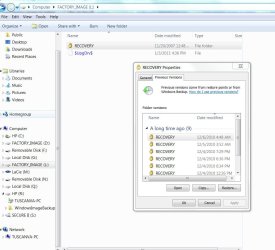
Please excuse my ignorance, but is the D drive(0 disk) adequate for factory image? Do I need the Factory Image on the F drive as well? If not I would plan to reformat it. My concern is whether or not the Factory Image on the external drive is needed.
 

My Computer My Computer

Computer Manufacturer/Model Number
HP Pavilion GX613AA-ABA a6300f
OS
windows 7 upgrade 32bit
CPU
2.00 gigahertz Intel Pentium Dual 64 kilobyte primary memory
Motherboard
FOXCONN Napa HP P/N 200 megahertz
Memory
1919 Megabytes Installed
Graphics Card(s)
NVIDIA GeForce 7100/NVIDIA nForce 630i
Monitor(s) Displays
LG E2250 21.7"vis.s/n
Hard Drives
2310.50 Gigabytes Usable Hard Drive Capacity
Hitachi HDT725050VLA360 ATA Device [Hard drive] (500.10 GB) -- drive 0, s/n
Hitachi HTS723225L9A360 USB Device [Hard drive] (250.06 GB) -- drive 11, s/n
SAMSUNG HD501LJ USB Device [Hard drive] (500.11 G
The Factory Image on F: is from the HP/Compaq PC the HD drive was on.
 

My Computer My Computer

OS
ME/XP/Vista/Win7
I'm not sure I understand. The F Drive is an external drive. I have 4 external hard drive. D is a partition on the internal hard drive. Is factory image on F drive necessary?
 

My Computer My Computer

Computer Manufacturer/Model Number
HP Pavilion GX613AA-ABA a6300f
OS
windows 7 upgrade 32bit
CPU
2.00 gigahertz Intel Pentium Dual 64 kilobyte primary memory
Motherboard
FOXCONN Napa HP P/N 200 megahertz
Memory
1919 Megabytes Installed
Graphics Card(s)
NVIDIA GeForce 7100/NVIDIA nForce 630i
Monitor(s) Displays
LG E2250 21.7"vis.s/n
Hard Drives
2310.50 Gigabytes Usable Hard Drive Capacity
Hitachi HDT725050VLA360 ATA Device [Hard drive] (500.10 GB) -- drive 0, s/n
Hitachi HTS723225L9A360 USB Device [Hard drive] (250.06 GB) -- drive 11, s/n
SAMSUNG HD501LJ USB Device [Hard drive] (500.11 G
I purchased it can't remember ffrom who. It is a Samsung HD5011J
 

My Computer My Computer

Computer Manufacturer/Model Number
HP Pavilion GX613AA-ABA a6300f
OS
windows 7 upgrade 32bit
CPU
2.00 gigahertz Intel Pentium Dual 64 kilobyte primary memory
Motherboard
FOXCONN Napa HP P/N 200 megahertz
Memory
1919 Megabytes Installed
Graphics Card(s)
NVIDIA GeForce 7100/NVIDIA nForce 630i
Monitor(s) Displays
LG E2250 21.7"vis.s/n
Hard Drives
2310.50 Gigabytes Usable Hard Drive Capacity
Hitachi HDT725050VLA360 ATA Device [Hard drive] (500.10 GB) -- drive 0, s/n
Hitachi HTS723225L9A360 USB Device [Hard drive] (250.06 GB) -- drive 11, s/n
SAMSUNG HD501LJ USB Device [Hard drive] (500.11 G
As the DATA is not yours, I would clean the HD drive.
 

My Computer My Computer

OS
ME/XP/Vista/Win7
Did you ever make a Windows7 system image. If yes, it probably picked that drive because it was the most obvious.

Open the drive and see what files are on it. Post them here.
 

My Computer My Computer

Computer Manufacturer/Model Number
HP, Dell, Gateway, Toshiba - 4 laptops and 2 desktops
OS
Vista, Windows7, Mint Mate, Zorin, Windows 8
CPU
from 1.6GHz Duo to i7
Monitor(s) Displays
2x HP w2207
Hard Drives
5x HDD, 7x SSD, 12x Externals
Keyboard
with trackball - no mices
Mouse
Trackball mice
Internet Speed
DSL 6000
I cannot open contents of Drive L but I will JPG properties of both Drive L and HP-R which are both on Disk 1. They will eith clipped on this or the next post.
Drive L factory image 10GB of Disk 1  500GB.JPGContents of HP-R Drive dates 1 4 2011 comprize 467 GB of 500GB disk.JPG
 

My Computer My Computer

Computer Manufacturer/Model Number
HP Pavilion GX613AA-ABA a6300f
OS
windows 7 upgrade 32bit
CPU
2.00 gigahertz Intel Pentium Dual 64 kilobyte primary memory
Motherboard
FOXCONN Napa HP P/N 200 megahertz
Memory
1919 Megabytes Installed
Graphics Card(s)
NVIDIA GeForce 7100/NVIDIA nForce 630i
Monitor(s) Displays
LG E2250 21.7"vis.s/n
Hard Drives
2310.50 Gigabytes Usable Hard Drive Capacity
Hitachi HDT725050VLA360 ATA Device [Hard drive] (500.10 GB) -- drive 0, s/n
Hitachi HTS723225L9A360 USB Device [Hard drive] (250.06 GB) -- drive 11, s/n
SAMSUNG HD501LJ USB Device [Hard drive] (500.11 G
Disk 0 has an OS but Disk 1 probably used to have an OS but doesn't any longer.
I'd guess that Disk 1 was an old HP OS disk.
If Disk 1 was purchased new then some operation has been performed on it. Did you do anything to it? eg. attempt a clone?
 

My Computer My Computer

Computer type
PC/Desktop
Computer Manufacturer/Model Number
Own build
OS
Windows 7x64 Home Premium SP1
CPU
Intel i7 2600k
Motherboard
ASUS P8Z68 Deluxe
Memory
G.Skill Ripjaws (DDR3-1600) 2x4GB
Graphics Card(s)
Nvidia GeForce GTS 450; Intel HD Graphics 3000(GT2+)
Monitor(s) Displays
Dell Ultrasharp IPS panel U2311H, Samsung SyncMaster P2350
Screen Resolution
1920x1080
Hard Drives
Samsung 850 Pro SSD 256GB, Samsung SSD 840 120GB, Seagates 1TB Barracuda ST31000528AS x2
PSU
Seasonic M12II 520W
Case
Lian Li Lancool PC-K60
Cooling
Case: 1x120mm, 3x140mm CPU: Hyper 212+
Keyboard
Logitech MK520 (wireless)
Mouse
Logitech MK520
Internet Speed
6-7 Mbps
Antivirus
Norton Security Premium, Malwarebytes on 2 (MSE on 3rd PC)
Browser
FireFox
Other Info
Audio: Logitech Z523 2.1
I'm not sure. Some time back when I was operating VISTA I recall installing a backup application "BounceBack Ultimate" which did require a dedicated disk. After a couple of disasters, I removed the application and Disk1 may be the remnant. Otherwise, I can only attribute it to my upgrade to Windows 7.
 

My Computer My Computer

Computer Manufacturer/Model Number
HP Pavilion GX613AA-ABA a6300f
OS
windows 7 upgrade 32bit
CPU
2.00 gigahertz Intel Pentium Dual 64 kilobyte primary memory
Motherboard
FOXCONN Napa HP P/N 200 megahertz
Memory
1919 Megabytes Installed
Graphics Card(s)
NVIDIA GeForce 7100/NVIDIA nForce 630i
Monitor(s) Displays
LG E2250 21.7"vis.s/n
Hard Drives
2310.50 Gigabytes Usable Hard Drive Capacity
Hitachi HDT725050VLA360 ATA Device [Hard drive] (500.10 GB) -- drive 0, s/n
Hitachi HTS723225L9A360 USB Device [Hard drive] (250.06 GB) -- drive 11, s/n
SAMSUNG HD501LJ USB Device [Hard drive] (500.11 G
Whatever is on L, you can probably delete. On R, you seem to have an image. But what about F where you had the problem.
 

My Computer My Computer

Computer Manufacturer/Model Number
HP, Dell, Gateway, Toshiba - 4 laptops and 2 desktops
OS
Vista, Windows7, Mint Mate, Zorin, Windows 8
CPU
from 1.6GHz Duo to i7
Monitor(s) Displays
2x HP w2207
Hard Drives
5x HDD, 7x SSD, 12x Externals
Keyboard
with trackball - no mices
Mouse
Trackball mice
Internet Speed
DSL 6000
I'm not sure. What I think happened is this. To identify which of my external drives was disk 1 I temporarily disconnected one of the external drives then reconnected it. Apparently the disk manager reassigned drive letters and What was drive F now is drive R. F drive no longer shows up under "my computer"
 

My Computer My Computer

Computer Manufacturer/Model Number
HP Pavilion GX613AA-ABA a6300f
OS
windows 7 upgrade 32bit
CPU
2.00 gigahertz Intel Pentium Dual 64 kilobyte primary memory
Motherboard
FOXCONN Napa HP P/N 200 megahertz
Memory
1919 Megabytes Installed
Graphics Card(s)
NVIDIA GeForce 7100/NVIDIA nForce 630i
Monitor(s) Displays
LG E2250 21.7"vis.s/n
Hard Drives
2310.50 Gigabytes Usable Hard Drive Capacity
Hitachi HDT725050VLA360 ATA Device [Hard drive] (500.10 GB) -- drive 0, s/n
Hitachi HTS723225L9A360 USB Device [Hard drive] (250.06 GB) -- drive 11, s/n
SAMSUNG HD501LJ USB Device [Hard drive] (500.11 G
Understand. As I said, delete the "L" stuff. The files on "R" must have come about from imaging. Only you would know when that happened and whether you want to keep it. You can always delete it and create a new image - if that's what you want.

But if you go into imaging, I would highly recommend you use free Macrium or free Paragon in lieu of Win7 imaging. http://www.sevenforums.com/tutorials/73828-imaging-free-macrium.html?ltr=I
 

My Computer My Computer

Computer Manufacturer/Model Number
HP, Dell, Gateway, Toshiba - 4 laptops and 2 desktops
OS
Vista, Windows7, Mint Mate, Zorin, Windows 8
CPU
from 1.6GHz Duo to i7
Monitor(s) Displays
2x HP w2207
Hard Drives
5x HDD, 7x SSD, 12x Externals
Keyboard
with trackball - no mices
Mouse
Trackball mice
Internet Speed
DSL 6000
Back
Top