Extra Long Delay In Connect Time?

toughbook

New member
Power User
VIP
Local time
1:05 AM
Messages
241
Location
Georgia
I can't figure out why I have such a delay in my computer being able to connect. Once I start up, the white bars will show instantly, sometimes with the yellow mark in them, sometimes not. Even if the white bars show up instantly I still cannot connect. It takes like 30 to 60 seconds until I can. I will try the Diagnose feature and it will say no problems, however I still can't connect.
If I look at the " Show me all my device's on my network" it will show a picture of my computer~Router~Web. There is a red line between the Router and the Web showing it is not connected. Which to me means that my router and computer are connected, but something else is not. Something is holding up my connection time and I can't figure it out:mad:

Any advice!!!!
 

My Computer

Computer type
Laptop
Computer Manufacturer/Model Number
Panasonic Toughbook CF54
OS
W7 Pro
CPU
Intel Core i-5300U
Motherboard
America MegaTrends
Memory
16Gb DDR3
Graphics Card(s)
Intel HD Graphics 5500
Sound Card
SoundMax
Monitor(s) Displays
DFP W/CircularPolarization 1000 Nit Touch
Screen Resolution
1920X1080
Hard Drives
Samsung SSD 850 Pro 512Gb
PSU
N/A
Case
Magnesium
Cooling
Passive
Keyboard
Emissive
Internet Speed
U-Verse Extreme 21MBPS,
Antivirus
MSE, Malwarebytes Professional
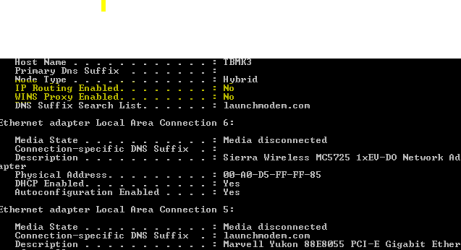
Look at the screen shot. It shows IP Routing Enabled as NO. Is that correct?
 

Attachments

  • Capture.PNG
    Capture.PNG
    4.5 KB · Views: 110

My Computer

Computer type
Laptop
Computer Manufacturer/Model Number
Panasonic Toughbook CF54
OS
W7 Pro
CPU
Intel Core i-5300U
Motherboard
America MegaTrends
Memory
16Gb DDR3
Graphics Card(s)
Intel HD Graphics 5500
Sound Card
SoundMax
Monitor(s) Displays
DFP W/CircularPolarization 1000 Nit Touch
Screen Resolution
1920X1080
Hard Drives
Samsung SSD 850 Pro 512Gb
PSU
N/A
Case
Magnesium
Cooling
Passive
Keyboard
Emissive
Internet Speed
U-Verse Extreme 21MBPS,
Antivirus
MSE, Malwarebytes Professional
Mine shows as NO also -- and no problems.

Could u try - momentarily - kicking off any wep security and see if that makes a difference.

In addition from an elevated command prompt try:

ipconfig /release

ipconfig /renew

ipconfig /flushdns

Then reboot the router and machine and see what happens.
 

My Computer

OS
Windows XP - Now Windows 7 Home Premium (64-bit).
Thanks Manhunter for the reply. I will give it a shot. To turn off any WEP security, does that mean I have to go into the router settings to do that? I guess I could setup a guest login with my router and use that with no WEP for the time being. BTW~I have a D-link DIR~655
 

My Computer

Computer type
Laptop
Computer Manufacturer/Model Number
Panasonic Toughbook CF54
OS
W7 Pro
CPU
Intel Core i-5300U
Motherboard
America MegaTrends
Memory
16Gb DDR3
Graphics Card(s)
Intel HD Graphics 5500
Sound Card
SoundMax
Monitor(s) Displays
DFP W/CircularPolarization 1000 Nit Touch
Screen Resolution
1920X1080
Hard Drives
Samsung SSD 850 Pro 512Gb
PSU
N/A
Case
Magnesium
Cooling
Passive
Keyboard
Emissive
Internet Speed
U-Verse Extreme 21MBPS,
Antivirus
MSE, Malwarebytes Professional
Well, that worked! I did not relase any WEP settings. I performed the Ipconfig steps, shut down computer, unplugged the Modem & Router for 30 seconds. I started up in 43 seconds and was instantly able to connect. Yes, I know I am anal. I check my startup times alot.
 

My Computer

Computer type
Laptop
Computer Manufacturer/Model Number
Panasonic Toughbook CF54
OS
W7 Pro
CPU
Intel Core i-5300U
Motherboard
America MegaTrends
Memory
16Gb DDR3
Graphics Card(s)
Intel HD Graphics 5500
Sound Card
SoundMax
Monitor(s) Displays
DFP W/CircularPolarization 1000 Nit Touch
Screen Resolution
1920X1080
Hard Drives
Samsung SSD 850 Pro 512Gb
PSU
N/A
Case
Magnesium
Cooling
Passive
Keyboard
Emissive
Internet Speed
U-Verse Extreme 21MBPS,
Antivirus
MSE, Malwarebytes Professional
^Glad u got it sorted.
 

My Computer

OS
Windows XP - Now Windows 7 Home Premium (64-bit).
cannot understand instruction

I have the same problem, but I dont understand where I can get to command prompt in my Windows 7 starter, to do recommended commands?
 

My Computer

OS
windows 7 starter

My Computer

Computer type
PC/Desktop
Computer Manufacturer/Model Number
Dell XPS 420
OS
Windows 10, Home Clean Install
CPU
Intel Core2 processsor Q8200(2.33Ghz 1333FSB) Quad Core Tech
Motherboard
Dell
Memory
6 gb
Graphics Card(s)
ATI Radeon 256MB HD3650
Sound Card
Intergrated 7.1 Channel Audio
Monitor(s) Displays
Dell SP2009W 20"
Hard Drives
640 GB Serial ATA Hard drive
Cooling
Fan
Keyboard
Dell USB Keyboard
Mouse
Dell Premium Optical USB
Internet Speed
DSL 2.85
Thank you for command prompt. I did suggested commands and it worked for once. But today it got back to the same old delay. What could be the reason?
 

My Computer

OS
windows 7 starter
Back
Top