Extract Files from Windows 7 Installation DVD

How to Extract Files from the Windows 7 Installation DVD

   Information
This will show you how to extract original files from the retail Windows 7 installation DVD. You can then use these extracted files to replace missing or corrupted system files in your current Windows 7 installation.
   Note
Normally you will find out that you have corrupted system files that cannot be repaired after your run a sfc /scannow command and look at it's log report.
   Tip
If you do not have a Windows 7 with SP1 installation disc, then you can download the latest official Windows 7 with SP1 ISO file at the link below, then create an installation DVD or USB with it.

Microsoft: Windows 7 Direct Download Links


Here's How:
1. Download and install the same free 32-bit or 64-bit 7-Zip program version as your 32-bit or 64-bit Windows 7.

2. Use Compatibiliy Mode on the 7-Zip shortcut and check the Run this program as an administrator box.

3. Run 7-Zip, then click on Tools and Options on the menu bar. Next, select (highlight) .wim, and click on the plus button for All users, and click on OK. (See screenshots below)
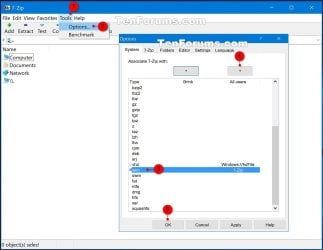
7-Zip.jpg
4. Insert your retail Windows 7 installation disc into the DVD drive and wait for it to be recognized.

5. In 7-Zip, navigate to your DVD drive letter (ex: E: ) that has the Windows 7 installation disc in it, and double click on the Sources folder. (See screenshot below)
Step2.jpg
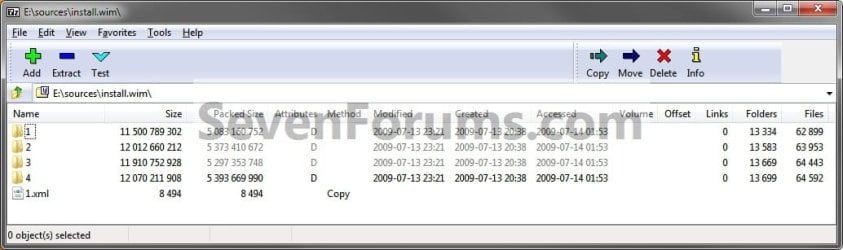
6. Scroll down and double click on the install.wim file. (See screenshot below)
Step3.jpg
7. You will now see this for a few seconds as it opens. (See screenshot below)
Step4.jpg
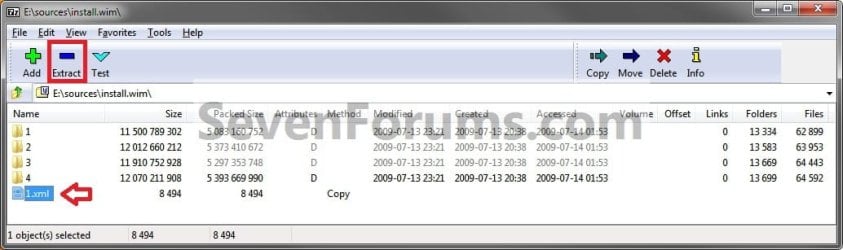
8. Each numbered folder is a different edition of Windows 7. They will vary depending on what type of Windows 7 installation DVD you have. To see what edition is for each numbered folder, select the 1.xml file and click on the Extract button on the toolbar. (See screenshots below)
Step5.jpg

Step6.jpg

9. Copy the 1.xml file to your desktop. (See screenshot below)
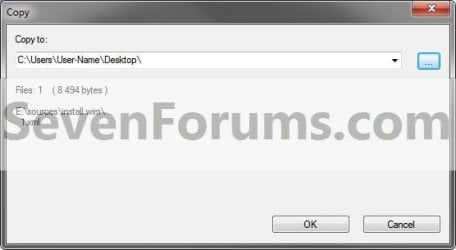
Step7.jpg
10. Open the 1.xml file on the desktop. Look for the <IMAGE INDEX="#"> entry and the <NAME>edition</NAME> entry a bit under it in the code (highlighted in red below) to see what Windows 7 edition is for each numbered folder in step 8. (See code box below with an example 1.xml file)
NOTE: This file will open in Internet Explorer by default.
Code:
[URL="file:///C:/Users/User-Name/Desktop/1.xml#"]-[/URL] <WIM>
  <TOTALBYTES>2860826557</TOTALBYTES> 
[URL="file:///C:/Users/User-Name/Desktop/1.xml#"][B][COLOR=red]-[/COLOR][/B][/URL][B][COLOR=red] <IMAGE INDEX="1">[/COLOR][/B]
  <DIRCOUNT>13290</DIRCOUNT> 
  <FILECOUNT>62943</FILECOUNT> 
  <TOTALBYTES>11500789302</TOTALBYTES> 
[URL="file:///C:/Users/User-Name/Desktop/1.xml#"]-[/URL] <CREATIONTIME>
  <HIGHPART>0x01CA0446</HIGHPART> 
  <LOWPART>0xE89FF88A</LOWPART> 
  </CREATIONTIME>
[URL="file:///C:/Users/User-Name/Desktop/1.xml#"]-[/URL] <LASTMODIFICATIONTIME>
  <HIGHPART>0x01CA045F</HIGHPART> 
  <LOWPART>0x3C8C7A24</LOWPART> 
  </LASTMODIFICATIONTIME>
[URL="file:///C:/Users/User-Name/Desktop/1.xml#"]-[/URL] <WINDOWS>
  <ARCH>9</ARCH> 
  <PRODUCTNAME>Microsoft® Windows® Operating System</PRODUCTNAME> 
  <EDITIONID>HomeBasic</EDITIONID> 
  <INSTALLATIONTYPE>Client</INSTALLATIONTYPE> 
  <HAL>acpiapic</HAL> 
  <PRODUCTTYPE>WinNT</PRODUCTTYPE> 
  <PRODUCTSUITE>Terminal Server</PRODUCTSUITE> 
[URL="file:///C:/Users/User-Name/Desktop/1.xml#"]-[/URL] <LANGUAGES>
  <LANGUAGE>en-US</LANGUAGE> 
  <DEFAULT>en-US</DEFAULT> 
  </LANGUAGES>
[URL="file:///C:/Users/User-Name/Desktop/1.xml#"]-[/URL] <VERSION>
  <MAJOR>6</MAJOR> 
  <MINOR>1</MINOR> 
  <BUILD>7600</BUILD> 
  <SPBUILD>16385</SPBUILD> 
  <SPLEVEL>0</SPLEVEL> 
  </VERSION>
  <SYSTEMROOT>WINDOWS</SYSTEMROOT> 
  </WINDOWS>
[B][COLOR=red]<NAME>Windows 7 HOMEBASIC</NAME>[/COLOR][/B] 
  <DESCRIPTION>Windows 7 HOMEBASIC</DESCRIPTION> 
  <FLAGS>HomeBasic</FLAGS> 
  <HARDLINKBYTES>4516930990</HARDLINKBYTES> 
  <DISPLAYNAME>Windows 7 Home Basic</DISPLAYNAME> 
  <DISPLAYDESCRIPTION>Windows 7 Home Basic</DISPLAYDESCRIPTION> 
  </IMAGE>
[URL="file:///C:/Users/User-Name/Desktop/1.xml#"][B][COLOR=red]-[/COLOR][/B][/URL][B][COLOR=red] <IMAGE INDEX="2">[/COLOR][/B]
  <DIRCOUNT>13539</DIRCOUNT> 
  <FILECOUNT>63997</FILECOUNT> 
  <TOTALBYTES>12012660212</TOTALBYTES> 
[URL="file:///C:/Users/User-Name/Desktop/1.xml#"]-[/URL] <CREATIONTIME>
  <HIGHPART>0x01CA0446</HIGHPART> 
  <LOWPART>0xE89FF88A</LOWPART> 
  </CREATIONTIME>
[URL="file:///C:/Users/User-Name/Desktop/1.xml#"]-[/URL] <LASTMODIFICATIONTIME>
  <HIGHPART>0x01CA045F</HIGHPART> 
  <LOWPART>0x5C029E16</LOWPART> 
  </LASTMODIFICATIONTIME>
[URL="file:///C:/Users/User-Name/Desktop/1.xml#"]-[/URL] <WINDOWS>
  <ARCH>9</ARCH> 
  <PRODUCTNAME>Microsoft® Windows® Operating System</PRODUCTNAME> 
  <EDITIONID>HomePremium</EDITIONID> 
  <INSTALLATIONTYPE>Client</INSTALLATIONTYPE> 
  <HAL>acpiapic</HAL> 
  <PRODUCTTYPE>WinNT</PRODUCTTYPE> 
  <PRODUCTSUITE>Terminal Server</PRODUCTSUITE> 
[URL="file:///C:/Users/User-Name/Desktop/1.xml#"]-[/URL] <LANGUAGES>
  <LANGUAGE>en-US</LANGUAGE> 
  <DEFAULT>en-US</DEFAULT> 
  </LANGUAGES>
[URL="file:///C:/Users/User-Name/Desktop/1.xml#"]-[/URL] <VERSION>
  <MAJOR>6</MAJOR> 
  <MINOR>1</MINOR> 
  <BUILD>7600</BUILD> 
  <SPBUILD>16385</SPBUILD> 
  <SPLEVEL>0</SPLEVEL> 
  </VERSION>
  <SYSTEMROOT>WINDOWS</SYSTEMROOT> 
  </WINDOWS>
  [B][COLOR=red]<NAME>Windows 7 HOMEPREMIUM</NAME>[/COLOR][/B] 
  <DESCRIPTION>Windows 7 HOMEPREMIUM</DESCRIPTION> 
  <FLAGS>HomePremium</FLAGS> 
  <HARDLINKBYTES>4931998179</HARDLINKBYTES> 
  <DISPLAYNAME>Windows 7 Home Premium</DISPLAYNAME> 
  <DISPLAYDESCRIPTION>Windows 7 Home Premium</DISPLAYDESCRIPTION> 
  </IMAGE>
[URL="file:///C:/Users/User-Name/Desktop/1.xml#"][B][COLOR=red]-[/COLOR][/B][/URL][B][COLOR=red] <IMAGE INDEX="3">[/COLOR][/B]
  <DIRCOUNT>13625</DIRCOUNT> 
  <FILECOUNT>64487</FILECOUNT> 
  <TOTALBYTES>11910752928</TOTALBYTES> 
[URL="file:///C:/Users/User-Name/Desktop/1.xml#"]-[/URL] <CREATIONTIME>
  <HIGHPART>0x01CA0446</HIGHPART> 
  <LOWPART>0xE89FF88A</LOWPART> 
  </CREATIONTIME>
[URL="file:///C:/Users/User-Name/Desktop/1.xml#"]-[/URL] <LASTMODIFICATIONTIME>
  <HIGHPART>0x01CA045F</HIGHPART> 
  <LOWPART>0x79D2BCF7</LOWPART> 
  </LASTMODIFICATIONTIME>
[URL="file:///C:/Users/User-Name/Desktop/1.xml#"]-[/URL] <WINDOWS>
  <ARCH>9</ARCH> 
  <PRODUCTNAME>Microsoft® Windows® Operating System</PRODUCTNAME> 
  <EDITIONID>Professional</EDITIONID> 
  <INSTALLATIONTYPE>Client</INSTALLATIONTYPE> 
  <HAL>acpiapic</HAL> 
  <PRODUCTTYPE>WinNT</PRODUCTTYPE> 
  <PRODUCTSUITE>Terminal Server</PRODUCTSUITE> 
[URL="file:///C:/Users/User-Name/Desktop/1.xml#"]-[/URL] <LANGUAGES>
  <LANGUAGE>en-US</LANGUAGE> 
  <DEFAULT>en-US</DEFAULT> 
  </LANGUAGES>
[URL="file:///C:/Users/User-Name/Desktop/1.xml#"]-[/URL] <VERSION>
  <MAJOR>6</MAJOR> 
  <MINOR>1</MINOR> 
  <BUILD>7600</BUILD> 
  <SPBUILD>16385</SPBUILD> 
  <SPLEVEL>0</SPLEVEL> 
  </VERSION>
  <SYSTEMROOT>WINDOWS</SYSTEMROOT> 
  </WINDOWS>
  [B][COLOR=red]<NAME>Windows 7 PROFESSIONAL</NAME>[/COLOR][/B] 
  <DESCRIPTION>Windows 7 PROFESSIONAL</DESCRIPTION> 
  <FLAGS>Professional</FLAGS> 
  <HARDLINKBYTES>4804037542</HARDLINKBYTES> 
  <DISPLAYNAME>Windows 7 Professional</DISPLAYNAME> 
  <DISPLAYDESCRIPTION>Windows 7 Professional</DISPLAYDESCRIPTION> 
  </IMAGE>
[URL="file:///C:/Users/User-Name/Desktop/1.xml#"][B][COLOR=red]-[/COLOR][/B][/URL][B][COLOR=red] <IMAGE INDEX="4">[/COLOR][/B]
  <DIRCOUNT>13655</DIRCOUNT> 
  <FILECOUNT>64636</FILECOUNT> 
  <TOTALBYTES>12070211908</TOTALBYTES> 
[URL="file:///C:/Users/User-Name/Desktop/1.xml#"]-[/URL] <CREATIONTIME>
  <HIGHPART>0x01CA0446</HIGHPART> 
  <LOWPART>0xE89FF88A</LOWPART> 
  </CREATIONTIME>
[URL="file:///C:/Users/User-Name/Desktop/1.xml#"]-[/URL] <LASTMODIFICATIONTIME>
  <HIGHPART>0x01CA045F</HIGHPART> 
   <LOWPART>0x97ECC597</LOWPART> 
  </LASTMODIFICATIONTIME>
[URL="file:///C:/Users/User-Name/Desktop/1.xml#"]-[/URL] <WINDOWS>
  <ARCH>9</ARCH> 
  <PRODUCTNAME>Microsoft® Windows® Operating System</PRODUCTNAME> 
  <EDITIONID>Ultimate</EDITIONID> 
  <INSTALLATIONTYPE>Client</INSTALLATIONTYPE> 
  <HAL>acpiapic</HAL> 
  <PRODUCTTYPE>WinNT</PRODUCTTYPE> 
  <PRODUCTSUITE>Terminal Server</PRODUCTSUITE> 
[URL="file:///C:/Users/User-Name/Desktop/1.xml#"]-[/URL] <LANGUAGES>
  <LANGUAGE>en-US</LANGUAGE> 
  <DEFAULT>en-US</DEFAULT> 
  </LANGUAGES>
[URL="file:///C:/Users/User-Name/Desktop/1.xml#"]-[/URL] <VERSION>
  <MAJOR>6</MAJOR> 
  <MINOR>1</MINOR> 
  <BUILD>7600</BUILD> 
  <SPBUILD>16385</SPBUILD> 
  <SPLEVEL>0</SPLEVEL> 
  </VERSION>
  <SYSTEMROOT>WINDOWS</SYSTEMROOT> 
  </WINDOWS>
  [B][COLOR=red]<NAME>Windows 7 ULTIMATE</NAME>[/COLOR][/B] 
  <DESCRIPTION>Windows 7 ULTIMATE</DESCRIPTION> 
  <FLAGS>Ultimate</FLAGS> 
  <HARDLINKBYTES>4963044302</HARDLINKBYTES> 
  <DISPLAYNAME>Windows 7 Ultimate</DISPLAYNAME> 
  <DISPLAYDESCRIPTION>Windows 7 Ultimate</DISPLAYDESCRIPTION> 
  </IMAGE>
  </WIM>
11. Now open the numbered folder (step 8) that is the same edition as your currently installed Windows 7 edition, and navigate to the Windows\System32 folder. You can now select and extract the system files that you need to your desktop. (See screenshot below)
Step8.jpg
12. Verify that each extracted file is unblocked. You can now use the extracted files to copy and replace your missing or corrupted system files in your currently installed Windows 7.

   Tip
You will need to take ownership and set permissions to "Allow" your account "Full Control" of the original file in your current installation before you will be allowed to replace it with the extracted copy.

If the system file is in use and you are unable to replace it with the extracted copy, then:
  • Open a Command Prompt at boot.
  • Do steps 4B to 4D in this tutorial first to verify the drive letter of your Windows 7 drive. It's not always C: at boot.
  • Type in the command below to copy and replace the original file with the extracted replacement file.
Copy /Y "full path of extracted replacement file" "full path of original Windows 7 system file"

For example:
If the extracted replacement uDWM.DLL is on my desktop, then I would use type this in the command prompt at boot and press enter.

Copy /Y "C:\Users\User-name\Desktop\uDWM.dll" "C:\Windows\System32\uDWM.dll"


That's it,
Shawn


Last edited:
I wouldn't worry about it. They're not going to cause any issues, so there's no point in risking to delete the wrong file and cause an issue. :)
 

My Computer My Computer

Computer type
PC/Desktop
Computer Manufacturer/Model Number
Self built custom
OS
64-bit Windows 11 Pro for Workstations
CPU
Intel i7-8700K OC'd to 5 GHz
Motherboard
ASUS ROG Maximus XI Formula Z390
Memory
64 GB (4x16GB) G.SKILL TridentZ RGB DDR4 3600 MHz
Graphics Card(s)
ASUS ROG-STRIX-GTX1080TI-O11G-GAMING
Sound Card
Integrated
Monitor(s) Displays
2 x Samsung Odyssey G7 27"
Screen Resolution
2560x1440
Hard Drives
1TB Samsung 990 PRO M.2,
4TB Samsung 990 PRO PRO M.2,
TerraMaster F8 SSD Plus NAS
PSU
Seasonic Prime Titanium 850W
Case
Thermaltake Core P3
Cooling
Corsair Hydro H115i
Keyboard
Logitech wireless K800
Mouse
Logitech MX Master 4
Internet Speed
2 Gb/s Download and 100 Mb/s Upload
Antivirus
Malwarebyte Anti-Malware Premium
Browser
Google Chrome
Other Info
Logitech Z625 speaker system,
Logitech BRIO 4K Pro webcam,
HP Color LaserJet Pro MFP M477fdn,
APC SMART-UPS RT 1000 XL - SURT1000XLI,
Galaxy S23 Plus phone
I wouldn't worry about it. They're not going to cause any issues, so there's no point in risking to delete the wrong file and cause an issue. :)

Hi shawn i still want to delete those GP files that youve seen on my CBS log, can you site all of them then i will manually delete them? The reason i want to delete those files is when i run SFC scan in the future and found corrupted files, i know that the default system files is corrupted.
 

My Computer My Computer

OS
Windows 7 Home Premium x64
Hey Brink/Shawn!

Just saying thanks for all your great tutorials, especially this one which has helped me out. (It work on Win. 8 ;))

I used the admin account to replace a corrupt "amd64_microsoft-windows-advancedtaskmanager" files. - Not sure if it was that or the security policy changes that I made prior which allowed copying the new files into the Windows\winsxs directory

Many thanks! :)
 

My Computer My Computer

Computer Manufacturer/Model Number
Dell L502X Notebook
OS
Windows 8 Pro 64bit
CPU
2630QM
Memory
8GB 1333MHz
Graphics Card(s)
HD3000 + GT540M
Monitor(s) Displays
1920x1080 B+RG
You're most welcome Neo. I'm happy to hear it was able to help. :)
 

My Computer My Computer

Computer type
PC/Desktop
Computer Manufacturer/Model Number
Self built custom
OS
64-bit Windows 11 Pro for Workstations
CPU
Intel i7-8700K OC'd to 5 GHz
Motherboard
ASUS ROG Maximus XI Formula Z390
Memory
64 GB (4x16GB) G.SKILL TridentZ RGB DDR4 3600 MHz
Graphics Card(s)
ASUS ROG-STRIX-GTX1080TI-O11G-GAMING
Sound Card
Integrated
Monitor(s) Displays
2 x Samsung Odyssey G7 27"
Screen Resolution
2560x1440
Hard Drives
1TB Samsung 990 PRO M.2,
4TB Samsung 990 PRO PRO M.2,
TerraMaster F8 SSD Plus NAS
PSU
Seasonic Prime Titanium 850W
Case
Thermaltake Core P3
Cooling
Corsair Hydro H115i
Keyboard
Logitech wireless K800
Mouse
Logitech MX Master 4
Internet Speed
2 Gb/s Download and 100 Mb/s Upload
Antivirus
Malwarebyte Anti-Malware Premium
Browser
Google Chrome
Other Info
Logitech Z625 speaker system,
Logitech BRIO 4K Pro webcam,
HP Color LaserJet Pro MFP M477fdn,
APC SMART-UPS RT 1000 XL - SURT1000XLI,
Galaxy S23 Plus phone
***********************************************
* EASY * USEFULL * UNDERSTANDABLE * THANK YOU *
* *
***********************************************
 

My Computer My Computer

Computer Manufacturer/Model Number
Acer Aspire 5739G laptop, *Dell XPS L702X
OS
Windows 7 Home Premium x64, *W7 Prem. x64
CPU
Intel P7450 2cores 2,13 GHz, *Intel Core i7-2670QM 2,20 GHz
Memory
4096Mb 2slots, *8088Mb
Graphics Card(s)
Nvidia GeForce 240m, *Nvidia GeForce GT 555m
Screen Resolution
1366x768, *1920x1080
Hard Drives
TOSHIBA MK5055GSX, *WD7500BPKT-75PK4T0 750,16 G
missing psd file

This is the first time I have used this forum, so I hope I am following the correct format.
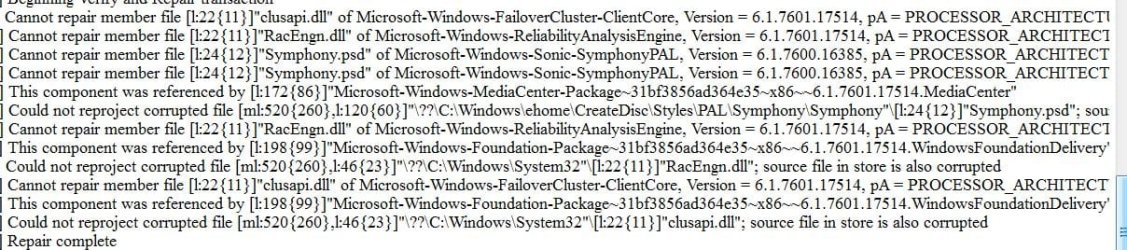
My Windows 7 Home Premium is missing the systems restore function. I have run sfc /scannow and found two corrupt files (clusapi.dll and RacEngn.dll) both of which I have identified in the windows system 32 folder.
But a third corrupt file (Symphony.psd) I cannot find in there.
It is my intention to use this tutorial to replace all these file but I have not been able to because of the missing third one.
The attachment is a copy of the sfc /scannow report which may help to identify the problem.
These are great tutorial's, I found them following links from Google, and have used one in the past to help cure a previous problem on my Brothers computer.
 

Attachments

  • Error Report.JPG
    Error Report.JPG
    109.1 KB · Views: 174

My Computer My Computer

Computer type
PC/Desktop
Computer Manufacturer/Model Number
Custom build
OS
Windows 7 Home Premium 32 bit
CPU
Intel Core 2 Duo
Motherboard
Micro-Star International MS-7235
Memory
4.00 GB Single Channel DDR2
Graphics Card(s)
ATI Radeon HD 4300/4500 Series
Hard Drives
279GB Samsung HD300 LJ ATA Device (SATA)
Antivirus
Avast Antivirus
Browser
Mozilla Firefox

My Computer My Computer

Computer type
PC/Desktop
Computer Manufacturer/Model Number
Self built custom
OS
64-bit Windows 11 Pro for Workstations
CPU
Intel i7-8700K OC'd to 5 GHz
Motherboard
ASUS ROG Maximus XI Formula Z390
Memory
64 GB (4x16GB) G.SKILL TridentZ RGB DDR4 3600 MHz
Graphics Card(s)
ASUS ROG-STRIX-GTX1080TI-O11G-GAMING
Sound Card
Integrated
Monitor(s) Displays
2 x Samsung Odyssey G7 27"
Screen Resolution
2560x1440
Hard Drives
1TB Samsung 990 PRO M.2,
4TB Samsung 990 PRO PRO M.2,
TerraMaster F8 SSD Plus NAS
PSU
Seasonic Prime Titanium 850W
Case
Thermaltake Core P3
Cooling
Corsair Hydro H115i
Keyboard
Logitech wireless K800
Mouse
Logitech MX Master 4
Internet Speed
2 Gb/s Download and 100 Mb/s Upload
Antivirus
Malwarebyte Anti-Malware Premium
Browser
Google Chrome
Other Info
Logitech Z625 speaker system,
Logitech BRIO 4K Pro webcam,
HP Color LaserJet Pro MFP M477fdn,
APC SMART-UPS RT 1000 XL - SURT1000XLI,
Galaxy S23 Plus phone
Hi Shawn.
Thanks for your rapid response to my query, I was not expecting such a quick reply, that's another big plus to go with the excellent tutorials.
I've only been able to carry out the first of your recommendations but without success, and am at the moment push for time to do any more.
Would like to continue this thread at a later date when I have carried out some more of your advice.
Best Regards Rustydog
 

My Computer My Computer

Computer type
PC/Desktop
Computer Manufacturer/Model Number
Custom build
OS
Windows 7 Home Premium 32 bit
CPU
Intel Core 2 Duo
Motherboard
Micro-Star International MS-7235
Memory
4.00 GB Single Channel DDR2
Graphics Card(s)
ATI Radeon HD 4300/4500 Series
Hard Drives
279GB Samsung HD300 LJ ATA Device (SATA)
Antivirus
Avast Antivirus
Browser
Mozilla Firefox
That's fine Rustydog. I'll be here when your ready. :)
 

My Computer My Computer

Computer type
PC/Desktop
Computer Manufacturer/Model Number
Self built custom
OS
64-bit Windows 11 Pro for Workstations
CPU
Intel i7-8700K OC'd to 5 GHz
Motherboard
ASUS ROG Maximus XI Formula Z390
Memory
64 GB (4x16GB) G.SKILL TridentZ RGB DDR4 3600 MHz
Graphics Card(s)
ASUS ROG-STRIX-GTX1080TI-O11G-GAMING
Sound Card
Integrated
Monitor(s) Displays
2 x Samsung Odyssey G7 27"
Screen Resolution
2560x1440
Hard Drives
1TB Samsung 990 PRO M.2,
4TB Samsung 990 PRO PRO M.2,
TerraMaster F8 SSD Plus NAS
PSU
Seasonic Prime Titanium 850W
Case
Thermaltake Core P3
Cooling
Corsair Hydro H115i
Keyboard
Logitech wireless K800
Mouse
Logitech MX Master 4
Internet Speed
2 Gb/s Download and 100 Mb/s Upload
Antivirus
Malwarebyte Anti-Malware Premium
Browser
Google Chrome
Other Info
Logitech Z625 speaker system,
Logitech BRIO 4K Pro webcam,
HP Color LaserJet Pro MFP M477fdn,
APC SMART-UPS RT 1000 XL - SURT1000XLI,
Galaxy S23 Plus phone
Hi Shawn
I'm picking up this thread to let you know my current situation.
I followed your advice and ran the sfc /scannow around nine time, it did not cure the problem but it's log indicated constantly, two corrupt system 32 files and one file I could not identify nor find out where it was stored.
These files were clusapi.dll, RacEngn.dll and Symphony.psd.
Working on the assumption that two corrupt systems file were more a hindrance than a help, I used the tutorial to extract from an installation DVD, copies of the corrupt files and copied them into the system 32 folder after having first taken over the ownership plus total control as administrator of the two corrupt system 32 files.
And got a O/K result.
The System Restore function is now fully operational and can be used by not only me but programs like Windows Up-Date etc.
I have return ownership and total control to TrustedInstaller as shown in a thread followed from this tutorial.
The only thing I have not be able to do is return the permissions of the administrator to the default.
Does this matter if the owner is TrustedInstaller or can the administrator inadvertently change anything because it has still got full control permissions.
Best Regards Rustydog
 

My Computer My Computer

Computer type
PC/Desktop
Computer Manufacturer/Model Number
Custom build
OS
Windows 7 Home Premium 32 bit
CPU
Intel Core 2 Duo
Motherboard
Micro-Star International MS-7235
Memory
4.00 GB Single Channel DDR2
Graphics Card(s)
ATI Radeon HD 4300/4500 Series
Hard Drives
279GB Samsung HD300 LJ ATA Device (SATA)
Antivirus
Avast Antivirus
Browser
Mozilla Firefox
Hi Shawn
I'm picking up this thread to let you know my current situation.
I followed your advice and ran the sfc /scannow around nine time, it did not cure the problem but it's log indicated constantly, two corrupt system 32 files and one file I could not identify nor find out where it was stored.
These files were clusapi.dll, RacEngn.dll and Symphony.psd.
Working on the assumption that two corrupt systems file were more a hindrance than a help, I used the tutorial to extract from an installation DVD, copies of the corrupt files and copied them into the system 32 folder after having first taken over the ownership plus total control as administrator of the two corrupt system 32 files.
And got a O/K result.
The System Restore function is now fully operational and can be used by not only me but programs like Windows Up-Date etc.
I have return ownership and total control to TrustedInstaller as shown in a thread followed from this tutorial.
The only thing I have not be able to do is return the permissions of the administrator to the default.
Does this matter if the owner is TrustedInstaller or can the administrator inadvertently change anything because it has still got full control permissions.
Best Regards Rustydog


Great news Rusty.

It really doesn't matter much to leave "Administrators" as the owner vs "TrustedInstaller". It's just better secured as "TrustedInstaller". :)
 
Last edited:

My Computer My Computer

Computer type
PC/Desktop
Computer Manufacturer/Model Number
Self built custom
OS
64-bit Windows 11 Pro for Workstations
CPU
Intel i7-8700K OC'd to 5 GHz
Motherboard
ASUS ROG Maximus XI Formula Z390
Memory
64 GB (4x16GB) G.SKILL TridentZ RGB DDR4 3600 MHz
Graphics Card(s)
ASUS ROG-STRIX-GTX1080TI-O11G-GAMING
Sound Card
Integrated
Monitor(s) Displays
2 x Samsung Odyssey G7 27"
Screen Resolution
2560x1440
Hard Drives
1TB Samsung 990 PRO M.2,
4TB Samsung 990 PRO PRO M.2,
TerraMaster F8 SSD Plus NAS
PSU
Seasonic Prime Titanium 850W
Case
Thermaltake Core P3
Cooling
Corsair Hydro H115i
Keyboard
Logitech wireless K800
Mouse
Logitech MX Master 4
Internet Speed
2 Gb/s Download and 100 Mb/s Upload
Antivirus
Malwarebyte Anti-Malware Premium
Browser
Google Chrome
Other Info
Logitech Z625 speaker system,
Logitech BRIO 4K Pro webcam,
HP Color LaserJet Pro MFP M477fdn,
APC SMART-UPS RT 1000 XL - SURT1000XLI,
Galaxy S23 Plus phone
Hi Shawn
Thank for your help, once more a GREAT forum and First Class Tutorials
Rustydog
 

My Computer My Computer

Computer type
PC/Desktop
Computer Manufacturer/Model Number
Custom build
OS
Windows 7 Home Premium 32 bit
CPU
Intel Core 2 Duo
Motherboard
Micro-Star International MS-7235
Memory
4.00 GB Single Channel DDR2
Graphics Card(s)
ATI Radeon HD 4300/4500 Series
Hard Drives
279GB Samsung HD300 LJ ATA Device (SATA)
Antivirus
Avast Antivirus
Browser
Mozilla Firefox
You're welcome. :)
 

My Computer My Computer

Computer type
PC/Desktop
Computer Manufacturer/Model Number
Self built custom
OS
64-bit Windows 11 Pro for Workstations
CPU
Intel i7-8700K OC'd to 5 GHz
Motherboard
ASUS ROG Maximus XI Formula Z390
Memory
64 GB (4x16GB) G.SKILL TridentZ RGB DDR4 3600 MHz
Graphics Card(s)
ASUS ROG-STRIX-GTX1080TI-O11G-GAMING
Sound Card
Integrated
Monitor(s) Displays
2 x Samsung Odyssey G7 27"
Screen Resolution
2560x1440
Hard Drives
1TB Samsung 990 PRO M.2,
4TB Samsung 990 PRO PRO M.2,
TerraMaster F8 SSD Plus NAS
PSU
Seasonic Prime Titanium 850W
Case
Thermaltake Core P3
Cooling
Corsair Hydro H115i
Keyboard
Logitech wireless K800
Mouse
Logitech MX Master 4
Internet Speed
2 Gb/s Download and 100 Mb/s Upload
Antivirus
Malwarebyte Anti-Malware Premium
Browser
Google Chrome
Other Info
Logitech Z625 speaker system,
Logitech BRIO 4K Pro webcam,
HP Color LaserJet Pro MFP M477fdn,
APC SMART-UPS RT 1000 XL - SURT1000XLI,
Galaxy S23 Plus phone
Hi This article is much more useful than some of the articles by microsoft in their help article. It clearly says that sfc /scannow checks and repair the corrupted files as given in the top of the tutorial.
But i want to know, how to know the files that are repaired by this scan and the files that are not repaired by this tool.
Because txt shows repairing and at the last of the text file, scan which is 100 percent complete, it shows that all the error shown in this scan have been successfully repaired. How to know these things.
The command also shows that some files could not be repaired in the command prompt
Hope somebody would reply
 

My Computer My Computer

Computer type
PC/Desktop
Computer Manufacturer/Model Number
custom build
OS
Microsoft Windows 7 Ultimate 64-bit 7601 Multiprocessor Free Service Pack 1
CPU
Intel(R) Core(TM)2 Duo CPU E7200 @ 2.53GHz
Motherboard
To be filled by O.E.M. To be filled by O.E.M.
Memory
4.00 GB
Graphics Card(s)
NVIDIA GeForce 210
Sound Card
(1) NVIDIA High Definition Audio (2) Realtek High Definiti
Screen Resolution
1920 x 1080 x 32 bits (4294967296 colors) @ 60 Hz
Hard Drives
ST3500312CS ATA Device

My Computer My Computer

Computer type
PC/Desktop
Computer Manufacturer/Model Number
Self built custom
OS
64-bit Windows 11 Pro for Workstations
CPU
Intel i7-8700K OC'd to 5 GHz
Motherboard
ASUS ROG Maximus XI Formula Z390
Memory
64 GB (4x16GB) G.SKILL TridentZ RGB DDR4 3600 MHz
Graphics Card(s)
ASUS ROG-STRIX-GTX1080TI-O11G-GAMING
Sound Card
Integrated
Monitor(s) Displays
2 x Samsung Odyssey G7 27"
Screen Resolution
2560x1440
Hard Drives
1TB Samsung 990 PRO M.2,
4TB Samsung 990 PRO PRO M.2,
TerraMaster F8 SSD Plus NAS
PSU
Seasonic Prime Titanium 850W
Case
Thermaltake Core P3
Cooling
Corsair Hydro H115i
Keyboard
Logitech wireless K800
Mouse
Logitech MX Master 4
Internet Speed
2 Gb/s Download and 100 Mb/s Upload
Antivirus
Malwarebyte Anti-Malware Premium
Browser
Google Chrome
Other Info
Logitech Z625 speaker system,
Logitech BRIO 4K Pro webcam,
HP Color LaserJet Pro MFP M477fdn,
APC SMART-UPS RT 1000 XL - SURT1000XLI,
Galaxy S23 Plus phone
Hi Thanks Brink
But what about the message at the end that all the files used by this tool has been successfully repaired. There are some files found that cannot repair member file and a long path. But at the end it shows that all has been successfully repaired. Is there any command to get exclusively what are those entries in the cbs log or sfcdetails.txt that pertain to the problematic lines in the scannow option/
Should we try to copy those files,from the method you prescribed. It would be easy if the files having problem alone could be copied using this method.
From your article i understand that sfc /scannow command tries to repair those files which are found in the installation directory or source from the computer directory. If not , we have to get from the dvd as per your tutorial. But how to know, which files are not repaired. I read an article in msoft article that repairing or repaired means that sfc can may copy these files, without an assertion of the facts on the instructions. cannot repair files , what should be done how to know the path of the file from the dvd. Please your tutorial is the best that could be found in the surfing
Use the System File Checker tool to troubleshoot missing or corrupted system files on Windows Vista or on Windows 7. This article could not describe what these commands at step is doing. Totally confusing, how it will fix some files by taking owner ship in the total sfc text
How to analyze the log file entries that the Microsoft Windows Resource Checker (SFC.exe) program generates in Windows Vista by refering this article , in entry, data, explanation, the description is totally confusing as how to find . They could have given samples.
Your article is the best on the subject, as the msoft article lacks in explanation to the fact that sfc command does not actually repair anything, eventhough it shows as repaired as given in the red lined note.
I hope no one would be willing to reinstall windows as it is a last step. You have to loose all the programs and it takes huge efforts. Thanks for listening
expecting your reply
 

My Computer My Computer

Computer type
PC/Desktop
Computer Manufacturer/Model Number
custom build
OS
Microsoft Windows 7 Ultimate 64-bit 7601 Multiprocessor Free Service Pack 1
CPU
Intel(R) Core(TM)2 Duo CPU E7200 @ 2.53GHz
Motherboard
To be filled by O.E.M. To be filled by O.E.M.
Memory
4.00 GB
Graphics Card(s)
NVIDIA GeForce 210
Sound Card
(1) NVIDIA High Definition Audio (2) Realtek High Definiti
Screen Resolution
1920 x 1080 x 32 bits (4294967296 colors) @ 60 Hz
Hard Drives
ST3500312CS ATA Device
Jraju,

Yes, the sfcdetails.txt file from OPTION THREE will give specific details on what was and was not repaired by SFC. If you like, upload your sfcdetails.txt file, and I'll be happy to take a look at it. It most certainly can be a bit overwhelming if your not used to reading it. :)
 

My Computer My Computer

Computer type
PC/Desktop
Computer Manufacturer/Model Number
Self built custom
OS
64-bit Windows 11 Pro for Workstations
CPU
Intel i7-8700K OC'd to 5 GHz
Motherboard
ASUS ROG Maximus XI Formula Z390
Memory
64 GB (4x16GB) G.SKILL TridentZ RGB DDR4 3600 MHz
Graphics Card(s)
ASUS ROG-STRIX-GTX1080TI-O11G-GAMING
Sound Card
Integrated
Monitor(s) Displays
2 x Samsung Odyssey G7 27"
Screen Resolution
2560x1440
Hard Drives
1TB Samsung 990 PRO M.2,
4TB Samsung 990 PRO PRO M.2,
TerraMaster F8 SSD Plus NAS
PSU
Seasonic Prime Titanium 850W
Case
Thermaltake Core P3
Cooling
Corsair Hydro H115i
Keyboard
Logitech wireless K800
Mouse
Logitech MX Master 4
Internet Speed
2 Gb/s Download and 100 Mb/s Upload
Antivirus
Malwarebyte Anti-Malware Premium
Browser
Google Chrome
Other Info
Logitech Z625 speaker system,
Logitech BRIO 4K Pro webcam,
HP Color LaserJet Pro MFP M477fdn,
APC SMART-UPS RT 1000 XL - SURT1000XLI,
Galaxy S23 Plus phone
Ok. I have done 3 scans and my system could be repaired oby sfc for most of the files. But some of the files , like desktop.ini and music , jpeg files could not be repaired. Anyhow for your perusal , i am sending the latest sfc details.txt.
But let me know clearly the repairing is repaired files from resource
repaired is repaired files from resource
cannot repair means that is not in the resource store.

But pl tell me that by taking ownership, how the sfc problem could be fixed as i have detailed in my link STEP2. Should it mean that c: instead of E as usual. Because mostly os is installed in c:
Please, i substitued c: in place of e, it allowed the permission, but the last command did not work. Please try and give me your considered opinion on how to go further about it.
Thank you for your excellent coverage with easy to understand. Yesterday only i tried the sfc three times and most of the problem have gone.
My wpfiles have been deleted by generic trojan and it was removed from using malware bytes. SFc could not complete then.Now it runs 100%. Could the trojan remove the protected files as easily as found in the mcafee article
Generic.dx!A0CD0A91A611 | Virus Profile & Definition | McAfee Inc.
It simply removes 20 files eh. Expecting reply
 

Attachments

My Computer My Computer

Computer type
PC/Desktop
Computer Manufacturer/Model Number
custom build
OS
Microsoft Windows 7 Ultimate 64-bit 7601 Multiprocessor Free Service Pack 1
CPU
Intel(R) Core(TM)2 Duo CPU E7200 @ 2.53GHz
Motherboard
To be filled by O.E.M. To be filled by O.E.M.
Memory
4.00 GB
Graphics Card(s)
NVIDIA GeForce 210
Sound Card
(1) NVIDIA High Definition Audio (2) Realtek High Definiti
Screen Resolution
1920 x 1080 x 32 bits (4294967296 colors) @ 60 Hz
Hard Drives
ST3500312CS ATA Device
There's just to many files to list and go over one by one, but they are nothing to worry about either. They are sample files from these folders:

  • C:\Users\(user-name)\Music\Sample Music
  • C:\Users\(user-name)\Photos\Sample Photos
  • C:\Users\(user-name)\Videos\Sample Videos
  • sample .mp4 and .mpg files in: C:\Windows\Performance\WinSAT
Yes, a virus can do just about anything once allowed to be infected by it. Personally since a virus was involved, I would recommend to do a clean install of Windows to help make sure your system is clean.
 

My Computer My Computer

Computer type
PC/Desktop
Computer Manufacturer/Model Number
Self built custom
OS
64-bit Windows 11 Pro for Workstations
CPU
Intel i7-8700K OC'd to 5 GHz
Motherboard
ASUS ROG Maximus XI Formula Z390
Memory
64 GB (4x16GB) G.SKILL TridentZ RGB DDR4 3600 MHz
Graphics Card(s)
ASUS ROG-STRIX-GTX1080TI-O11G-GAMING
Sound Card
Integrated
Monitor(s) Displays
2 x Samsung Odyssey G7 27"
Screen Resolution
2560x1440
Hard Drives
1TB Samsung 990 PRO M.2,
4TB Samsung 990 PRO PRO M.2,
TerraMaster F8 SSD Plus NAS
PSU
Seasonic Prime Titanium 850W
Case
Thermaltake Core P3
Cooling
Corsair Hydro H115i
Keyboard
Logitech wireless K800
Mouse
Logitech MX Master 4
Internet Speed
2 Gb/s Download and 100 Mb/s Upload
Antivirus
Malwarebyte Anti-Malware Premium
Browser
Google Chrome
Other Info
Logitech Z625 speaker system,
Logitech BRIO 4K Pro webcam,
HP Color LaserJet Pro MFP M477fdn,
APC SMART-UPS RT 1000 XL - SURT1000XLI,
Galaxy S23 Plus phone
Hi Thank you Brink for pointing me. But, the analysis you could do may kindly be detailed, so that any could do it. I am really fascinated by your replies and tutorial. Daily i visit this site for tutorial .
What about my question on the 2nd step. How it will be helpful to the files that sfc could not repair. You are a valuable person and you could thro some light on the above subject.

How to find that these files are related to c:users. expecting
 

My Computer My Computer

Computer type
PC/Desktop
Computer Manufacturer/Model Number
custom build
OS
Microsoft Windows 7 Ultimate 64-bit 7601 Multiprocessor Free Service Pack 1
CPU
Intel(R) Core(TM)2 Duo CPU E7200 @ 2.53GHz
Motherboard
To be filled by O.E.M. To be filled by O.E.M.
Memory
4.00 GB
Graphics Card(s)
NVIDIA GeForce 210
Sound Card
(1) NVIDIA High Definition Audio (2) Realtek High Definiti
Screen Resolution
1920 x 1080 x 32 bits (4294967296 colors) @ 60 Hz
Hard Drives
ST3500312CS ATA Device
Back
Top