Extract Files from Windows 7 Installation DVD

How to Extract Files from the Windows 7 Installation DVD

   Information
This will show you how to extract original files from the retail Windows 7 installation DVD. You can then use these extracted files to replace missing or corrupted system files in your current Windows 7 installation.
   Note
Normally you will find out that you have corrupted system files that cannot be repaired after your run a sfc /scannow command and look at it's log report.
   Tip
If you do not have a Windows 7 with SP1 installation disc, then you can download the latest official Windows 7 with SP1 ISO file at the link below, then create an installation DVD or USB with it.

Microsoft: Windows 7 Direct Download Links


Here's How:
1. Download and install the same free 32-bit or 64-bit 7-Zip program version as your 32-bit or 64-bit Windows 7.

2. Use Compatibiliy Mode on the 7-Zip shortcut and check the Run this program as an administrator box.

3. Run 7-Zip, then click on Tools and Options on the menu bar. Next, select (highlight) .wim, and click on the plus button for All users, and click on OK. (See screenshots below)
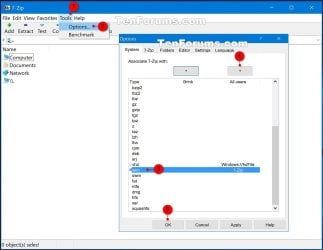
7-Zip.jpg
4. Insert your retail Windows 7 installation disc into the DVD drive and wait for it to be recognized.

5. In 7-Zip, navigate to your DVD drive letter (ex: E: ) that has the Windows 7 installation disc in it, and double click on the Sources folder. (See screenshot below)
Step2.jpg
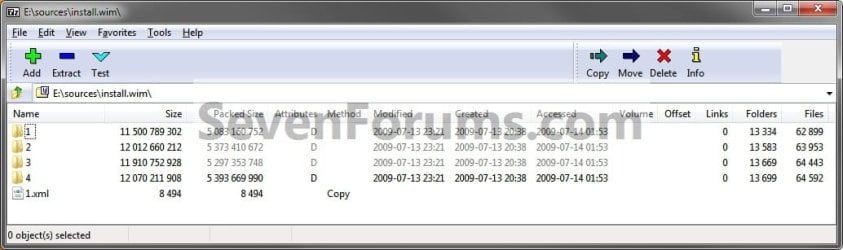
6. Scroll down and double click on the install.wim file. (See screenshot below)
Step3.jpg
7. You will now see this for a few seconds as it opens. (See screenshot below)
Step4.jpg
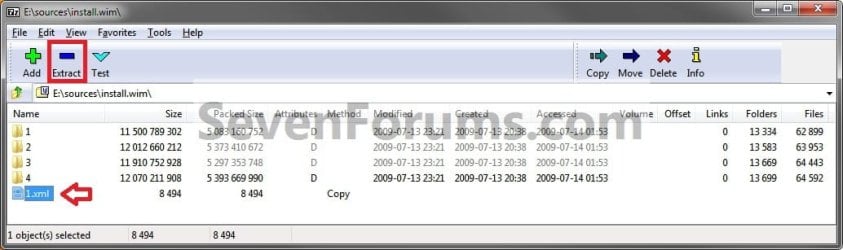
8. Each numbered folder is a different edition of Windows 7. They will vary depending on what type of Windows 7 installation DVD you have. To see what edition is for each numbered folder, select the 1.xml file and click on the Extract button on the toolbar. (See screenshots below)
Step5.jpg

Step6.jpg

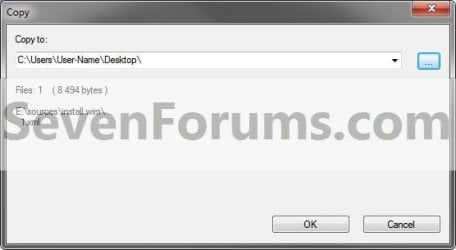
9. Copy the 1.xml file to your desktop. (See screenshot below)
Step7.jpg
10. Open the 1.xml file on the desktop. Look for the <IMAGE INDEX="#"> entry and the <NAME>edition</NAME> entry a bit under it in the code (highlighted in red below) to see what Windows 7 edition is for each numbered folder in step 8. (See code box below with an example 1.xml file)
NOTE: This file will open in Internet Explorer by default.
Code:
[URL="file:///C:/Users/User-Name/Desktop/1.xml#"]-[/URL] <WIM>
  <TOTALBYTES>2860826557</TOTALBYTES> 
[URL="file:///C:/Users/User-Name/Desktop/1.xml#"][B][COLOR=red]-[/COLOR][/B][/URL][B][COLOR=red] <IMAGE INDEX="1">[/COLOR][/B]
  <DIRCOUNT>13290</DIRCOUNT> 
  <FILECOUNT>62943</FILECOUNT> 
  <TOTALBYTES>11500789302</TOTALBYTES> 
[URL="file:///C:/Users/User-Name/Desktop/1.xml#"]-[/URL] <CREATIONTIME>
  <HIGHPART>0x01CA0446</HIGHPART> 
  <LOWPART>0xE89FF88A</LOWPART> 
  </CREATIONTIME>
[URL="file:///C:/Users/User-Name/Desktop/1.xml#"]-[/URL] <LASTMODIFICATIONTIME>
  <HIGHPART>0x01CA045F</HIGHPART> 
  <LOWPART>0x3C8C7A24</LOWPART> 
  </LASTMODIFICATIONTIME>
[URL="file:///C:/Users/User-Name/Desktop/1.xml#"]-[/URL] <WINDOWS>
  <ARCH>9</ARCH> 
  <PRODUCTNAME>Microsoft® Windows® Operating System</PRODUCTNAME> 
  <EDITIONID>HomeBasic</EDITIONID> 
  <INSTALLATIONTYPE>Client</INSTALLATIONTYPE> 
  <HAL>acpiapic</HAL> 
  <PRODUCTTYPE>WinNT</PRODUCTTYPE> 
  <PRODUCTSUITE>Terminal Server</PRODUCTSUITE> 
[URL="file:///C:/Users/User-Name/Desktop/1.xml#"]-[/URL] <LANGUAGES>
  <LANGUAGE>en-US</LANGUAGE> 
  <DEFAULT>en-US</DEFAULT> 
  </LANGUAGES>
[URL="file:///C:/Users/User-Name/Desktop/1.xml#"]-[/URL] <VERSION>
  <MAJOR>6</MAJOR> 
  <MINOR>1</MINOR> 
  <BUILD>7600</BUILD> 
  <SPBUILD>16385</SPBUILD> 
  <SPLEVEL>0</SPLEVEL> 
  </VERSION>
  <SYSTEMROOT>WINDOWS</SYSTEMROOT> 
  </WINDOWS>
[B][COLOR=red]<NAME>Windows 7 HOMEBASIC</NAME>[/COLOR][/B] 
  <DESCRIPTION>Windows 7 HOMEBASIC</DESCRIPTION> 
  <FLAGS>HomeBasic</FLAGS> 
  <HARDLINKBYTES>4516930990</HARDLINKBYTES> 
  <DISPLAYNAME>Windows 7 Home Basic</DISPLAYNAME> 
  <DISPLAYDESCRIPTION>Windows 7 Home Basic</DISPLAYDESCRIPTION> 
  </IMAGE>
[URL="file:///C:/Users/User-Name/Desktop/1.xml#"][B][COLOR=red]-[/COLOR][/B][/URL][B][COLOR=red] <IMAGE INDEX="2">[/COLOR][/B]
  <DIRCOUNT>13539</DIRCOUNT> 
  <FILECOUNT>63997</FILECOUNT> 
  <TOTALBYTES>12012660212</TOTALBYTES> 
[URL="file:///C:/Users/User-Name/Desktop/1.xml#"]-[/URL] <CREATIONTIME>
  <HIGHPART>0x01CA0446</HIGHPART> 
  <LOWPART>0xE89FF88A</LOWPART> 
  </CREATIONTIME>
[URL="file:///C:/Users/User-Name/Desktop/1.xml#"]-[/URL] <LASTMODIFICATIONTIME>
  <HIGHPART>0x01CA045F</HIGHPART> 
  <LOWPART>0x5C029E16</LOWPART> 
  </LASTMODIFICATIONTIME>
[URL="file:///C:/Users/User-Name/Desktop/1.xml#"]-[/URL] <WINDOWS>
  <ARCH>9</ARCH> 
  <PRODUCTNAME>Microsoft® Windows® Operating System</PRODUCTNAME> 
  <EDITIONID>HomePremium</EDITIONID> 
  <INSTALLATIONTYPE>Client</INSTALLATIONTYPE> 
  <HAL>acpiapic</HAL> 
  <PRODUCTTYPE>WinNT</PRODUCTTYPE> 
  <PRODUCTSUITE>Terminal Server</PRODUCTSUITE> 
[URL="file:///C:/Users/User-Name/Desktop/1.xml#"]-[/URL] <LANGUAGES>
  <LANGUAGE>en-US</LANGUAGE> 
  <DEFAULT>en-US</DEFAULT> 
  </LANGUAGES>
[URL="file:///C:/Users/User-Name/Desktop/1.xml#"]-[/URL] <VERSION>
  <MAJOR>6</MAJOR> 
  <MINOR>1</MINOR> 
  <BUILD>7600</BUILD> 
  <SPBUILD>16385</SPBUILD> 
  <SPLEVEL>0</SPLEVEL> 
  </VERSION>
  <SYSTEMROOT>WINDOWS</SYSTEMROOT> 
  </WINDOWS>
  [B][COLOR=red]<NAME>Windows 7 HOMEPREMIUM</NAME>[/COLOR][/B] 
  <DESCRIPTION>Windows 7 HOMEPREMIUM</DESCRIPTION> 
  <FLAGS>HomePremium</FLAGS> 
  <HARDLINKBYTES>4931998179</HARDLINKBYTES> 
  <DISPLAYNAME>Windows 7 Home Premium</DISPLAYNAME> 
  <DISPLAYDESCRIPTION>Windows 7 Home Premium</DISPLAYDESCRIPTION> 
  </IMAGE>
[URL="file:///C:/Users/User-Name/Desktop/1.xml#"][B][COLOR=red]-[/COLOR][/B][/URL][B][COLOR=red] <IMAGE INDEX="3">[/COLOR][/B]
  <DIRCOUNT>13625</DIRCOUNT> 
  <FILECOUNT>64487</FILECOUNT> 
  <TOTALBYTES>11910752928</TOTALBYTES> 
[URL="file:///C:/Users/User-Name/Desktop/1.xml#"]-[/URL] <CREATIONTIME>
  <HIGHPART>0x01CA0446</HIGHPART> 
  <LOWPART>0xE89FF88A</LOWPART> 
  </CREATIONTIME>
[URL="file:///C:/Users/User-Name/Desktop/1.xml#"]-[/URL] <LASTMODIFICATIONTIME>
  <HIGHPART>0x01CA045F</HIGHPART> 
  <LOWPART>0x79D2BCF7</LOWPART> 
  </LASTMODIFICATIONTIME>
[URL="file:///C:/Users/User-Name/Desktop/1.xml#"]-[/URL] <WINDOWS>
  <ARCH>9</ARCH> 
  <PRODUCTNAME>Microsoft® Windows® Operating System</PRODUCTNAME> 
  <EDITIONID>Professional</EDITIONID> 
  <INSTALLATIONTYPE>Client</INSTALLATIONTYPE> 
  <HAL>acpiapic</HAL> 
  <PRODUCTTYPE>WinNT</PRODUCTTYPE> 
  <PRODUCTSUITE>Terminal Server</PRODUCTSUITE> 
[URL="file:///C:/Users/User-Name/Desktop/1.xml#"]-[/URL] <LANGUAGES>
  <LANGUAGE>en-US</LANGUAGE> 
  <DEFAULT>en-US</DEFAULT> 
  </LANGUAGES>
[URL="file:///C:/Users/User-Name/Desktop/1.xml#"]-[/URL] <VERSION>
  <MAJOR>6</MAJOR> 
  <MINOR>1</MINOR> 
  <BUILD>7600</BUILD> 
  <SPBUILD>16385</SPBUILD> 
  <SPLEVEL>0</SPLEVEL> 
  </VERSION>
  <SYSTEMROOT>WINDOWS</SYSTEMROOT> 
  </WINDOWS>
  [B][COLOR=red]<NAME>Windows 7 PROFESSIONAL</NAME>[/COLOR][/B] 
  <DESCRIPTION>Windows 7 PROFESSIONAL</DESCRIPTION> 
  <FLAGS>Professional</FLAGS> 
  <HARDLINKBYTES>4804037542</HARDLINKBYTES> 
  <DISPLAYNAME>Windows 7 Professional</DISPLAYNAME> 
  <DISPLAYDESCRIPTION>Windows 7 Professional</DISPLAYDESCRIPTION> 
  </IMAGE>
[URL="file:///C:/Users/User-Name/Desktop/1.xml#"][B][COLOR=red]-[/COLOR][/B][/URL][B][COLOR=red] <IMAGE INDEX="4">[/COLOR][/B]
  <DIRCOUNT>13655</DIRCOUNT> 
  <FILECOUNT>64636</FILECOUNT> 
  <TOTALBYTES>12070211908</TOTALBYTES> 
[URL="file:///C:/Users/User-Name/Desktop/1.xml#"]-[/URL] <CREATIONTIME>
  <HIGHPART>0x01CA0446</HIGHPART> 
  <LOWPART>0xE89FF88A</LOWPART> 
  </CREATIONTIME>
[URL="file:///C:/Users/User-Name/Desktop/1.xml#"]-[/URL] <LASTMODIFICATIONTIME>
  <HIGHPART>0x01CA045F</HIGHPART> 
   <LOWPART>0x97ECC597</LOWPART> 
  </LASTMODIFICATIONTIME>
[URL="file:///C:/Users/User-Name/Desktop/1.xml#"]-[/URL] <WINDOWS>
  <ARCH>9</ARCH> 
  <PRODUCTNAME>Microsoft® Windows® Operating System</PRODUCTNAME> 
  <EDITIONID>Ultimate</EDITIONID> 
  <INSTALLATIONTYPE>Client</INSTALLATIONTYPE> 
  <HAL>acpiapic</HAL> 
  <PRODUCTTYPE>WinNT</PRODUCTTYPE> 
  <PRODUCTSUITE>Terminal Server</PRODUCTSUITE> 
[URL="file:///C:/Users/User-Name/Desktop/1.xml#"]-[/URL] <LANGUAGES>
  <LANGUAGE>en-US</LANGUAGE> 
  <DEFAULT>en-US</DEFAULT> 
  </LANGUAGES>
[URL="file:///C:/Users/User-Name/Desktop/1.xml#"]-[/URL] <VERSION>
  <MAJOR>6</MAJOR> 
  <MINOR>1</MINOR> 
  <BUILD>7600</BUILD> 
  <SPBUILD>16385</SPBUILD> 
  <SPLEVEL>0</SPLEVEL> 
  </VERSION>
  <SYSTEMROOT>WINDOWS</SYSTEMROOT> 
  </WINDOWS>
  [B][COLOR=red]<NAME>Windows 7 ULTIMATE</NAME>[/COLOR][/B] 
  <DESCRIPTION>Windows 7 ULTIMATE</DESCRIPTION> 
  <FLAGS>Ultimate</FLAGS> 
  <HARDLINKBYTES>4963044302</HARDLINKBYTES> 
  <DISPLAYNAME>Windows 7 Ultimate</DISPLAYNAME> 
  <DISPLAYDESCRIPTION>Windows 7 Ultimate</DISPLAYDESCRIPTION> 
  </IMAGE>
  </WIM>
11. Now open the numbered folder (step 8) that is the same edition as your currently installed Windows 7 edition, and navigate to the Windows\System32 folder. You can now select and extract the system files that you need to your desktop. (See screenshot below)
Step8.jpg
12. Verify that each extracted file is unblocked. You can now use the extracted files to copy and replace your missing or corrupted system files in your currently installed Windows 7.

   Tip
You will need to take ownership and set permissions to "Allow" your account "Full Control" of the original file in your current installation before you will be allowed to replace it with the extracted copy.

If the system file is in use and you are unable to replace it with the extracted copy, then:
  • Open a Command Prompt at boot.
  • Do steps 4B to 4D in this tutorial first to verify the drive letter of your Windows 7 drive. It's not always C: at boot.
  • Type in the command below to copy and replace the original file with the extracted replacement file.
Copy /Y "full path of extracted replacement file" "full path of original Windows 7 system file"

For example:
If the extracted replacement uDWM.DLL is on my desktop, then I would use type this in the command prompt at boot and press enter.

Copy /Y "C:\Users\User-name\Desktop\uDWM.dll" "C:\Windows\System32\uDWM.dll"


That's it,
Shawn


Last edited:
I meant the last one which shows

<NAME>Windows 7 ULTIMATE</NAME>
<DESCRIPTION>Windows 7 ULTIMATE</DESCRIPTION>
<FLAGS>Ultimate</FLAGS>
<HARDLINKBYTES>4963044302</HARDLINKBYTES>
<DISPLAYNAME>Windows 7 Ultimate</DISPLAYNAME>
<DISPLAYDESCRIPTION>Windows 7 Ultimate</DISPLAYDESCRIPTION>
</IMAGE>
</WIM>

That one is also same for me.....So can I extract it safely and replace if needed in future..
 

My Computer

Computer Manufacturer/Model Number
aspire 5920
OS
Windows 8 Professional x64
CPU
core 2 duo T5550
Memory
4 GB
Graphics Card(s)
GMA X3100
Hard Drives
160 GB + 320 GB
Internet Speed
2 mbps
Yes, you will be able to extract files from it to use to replace corrupted files on your system for as long as they are the same file version as the on you are replacing. A different file version may not always work.
 

My Computer

Computer type
PC/Desktop
Computer Manufacturer/Model Number
Self built custom
OS
64-bit Windows 11 Pro for Workstations
CPU
Intel i7-8700K OC'd to 5 GHz
Motherboard
ASUS ROG Maximus XI Formula Z390
Memory
64 GB (4x16GB) G.SKILL TridentZ RGB DDR4 3600 MHz
Graphics Card(s)
ASUS ROG-STRIX-GTX1080TI-O11G-GAMING
Sound Card
Integrated
Monitor(s) Displays
2 x Samsung Odyssey G7 27"
Screen Resolution
2560x1440
Hard Drives
1TB Samsung 990 PRO M.2,
4TB Samsung 990 PRO PRO M.2,
TerraMaster F8 SSD Plus NAS
PSU
Seasonic Prime Titanium 850W
Case
Thermaltake Core P3
Cooling
Corsair Hydro H115i
Keyboard
Logitech wireless K800
Mouse
Logitech MX Master 4
Internet Speed
2 Gb/s Download and 100 Mb/s Upload
Antivirus
Malwarebyte Anti-Malware Premium
Browser
Google Chrome
Other Info
Logitech Z625 speaker system,
Logitech BRIO 4K Pro webcam,
HP Color LaserJet Pro MFP M477fdn,
APC SMART-UPS RT 1000 XL - SURT1000XLI,
Galaxy S23 Plus phone
I have extracted the files from the DVD to a folder on the desktop..Now can I use copy and paste command in the system 32 folder and replace it?
 

My Computer

Computer Manufacturer/Model Number
aspire 5920
OS
Windows 8 Professional x64
CPU
core 2 duo T5550
Memory
4 GB
Graphics Card(s)
GMA X3100
Hard Drives
160 GB + 320 GB
Internet Speed
2 mbps
Hello Bagavan,

You will need to take ownership and set permissions to "Allow" your account "Full Control" of the original files in the system 32 folder before you will be allowed to "Copy" & "Paste" to replace it with the extacted copy. (step 11 tip)
 

My Computer

Computer type
PC/Desktop
Computer Manufacturer/Model Number
Self built custom
OS
64-bit Windows 11 Pro for Workstations
CPU
Intel i7-8700K OC'd to 5 GHz
Motherboard
ASUS ROG Maximus XI Formula Z390
Memory
64 GB (4x16GB) G.SKILL TridentZ RGB DDR4 3600 MHz
Graphics Card(s)
ASUS ROG-STRIX-GTX1080TI-O11G-GAMING
Sound Card
Integrated
Monitor(s) Displays
2 x Samsung Odyssey G7 27"
Screen Resolution
2560x1440
Hard Drives
1TB Samsung 990 PRO M.2,
4TB Samsung 990 PRO PRO M.2,
TerraMaster F8 SSD Plus NAS
PSU
Seasonic Prime Titanium 850W
Case
Thermaltake Core P3
Cooling
Corsair Hydro H115i
Keyboard
Logitech wireless K800
Mouse
Logitech MX Master 4
Internet Speed
2 Gb/s Download and 100 Mb/s Upload
Antivirus
Malwarebyte Anti-Malware Premium
Browser
Google Chrome
Other Info
Logitech Z625 speaker system,
Logitech BRIO 4K Pro webcam,
HP Color LaserJet Pro MFP M477fdn,
APC SMART-UPS RT 1000 XL - SURT1000XLI,
Galaxy S23 Plus phone

My Computer

Computer type
PC/Desktop
Computer Manufacturer/Model Number
Lenovo IdeaCenter 450
OS
Windows 10 Pro X64
CPU
Intel Quad Core i7-4770 @ 3.4Ghz
Memory
16.0GB PC3-12800 DDR3 SDRAM 1600 MHz
Graphics Card(s)
Intel Integrated HD Graphics
Sound Card
Realtek HD Audio
Monitor(s) Displays
HP 22" LCD
Screen Resolution
1680 x 1050
Hard Drives
250GB Samsung EVO SATA-3 SSD
2TB Seagate ST2000DM001 SATA-2
1.5TB Seagate ST3150041AS SATA
Keyboard
Dell USB
Mouse
Lenovo USB
Internet Speed
Cable via Road Runner 3MB Upload, 30MB Download
Antivirus
Windows Defender, MBAM Pro, MBAE
Browser
Seamonkey
Other Info
UEFI/GPT
PLDS DVD-RW DH16AERSH
I have the entire winsxs directory extracted on my desktop in a folder. How may I path to it?
Isn't there a faster way than using System File Checker?
 

My Computer

Computer Manufacturer/Model Number
Home build
OS
Windows 7 Pro 64Bit
CPU
AMD Phenom II 965
Motherboard
Biostar 790GXE
Memory
Corsair XMS2 4GB PC6400 DDR2 800MHz Memory Upgrade - 2x2048M
Graphics Card(s)
GeForce 9500 GT Video Card, 1GB DDR2
Sound Card
Realtek Digital Audio 6.1
Monitor(s) Displays
Acer X223W
Screen Resolution
680Hx1050H
Hard Drives
WDC WD1002-FAEX-00Z3A0 1000GB SATA2 64MB CACHE
WDC WD2002-FAEX-007BA0 2000GB SATA2 64MB CACHE
PSU
Ultra X4 750-Watt Modular Power Supply - 135mm Fan, ATX
Case
CoolerMaster Elite 300 (Black)
Cooling
Enermax 120mm HiVolocity, CoolerMaster
Keyboard
Logitech Deluxe 250 (PS/2)
Mouse
Logitech Optical Mouse 852149-0000 (PS/2)
Internet Speed
AT&T (3Gb/s: so they claim)
Other Info
Logitech C600 Webcam HD, Logitech
Logitech Z-4(3-driver) 40 watts 2.1 Speakers w/subwoofer
I have the entire winsxs directory extracted on my desktop in a folder.

Why?

Isn't there a faster way than using System File Checker?

To do what?
 

My Computers

System One System Two

  • Computer type
    PC/Desktop
    OS
    7 X64
    CPU
    i5 8400
    Motherboard
    gigabyte b365m ds3h
    Memory
    2x8gb 3200mhz
    Hard Drives
    various
    PSU
    pure power 11 400w cm
    Case
    Coolermaster
    Cooling
    cryorig m9i
  • Computer type
    PC/Desktop
    OS
    7x64
    CPU
    g5400
    Motherboard
    ga b365m ds3h
    Memory
    8gb ddr4 2400
    PSU
    xfx pro 450w

My Computer

Computer type
PC/Desktop
Computer Manufacturer/Model Number
Self built custom
OS
64-bit Windows 11 Pro for Workstations
CPU
Intel i7-8700K OC'd to 5 GHz
Motherboard
ASUS ROG Maximus XI Formula Z390
Memory
64 GB (4x16GB) G.SKILL TridentZ RGB DDR4 3600 MHz
Graphics Card(s)
ASUS ROG-STRIX-GTX1080TI-O11G-GAMING
Sound Card
Integrated
Monitor(s) Displays
2 x Samsung Odyssey G7 27"
Screen Resolution
2560x1440
Hard Drives
1TB Samsung 990 PRO M.2,
4TB Samsung 990 PRO PRO M.2,
TerraMaster F8 SSD Plus NAS
PSU
Seasonic Prime Titanium 850W
Case
Thermaltake Core P3
Cooling
Corsair Hydro H115i
Keyboard
Logitech wireless K800
Mouse
Logitech MX Master 4
Internet Speed
2 Gb/s Download and 100 Mb/s Upload
Antivirus
Malwarebyte Anti-Malware Premium
Browser
Google Chrome
Other Info
Logitech Z625 speaker system,
Logitech BRIO 4K Pro webcam,
HP Color LaserJet Pro MFP M477fdn,
APC SMART-UPS RT 1000 XL - SURT1000XLI,
Galaxy S23 Plus phone

My Computer

Computer Manufacturer/Model Number
Home build
OS
Windows 7 Pro 64Bit
CPU
AMD Phenom II 965
Motherboard
Biostar 790GXE
Memory
Corsair XMS2 4GB PC6400 DDR2 800MHz Memory Upgrade - 2x2048M
Graphics Card(s)
GeForce 9500 GT Video Card, 1GB DDR2
Sound Card
Realtek Digital Audio 6.1
Monitor(s) Displays
Acer X223W
Screen Resolution
680Hx1050H
Hard Drives
WDC WD1002-FAEX-00Z3A0 1000GB SATA2 64MB CACHE
WDC WD2002-FAEX-007BA0 2000GB SATA2 64MB CACHE
PSU
Ultra X4 750-Watt Modular Power Supply - 135mm Fan, ATX
Case
CoolerMaster Elite 300 (Black)
Cooling
Enermax 120mm HiVolocity, CoolerMaster
Keyboard
Logitech Deluxe 250 (PS/2)
Mouse
Logitech Optical Mouse 852149-0000 (PS/2)
Internet Speed
AT&T (3Gb/s: so they claim)
Other Info
Logitech C600 Webcam HD, Logitech
Logitech Z-4(3-driver) 40 watts 2.1 Speakers w/subwoofer
Then you would just need to use the method outlined in the tutorial to extract the needed files at the exact same location on the installation disk as the same location of the files needing to be replaced in your installation. Afterwards, you should be able to replace them if they are not currently in use by Windows 7.

Well, if you do not use ATI, then you need to check and make sure that you have all ATI drivers are completely uninstalled in your Windows 7. Your attached sfcdetails.txt file at the thread above clearly show that you have unrepairable corrupted ATI driver files listed in it.
 

My Computer

Computer type
PC/Desktop
Computer Manufacturer/Model Number
Self built custom
OS
64-bit Windows 11 Pro for Workstations
CPU
Intel i7-8700K OC'd to 5 GHz
Motherboard
ASUS ROG Maximus XI Formula Z390
Memory
64 GB (4x16GB) G.SKILL TridentZ RGB DDR4 3600 MHz
Graphics Card(s)
ASUS ROG-STRIX-GTX1080TI-O11G-GAMING
Sound Card
Integrated
Monitor(s) Displays
2 x Samsung Odyssey G7 27"
Screen Resolution
2560x1440
Hard Drives
1TB Samsung 990 PRO M.2,
4TB Samsung 990 PRO PRO M.2,
TerraMaster F8 SSD Plus NAS
PSU
Seasonic Prime Titanium 850W
Case
Thermaltake Core P3
Cooling
Corsair Hydro H115i
Keyboard
Logitech wireless K800
Mouse
Logitech MX Master 4
Internet Speed
2 Gb/s Download and 100 Mb/s Upload
Antivirus
Malwarebyte Anti-Malware Premium
Browser
Google Chrome
Other Info
Logitech Z625 speaker system,
Logitech BRIO 4K Pro webcam,
HP Color LaserJet Pro MFP M477fdn,
APC SMART-UPS RT 1000 XL - SURT1000XLI,
Galaxy S23 Plus phone
Just wanted to say thank you. I managed to clean up 5 corrupted files by meticulously following these steps.
 

My Computer

OS
Windows 7 Home Premium 64bit
You're most welcome Chriskoch, and welcome to Seven Forums. :)
 

My Computer

Computer type
PC/Desktop
Computer Manufacturer/Model Number
Self built custom
OS
64-bit Windows 11 Pro for Workstations
CPU
Intel i7-8700K OC'd to 5 GHz
Motherboard
ASUS ROG Maximus XI Formula Z390
Memory
64 GB (4x16GB) G.SKILL TridentZ RGB DDR4 3600 MHz
Graphics Card(s)
ASUS ROG-STRIX-GTX1080TI-O11G-GAMING
Sound Card
Integrated
Monitor(s) Displays
2 x Samsung Odyssey G7 27"
Screen Resolution
2560x1440
Hard Drives
1TB Samsung 990 PRO M.2,
4TB Samsung 990 PRO PRO M.2,
TerraMaster F8 SSD Plus NAS
PSU
Seasonic Prime Titanium 850W
Case
Thermaltake Core P3
Cooling
Corsair Hydro H115i
Keyboard
Logitech wireless K800
Mouse
Logitech MX Master 4
Internet Speed
2 Gb/s Download and 100 Mb/s Upload
Antivirus
Malwarebyte Anti-Malware Premium
Browser
Google Chrome
Other Info
Logitech Z625 speaker system,
Logitech BRIO 4K Pro webcam,
HP Color LaserJet Pro MFP M477fdn,
APC SMART-UPS RT 1000 XL - SURT1000XLI,
Galaxy S23 Plus phone
:geek:Hello All:

Normally, I guess the above plan *may* work, but I haven't tried it. My problem was I had some SFC errors where files were corrupted. I was told by some MS Tech guys who man the forums at Microsoft Answers that if I did the winsxs file extractions I was going to have major permissions and access errors.

It turned out I previously used a piece of crap program to fix something and it scrambled the holy guts (ie: Protected Files Storage and its archives which comprise that which is used to do an auto-recovery of a damaged System File). Consequently, I couldn't do a upgrade to SP1 unless all was pristine in Win7 x64 Guts.

I had a backup with Macrium Backup [see "http://www.filehippo.com"] FileHippo.com[/URL] and search for it). Some MS Tech said I needed to do a Custom Install and copy my old stuff back on my drive, some said after going through hoops finding and resolving errors, the SP1 update would magically solve everything by installing. No, it went to 99% done and reverted.

My advice: if you know what file(s) are bad and have a way to stomach the cryptic command-line for I guess 40+ files, ok, do it. What I needed was a way to take my C:\Windows\CBS.log then parse it's contents to a better SFC.exe, having it find every error from a good file source in PC (a DVD or Folder with a new copy of Windows DVD.)

Yet, on a lark, took my virgin backup copy of Windows 7 x64 and did a Restore Install:
(while my machine was up and running):

1. Search for msconfig32.exe and run it, UNCHECK all BOOT drivers and STARTUP items, HIDE ALL MS DRIVERS.
2. Remove Antivirus software
3. REBOOT as in a RESTART of PC
4. Insert Windows Setup DVD and wait till 'Install Windows' window shows, then click on 'Install Windows', follow screens, CLICK ON 'UPGRADE INSTALL' PANEL
5. Remove Windows DVD

At least this is how I figured out how to solve my problem. Good Luck, Donald
 
Last edited:

My Computer

Computer Manufacturer/Model Number
Home build
OS
Windows 7 Pro 64Bit
CPU
AMD Phenom II 965
Motherboard
Biostar 790GXE
Memory
Corsair XMS2 4GB PC6400 DDR2 800MHz Memory Upgrade - 2x2048M
Graphics Card(s)
GeForce 9500 GT Video Card, 1GB DDR2
Sound Card
Realtek Digital Audio 6.1
Monitor(s) Displays
Acer X223W
Screen Resolution
680Hx1050H
Hard Drives
WDC WD1002-FAEX-00Z3A0 1000GB SATA2 64MB CACHE
WDC WD2002-FAEX-007BA0 2000GB SATA2 64MB CACHE
PSU
Ultra X4 750-Watt Modular Power Supply - 135mm Fan, ATX
Case
CoolerMaster Elite 300 (Black)
Cooling
Enermax 120mm HiVolocity, CoolerMaster
Keyboard
Logitech Deluxe 250 (PS/2)
Mouse
Logitech Optical Mouse 852149-0000 (PS/2)
Internet Speed
AT&T (3Gb/s: so they claim)
Other Info
Logitech C600 Webcam HD, Logitech
Logitech Z-4(3-driver) 40 watts 2.1 Speakers w/subwoofer
Hello Donald,

Sorry you had to go through all that. I agree that if you did want to or could not do a clean install, then a repair install (if able) would be better than trying to replace that many corrupted system files.
 

My Computer

Computer type
PC/Desktop
Computer Manufacturer/Model Number
Self built custom
OS
64-bit Windows 11 Pro for Workstations
CPU
Intel i7-8700K OC'd to 5 GHz
Motherboard
ASUS ROG Maximus XI Formula Z390
Memory
64 GB (4x16GB) G.SKILL TridentZ RGB DDR4 3600 MHz
Graphics Card(s)
ASUS ROG-STRIX-GTX1080TI-O11G-GAMING
Sound Card
Integrated
Monitor(s) Displays
2 x Samsung Odyssey G7 27"
Screen Resolution
2560x1440
Hard Drives
1TB Samsung 990 PRO M.2,
4TB Samsung 990 PRO PRO M.2,
TerraMaster F8 SSD Plus NAS
PSU
Seasonic Prime Titanium 850W
Case
Thermaltake Core P3
Cooling
Corsair Hydro H115i
Keyboard
Logitech wireless K800
Mouse
Logitech MX Master 4
Internet Speed
2 Gb/s Download and 100 Mb/s Upload
Antivirus
Malwarebyte Anti-Malware Premium
Browser
Google Chrome
Other Info
Logitech Z625 speaker system,
Logitech BRIO 4K Pro webcam,
HP Color LaserJet Pro MFP M477fdn,
APC SMART-UPS RT 1000 XL - SURT1000XLI,
Galaxy S23 Plus phone
How do you do this with a lap top which came with windows 7 pre-installed and no disk ? and you can only F9 it to reinstall windows and then lose all the programs you have installed on that partician and have to update everything.. I did a scan and it did not fix it and the below errors were sholwn on the files...

2011-10-23 20:22:42, Info CSI 000000d2 [SR] Beginning Verify and Repair transaction
2011-10-23 20:22:43, Info CSI 000000d4 [SR] Cannot repair member file [l:22{11}]"PINTLGB.IMD" of Microsoft-Windows-IME-Simplified-Chinese-Core, Version = 6.1.7601.17514, pA = PROCESSOR_ARCHITECTURE_AMD64 (9), Culture neutral, VersionScope = 1 nonSxS, PublicKeyToken = {l:8 b:31bf3856ad364e35}, Type neutral, TypeName neutral, PublicKey neutral in the store, hash mismatch
2011-10-23 20:22:46, Info CSI 000000d6 [SR] Cannot repair member file [l:22{11}]"PINTLGB.IMD" of Microsoft-Windows-IME-Simplified-Chinese-Core, Version = 6.1.7601.17514, pA = PROCESSOR_ARCHITECTURE_AMD64 (9), Culture neutral, VersionScope = 1 nonSxS, PublicKeyToken = {l:8 b:31bf3856ad364e35}, Type neutral, TypeName neutral, PublicKey neutral in the store, hash mismatch
2011-10-23 20:22:46, Info CSI 000000d7 [SR] This component was referenced by [l:202{101}]"Microsoft-Windows-Foundation-Package~31bf3856ad364e35~amd64~~6.1.7601.17514.WindowsFoundationDelivery"
2011-10-23 20:22:46, Info CSI 000000da [SR] Could not reproject corrupted file [ml:520{260},l:62{31}]"\??\C:\Windows\IME\IMESC5\DICTS"\[l:22{11}]"PINTLGB.IMD"; source file in store is also corrupted
2011-10-23 20:22:46, Info CSI 000000dc [SR] Verify complete

AND

2011-10-23 20:30:06, Info CSI 000002f0 [SR] Verify complete
2011-10-23 20:30:06, Info CSI 000002f1 [SR] Repairing 1 components
2011-10-23 20:30:06, Info CSI 000002f2 [SR] Beginning Verify and Repair transaction
2011-10-23 20:30:06, Info CSI 000002f4 [SR] Cannot repair member file [l:22{11}]"PINTLGB.IMD" of Microsoft-Windows-IME-Simplified-Chinese-Core, Version = 6.1.7601.17514, pA = PROCESSOR_ARCHITECTURE_AMD64 (9), Culture neutral, VersionScope = 1 nonSxS, PublicKeyToken = {l:8 b:31bf3856ad364e35}, Type neutral, TypeName neutral, PublicKey neutral in the store, hash mismatch
2011-10-23 20:30:06, Info CSI 000002f6 [SR] Cannot repair member file [l:22{11}]"PINTLGB.IMD" of Microsoft-Windows-IME-Simplified-Chinese-Core, Version = 6.1.7601.17514, pA = PROCESSOR_ARCHITECTURE_AMD64 (9), Culture neutral, VersionScope = 1 nonSxS, PublicKeyToken = {l:8 b:31bf3856ad364e35}, Type neutral, TypeName neutral, PublicKey neutral in the store, hash mismatch
2011-10-23 20:30:06, Info CSI 000002f7 [SR] This component was referenced by [l:202{101}]"Microsoft-Windows-Foundation-Package~31bf3856ad364e35~amd64~~6.1.7601.17514.WindowsFoundationDelivery"
2011-10-23 20:30:06, Info CSI 000002fa [SR] Could not reproject corrupted file [ml:520{260},l:62{31}]"\??\C:\Windows\IME\IMESC5\DICTS"\[l:22{11}]"PINTLGB.IMD"; source file in store is also corrupted
2011-10-23 20:30:06, Info CSI 000002fc [SR] Repair complete
 

My Computer

Computer Manufacturer/Model Number
ASUS - N53SV
OS
Windows Home Premium 64bit
CPU
Intel(R) Core(TM) i7-2630QM CPU @ 2.00GHz, 2001 Mh
Memory
8GB
Graphics Card(s)
nvidia geforce gt 540m cuda 2 GB
Sound Card
Realtek HD
Monitor(s) Displays
HD
Screen Resolution
1366 x 768 x 60 hertz
Hard Drives
750Gb
Hello Laurie,

I'm sorry, but you are not able to do this tutorial with a OEM factory recovery partition. :(

However, this is part of the Simplified Chinese Language Pack either installed in Windows Updates, or part of Microsoft Office (if installed). If you do not need or use this language pack, and are not experiencing any issues, then I wouldn't worry about it since it's not critical to Windows 7. If you are experiencing issues, then either uninstall and reinstall the language pack or reinstall Microsoft Office (if installled) depending on which one you installed originally.

Hope this helps,
Shawn
 

My Computer

Computer type
PC/Desktop
Computer Manufacturer/Model Number
Self built custom
OS
64-bit Windows 11 Pro for Workstations
CPU
Intel i7-8700K OC'd to 5 GHz
Motherboard
ASUS ROG Maximus XI Formula Z390
Memory
64 GB (4x16GB) G.SKILL TridentZ RGB DDR4 3600 MHz
Graphics Card(s)
ASUS ROG-STRIX-GTX1080TI-O11G-GAMING
Sound Card
Integrated
Monitor(s) Displays
2 x Samsung Odyssey G7 27"
Screen Resolution
2560x1440
Hard Drives
1TB Samsung 990 PRO M.2,
4TB Samsung 990 PRO PRO M.2,
TerraMaster F8 SSD Plus NAS
PSU
Seasonic Prime Titanium 850W
Case
Thermaltake Core P3
Cooling
Corsair Hydro H115i
Keyboard
Logitech wireless K800
Mouse
Logitech MX Master 4
Internet Speed
2 Gb/s Download and 100 Mb/s Upload
Antivirus
Malwarebyte Anti-Malware Premium
Browser
Google Chrome
Other Info
Logitech Z625 speaker system,
Logitech BRIO 4K Pro webcam,
HP Color LaserJet Pro MFP M477fdn,
APC SMART-UPS RT 1000 XL - SURT1000XLI,
Galaxy S23 Plus phone
I have Office 2007 Professional installed with all the extras ticked to run from computer ... There is also a basic trial of 2010 on the computer.

No I do not need the language part as only do english, when installed office tricked all the boxes so I did not have to put the disk back in each time I opened a program which needed the disk to run from or needed in for the first time it ran... gets annoying.

Thanks for the advice I did the scan to check on any conflicts as Explorer closes some times on some sites saying it had to close and would look at solution and then you do not get one.

Should have learnt my lesson when I purchased my first computer in 95 and not buy anything with oem software or recovery sectors on hard drive. Same as I never buy upgrade software... I buy the new version as if you have to re-install/rebuilt you have to run both disks/versions to re-install.

They should have to supply you with the full software disk, you pay top dollar for the computer and give you nothing, same as the trial stuff they put on it OR old version software trying to get you to buy it and or upgrade.

Software ends up costing you more than your computer did and then it plays up and you have conflicts with other software and the computer itself, and have to buy other software to run scans and fix things and make your system run property.

I was told by one computer tech to re-built your computer every 6 months as this is the only way of getting all the rubbish off it and make it run properly as after time it slows down and issues emerge...

I did up a set of recovery disks when I first bought the lap top so I can always go back to them as well as doing an F9 to reinstall and have done two backups onto external drives since I purchsed it one with their backup where it goes into a folder and you can't see anything and another where I just draged what I wanted to copy into a folder on the external drive...

All I can say is I am glad some of these companies are not into building cars...


Thanks for the help Laurie.
 

My Computer

Computer Manufacturer/Model Number
ASUS - N53SV
OS
Windows Home Premium 64bit
CPU
Intel(R) Core(TM) i7-2630QM CPU @ 2.00GHz, 2001 Mh
Memory
8GB
Graphics Card(s)
nvidia geforce gt 540m cuda 2 GB
Sound Card
Realtek HD
Monitor(s) Displays
HD
Screen Resolution
1366 x 768 x 60 hertz
Hard Drives
750Gb
You're welcome Laurie. :)
 

My Computer

Computer type
PC/Desktop
Computer Manufacturer/Model Number
Self built custom
OS
64-bit Windows 11 Pro for Workstations
CPU
Intel i7-8700K OC'd to 5 GHz
Motherboard
ASUS ROG Maximus XI Formula Z390
Memory
64 GB (4x16GB) G.SKILL TridentZ RGB DDR4 3600 MHz
Graphics Card(s)
ASUS ROG-STRIX-GTX1080TI-O11G-GAMING
Sound Card
Integrated
Monitor(s) Displays
2 x Samsung Odyssey G7 27"
Screen Resolution
2560x1440
Hard Drives
1TB Samsung 990 PRO M.2,
4TB Samsung 990 PRO PRO M.2,
TerraMaster F8 SSD Plus NAS
PSU
Seasonic Prime Titanium 850W
Case
Thermaltake Core P3
Cooling
Corsair Hydro H115i
Keyboard
Logitech wireless K800
Mouse
Logitech MX Master 4
Internet Speed
2 Gb/s Download and 100 Mb/s Upload
Antivirus
Malwarebyte Anti-Malware Premium
Browser
Google Chrome
Other Info
Logitech Z625 speaker system,
Logitech BRIO 4K Pro webcam,
HP Color LaserJet Pro MFP M477fdn,
APC SMART-UPS RT 1000 XL - SURT1000XLI,
Galaxy S23 Plus phone
hi i was linked here to see your tip but i think maybe the tut you refer to has changed regarding step 2b to 2d - i got your point though and thank you. just fyi unless i am wrong.
 

My Computer

Computer Manufacturer/Model Number
builtatfrys
OS
Windows 7 hom prem sp1 x32
CPU
amd 64 ada3800pbox
Motherboard
ga-kn8por-sli
Memory
4gb
Graphics Card(s)
bfg 9400 gt 1gb
Sound Card
n/m
Monitor(s) Displays
acer
Hard Drives
wd 2000 jd caviar se
PSU
antec trio 430
Case
cheiftac dragon
Cooling
amd out-of-box
Keyboard
dell usb
Mouse
logitech wheel usb
Internet Speed
dsl
Other Info
fernando's windows 7 nforce4 drivers for ck804
Hello Bam,

Thank you. It should have been changed to 4b-4d in the yellow TIP box after previously updating the other tutorial. :)
 

My Computer

Computer type
PC/Desktop
Computer Manufacturer/Model Number
Self built custom
OS
64-bit Windows 11 Pro for Workstations
CPU
Intel i7-8700K OC'd to 5 GHz
Motherboard
ASUS ROG Maximus XI Formula Z390
Memory
64 GB (4x16GB) G.SKILL TridentZ RGB DDR4 3600 MHz
Graphics Card(s)
ASUS ROG-STRIX-GTX1080TI-O11G-GAMING
Sound Card
Integrated
Monitor(s) Displays
2 x Samsung Odyssey G7 27"
Screen Resolution
2560x1440
Hard Drives
1TB Samsung 990 PRO M.2,
4TB Samsung 990 PRO PRO M.2,
TerraMaster F8 SSD Plus NAS
PSU
Seasonic Prime Titanium 850W
Case
Thermaltake Core P3
Cooling
Corsair Hydro H115i
Keyboard
Logitech wireless K800
Mouse
Logitech MX Master 4
Internet Speed
2 Gb/s Download and 100 Mb/s Upload
Antivirus
Malwarebyte Anti-Malware Premium
Browser
Google Chrome
Other Info
Logitech Z625 speaker system,
Logitech BRIO 4K Pro webcam,
HP Color LaserJet Pro MFP M477fdn,
APC SMART-UPS RT 1000 XL - SURT1000XLI,
Galaxy S23 Plus phone
Back
Top