Extremely Confusing Audio Problem

Rico Spanish

New member
Local time
6:35 AM
Messages
2
Mmmmkay folks, this one has me stumped. I'll lay down some background information here for you.

I got this Sager laptop built off of a Clevo W150HN used after my previous laptop was stolen out of my car one night. I use this laptop for fairly demanding audio and music purposes. It's loaded up with 16 Gb of RAM and a quad core Intel i7-2630QM running Windows 7 Ultimate x64. There's plenty of power to boot for applications.

The problem lies in playing media files. Regardless if I'm using the built in audio card or ASIO drivers along side a myriad of external audio cards, most of my media files will, for lack of a better term, "buffer", when i try and play them back. Audio files will skip and glitch every five seconds or so. Videos will skip and lost v-sync and audio sync every few minutes or so. It does this in every media player I've found. Itunes, VLC, foobar2000, it doesn't matter. Even inside my DAW's, like FL12 or Ableton Live 9. When I'm loading in drum samples or anything audio related, they'll buffer and glitch when selecting them. It's incredibly annoying.

Now, after a boot and the files been played once through, it will stop glitching. Like, it built a cache on the file or something. That baffles me even more...

I've tried updating drivers, increasing the paging file size, ran DPC latency checker to find any underlying latency issues, checking any programs or services that might be hogging any sort of resource that might be causing this. Hell, I've even reinstalled windows and this problem still exists.

I'm sort of at my wits end with this problem. Anyone have any suggestions?
 

My Computer

Computer type
PC/Desktop
Computer Manufacturer/Model Number
Sager
OS
Windows 7 Ultimate x64
CPU
i7-2630 QM
Memory
16 GB 1333Mhz
Hello and welcome Rico mate I might be well out of whack here but I would run a memtest because it seems you have done just about everything to keep the wolves at bay capacity wise.
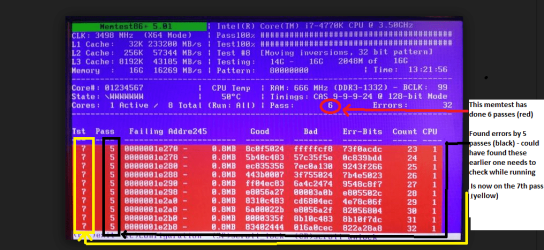
If you do run the test please make sure it is run for at least 8 passes (overnight is good unless the rrors come up sooner) and only the memtest that we recommend in the tutorial - the Windows feature is pretty pathetic.
http://www.sevenforums.com/tutorials/105647-ram-test-memtest86.html I have attached a couple of pics so you can see what the test will look like:)
 

Attachments

  • MEMTEST START UP SCREEN.PNG
    MEMTEST START UP SCREEN.PNG
    57.2 KB · Views: 20
  • MEMTEST ERRORS.PNG
    MEMTEST ERRORS.PNG
    183 KB · Views: 0

My Computer

Computer type
PC/Desktop
Computer Manufacturer/Model Number
Own build (new) Desk1 / Asus ROG Win 7 / Desk2 1st build
OS
Desk1 7 Home Prem / Desk2 10 Pro / Main lap Asus ROG 10 Pro 2 laptop Toshiba 7 Pro Asus P2520 7 & 10
CPU
Desk1 i5 3750K / Laptop i7 GTX 860M / Desk2 i5 2500
Motherboard
Desk1 Asus P877-V / Desk2 Gigabyte H67 UD3H / Laptop ?
Memory
Desk1 8GB (1866) / Desk2 16GB (1333) / Laptop 8Gb DDR3
Graphics Card(s)
Desk 1& 2NVidia GTX 650 & Laptops on board Intel
Sound Card
Desk 1 & 2 -XONAR DG Realtek High Def audio Laptop
Monitor(s) Displays
Desk 1 Benq HD 2450 / Desk2 Philips 24" / Laptop 17.5"
Screen Resolution
1920x1080 D1 & D2 & Laptop 1
Hard Drives
Desk1 Samsung 120GB 830 SSD
Asus ROG 256GB 850 Pro SSD
Desk2 Samsung 840 256 SSD
Toshiba 120GB EVO
PSU
Desk 1 Corsair HX 1050/ Laptop ? / Desk 2 Corsair HX 650
Case
Desk 1 Cooler HAF XM ? Toshiba laptop / Desk2 Coolermaster
Cooling
Fans on all Desk1 -2 Desk2 - all Coolermasters 5 Laptop ?
Keyboard
Desk 1 MS Sidewinder X6 Desk 2 MS Sidewinder X 4
Mouse
Desk 1&2 - Gigabyte MS 900 gamer - laptop - Logitec wireless
Internet Speed
ADSL2+
Other Info
One other Desktop (tester) and spare Toshba laptop both with SSD's
Running Kaspersky 2016 ISS on all machines config'd identically
Logitec audio stereo systems on each machine (x3)
Canon MG5250MFC
Router/modem TP-Link running WPA2SK
see if you can see your cpu temps when the stuttering starts and go into your BIOS and see what you can tweak there. Turn off crap like 'turboboost' or any other things that can screw with CPU.
 

My Computer

Computer type
PC/Desktop
OS
Windows 7 Pro 64 bit SP1
CPU
Intel Core i7 950 Quad OC'ed to 3.2 GHZ
Motherboard
ASRock X58
Memory
12GB DDR 3
Graphics Card(s)
Radeon HD 5870 1GB
Sound Card
Onboard
Monitor(s) Displays
23" Acer HD
Screen Resolution
1920x1080
Hard Drives
128GB SSD
PSU
700W
Case
Coolermaster
Antivirus
Avast Free
Browser
Firefox
Still reckon the RAM is worth a look because the OP has already tied some of the software changes and it is what I would do if only to eliminate it.
 

My Computer

Computer type
PC/Desktop
Computer Manufacturer/Model Number
Own build (new) Desk1 / Asus ROG Win 7 / Desk2 1st build
OS
Desk1 7 Home Prem / Desk2 10 Pro / Main lap Asus ROG 10 Pro 2 laptop Toshiba 7 Pro Asus P2520 7 & 10
CPU
Desk1 i5 3750K / Laptop i7 GTX 860M / Desk2 i5 2500
Motherboard
Desk1 Asus P877-V / Desk2 Gigabyte H67 UD3H / Laptop ?
Memory
Desk1 8GB (1866) / Desk2 16GB (1333) / Laptop 8Gb DDR3
Graphics Card(s)
Desk 1& 2NVidia GTX 650 & Laptops on board Intel
Sound Card
Desk 1 & 2 -XONAR DG Realtek High Def audio Laptop
Monitor(s) Displays
Desk 1 Benq HD 2450 / Desk2 Philips 24" / Laptop 17.5"
Screen Resolution
1920x1080 D1 & D2 & Laptop 1
Hard Drives
Desk1 Samsung 120GB 830 SSD
Asus ROG 256GB 850 Pro SSD
Desk2 Samsung 840 256 SSD
Toshiba 120GB EVO
PSU
Desk 1 Corsair HX 1050/ Laptop ? / Desk 2 Corsair HX 650
Case
Desk 1 Cooler HAF XM ? Toshiba laptop / Desk2 Coolermaster
Cooling
Fans on all Desk1 -2 Desk2 - all Coolermasters 5 Laptop ?
Keyboard
Desk 1 MS Sidewinder X6 Desk 2 MS Sidewinder X 4
Mouse
Desk 1&2 - Gigabyte MS 900 gamer - laptop - Logitec wireless
Internet Speed
ADSL2+
Other Info
One other Desktop (tester) and spare Toshba laptop both with SSD's
Running Kaspersky 2016 ISS on all machines config'd identically
Logitec audio stereo systems on each machine (x3)
Canon MG5250MFC
Router/modem TP-Link running WPA2SK
I'll be running the memtest later today and posting results.
I'd like to try and get to the root problem of the odd handling of these media files not just for enjoyment, but to be a lot more productive with my work, which is why I'm not just looking for an alternative media player
 

My Computer

Computer type
PC/Desktop
Computer Manufacturer/Model Number
Sager
OS
Windows 7 Ultimate x64
CPU
i7-2630 QM
Memory
16 GB 1333Mhz
Ok Rico I was just thinking that whatever software you might try it still has to use the RAM it's a no brainer to me.

The other really basic thing you could try if you want is this
Using HW Info
PART A:
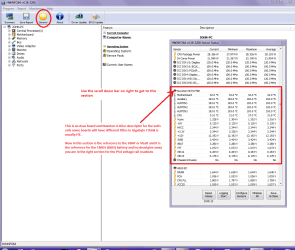
You can test the volts on the PSU with HW Info HWiNFO, HWiNFO32/64 - Download < download the right bit version and close the right hand window select Sensors and scroll down to the power section where you will see what the volts are doing see my pic. In my pic the section (Nuvoton) with VBATT is a dead give away you are in the section for the rail voltages. There are other section titles and one that pops up often is ITE
Now the voltage on the different rails have to be within 5% =+/- of what is required or the machine will not work properly if at all.
ATX Minimum Specs:

3.3v Rail (ORANGE) (Min: 3.14v Max: 3.47v)

5v Rail (RED) (Min: 4.75v Max: 5.25v)

12v Rail (YELLOW) (Min: 11.4v Max: 12.6v)

(GREY CABLE PIN 8 - 5v = Power Good signal)

0v “Rail” (ALL BLACK cables, case, and board fixing screws)
See this for the rail voltage info
Power Supply 101: A Reference Of Specifications - Power Supplies (Section 2.)
The original right hand window shows the machine running and is handy for that but for looking at the components in some detail close it and use the main left hand side panel
FOR OTHER COMPONENTS
PART B:
Open each small square with + in it on the section the components are in and then click on the individual component/s (it will highlight in blue) - in the right hand side will appear all sorts of details including brands speeds and other essential info that particular device. See pic for example.
 

Attachments

  • HW INFO DESKTOP PSU.PNG
    HW INFO DESKTOP PSU.PNG
    52.6 KB · Views: 0

My Computer

Computer type
PC/Desktop
Computer Manufacturer/Model Number
Own build (new) Desk1 / Asus ROG Win 7 / Desk2 1st build
OS
Desk1 7 Home Prem / Desk2 10 Pro / Main lap Asus ROG 10 Pro 2 laptop Toshiba 7 Pro Asus P2520 7 & 10
CPU
Desk1 i5 3750K / Laptop i7 GTX 860M / Desk2 i5 2500
Motherboard
Desk1 Asus P877-V / Desk2 Gigabyte H67 UD3H / Laptop ?
Memory
Desk1 8GB (1866) / Desk2 16GB (1333) / Laptop 8Gb DDR3
Graphics Card(s)
Desk 1& 2NVidia GTX 650 & Laptops on board Intel
Sound Card
Desk 1 & 2 -XONAR DG Realtek High Def audio Laptop
Monitor(s) Displays
Desk 1 Benq HD 2450 / Desk2 Philips 24" / Laptop 17.5"
Screen Resolution
1920x1080 D1 & D2 & Laptop 1
Hard Drives
Desk1 Samsung 120GB 830 SSD
Asus ROG 256GB 850 Pro SSD
Desk2 Samsung 840 256 SSD
Toshiba 120GB EVO
PSU
Desk 1 Corsair HX 1050/ Laptop ? / Desk 2 Corsair HX 650
Case
Desk 1 Cooler HAF XM ? Toshiba laptop / Desk2 Coolermaster
Cooling
Fans on all Desk1 -2 Desk2 - all Coolermasters 5 Laptop ?
Keyboard
Desk 1 MS Sidewinder X6 Desk 2 MS Sidewinder X 4
Mouse
Desk 1&2 - Gigabyte MS 900 gamer - laptop - Logitec wireless
Internet Speed
ADSL2+
Other Info
One other Desktop (tester) and spare Toshba laptop both with SSD's
Running Kaspersky 2016 ISS on all machines config'd identically
Logitec audio stereo systems on each machine (x3)
Canon MG5250MFC
Router/modem TP-Link running WPA2SK
what are your processor settings in the bios
 

My Computer

Computer type
PC/Desktop
OS
Windows 7 Pro 64 bit SP1
CPU
Intel Core i7 950 Quad OC'ed to 3.2 GHZ
Motherboard
ASRock X58
Memory
12GB DDR 3
Graphics Card(s)
Radeon HD 5870 1GB
Sound Card
Onboard
Monitor(s) Displays
23" Acer HD
Screen Resolution
1920x1080
Hard Drives
128GB SSD
PSU
700W
Case
Coolermaster
Antivirus
Avast Free
Browser
Firefox
Back
Top