Extremely Slow WLAN Speed

amsgator

New member
Local time
8:32 PM
Messages
15
I finally got my WLAN set up and I'm getting ridiculously slow speed according to LAN Speed Test. When I say ridiculously slow I mean like 10 Mbps slow.

The router and all of the wireless cards are 802.11n. I have an excellent signal on both computers. I've tried two different routers and it made no difference.

My desktop is running Windows 7 Home Premium and my laptop is running Mac OS X 10.6.

Any help would be appreciated.
 

My Computer

Computer type
PC/Desktop
OS
Windows 7 Home Premium x64
How much download speed does your ISP claim?
 

My Computer

Computer type
PC/Desktop
Computer Manufacturer/Model Number
Home Built Desktop By DataTech
OS
Windows 7 Ultimate X64 SP1
CPU
Intel i5-2550K, Differing ~4.4-4.8GHz No built in GPU
Motherboard
ASUS P8Z68-V PRO/GEN3
Memory
16GB G.Skill Sniper 1866MHz @ 2133MHz 2x8GB
Graphics Card(s)
ASUS GTX650TIB-DC2OC-2GD5, (650TI Boost)
Sound Card
Onboard Realtek 5-1
Monitor(s) Displays
Samsung P2570HD
Screen Resolution
1920x1080
Hard Drives
Samsung 840 Pro 256GB SSD for OS, 500GB Seagate Constellation (Enterprise drive) for Data
PSU
Corsair HX650W
Case
Inwin Dragon Rider
Cooling
Hyper 212 EVO w/two Noctua fans, push-pull, @1300 RPM
Keyboard
E-Z Eyes, bright yellow keys with large characters
Mouse
steelseries SENSEI Laser Pro Gaming
Internet Speed
48-51Mbs Mbs down, 11 Mbs up Xfinity Cable
Antivirus
Norton Internet Security 2013
Browser
IE 10, Opera, Pale Moon if needed
Other Info
4 case fans, LG BluRay-RE, ASUS DVD-RW, Mr. Fusion power supply, 1.21 gigawatts.
My download speed is 6 Mbps. But I'm referring to WLAN computer to computer file transfer, not WAN internet speed.

I realize the 300 Mbps is theoretical, but 10?
 

My Computer

Computer type
PC/Desktop
OS
Windows 7 Home Premium x64
How far is the router from each machine? Wall and distance degrade transfers markedly.
 

My Computer

Computer type
PC/Desktop
Computer Manufacturer/Model Number
Home Built Desktop By DataTech
OS
Windows 7 Ultimate X64 SP1
CPU
Intel i5-2550K, Differing ~4.4-4.8GHz No built in GPU
Motherboard
ASUS P8Z68-V PRO/GEN3
Memory
16GB G.Skill Sniper 1866MHz @ 2133MHz 2x8GB
Graphics Card(s)
ASUS GTX650TIB-DC2OC-2GD5, (650TI Boost)
Sound Card
Onboard Realtek 5-1
Monitor(s) Displays
Samsung P2570HD
Screen Resolution
1920x1080
Hard Drives
Samsung 840 Pro 256GB SSD for OS, 500GB Seagate Constellation (Enterprise drive) for Data
PSU
Corsair HX650W
Case
Inwin Dragon Rider
Cooling
Hyper 212 EVO w/two Noctua fans, push-pull, @1300 RPM
Keyboard
E-Z Eyes, bright yellow keys with large characters
Mouse
steelseries SENSEI Laser Pro Gaming
Internet Speed
48-51Mbs Mbs down, 11 Mbs up Xfinity Cable
Antivirus
Norton Internet Security 2013
Browser
IE 10, Opera, Pale Moon if needed
Other Info
4 case fans, LG BluRay-RE, ASUS DVD-RW, Mr. Fusion power supply, 1.21 gigawatts.
Maybe 30 feet. No walls between. There's also no other electronics near the router to cause any issues: phones, fluorescent lights, etc. I also used inSSIDer and the channel I'm using is vacant.

I'm not sure what a good network ping time is but mine average 3-4ms.
 

My Computer

Computer type
PC/Desktop
OS
Windows 7 Home Premium x64
All right, as an experiment can you place on or the other closer to the router to see how it affects it? I know if I'm 30' from mine speed drops.
 

My Computer

Computer type
PC/Desktop
Computer Manufacturer/Model Number
Home Built Desktop By DataTech
OS
Windows 7 Ultimate X64 SP1
CPU
Intel i5-2550K, Differing ~4.4-4.8GHz No built in GPU
Motherboard
ASUS P8Z68-V PRO/GEN3
Memory
16GB G.Skill Sniper 1866MHz @ 2133MHz 2x8GB
Graphics Card(s)
ASUS GTX650TIB-DC2OC-2GD5, (650TI Boost)
Sound Card
Onboard Realtek 5-1
Monitor(s) Displays
Samsung P2570HD
Screen Resolution
1920x1080
Hard Drives
Samsung 840 Pro 256GB SSD for OS, 500GB Seagate Constellation (Enterprise drive) for Data
PSU
Corsair HX650W
Case
Inwin Dragon Rider
Cooling
Hyper 212 EVO w/two Noctua fans, push-pull, @1300 RPM
Keyboard
E-Z Eyes, bright yellow keys with large characters
Mouse
steelseries SENSEI Laser Pro Gaming
Internet Speed
48-51Mbs Mbs down, 11 Mbs up Xfinity Cable
Antivirus
Norton Internet Security 2013
Browser
IE 10, Opera, Pale Moon if needed
Other Info
4 case fans, LG BluRay-RE, ASUS DVD-RW, Mr. Fusion power supply, 1.21 gigawatts.

My Computer

Computer Manufacturer/Model Number
Lenovo Desktop/Samsung Laptop
OS
Win7 & Win8 64bit
CPU
Intel i5
Internet Speed
Charter-20 Mbps
Antivirus
Avast
Browser
FF, IE9 and Chrome
All right, as an experiment can you place on or the other closer to the router to see how it affects it? I know if I'm 30' from mine speed drops.

I moved the router and computers so the router was within 2 feet of each computer (about as close as I could get them without stacking them on top of each other).

The RSSI on the desktop was -25 and on the laptop was -33, so both are excellent signals. That said, I was only getting 20 Mbps.
 

My Computer

Computer type
PC/Desktop
OS
Windows 7 Home Premium x64

My Computer

Computer type
PC/Desktop
OS
Windows 7 Home Premium x64
I was able to use my wife's computer and same thing. I tried transferring between my Mac and her Win 7 laptop, and the Win 7 desktop and her Win 7 laptop. Same thing.

EDIT: I can't find the specs on any of the network cards to see if they are 150 or 300Mbps cards. My best guess is the desktop is 300Mbps since it appears to be 2T2R. I'm unsure of the laptops, so they may be 150 which would limit it some, but I just can't see if knocking down to 10Mbps even then.
 
Last edited:

My Computer

Computer type
PC/Desktop
OS
Windows 7 Home Premium x64
If the router isn't set to use the 802.11n Only setting then you can't get more than 54Mbps, the mixed wireless settings can really slow things down. You would also need to use WPA2 with AES encryption to achieve full wireless N speeds.

You can also try using the channel bonding feature which should show up in the routers wireless settings as 20Mhz-40Mhz, this setting can double your bandwidth.

It's possible for wireless N to achieve 450Mbps "status speed" but you need the right router and correct 3 antenna PCI NIC for this.

Besides those adjustments the signal strength etc. looks good here.
 
Last edited:

My Computer

Computer type
PC/Desktop
Computer Manufacturer/Model Number
Home built
OS
Windows 7 Ult, Windows 8.1 Pro,
CPU
Q9650-4.275GHz, E8600 4.5GHz, E6750-3.8GHz
Motherboard
Evga 780i FTW
Memory
G.Skill PC2 9600 1200Mhz 5 5 5 15 2T
Graphics Card(s)
GTX480
Sound Card
Asus Xonar D2
Monitor(s) Displays
HannsG
Screen Resolution
1680X1050
Hard Drives
GSkill Phoenix Pro 120GB SSD
PSU
ThermalTake Toughpower 1000Watt modular
Case
ThermalTake XaserV
Cooling
Xigmatek S1283
Keyboard
Logitech G15
Mouse
Logitech G9
Internet Speed
T1
If the router isn't set to use the 802.11n Only setting then you can't get more than 54Mbps, the mixed wireless settings can really slow things down. You would also need to use WPA2 with AES encryption to achieve full wireless N speeds.

You can also try using the channel bonding feature which should show up in the routers wireless settings as 20Mhz-40Mhz, this setting can double your bandwidth.

It's possible for wireless N to achieve 450Mbps "status speed" but you need the right router and correct 3 antenna PCI NIC for this.

Besides those adjustments the signal strength etc. looks good here.

Thanks. It looks like my router only offers mixed mode, no N only. I'll look into a new one. I am also already using the channel bonding.

If I take my two laptops to Starbucks, get on their wifi and set a unique workgroup so I'm not visible to anyone else, can I run a LAN test there? I'm just trying to figure out if I'm being limited by my cards, the router, something in my house, etc without buying and swapping things. If I can get a good speed over another Wifi network, I can eliminate my cards as the problem. This is a lot easier for me to do than borrow a friend.
 

My Computer

Computer type
PC/Desktop
OS
Windows 7 Home Premium x64
If the router isn't set to use the 802.11n Only setting then you can't get more than 54Mbps, the mixed wireless settings can really slow things down. You would also need to use WPA2 with AES encryption to achieve full wireless N speeds.

You can also try using the channel bonding feature which should show up in the routers wireless settings as 20Mhz-40Mhz, this setting can double your bandwidth.

It's possible for wireless N to achieve 450Mbps "status speed" but you need the right router and correct 3 antenna PCI NIC for this.

Besides those adjustments the signal strength etc. looks good here.

Thanks. It looks like my router only offers mixed mode, no N only. I'll look into a new one. I am also already using the channel bonding.

If I take my two laptops to Starbucks, get on their wifi and set a unique workgroup so I'm not visible to anyone else, can I run a LAN test there? I'm just trying to figure out if I'm being limited by my cards, the router, something in my house, etc without buying and swapping things. If I can get a good speed over another Wifi network, I can eliminate my cards as the problem. This is a lot easier for me to do than borrow a friend.

If there is no N only option then you have found the source of the problem. In fact you are limiting every wireless NIC on your network to 54Mbps "status speed" unless this setting is enabled.

Maybe a firmware update would help in this regard but any router without this option would definitely cause the problems you are describing.

For connection at Starbucks just turn off Network Discovery in the Advanced Sharing settings at the Network and Sharing Center. This will prevent others from seeing your machine or accessing it. Testing at Starbucks probably won't help as they are most likely using the mixed wireless settings to accommodate the mix of clients.
 
Last edited:

My Computer

Computer type
PC/Desktop
Computer Manufacturer/Model Number
Home built
OS
Windows 7 Ult, Windows 8.1 Pro,
CPU
Q9650-4.275GHz, E8600 4.5GHz, E6750-3.8GHz
Motherboard
Evga 780i FTW
Memory
G.Skill PC2 9600 1200Mhz 5 5 5 15 2T
Graphics Card(s)
GTX480
Sound Card
Asus Xonar D2
Monitor(s) Displays
HannsG
Screen Resolution
1680X1050
Hard Drives
GSkill Phoenix Pro 120GB SSD
PSU
ThermalTake Toughpower 1000Watt modular
Case
ThermalTake XaserV
Cooling
Xigmatek S1283
Keyboard
Logitech G15
Mouse
Logitech G9
Internet Speed
T1
chev65 said:
If there is no N only option then you have found the source of the problem. In fact you are limiting every wireless NIC on your network to 54Mbps "status speed" unless this setting is enabled.

Maybe a firmware update would help in this regard but any router without this option would definitely cause the problems you are describing.

For connection at Starbucks just turn off Network Discovery in the Advanced Sharing settings at the Network and Sharing Center. This will prevent others from seeing your machine or accessing it. Testing at Starbucks probably won't help as they are most likely using the mixed wireless settings to accommodate the mix of clients.

One of the routers (actually a DSL wireless gateway) I tested previously has N only mode. I enable that and when connected I get ~20Mbps. That still seems awfully slow. Makes me wonder if something's wrong with my computers. I tried all three which seems farfetched for all three cards to be shot. They aren't dual band so maybe I'm expecting unrealistic throughput.

The original router, unfortunately, is discontinued and no longer updated so the firmware it's got is the last it'll get. Maybe it's time to get a new router.
 

My Computer

Computer type
PC/Desktop
OS
Windows 7 Home Premium x64
chev65 said:
If there is no N only option then you have found the source of the problem. In fact you are limiting every wireless NIC on your network to 54Mbps "status speed" unless this setting is enabled.

Maybe a firmware update would help in this regard but any router without this option would definitely cause the problems you are describing.

For connection at Starbucks just turn off Network Discovery in the Advanced Sharing settings at the Network and Sharing Center. This will prevent others from seeing your machine or accessing it. Testing at Starbucks probably won't help as they are most likely using the mixed wireless settings to accommodate the mix of clients.

One of the routers (actually a DSL wireless gateway) I tested previously has N only mode. I enable that and when connected I get ~20Mbps. That still seems awfully slow. Makes me wonder if something's wrong with my computers. I tried all three which seems farfetched for all three cards to be shot. They aren't dual band so maybe I'm expecting unrealistic throughput.

The original router, unfortunately, is discontinued and no longer updated so the firmware it's got is the last it'll get. Maybe it's time to get a new router.

That is twice as fast compared to the first router on your original post so it looks like we are getting somewhere.

I'm not completely sure what you are using to measure the WLAN speed with?

If you can post the wireless status speed it would give me a better idea of how this is working.

I might be able to help more if you could post the read out from inSSIDer rather than Xirrus.

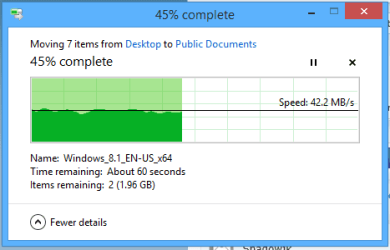
I should add that I only get approx. 40Mbps when sending files from my Gb wired connection to my wireless AC connection which runs at 877.5Mbps "status speed" so I'd say that 20Mbps is about what you should expect for your current wireless connection.

The good thing is that your wireless connection speed has now doubled since you changed to the N only setting as was advised earlier.
 

Attachments

  • Wired to Wireless 41Mbps.PNG
    Wired to Wireless 41Mbps.PNG
    5.2 KB · Views: 18
Last edited:

My Computer

Computer type
PC/Desktop
Computer Manufacturer/Model Number
Home built
OS
Windows 7 Ult, Windows 8.1 Pro,
CPU
Q9650-4.275GHz, E8600 4.5GHz, E6750-3.8GHz
Motherboard
Evga 780i FTW
Memory
G.Skill PC2 9600 1200Mhz 5 5 5 15 2T
Graphics Card(s)
GTX480
Sound Card
Asus Xonar D2
Monitor(s) Displays
HannsG
Screen Resolution
1680X1050
Hard Drives
GSkill Phoenix Pro 120GB SSD
PSU
ThermalTake Toughpower 1000Watt modular
Case
ThermalTake XaserV
Cooling
Xigmatek S1283
Keyboard
Logitech G15
Mouse
Logitech G9
Internet Speed
T1
I am using a program called LAN Speed Test and am also timing it with a stop watch and dividing the time it takes to transfer a file of a given size, such as 20 MB. And when I ran it when I got home this morning I was getting an upload speed of ~3Mbps and a download speed ~15Mbps. So I have no clue what's going on.

What are you needing from inSSIDer? I'm running the free one so it might not have what you're looking for. If that image is windows file transfer, how do I view the histogram?

On your picture there you are getting about 40MB/s, which is 240 Mbps (40 x 8 bits per byte). I am getting about (2.5MB/s 20Mbps/8 bits per byte).

EDIT: I have a status speed of 300Mbps on my destop and 130Mbps on my laptop.
 
Last edited:

My Computer

Computer type
PC/Desktop
OS
Windows 7 Home Premium x64
If inSSIDer is reporting my RSSI as -35dbi, is it safe to say interference isn't an issue, or is that still a possibility?
 

My Computer

Computer type
PC/Desktop
OS
Windows 7 Home Premium x64
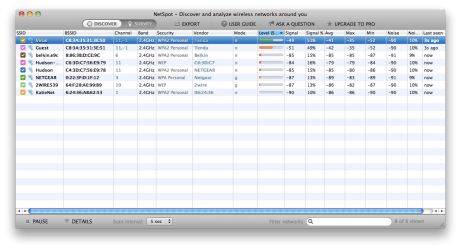
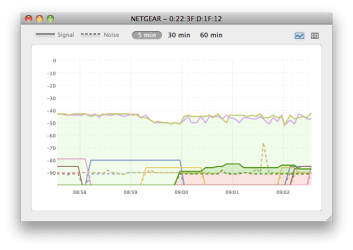
Here is the analysis from my bedroom on my Mac laptop. Both Virus and Guest are mine.
 

Attachments

  • Networks.png
    Networks.png
    44.3 KB · Views: 4
  • Network Map.png
    Network Map.png
    13 KB · Views: 14

My Computer

Computer type
PC/Desktop
OS
Windows 7 Home Premium x64
I am using a program called LAN Speed Test and am also timing it with a stop watch and dividing the time it takes to transfer a file of a given size, such as 20 MB. And when I ran it when I got home this morning I was getting an upload speed of ~3Mbps and a download speed ~15Mbps. So I have no clue what's going on.

What are you needing from inSSIDer? I'm running the free one so it might not have what you're looking for. If that image is windows file transfer, how do I view the histogram?

On your picture there you are getting about 40MB/s, which is 240 Mbps (40 x 8 bits per byte). I am getting about (2.5MB/s 20Mbps/8 bits per byte).

EDIT: I have a status speed of 300Mbps on my destop and 130Mbps on my laptop.


With those status speeds I'd say you are good as it will get for both of those devices. You are now getting exactly what you should be. Both of those devices are maxed out and doing exactly what they were designed for.

If you really want faster wireless then the only option is to upgrade everything to the newer wireless AC, that means the router and all the wireless NIC's would need to be updated as well "not cheap".

That is what I was using for my example,> Gb wired connection to wireless AC working at 877.5Mbps so of course it's going to be about twice as fast compared to wireless N.

You are showing exactly what you should be for a standard wireless network, no more, no less. There is no fix because nothing is broken besides the original problem with that old router which you have wisely changed out.
 

My Computer

Computer type
PC/Desktop
Computer Manufacturer/Model Number
Home built
OS
Windows 7 Ult, Windows 8.1 Pro,
CPU
Q9650-4.275GHz, E8600 4.5GHz, E6750-3.8GHz
Motherboard
Evga 780i FTW
Memory
G.Skill PC2 9600 1200Mhz 5 5 5 15 2T
Graphics Card(s)
GTX480
Sound Card
Asus Xonar D2
Monitor(s) Displays
HannsG
Screen Resolution
1680X1050
Hard Drives
GSkill Phoenix Pro 120GB SSD
PSU
ThermalTake Toughpower 1000Watt modular
Case
ThermalTake XaserV
Cooling
Xigmatek S1283
Keyboard
Logitech G15
Mouse
Logitech G9
Internet Speed
T1
I think there's some confusion about the speed I am getting. I am getting about 15-20 megabits per second, not megabytes per second.

In the image you posted you are getting about 42 megabytes per second which is about 20 times, not twice,the speed I am getting. While I understand you're is going to be faster with the AC, 2 megabytes per second, if I'm lucky, is insanely low. I've googled around and other threads/forums are indicating that 10 megabytes per second is slow for N speeds, and I'm getting about 1/5 of that.

If 2 MB/s is what wireless N speeds are supposed to be then I guess I'm about to get in my attic and wire my entire house with Cat5e or Cat6 cable.
 

My Computer

Computer type
PC/Desktop
OS
Windows 7 Home Premium x64
Back
Top