Facing an unknown problem with my PC; only folders open.

Download HiJackThis from this link HiJackThis | Free software downloads at SourceForge.net . Double click on the exe and choose " Do a system scan and save a log file " . You may run this in Safe Mode. Upload the file once you're done . The log file will be a regular .txt file .
 

My Computer My Computer

At a glance

Windows 7 Ultimate 32-Bit & Windows 7 Ultimat...Intel Core i7 CPU 950 @ 3.07GHzOCZ 6GB (3 x 2GB) 240-Pin DDR3 SDRAM DDR3 160...ATI Radeon HD 5700 Series
Computer Manufacturer/Model Number
Custom Built
OS
Windows 7 Ultimate 32-Bit & Windows 7 Ultimate 64-Bit
CPU
Intel Core i7 CPU 950 @ 3.07GHz
Motherboard
ASUS P6T DELUXE V2
Memory
OCZ 6GB (3 x 2GB) 240-Pin DDR3 SDRAM DDR3 1600 OCZ3X1600R2
Graphics Card(s)
ATI Radeon HD 5700 Series
Sound Card
OnBoard
Hard Drives
WD6400AACS-00M3B0 (640GB SATA )
PSU
CORSAIR 850w
Case
NZXT LEXA
Cooling
Intel Stock Heatsink Fan
Keyboard
Microsoft Wireless Laser Keyboard 7000
Mouse
Microsoft Wireless Laser Mouse 7000
Download HiJackThis from this link HiJackThis | Free software downloads at SourceForge.net . Double click on the exe and choose " Do a system scan and save a log file " . You may run this in Safe Mode. Upload the file once you're done . The log file will be a regular .txt file .

HijackThis is a tool of the past and won't show most modern malware. It will also struggle on x64 systems so it really isn't a great tool for here :)
 

My Computer My Computer

At a glance

Windows 8.1 Pro x64Intel i7 3770K @4.5GHzCorsair Vengeance 2x4GB DDR3 1600MHz Low Prof...Gigabyte Radeon HD 7850 (2GB GDDR5)
Computer type
PC/Desktop
Computer Manufacturer/Model Number
Build #1
OS
Windows 8.1 Pro x64
CPU
Intel i7 3770K @4.5GHz
Motherboard
ASUS P8Z77-V PRO
Memory
Corsair Vengeance 2x4GB DDR3 1600MHz Low Profile (White)
Graphics Card(s)
Gigabyte Radeon HD 7850 (2GB GDDR5)
Sound Card
Integrated on motherboard
Monitor(s) Displays
23" LG LCD/LED IPS
Screen Resolution
1920*1080
Hard Drives
Samsung EVO 128GB SSD
Seagate Barracuda 2GB 7200rpm
2x Seagate FreeAgent [500gb]
PSU
Corsair TX650W V2 (80+ Bronze)
Case
NZXT Phantom 410 White
Cooling
Corsair H100 Water Cooler
Keyboard
Microsoft Desktop 2000 Wireless Keyboard
Mouse
Microsoft Desktop 2000 Wireless Mouse
Internet Speed
95 Mb/s Download 70 Mb/s Upload
Antivirus
MSE + MBAM Pro
Browser
Firefox
Oh boy oh boy. Ladies and gentlemen of SevenForums, it seems that my computer just doesn't want to get fixed. From being unable to run .exe's in Regular Mode, to shooting my RAM sky high, it just won't give up.

When I turn on my PC, it asks me the usual "windows error recovery," i,e. starting in "Regular" or "Safe Mode" and, wanting to do as Jacee directed, I choose "Regular."


All goes well for a while, it brings me to the login screen and...
Then it does it again?
It's struck me as odd, but, I just accepted it was a bug. Everything goes forward and I go back to the login screen once more. Only this time, the colors are ALL out of whack. The only solution I could think off is to reboot the tower, which I do.


Now when I choose "Regular" in the windows error recovery screen, the login screen shan't ever appear. Just a black (well, grey, because the screen is producing light) screen for all eternity. Now, this worries me, so I reboot again into Safe Mode. Thankfully, that works just fine.


So this computer adapt comes to the masters of SF, reaching out a hand and asking "where do I go from here?"
It seems like my PC really wants to be lugged into town for a repair. I don't see why, I mean, there's not much to see in town anyway...
Jokes aside, I apologize for my computer producing more problems that I can't fix and end up coming to here with my tail between my legs. I hope I, as a newcomer, am not too much work for this forum site.
 

My Computer My Computer

At a glance

Windows 7 Home Premium 64bit
OS
Windows 7 Home Premium 64bit
My apologies, my time is limited during the week. I am pointing the Gurus towards your post. Hopefully some help is on the way. A Guy
 

My Computer My Computer

At a glance

Windows 10 Home x64INTEL Core i5-750 Quad-Core 3.37GHzHyperX Fury Black Series 8GB (2 x 4GB) 1866MhzEVGA GeForce GTX 750 Superclocked 1GB 128-Bit...
Computer type
PC/Desktop
OS
Windows 10 Home x64
CPU
INTEL Core i5-750 Quad-Core 3.37GHz
Motherboard
ASUS P7P55D
Memory
HyperX Fury Black Series 8GB (2 x 4GB) 1866Mhz
Graphics Card(s)
EVGA GeForce GTX 750 Superclocked 1GB 128-Bit GDDR5
Monitor(s) Displays
LG 32MA68HY 32" IPS
Screen Resolution
1920 x 1080
Hard Drives
Samsung 840 Evo 120GB, SEAGATE 500GB Barracuda® 7200.12, SATA 3 Gb/s, 7200 RPM, 16MB cache
PSU
ANTEC TruePower New TP-550, 80 PLUS, 550W
Case
ANTEC Three Hundred Illusion
Cooling
COOLER MASTER Hyper 212 Plus, 4 x 120mm 1 x 140mm Noctua's
Internet Speed
85 + Mbps
Antivirus
Avast
Browser
Vivaldi
My apologies, my time is limited during the week. I am pointing the Gurus towards your post. Hopefully some help is on the way. A Guy

I have no one to blame but myself. My stupidity got me into this mess, and it sure as hell won't get me out.
 

My Computer My Computer

At a glance

Windows 7 Home Premium 64bit
OS
Windows 7 Home Premium 64bit
You have some fine people helping you. If it was my computer I would remove IObit everything that has anything to do with IObit. (Advance System Care) Safe Mode should work. Then run sfc /scannow. After done with that see if you can go back through the thread and try to complete the request.
Use cmd prompt from admin and type in sfc /scannow.
If need be run it 3 times with boot after each.
 

My Computer My Computer

At a glance

Windows 10 Pro. 64/ version 1709 Windows 7 Pr...Intel i7-6800K @ 4.3Corsair Platinum 16 gig @2400EVGA GTX 1070 OC
Computer type
PC/Desktop
Computer Manufacturer/Model Number
Home made Desktop
OS
Windows 10 Pro. 64/ version 1709 Windows 7 Pro/64
CPU
Intel i7-6800K @ 4.3
Motherboard
ASUS X-99 Deluxe II
Memory
Corsair Platinum 16 gig @2400
Graphics Card(s)
EVGA GTX 1070 OC
Monitor(s) Displays
Asus 27" LED LCD/VE278Q
Screen Resolution
1920-1080 or 1280-720 HDMI
Hard Drives
INTEL SSD 730-240 Gb Sata 3.0/
PSU
EVGA Platium 1200W
Case
Phanteks Luxe Tempered Glass 8 fans/ one radiator
Cooling
XSPC/ Water Cooled CPU
Keyboard
Das 4 Professional
Mouse
Logitech M705/MX Anywhere 2-S
Internet Speed
100 mbits
Antivirus
Microsoft Security Essentials/ Malwarebytes Premium 3.0/ SAS
Browser
I.E. 11 default/Firefox/ ISP Time Warner Cable/Spectrum
Other Info
LG BluRay Burner/
Sound system-KLipsch-THX/
Icy Dock ssd Hot Swap bays.
My apologies for jumping in. It's not my intent to step on anyones toes. It seems there's a possibility of malware on this computer. Would running Windows Defender Offline be prudent?

http://www.sevenforums.com/tutorials/166445-windows-defender-offline.html

The boot media should be prepared on a non-infected machine and the non-infected machine should match the architecture of the infected machine. (If the infected machine is 64-bit, so should the non-infected machine be 64-bit.)
 

My Computer My Computer

At a glance

Win 7 Pro 64-bitIntel i5 2.4 Ghz8GB DDR3Intel HD 3000
Computer type
Laptop
Computer Manufacturer/Model Number
Sony Vaio VPCEB47GM Laptop
OS
Win 7 Pro 64-bit
CPU
Intel i5 2.4 Ghz
Memory
8GB DDR3
Graphics Card(s)
Intel HD 3000
Sound Card
IDT High Definition
Monitor(s) Displays
15.6 WGXA Anti-Glare LED
Screen Resolution
1280x800
Hard Drives
640Gb 7200rpm
Antivirus
MSE
Browser
Opera (primary) with IE9 backup
marsmimar I do believe the good people here know neither one of us are trying to step on toes. At least I hope so. If it matters I like your idea with WDO.
 

My Computer My Computer

At a glance

Windows 10 Pro. 64/ version 1709 Windows 7 Pr...Intel i7-6800K @ 4.3Corsair Platinum 16 gig @2400EVGA GTX 1070 OC
Computer type
PC/Desktop
Computer Manufacturer/Model Number
Home made Desktop
OS
Windows 10 Pro. 64/ version 1709 Windows 7 Pro/64
CPU
Intel i7-6800K @ 4.3
Motherboard
ASUS X-99 Deluxe II
Memory
Corsair Platinum 16 gig @2400
Graphics Card(s)
EVGA GTX 1070 OC
Monitor(s) Displays
Asus 27" LED LCD/VE278Q
Screen Resolution
1920-1080 or 1280-720 HDMI
Hard Drives
INTEL SSD 730-240 Gb Sata 3.0/
PSU
EVGA Platium 1200W
Case
Phanteks Luxe Tempered Glass 8 fans/ one radiator
Cooling
XSPC/ Water Cooled CPU
Keyboard
Das 4 Professional
Mouse
Logitech M705/MX Anywhere 2-S
Internet Speed
100 mbits
Antivirus
Microsoft Security Essentials/ Malwarebytes Premium 3.0/ SAS
Browser
I.E. 11 default/Firefox/ ISP Time Warner Cable/Spectrum
Other Info
LG BluRay Burner/
Sound system-KLipsch-THX/
Icy Dock ssd Hot Swap bays.
Hi,

I'v had a very quick look at your attachment, and spotted this:

Code:
.
==== System Restore Points ===================
.
RP301: 2/14/2013 12:58:55 AM - Scheduled Checkpoint
.
==== Installed Programs ======================
.
Adobe Flash Player 11 ActiveX
Adobe Flash Player 11 Plugin
Advanced SystemCare Ultimate 6
Apple Mobile Device Support
ATI Catalyst Install Manager
Bonjour
[B][COLOR="Red"]bProtector for Windows[/COLOR][/B]
Command & Conquer™ Red Alert™ 3
Google Chrome
HP Auto
HP Client Services
HP Deskjet 1050 J410 series Basic Device Software
HP Deskjet 1050 J410 series Product Improvement Study
HP Vision Hardware Diagnostics
iCloud
iTunes

Pushing that into Google, I then found this:

BITS and PC's - News From the Trenches!: BProtector for Windows: A Case of Digitally Signed Malware

Which appears to be a very comprehensive description of an especially malicous piece of rogueware product known as BProtector for Windows.

Could this be at least one of the issues you have? I will email Jacee and ask her to have a look at this for you again.

Regards,
Golden
 

My Computer My Computer

At a glance

Windows 10 Pro x64 ; Xubuntu x64Intel i7 860 @ 2.80 GHz O/C'ed to 4.0GHz16GB Corsair Vengance DDR3 @ 661 MHz Dual Cha...EVGA NVidia GTX 560 1024MB
Computer type
PC/Desktop
Computer Manufacturer/Model Number
Golden Mk. I.4
OS
Windows 10 Pro x64 ; Xubuntu x64
CPU
Intel i7 860 @ 2.80 GHz O/C'ed to 4.0GHz
Motherboard
Gigabyte P55A-UD3R Rev.1. Award BIOS F13
Memory
16GB Corsair Vengance DDR3 @ 661 MHz Dual Channel (9-9-9-24)
Graphics Card(s)
EVGA NVidia GTX 560 1024MB
Sound Card
Realtek Integrated
Monitor(s) Displays
Dual Samsung SyncMaster 2494HS
Screen Resolution
1920*1080 and 1920*1080
Hard Drives
1*Samsung 840 EVO 120GB SSD;
1*OCZ Vertex 2 60GB SSD;
2*Samsung F3 SpinPoint 1TB in RAID0;
1*Samsung F1 SpinPoint 1TB;
2*Western Digital 1TB External USB 3.0
1*Western Digital 500GB External USB 3.0
1*Seagate 500GB External USB 2.0
PSU
Thermaltake ToughPower QFan 750W
Case
Thermaltake Element S VK60001W2Z
Cooling
Corsair H60 Water Cooling, 2*230mm and 2*80mm case fans
Keyboard
Logitech G110
Mouse
Logitech MX518
Good find Golden.
 

My Computer My Computer

At a glance

Windows 10 Pro. 64/ version 1709 Windows 7 Pr...Intel i7-6800K @ 4.3Corsair Platinum 16 gig @2400EVGA GTX 1070 OC
Computer type
PC/Desktop
Computer Manufacturer/Model Number
Home made Desktop
OS
Windows 10 Pro. 64/ version 1709 Windows 7 Pro/64
CPU
Intel i7-6800K @ 4.3
Motherboard
ASUS X-99 Deluxe II
Memory
Corsair Platinum 16 gig @2400
Graphics Card(s)
EVGA GTX 1070 OC
Monitor(s) Displays
Asus 27" LED LCD/VE278Q
Screen Resolution
1920-1080 or 1280-720 HDMI
Hard Drives
INTEL SSD 730-240 Gb Sata 3.0/
PSU
EVGA Platium 1200W
Case
Phanteks Luxe Tempered Glass 8 fans/ one radiator
Cooling
XSPC/ Water Cooled CPU
Keyboard
Das 4 Professional
Mouse
Logitech M705/MX Anywhere 2-S
Internet Speed
100 mbits
Antivirus
Microsoft Security Essentials/ Malwarebytes Premium 3.0/ SAS
Browser
I.E. 11 default/Firefox/ ISP Time Warner Cable/Spectrum
Other Info
LG BluRay Burner/
Sound system-KLipsch-THX/
Icy Dock ssd Hot Swap bays.
bProtector for Windows ... searchplugins and browser PUPs. AdWare Cleaner will take care of these pests.

See if it runs in safe mode.
 

My Computer My Computer

At a glance

Windows 7 Ultimate 32bit SP1Intel(R) Core(TM)2 Quad CPU @ 2.40GHz, 2400 MHz4 GBATI Radeon HD 2600 Pro
Computer type
PC/Desktop
Computer Manufacturer/Model Number
Bruce ... somewhere in his 40's
OS
Windows 7 Ultimate 32bit SP1
CPU
Intel(R) Core(TM)2 Quad CPU @ 2.40GHz, 2400 MHz
Motherboard
INTEL/D975XBX2
Memory
4 GB
Graphics Card(s)
ATI Radeon HD 2600 Pro
Monitor(s) Displays
Samsung SyncMaster 914v
Screen Resolution
1280 x 1024
Hard Drives
2/500GB each ... ST3500630AS ATA Device.
One is not connected
PSU
Rocketfish 700 W
Case
G.Skill Gigabyte Chassis
Keyboard
Standard PS/2 Keyboard
Mouse
Microsoft PS/2 Mouse
Internet Speed
DSL
Antivirus
Avira Internet Security
Browser
IE 11
Other Info
ATI HDMI Audio

My Computer My Computer

At a glance

Windows 7 Home Premium 64bit
OS
Windows 7 Home Premium 64bit
Okay, so, I finally cracked down and took it to my local PC repair shop. The fellow working there plugged it in, booted it up, and everything went well. They said they would have a look at it and see what was wrong, even though they determined my RAM was no longer shooting up at a quick rate.

With that statement, I bid him farewell, and went on my way and wait to see what comes up. Between the time of drop off and pick up, I did research on some external hard drives to buy so that I could back up every little bit every week or so. I thought that after the PC was fixed, I'd ensure it to never happen again.

However, it wasn't necessarily fixed. In fact, I do believe it's in a worse condition. The man failed to back up the PC correctly, and when he tried to restore it, only some files (like a few in the %appdata%) survived, as well as every PC folder I had, and not a single .exe file (thank goodness I took a screenshot for some reference in case I accidentally buggered my background, allowing me to fix it,) made it through. Keeping a calm head, I paid him his money, left, and went to see if I could do anything to get it back.

Plugging it in, and booting it up resulted in a very familiar state...
IT WOULDN'T SHOW UP TO THE LOGIN SCREEN ONCE MORE. Frustrated, I thought "Well, then what the heck could be causing this havoc?", and decided it must lie in the cords. Putting that as the "only reasonable explanation," I raced down to buy a new PC display cord. And guess what was the result with that?

Success.

Coming to realization, I now knew I pretty much just paid some guy to wipe most of my files WITHOUT even the thought "Oh, jee wiz, it works just fine with my cables. Maybe I should tell him to go buy a new display cable first and then return to me if it persists," occurring to him. Outraged, I begin to tinker away, downloading .exe after .exe. But, sadly, with my country internet, I knew it was no use. I'd have to just wait for better bandwidth.

Okay, now after my excellent little story, I wanted to ask if there's any way to retrieve my lost files, or if I should just give up, and re-download EVERY little megabyte? I know cops can find some supposedly "deleted" files pretty well on hard drives, so, this gives me a sliver of hope.

Also, I looked at my system restore points, and not even any points from last year (my last restore point) showed up, so a System Restore is out of the question.

 

My Computer My Computer

At a glance

Windows 7 Home Premium 64bit
OS
Windows 7 Home Premium 64bit

My Computer My Computer

At a glance

Win 7 Pro 64-bitIntel i5 2.4 Ghz8GB DDR3Intel HD 3000
Computer type
Laptop
Computer Manufacturer/Model Number
Sony Vaio VPCEB47GM Laptop
OS
Win 7 Pro 64-bit
CPU
Intel i5 2.4 Ghz
Memory
8GB DDR3
Graphics Card(s)
Intel HD 3000
Sound Card
IDT High Definition
Monitor(s) Displays
15.6 WGXA Anti-Glare LED
Screen Resolution
1280x800
Hard Drives
640Gb 7200rpm
Antivirus
MSE
Browser
Opera (primary) with IE9 backup

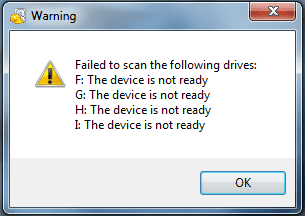
Alright, got that downloaded, and ran it to scan the largest it can go (all files every where), and after a few hours of scanning, I'm met with the error attached to this post.

A question I have is: Are these supposed to be USB drives? If so, I checked Start > Computer and have no USB drives plugged in, other than my keyboard USB, my mouse USB, wifi adapter (I think that's the name...) and my USB hub (just for the sake of conformity, the 3 USB devices are plugged in to the hub). Obviously all devices are instlalled correctly, me being able to type, navigate to this website and be connected to the internet.
 

Attachments

  • Error.PNG
    Error.PNG
    7.3 KB · Views: 21

My Computer My Computer

At a glance

Windows 7 Home Premium 64bit
OS
Windows 7 Home Premium 64bit
Do you have a card reader on your PC? that might be the reason as it can't find media on those devices.
 

My Computer My Computer

At a glance

Windows 7 Home Premium (64 bit)Intel I5 2500K 3.3Ghz Stock8Gig Kingston DDRIII HyperX Blue 1333 MhzAMD Sapphire 7870 2GB
Computer type
PC/Desktop
Computer Manufacturer/Model Number
Self Built
OS
Windows 7 Home Premium (64 bit)
CPU
Intel I5 2500K 3.3Ghz Stock
Motherboard
Asus P8H 61-M LE USB 3
Memory
8Gig Kingston DDRIII HyperX Blue 1333 Mhz
Graphics Card(s)
AMD Sapphire 7870 2GB
Sound Card
Creative Fatality Pro
Monitor(s) Displays
27" BENQ LED
Screen Resolution
1920X1080
Hard Drives
1 x OCZ Agility 3 120GB SSD
1 x Seagate 250GB
1 x Western Digital 1000GB
1 x HP 500GB
PSU
700W Coolermaster Stealth Pro etc
Case
Coolermaster Scout
Cooling
Some fans
Keyboard
Some Logitech type.
Mouse
Logitech MX518
Internet Speed
Wireless 8mb
Other Info
Canon Scanner
Epson Printer
Nikon DSLR 3000
Wacom Tablet
Do you have a card reader on your PC? that might be the reason as it can't find media on those devices.

The only devices I have plugged into my tower via USB are those listed above through the HUB tower, a display cable and an unplugged-on-one-end HDMI cable.

Should I run the program through something like TeamViewer on another devices with everything else unplugged?
 

My Computer My Computer

At a glance

Windows 7 Home Premium 64bit
OS
Windows 7 Home Premium 64bit
Well, I've got Recuva to run, and wanted to know if it'd be best for me to put the restore path to something such as an external hard drive, or right onto my computer's drive? I'm unsure of it, and am a little anxious, wanting as much advice for this as available.
 

My Computer My Computer

At a glance

Windows 7 Home Premium 64bit
OS
Windows 7 Home Premium 64bit
Back
Top