Failed backup - yet again

speedyfastcat

New member
Local time
9:59 PM
Messages
10
Location
California
Every time I attempt to back up files, which takes forever, at the very end I always get a message: backup completed but some files were skipped! What files? What does skipped mean? Is this a valid backup? If files are skipped, does this compromise backup? As usual, MS does not provide any help or direction after that error message which is done in RED which would indicate that this is serious and dire! No fixes, no suggestions, no ideas where to go to resolve this matter (why am I not surprised?).
So, dear Forum, can anyone please help me with this. As I said, it is an ongoing and continuing issues.
Many thanks ...
 

My Computer

OS
Windows 7 Home Premium 64-bit
I no longer use MS backup as it failed once too often. The files it FAILED to back up were jpg files. It backed up the folders but not the pictures although other documents were ok. Fortunately I had the Raw images backed up elsewhere.

I suggest you use a third party product. I use EaseUS Todo Backup Free
 

My Computer

Computer Manufacturer/Model Number
HP
OS
Windows 7 Home Premium
Hi speedyfastcat and welcome to Seven Forums. The usual cause of this is deleting a folder that is specified in the backup. The cure for it is to go through the Backup Configuration again.
 

My Computer

Computer type
Laptop
Computer Manufacturer/Model Number
Hewlett-Packard/G62-107SA Notebook
OS
Microsoft Windows 7 Home Premium 64-bit Service Pack 1
CPU
Intel(R) Core(TM) i3 CPU M 330 @ 2.13GHz
Motherboard
Hewlett-Packard 1425
Memory
8 GB DDR3
Graphics Card(s)
Intel(R) HD Graphics
Sound Card
Realtek High Definition Audio
Monitor(s) Displays
Builtin
Screen Resolution
1366 x 768 x 32 bits (4294967296 colors) @ 60 Hz
Hard Drives
250 GB SATA Hard Disk Drive 7200 rpm
2TB Seagate GoFlex USB 2 Drive
1TB Iomega Prestige USB 2 Drive
1.5TB Iomega Prestige USB 2 Drive (Samsung)
2TB WD MyBook Live NAS.
Mouse
Logitech Anywhere MX
Internet Speed
152 Mbs download 10 Mbs upload
Antivirus
Norton 360
Browser
Chrome
Sorry for delay in responding.
I may have neglected to have replies emailed to me.
What is a backup configuration?
Who is deleting folder?
Why?
What folder is being deleted?
Is this folder important?
Who specifies this folder in the backup?
Why?
Thanks ...
 

My Computer

OS
Windows 7 Home Premium 64-bit
Sorry for delay in responding.
I may have neglected to have replies emailed to me.
What is a backup configuration?
Who is deleting folder?
Why?
What folder is being deleted?
Is this folder important?
Who specifies this folder in the backup?
Why?
Thanks ...

One thing at a time.

What are you trying to back up? Windows? Personal data? "Everything"?

Generally speaking: you have control over what is backed up--the backup configuration.

I'm guessing you are using the built-in Windows Backup? There are simpler and more easily understood alternatives. Many would say they are superior as well.

If you don't understand the application you are using, it may be time to quit using it.
 

My Computer

Computer type
PC/Desktop
Computer Manufacturer/Model Number
Ignatz Special; 4 speed manual gearbox; factory air conditioning; one of one
OS
Windows 7 Home Premium SP1, 64-bit
CPU
Intel Skylake i5-6600K, not overclocked
Motherboard
AsRock Z170M Extreme 4, micro ATX
Memory
8 GB HyperX DDR4-2666 (2 x 4 GB)
Graphics Card(s)
none; graphics are integrated on CPU
Sound Card
onboard: Realtek ALC1150; external: USB Behringer UF0-202
Monitor(s) Displays
Dell S2340M 23 inch IPS
Screen Resolution
1600 x 900
Hard Drives
System: Crucial MX100 series SSD, 128 GB;
Data: Samsung Spinpoint 103SJ, 1 TB;
Backup: WD Caviar Green WD30EZRX-00D8PB0, 3 TB
PSU
Rosewill SilentNight 500 watt fanless, semi-modular
Case
Antec Solo II
Cooling
Noctua NH-U12S; Noctua F12 intake, Noctua S12A exhaust
Keyboard
Microsoft 200 6JH-00001 USB
Mouse
Dell or Microsoft optical wired; USB
Antivirus
Microsoft Security Essentials and Malwarebytes Premium
Browser
Pale Moon
Other Info
All fans PWM; speeds at idle: CPU circa 500 rpm; intake circa 600 rpm; exhaust circa 600 rpm; CPU temps 27 idle and 47 C load in a warm room (27 C/81 F) when running Intel Extreme Tuning Utility stress test.
I'm sorry you didn't read my earlier query.
Factory restore backup, including Windows, has been made.
Scheduled backup is for files and data.
What do you mean by "everything"?
I am doing a basic back-up under Backup and Restore.
I do know how to back-up, your sarcasm to the contrary, but I will admit that the instructions to do the MS backup leave a lot to be desired. I haven't been able to locate a partial vs. complete backup instructions. I'm sure it's there; it is very difficult to maneuver around MS.
Thank you for that very helpful statement that it may be time for me to stop using a particular application since I clearly don't understand it!
If you are able to disclose the names of these simpler applications, more easily understood, and superior (always a good thing) alternatives you are referring to, it would greatly be appreciated. After all, those of us who are in need of simplicity and easy to comprehend applications would find those alternatives to be ever so helpful.
Thank you.
 

My Computer

OS
Windows 7 Home Premium 64-bit
If you are trying to backup files and folders ( not an image of your drive), you can't do better than Karen's Replicator
 

My Computers

System One System Two

  • Computer type
    PC/Desktop
    OS
    7 X64
    CPU
    i5 8400
    Motherboard
    gigabyte b365m ds3h
    Memory
    2x8gb 3200mhz
    Hard Drives
    various
    PSU
    pure power 11 400w cm
    Case
    Coolermaster
    Cooling
    cryorig m9i
  • Computer type
    PC/Desktop
    OS
    7x64
    CPU
    g5400
    Motherboard
    ga b365m ds3h
    Memory
    8gb ddr4 2400
    PSU
    xfx pro 450w
Speedy:

I was not being sarcastic in the least. The MS tool is a first generation tool and is not refined or well-presented to the user.

Simpler applications to back up Windows (eg, your C partition):

Macrium would be my first choice. It's a free download.

Acronis would be my second choice. It is free if you have a Western Digital or Seagate hard drive.

Easiest to backup personal data files (as opposed to Windows), not using an "image":

Synctoy or Karen's Replicator or Second Copy. The first 2 are free. The last one is free for 30 days and $30 if you want to use it thereafter.

I would urge you not to rely on images to back up your personal data, but images are the only way to back up Windows per se.

I'd also advise you to not rely on an automated schedule. Do it manually. Maybe daily for your data and weekly, monthly, or quarterly for Windows itself. Manual backups keep you from being complacent and keep your head in the game.

And make full images rather than incrementals.
 

My Computer

Computer type
PC/Desktop
Computer Manufacturer/Model Number
Ignatz Special; 4 speed manual gearbox; factory air conditioning; one of one
OS
Windows 7 Home Premium SP1, 64-bit
CPU
Intel Skylake i5-6600K, not overclocked
Motherboard
AsRock Z170M Extreme 4, micro ATX
Memory
8 GB HyperX DDR4-2666 (2 x 4 GB)
Graphics Card(s)
none; graphics are integrated on CPU
Sound Card
onboard: Realtek ALC1150; external: USB Behringer UF0-202
Monitor(s) Displays
Dell S2340M 23 inch IPS
Screen Resolution
1600 x 900
Hard Drives
System: Crucial MX100 series SSD, 128 GB;
Data: Samsung Spinpoint 103SJ, 1 TB;
Backup: WD Caviar Green WD30EZRX-00D8PB0, 3 TB
PSU
Rosewill SilentNight 500 watt fanless, semi-modular
Case
Antec Solo II
Cooling
Noctua NH-U12S; Noctua F12 intake, Noctua S12A exhaust
Keyboard
Microsoft 200 6JH-00001 USB
Mouse
Dell or Microsoft optical wired; USB
Antivirus
Microsoft Security Essentials and Malwarebytes Premium
Browser
Pale Moon
Other Info
All fans PWM; speeds at idle: CPU circa 500 rpm; intake circa 600 rpm; exhaust circa 600 rpm; CPU temps 27 idle and 47 C load in a warm room (27 C/81 F) when running Intel Extreme Tuning Utility stress test.

My Computer

Computer type
PC/Desktop
Computer Manufacturer/Model Number
Custom Build
OS
Win 7 Ultimate, Win 8.1 Pro, Linux Mint 19 Cinnamon (All 64-Bit)
CPU
Intel i5 4690K
Motherboard
Gigabyte Z97X-UD3H
Memory
Corsair Vengeance LP 32GB DDR3
Graphics Card(s)
MSI GTX 1060 GAMING X 6GB
Sound Card
Onboard
Hard Drives
Samsung 850 EVO 250GB SSD (x2)
Samsung 860 EVO 1TB SSD (x2)
Crucial MX300 525GB SSD
WD Blue 2TB 5400rpm Intellipark Disabled (x2)
PSU
Corsair HX750i
Case
Phanteks Enthoo Pro
Cooling
CM Hyper 212 EVO on CPU, Noctua Redux NF-P14S 1500rpm (x6)
Keyboard
Corsair K70 RGB LUX
Mouse
Corsair Sabre RGB
Antivirus
Avast Free, MalwareBytes, SAS & CryptoPrevent
Browser
Chrome
Other Info
StarTech PEXESAT322I 2 Port PCI-E SATA Card
ASUS PCE-AC56 Dual-band AC1300 Wireless Card
Akasa FC.Six Manual Fan Controller
And a Partridge in a Pear Tree!

My Computer

Computer type
PC/Desktop
Computer Manufacturer/Model Number
Custom Build
OS
Win 7 Ultimate, Win 8.1 Pro, Linux Mint 19 Cinnamon (All 64-Bit)
CPU
Intel i5 4690K
Motherboard
Gigabyte Z97X-UD3H
Memory
Corsair Vengeance LP 32GB DDR3
Graphics Card(s)
MSI GTX 1060 GAMING X 6GB
Sound Card
Onboard
Hard Drives
Samsung 850 EVO 250GB SSD (x2)
Samsung 860 EVO 1TB SSD (x2)
Crucial MX300 525GB SSD
WD Blue 2TB 5400rpm Intellipark Disabled (x2)
PSU
Corsair HX750i
Case
Phanteks Enthoo Pro
Cooling
CM Hyper 212 EVO on CPU, Noctua Redux NF-P14S 1500rpm (x6)
Keyboard
Corsair K70 RGB LUX
Mouse
Corsair Sabre RGB
Antivirus
Avast Free, MalwareBytes, SAS & CryptoPrevent
Browser
Chrome
Other Info
StarTech PEXESAT322I 2 Port PCI-E SATA Card
ASUS PCE-AC56 Dual-band AC1300 Wireless Card
Akasa FC.Six Manual Fan Controller
And a Partridge in a Pear Tree!
By the way, alll the products Ignatz mentioned are all very good. It just comes down to personal choice really.
 

My Computer

Computer type
PC/Desktop
Computer Manufacturer/Model Number
Custom Build
OS
Win 7 Ultimate, Win 8.1 Pro, Linux Mint 19 Cinnamon (All 64-Bit)
CPU
Intel i5 4690K
Motherboard
Gigabyte Z97X-UD3H
Memory
Corsair Vengeance LP 32GB DDR3
Graphics Card(s)
MSI GTX 1060 GAMING X 6GB
Sound Card
Onboard
Hard Drives
Samsung 850 EVO 250GB SSD (x2)
Samsung 860 EVO 1TB SSD (x2)
Crucial MX300 525GB SSD
WD Blue 2TB 5400rpm Intellipark Disabled (x2)
PSU
Corsair HX750i
Case
Phanteks Enthoo Pro
Cooling
CM Hyper 212 EVO on CPU, Noctua Redux NF-P14S 1500rpm (x6)
Keyboard
Corsair K70 RGB LUX
Mouse
Corsair Sabre RGB
Antivirus
Avast Free, MalwareBytes, SAS & CryptoPrevent
Browser
Chrome
Other Info
StarTech PEXESAT322I 2 Port PCI-E SATA Card
ASUS PCE-AC56 Dual-band AC1300 Wireless Card
Akasa FC.Six Manual Fan Controller
And a Partridge in a Pear Tree!
Sorry for delay in responding.
I may have neglected to have replies emailed to me.
What is a backup configuration?
Who is deleting folder?
Why?
What folder is being deleted?
Is this folder important?
Who specifies this folder in the backup?
Why?
Thanks ...

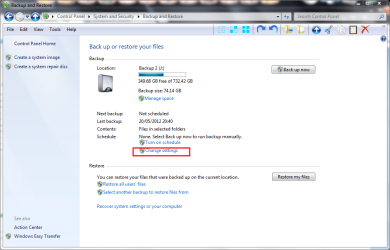
You need to go to Control Panel->System and Security->Backup and Restore and press the change settings button.

screenshot174_2012-05-27.png

Just run through the wizard and everything should be back to normal. Sometimes when you add, remove or rename folders that are in the backup set Windows Backup doesn't understand what is going on.

I see that Burdus has recommended FreeFileSync and pointed you to my video. That would be my choice as an alternative to the Windows Backup for data files. For images I recommend Macrium Reflect Free. The link is in my signature.
 
Last edited:

My Computer

Computer type
Laptop
Computer Manufacturer/Model Number
Hewlett-Packard/G62-107SA Notebook
OS
Microsoft Windows 7 Home Premium 64-bit Service Pack 1
CPU
Intel(R) Core(TM) i3 CPU M 330 @ 2.13GHz
Motherboard
Hewlett-Packard 1425
Memory
8 GB DDR3
Graphics Card(s)
Intel(R) HD Graphics
Sound Card
Realtek High Definition Audio
Monitor(s) Displays
Builtin
Screen Resolution
1366 x 768 x 32 bits (4294967296 colors) @ 60 Hz
Hard Drives
250 GB SATA Hard Disk Drive 7200 rpm
2TB Seagate GoFlex USB 2 Drive
1TB Iomega Prestige USB 2 Drive
1.5TB Iomega Prestige USB 2 Drive (Samsung)
2TB WD MyBook Live NAS.
Mouse
Logitech Anywhere MX
Internet Speed
152 Mbs download 10 Mbs upload
Antivirus
Norton 360
Browser
Chrome
I have made the experience that many of those backup programs - especially the ones built into Windows - do strange things that I do not understand. That is why I just copy my data manually to an external drive or make an image of the data partition (on those systems where I have a seperate data partition) using free Macrium.

I also recommend to enable restore points on data partitions and allocate sufficient space for about 10 restore points. That is often handy if you lost files. They are easy to recover with Shadow Explorer
 

My Computer

Computer Manufacturer/Model Number
HP, Dell, Gateway, Toshiba - 4 laptops and 2 desktops
OS
Vista, Windows7, Mint Mate, Zorin, Windows 8
CPU
from 1.6GHz Duo to i7
Monitor(s) Displays
2x HP w2207
Hard Drives
5x HDD, 7x SSD, 12x Externals
Keyboard
with trackball - no mices
Mouse
Trackball mice
Internet Speed
DSL 6000
Shadow Explorer is good but Windows has built in support for restore points on data volumes using the Previous Versions tab in the file and folder properties dialogue.
 

My Computer

Computer type
Laptop
Computer Manufacturer/Model Number
Hewlett-Packard/G62-107SA Notebook
OS
Microsoft Windows 7 Home Premium 64-bit Service Pack 1
CPU
Intel(R) Core(TM) i3 CPU M 330 @ 2.13GHz
Motherboard
Hewlett-Packard 1425
Memory
8 GB DDR3
Graphics Card(s)
Intel(R) HD Graphics
Sound Card
Realtek High Definition Audio
Monitor(s) Displays
Builtin
Screen Resolution
1366 x 768 x 32 bits (4294967296 colors) @ 60 Hz
Hard Drives
250 GB SATA Hard Disk Drive 7200 rpm
2TB Seagate GoFlex USB 2 Drive
1TB Iomega Prestige USB 2 Drive
1.5TB Iomega Prestige USB 2 Drive (Samsung)
2TB WD MyBook Live NAS.
Mouse
Logitech Anywhere MX
Internet Speed
152 Mbs download 10 Mbs upload
Antivirus
Norton 360
Browser
Chrome
Keith, previous version is fine if you still have a version of the file. But what do you do when the file has been totally deleted - e.g. by accident.
 

My Computer

Computer Manufacturer/Model Number
HP, Dell, Gateway, Toshiba - 4 laptops and 2 desktops
OS
Vista, Windows7, Mint Mate, Zorin, Windows 8
CPU
from 1.6GHz Duo to i7
Monitor(s) Displays
2x HP w2207
Hard Drives
5x HDD, 7x SSD, 12x Externals
Keyboard
with trackball - no mices
Mouse
Trackball mice
Internet Speed
DSL 6000
Hi Wolfgang. You go to Previous Versions of the containing folder or the drive if a root folder has been deleted.
 

My Computer

Computer type
Laptop
Computer Manufacturer/Model Number
Hewlett-Packard/G62-107SA Notebook
OS
Microsoft Windows 7 Home Premium 64-bit Service Pack 1
CPU
Intel(R) Core(TM) i3 CPU M 330 @ 2.13GHz
Motherboard
Hewlett-Packard 1425
Memory
8 GB DDR3
Graphics Card(s)
Intel(R) HD Graphics
Sound Card
Realtek High Definition Audio
Monitor(s) Displays
Builtin
Screen Resolution
1366 x 768 x 32 bits (4294967296 colors) @ 60 Hz
Hard Drives
250 GB SATA Hard Disk Drive 7200 rpm
2TB Seagate GoFlex USB 2 Drive
1TB Iomega Prestige USB 2 Drive
1.5TB Iomega Prestige USB 2 Drive (Samsung)
2TB WD MyBook Live NAS.
Mouse
Logitech Anywhere MX
Internet Speed
152 Mbs download 10 Mbs upload
Antivirus
Norton 360
Browser
Chrome
Hi there
This is one of those cases where I REALLY would spend the 40 or so USD on a commercial backup product.
I don't know about you but in my case the DATA I have stored on various computers is worth FAR MORE than the entire Computer(s) and some of it would be nearly impossible to re-create or take hours or even weeks to do so.

For example I can't imagine having to rip over 1000 CD's again (assuming I can even find them all), re-create photo libraries, music folders etc. to say nothing of important documents like Income Tax statements etc.

the 45 or so USD I spent on Acronis IMO was money EXTREMELY WELL SPENT.

The MS built in backup gives mixed results for different people -- it's slightly better in the new W8 Consumer edition but still nothing like as good as a decent 3rd party product.

The other advantages these commercial products give you is that they can do what's known as Incremental Backups -- that is for example at the end of the day when you run a backup only data that's changed is backed up.

You can exclude particular types of files such as temporary one's or particular directories.

These types of backups also can make BOOTABL:E restore images of your OS so if your whole system becomes non bootable - simply insert the backup bootable media and restore.

Ms Backup is better than nothing - but its results appear to be too unpredictable to rely on it completely.

BTW also when taking backups ALWAYS have more than one copy - HDD's are cheap these days -- recovering lost data ISN'T. !!!

Cheers
jimbo
 

My Computer

Computer type
PC/Desktop
Computer Manufacturer/Model Number
Custom built, several laptops HP/ASUS
OS
Linux CENTOS 7 / various Windows OS'es and servers
CPU
Intel i7 Intel i5
Memory
8GB, 16GB
Graphics Card(s)
On Motherboard
Sound Card
Realtek HD audio
Monitor(s) Displays
Apple Cinema display, Samsung LCD
Screen Resolution
1920 X 1080
Hard Drives
4 X 1TB SATA
Mouse
Toshiba wireless laser
Internet Speed
> 20MB up
Hi Wolfgang. You go to Previous Versions of the containing folder or the drive if a root folder has been deleted.
Understand Keith. But that may have some undesirable effects. If you go to a higher level folder - e.g. the root folder - you may reset a lot of other files that were updated in the meantime. With Shadow Explorer you can pick the exact file you want to restore. I think that is an advantage.

Try it once, it is really easy. You just navigate to the file in question in the shadow and right click on it. Then you can retrieve it.
 

My Computer

Computer Manufacturer/Model Number
HP, Dell, Gateway, Toshiba - 4 laptops and 2 desktops
OS
Vista, Windows7, Mint Mate, Zorin, Windows 8
CPU
from 1.6GHz Duo to i7
Monitor(s) Displays
2x HP w2207
Hard Drives
5x HDD, 7x SSD, 12x Externals
Keyboard
with trackball - no mices
Mouse
Trackball mice
Internet Speed
DSL 6000
Yes I also use Shadow Explorer.

If you double click the previous version for a folder or drive it doesn't restore, it opens in Windows Explorer.
 

My Computer

Computer type
Laptop
Computer Manufacturer/Model Number
Hewlett-Packard/G62-107SA Notebook
OS
Microsoft Windows 7 Home Premium 64-bit Service Pack 1
CPU
Intel(R) Core(TM) i3 CPU M 330 @ 2.13GHz
Motherboard
Hewlett-Packard 1425
Memory
8 GB DDR3
Graphics Card(s)
Intel(R) HD Graphics
Sound Card
Realtek High Definition Audio
Monitor(s) Displays
Builtin
Screen Resolution
1366 x 768 x 32 bits (4294967296 colors) @ 60 Hz
Hard Drives
250 GB SATA Hard Disk Drive 7200 rpm
2TB Seagate GoFlex USB 2 Drive
1TB Iomega Prestige USB 2 Drive
1.5TB Iomega Prestige USB 2 Drive (Samsung)
2TB WD MyBook Live NAS.
Mouse
Logitech Anywhere MX
Internet Speed
152 Mbs download 10 Mbs upload
Antivirus
Norton 360
Browser
Chrome
Back
Top