Solved Failed to Take Ownership

Magnakai

New member
Member
VIP
Local time
6:57 AM
Messages
160
hi all, i need help with taking ownership of a folder; i have failed to do so after a manual attempt, as well as after applying the shortcut downloaded from here http://www.sevenforums.com/tutorials/1911-take-ownership-shortcut.html.

folder location is here, generated by bitdefender :-

C:\ProgramData\Bitdefender\Desktop\Profiles\Logs\<some randomly generated serial folder name>\

there are 2 such folders at C:\ProgramData\Bitdefender\Desktop\Profiles\Logs\, one for Quick Scan & one for System Scan.

thanks.
 

My Computer My Computer

Computer type
PC/Desktop
OS
Windows 7 Ultimate x64
Okay - here's a guess. Maybe that folder is being used (or "locked")

Try LockHunter to see if that's the case. Or find open handles to that folder using ProcessExplorer or similar.

Be warned that BitDefender may not allow you to unlock that folder anyway if that's what happens to be locking it.

There should be an option somewhere in Bitdefender to clear logs.

Why do you need to take ownership? To delete it. move it, view contents - or some other reason?

RE: TakeOwnership. I've never liked it as there's no easy way to restore original permissions.

A couple of ways that I use.

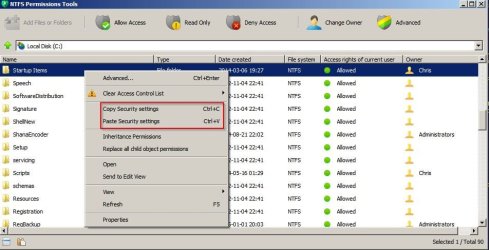
Copy and paste original permissions.

NTFS Permissions.jpg

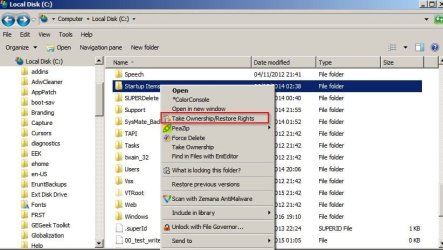
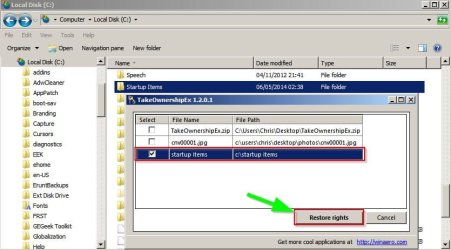
Take Ownership/ Restore Rights:

Take Ownership_Restore Rights.jpg

Restore Rights.jpg

If you need it there might be a way to force copy the folder so that you can mess about with the copy without affecting the original.
 
Last edited:

My Computer My Computer

Computer type
Laptop
Computer Manufacturer/Model Number
ASUS
OS
Microsoft Windows 7 Home Premium 64-bit 7601 Multiprocessor Free Service Pack 1
CPU
AMD C-60 APU with Radeon(tm) HD Graphics
Motherboard
ASUSTeK COMPUTER INC. X501U
Memory
4.00 GB
Graphics Card(s)
AMD Radeon HD 6290 Graphics
Sound Card
(1) AMD High Definition Audio Device (2) Realtek High Defi
Screen Resolution
1366 x 768 x 32 bits (4294967296 colors) @ 60 Hz
Hard Drives
Hitachi HTS545050A7E380 SATA Disk Device
Antivirus
Comodo CIS & FW, SecureAplus App Whitelisting, Threatfire
Browser
Cyberfox 64bit, Opera 64bit, Airfox
Other Info
Spy-The-Spy, HitmanPro.Alert, Norton Connect Safe, MJRegWatcher, BitDefender TrafficLight, Voodoo Shield, Zemana AntiMalware
callender did u identify those folders? are those on-demand scan results. can u check urs?

thanks i will give your method a try. it's cool i cloned my pc before i put on bitdefender
 

My Computer My Computer

Computer type
PC/Desktop
OS
Windows 7 Ultimate x64
I don't have those folders as I don't use BitDefender as my AV. I do have BitDefender TrafficLight (browser plugin)

There should be a way to view scan results from within BitDefender GUI.
 

My Computer My Computer

Computer type
Laptop
Computer Manufacturer/Model Number
ASUS
OS
Microsoft Windows 7 Home Premium 64-bit 7601 Multiprocessor Free Service Pack 1
CPU
AMD C-60 APU with Radeon(tm) HD Graphics
Motherboard
ASUSTeK COMPUTER INC. X501U
Memory
4.00 GB
Graphics Card(s)
AMD Radeon HD 6290 Graphics
Sound Card
(1) AMD High Definition Audio Device (2) Realtek High Defi
Screen Resolution
1366 x 768 x 32 bits (4294967296 colors) @ 60 Hz
Hard Drives
Hitachi HTS545050A7E380 SATA Disk Device
Antivirus
Comodo CIS & FW, SecureAplus App Whitelisting, Threatfire
Browser
Cyberfox 64bit, Opera 64bit, Airfox
Other Info
Spy-The-Spy, HitmanPro.Alert, Norton Connect Safe, MJRegWatcher, BitDefender TrafficLight, Voodoo Shield, Zemana AntiMalware
it's cool, i resolved the matter. thanks callender.
 

My Computer My Computer

Computer type
PC/Desktop
OS
Windows 7 Ultimate x64
Back
Top