Solved Failure Configuring Windows Updates Message While PC is Restarting

Efdy

New member
Member
VIP
Local time
12:36 PM
Messages
137
Location
USA
This here thread went on for a long time, and eventually lead to me doing a repair install. Someone who had the same exact problem I had with this message while trying to install the Security Monthly Quality Rollup updates for March and April posted some information about a possible solution to this particular difficulty that may not include doing a repair install. You can read what he wrote about that in post #55 of this thread.

[Edit March 23, 4:00 AM GMT -6 hrs I still can't get the zip with the entire CBS folder to upload here, so I replaced the one I uploaded to my Outlook.com OneDrive public folder that was made using WinRAR with a zip made using the built-in zip creator utility thing. I also replaced the two zips uploaded here that have the individual CBS and CheckSUR logs. There is a MGADiag report in the following post.]

[Edit March 22, 2:30 AM GMT -6 hrs I read in someone else's post that Torchwood asked them to make their zips with the built-in zip creator thing instead of whatever they used. I'll try to do that as soon as I can, like later today, because all mine were made with WinRAR.]

[Edit March 20] Are we supposed to include the entire CBS folder to attach to posts here with all the files that say persist in the name, or just the CBS.log and CheckSUR.log? My CBS folder is 28GB. Compressed in a ZIP it is 1.8GB, and in a RAR it is 310MB. Is that the normal size of the CBS folder?

I still can't upload the larger archive here that includes the entire CBS folder. I uploaded the compressed CBS folder copied today, March 20, to my Outlook.com OneDrive Public folder after doing today what is mentioned in the following paragraph. (Farther down is what I originally posted a few days ago.) Here is a link to that Public folder, and ZIPs with just the CBS.log and CheckSUR.log files are attached here. The web page of that folder has an icon in the upper-right that you can click on to change views. List view makes it easier to see complete file names.

Public folder at OneDrive
https://1drv.ms/f/s!Ag_89ambIEpjcaYX8tpJ_yGOIZ8

These two are uploaded here.
View attachment CBS Log ZIP.zip
View attachment CheckSUR Log ZIP.zip

Today, March 20, that Windows Update Troubleshooter thing still says I have the unfixed Windows Update error 0x80070057. Today I installed/ran System Update Readiness Tool again and then tried to install KB4088875 again. Like before, the Readiness Tool thing seemed to work okay and in Update History it says Successful. When I tried to install KB4088875 again after that, the same things happened as before. It seemed to install okay, and then I was prompted to restart the computer. I actually clicked Postpone instead of Restart Now and then clicked Start>Shut down this time, and then started the computer again by pressing the power button. I don't know why. Anyway, then I got the failure to configure Windows Updates message again when Windows started up, and like before, after the desktop appeared, in Windows Update History it said successful for KB4088875. I'll try to show a screenshot. But my problem is that I don't know that the installation of KB4088875 was successful, and it seems like it wasn't even when it said it was, for reasons explained below, such as it was still being offered in Windows Update after it said successful and the "Failure configuring windows updates. Reverting changes" message appeared after restart every time I tried to install the update.
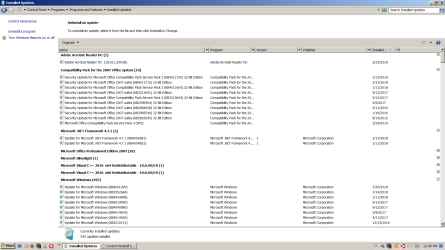
Screenshot 004 Installed Updates March 20 2018.png

Screenshot 005 Update History March 20 2018.png

In Installed Updates, I don't see KB4088875 listed, but in Update History, it looks like there are many more of those KB... updates listed than there are listed in Installed Updates, where it says 542 updates are installed altogether. And in Installed Updates it says KB4091290 was installed today, March 20. In Update History, it says that was installed March 13, which is when it was installed. I don't understand.

Sorry for not knowing how to do things right and for being very wordy. Thank you for reading this. I appreciate it. Below is what I originally posted a few days ago.

Hello. This month, the last update appeared in Windows Update after restarting the computer after installing the other updates. A desktop alert pop-up message whatever thing also appeared on the desktop saying an update was available for Malwarebytes. I installed the Malwarebytes update. It didn't say to restart the computer, so I installed the available Windows update, KB4088875, without restarting the computer again first. When this Windows update installed, I restarted the computer as prompted, which seemed to go normally until after the computer restarted. The blue screen with the white bird said "Please wait." Then it said "Preparing to configure windows." Then it said "Failure configuring Windows Updates. Reverting changes. Don't turn off your computer."

After the computer desktop appeared again, in Windows Update it said the installation of that update, KB4088875, failed. I uninstalled Malwarebytes in case that might help--I don't know why to think it would have, I'm not very computer savvy--and also uninstalled TunnelBear VPN for the hell of it (which is never running during Windows updates), and then tried downloading KB4088875 outside of Windows Update and installing it. I was prompted to restart the computer as usual, and the same thing happened again after the computer restarted. (note added March 23: later I also tried installing KB4088875 with Avast, TunnelBear, and Malwarebytes all uninstalled, restarting the PC after each was removed.)

I typed "failure configuring windows updates reverting changes" into a search engine, read some things, then downloaded and ran something called Windows Update Troubleshooter. After running, a dialogue box reported this.

Please see attached screenshot 001 if I am unable to insert it here in this post.
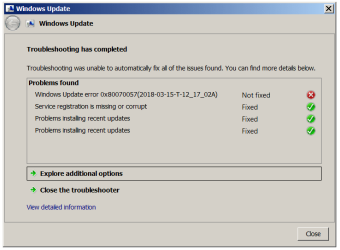
Windows Update Post Screenshot 001 PNG.png

After that, I typed "windows update error 0x80070057" into a search engine, read some things, and then installed KB947821, the Update Readiness Tool and waited for it to run. After restarting the computer, Windows Update History said the installation of KB947821 was successful.

After clicking to check for updates in Windows Updates, it said no updates were available. I tried installing the downloaded copy of KB4088875 again. After restarting the computer when prompted, the same thing happened again ("Failure configuring Windows Updates. Reverting changes. Don't turn off your computer."). But after that, in Windows Update History it said the installation of KB4088875 was successful.

Please see attached screenshot 002 if I am unable to insert it here in this post.
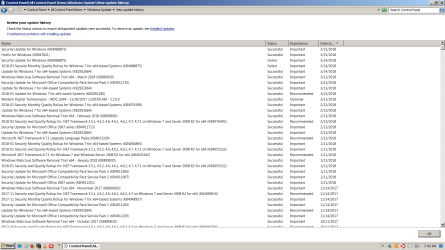
Windows Update Post Screenshot 002 PNG.png

The next day, a desktop alert pop-up whatever thing said new updates for Windows were available. I opened Windows Update. There was only one available update listed, KB4088875, the one I had problems installing. I tried installing KB4088875 that was downloaded in Windows Update. After restarting the PC when prompted, the same things happened again ("Failure configuring Windows Updates. Reverting changes. Don't turn off your computer."). Then after the desktop returned, in Windows Update History, it said the installation of KB4088875 failed.

Please see attached screenshot 003 if I am unable to insert it here in this post.
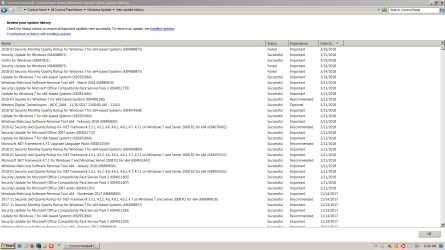
Windows Update Post Screenshot 003 PNG.png

I didn't see some instructions at this website regarding issues with Windows Updates before doing all that. After reading the instructions, I tried to run sfc /scannow. After it ran once, it said "Protection did not find any integrity violations."

System Restore says there aren't restore points for before this happened.

This is on my desktop PC that has Windows 7 Ultimate 64-bit. I have the Windows 7 Ultimate installation DVD. I don't thnk it's an OEM version if that matters. I don't really know. It doesn't say OEM anywhere that I can see on the disk or package.

I have the free version of Avast and the paid for version of Malwarebytes installed on that PC, both of which start when Windows starts. The paid for version of TunnelBear VPN is also installed, but it's never running when I do Windows Updates. In settings, TunnelBear is set to Off where it says "Launch TunnelBear at Startup." Both Malwarebytes and TunnelBear have been installed again since trying to see if uninstalling them made any difference as mentioned above.

That's all the information I can think of to provide to begin with. As you can see in the screenshots of Windows Update History, I haven't usually been having problems installing updates. Can someone please try to help me with this problem? Thank you.

I was able to upload screenshots to attach to my post, but I was unable to upload a CBS.zip (from the Windows\Logs folder) for the computer this issue is on. I tried uploading it using each of my desktop computers. I tried while signed in here using Internet Explorer and Firefox. In IE it says page can't be opened and in Firefox it says file can't be found. I made a second CBS.zip and tried uploading that, and I tried with a CBS.rar, neither of which would upload here. I'm not having any difficulty uploading files at other websites that work the same way (click upload button at website and select file from the computer in a little window that opens). I just can't upload the ZIP or the RAR here. Here is a link to where the CBS.rar is uploaded to my Microsoft email OneDrive storage. https://1drv.ms/f/s!Ag_89ambIEpjcaYX8tpJ_yGOIZ8
 
Last edited:

My Computer

Computer type
PC/Desktop
Computer Manufacturer/Model Number
I do not know. It was put together with separately purchased parts.
OS
Windows 7 Ultimate 64-bit SP1
CPU
Intel Core i5-3570K
Motherboard
ASUS P8Z77-V PRO
Memory
Corsair Vengeance Blue 4x8 GB
Graphics Card(s)
Nvidia GTX 1060
Sound Card
M-Audio Delta 1010LT
Monitor(s) Displays
2 Asus VS247H-P 23.6-Inch LED-Lit LCD monitors
Screen Resolution
1920x1080
Hard Drives
Western Digital WD1002FAEX Caviar Black 1TB SATA III
(no SSD)
My Passport Ultra external hard drive 2TB
PSU
CORSAIR RM650 650W 80 PLUS GOLD Full Modular PSU
Case
Corsair Obsidian Series Black 550D Mid Tower
Cooling
Zalman CNPS9500AT CPU Cooler
Keyboard
Azio Large Print Tri-Color Backlit Wired Keyboard (KB505U)
Mouse
Logitech Gaming Mouse G300
Internet Speed
6-8Mbps down, 2Mbps up
Antivirus
Malwarebytes Premium
Browser
IE, Firefox, Chrome
Other Info
2nd PC: Dell Dimension 4600
OS: Windows 7 Home Premium 32-bit SP1
PSU: EVGA 500W 80+ thingo
CPU: Intel Pentium 4
RAM: 3.00 GB Dual Channel DDR @ 199MHz
MB: Dell 02Y832
GPU: 512MB Nvidia GeForce 6200
HDD: 465GB WDC WD5000AAKS-00A7B2 ATA (SATA)
Opt Drive: HL-DT-ST DVD-ROM GDR8162B ATA Device
Opt Drive: TSSTcorp CD-RW TS-H292C ATA Device
Audio: Creative SB Live
Monitor: Asus-VS247H-P
[Edit March 23, 4:00 AM GMT -6 hrs I still can't get the zip with the entire CBS folder to upload here, so I replaced the one I uploaded to my Outlook.com OneDrive public folder that was made using WinRAR with a zip made with the built-in zip creator utility thing. I also replaced the two zips uploaded here that have the individual CBS and CheckSUR logs. Those links are near the top of my previous post.]

[Edit March 22, 2:30 AM GMT -6 hrs I read in someone else's post that Torchwood asked them to make their zips with the built-in zip creator thing instead of whatever they used. I'll try to do that as soon as I can, like later today, because all mine were made with WinRAR.]

Here's this MGADiag thing report or whatever, by the way. Please tell me this hasn't got anything to do with my software being bogus.

Code:
Diagnostic Report (1.9.0027.0):
-----------------------------------------
Windows Validation Data-->

Validation Code: 0
Cached Online Validation Code: 0x0
Windows Product Key: *****-*****-GY7W4-7YC77-GMV3X
Windows Product Key Hash: OapDLtykx20afY565KjWNkcR3+Y=
Windows Product ID: 00426-292-7110982-85593
Windows Product ID Type: 5
Windows License Type: Retail
Windows OS version: 6.1.7601.2.00010100.1.0.001
ID: {6F83F9AE-3E50-4FD2-80B7-C6438137B7C8}(3)
Is Admin: Yes
TestCab: 0x0
LegitcheckControl ActiveX: N/A, hr = 0x80070002
Signed By: N/A, hr = 0x80070002
Product Name: Windows 7 Ultimate
Architecture: 0x00000009
Build lab: 7601.win7sp1_ldr.180112-0600
TTS Error: 
Validation Diagnostic: 
Resolution Status: N/A

Vista WgaER Data-->
ThreatID(s): N/A, hr = 0x80070002
Version: N/A, hr = 0x80070002

Windows XP Notifications Data-->
Cached Result: N/A, hr = 0x80070002
File Exists: No
Version: N/A, hr = 0x80070002
WgaTray.exe Signed By: N/A, hr = 0x80070002
WgaLogon.dll Signed By: N/A, hr = 0x80070002

OGA Notifications Data-->
Cached Result: N/A, hr = 0x80070002
Version: N/A, hr = 0x80070002
OGAExec.exe Signed By: N/A, hr = 0x80070002
OGAAddin.dll Signed By: N/A, hr = 0x80070002

OGA Data-->
Office Status: 100 Genuine
Microsoft Office Professional Edition 2003 - 115
OGA Version: N/A, 0x80070002
Signed By: N/A, hr = 0x80070002
Office Diagnostics: B4D0AA8B-604-645_025D1FF3-364-80041010_025D1FF3-229-80041010_025D1FF3-230-1_025D1FF3-517-80040154_025D1FF3-237-80040154_025D1FF3-238-2_025D1FF3-244-80070002_025D1FF3-258-3_E2AD56EA-765-d003_E2AD56EA-766-0_E2AD56EA-134-80004005_E2AD56EA-765-b01a_E2AD56EA-766-0_E2AD56EA-148-80004005_16E0B333-89-80004005_B4D0AA8B-1029-80004005

Browser Data-->
Proxy settings: N/A
User Agent: Mozilla/4.0 (compatible; MSIE 8.0; Win32)
Default Browser: C:\Program Files\Internet Explorer\IEXPLORE.exe
Download signed ActiveX controls: Prompt
Download unsigned ActiveX controls: Disabled
Run ActiveX controls and plug-ins: Allowed
Initialize and script ActiveX controls not marked as safe: Disabled
Allow scripting of Internet Explorer Webbrowser control: Disabled
Active scripting: Allowed
Script ActiveX controls marked as safe for scripting: Allowed

File Scan Data-->

Other data-->
Office Details: <GenuineResults><MachineData><UGUID>{6F83F9AE-3E50-4FD2-80B7-C6438137B7C8}</UGUID><Version>1.9.0027.0</Version><OS>6.1.7601.2.00010100.1.0.001</OS><Architecture>x64</Architecture><PKey>*****-*****-*****-*****-GMV3X</PKey><PID>00426-292-7110982-85593</PID><PIDType>5</PIDType><SID>S-1-5-21-1527410559-2550731853-3017635830</SID><SYSTEM><Manufacturer>System manufacturer</Manufacturer><Model>System Product Name</Model></SYSTEM><BIOS><Manufacturer>American Megatrends Inc.</Manufacturer><Version>1805</Version><SMBIOSVersion major="2" minor="7"/><Date>20121219000000.000000+000</Date></BIOS><HWID>E9203407018400FE</HWID><UserLCID>0409</UserLCID><SystemLCID>0409</SystemLCID><TimeZone>Central Standard Time(GMT-06:00)</TimeZone><iJoin>0</iJoin><SBID><stat>3</stat><msppid></msppid><name></name><model></model></SBID><OEM/><GANotification/></MachineData><Software><Office><Result>100</Result><Products><Product GUID="{91110409-6000-11D3-8CFE-0150048383C9}"><LegitResult>115</LegitResult><Name>Microsoft Office Professional Edition 2003</Name><Ver>11</Ver><Val>97A91F0CC767F6E</Val><Hash>NtlMTIKmVzny7m/VX8rIaQHjrYg=</Hash><Pid>70145-OEM-5795144-36529</Pid><PidType>5</PidType></Product></Products><Applications><App Id="15" Version="11" Result="100"/><App Id="16" Version="11" Result="100"/><App Id="18" Version="11" Result="100"/><App Id="19" Version="11" Result="100"/><App Id="1A" Version="11" Result="100"/><App Id="1B" Version="11" Result="100"/><App Id="44" Version="11" Result="100"/></Applications></Office></Software></GenuineResults>  

Spsys.log Content: 0x80070002

Licensing Data-->
Software licensing service version: 6.1.7601.17514

Name: Windows(R) 7, Ultimate edition
Description: Windows Operating System - Windows(R) 7, RETAIL channel
Activation ID: ac96e1a8-6cc4-4310-a4ff-332ce77fb5b8
Application ID: 55c92734-d682-4d71-983e-d6ec3f16059f
Extended PID: 00426-00170-292-711098-00-1033-7601.0000-1912016
Installation ID: 002520425641924131350043643164109853017024165821505565
Processor Certificate URL: http://go.microsoft.com/fwlink/?LinkID=88338
Machine Certificate URL: http://go.microsoft.com/fwlink/?LinkID=88339
Use License URL: http://go.microsoft.com/fwlink/?LinkID=88341
Product Key Certificate URL: http://go.microsoft.com/fwlink/?LinkID=88340
Partial Product Key: GMV3X
License Status: Licensed
Remaining Windows rearm count: 1
Trusted time: 3/23/2018 3:35:53 AM

Windows Activation Technologies-->
HrOffline: 0x00000000
HrOnline: 0x00000000
HealthStatus: 0x0000000000000000
Event Time Stamp: 1:2:2018 02:03
ActiveX: Registered, Version: 7.1.7600.16395
Admin Service: Registered, Version: 7.1.7600.16395
HealthStatus Bitmask Output:


HWID Data-->
HWID Hash Current: OAAAAAIABgABAAEAAAACAAAAAQABAAEAhFES5EAudxZgGnTECBR0uGTHeOzkF+4/MqiIp4i8lmM=

OEM Activation 1.0 Data-->
N/A

OEM Activation 2.0 Data-->
BIOS valid for OA 2.0: yes, but no SLIC table
Windows marker version: N/A
OEMID and OEMTableID Consistent: N/A
BIOS Information: 
  ACPI Table Name    OEMID Value    OEMTableID Value
  APIC            ALASKA        A M I
  FACP            ALASKA        A M I
  HPET            ALASKA        A M I
  MCFG            ALASKA        A M I
  FPDT            ALASKA        A M I
  SSDT            IdeRef        IdeTable
  BGRT            ALASKA        A M I
  SSDT            IdeRef        IdeTable
  SSDT            IdeRef        IdeTable
 
Last edited:

My Computer

Computer type
PC/Desktop
Computer Manufacturer/Model Number
I do not know. It was put together with separately purchased parts.
OS
Windows 7 Ultimate 64-bit SP1
CPU
Intel Core i5-3570K
Motherboard
ASUS P8Z77-V PRO
Memory
Corsair Vengeance Blue 4x8 GB
Graphics Card(s)
Nvidia GTX 1060
Sound Card
M-Audio Delta 1010LT
Monitor(s) Displays
2 Asus VS247H-P 23.6-Inch LED-Lit LCD monitors
Screen Resolution
1920x1080
Hard Drives
Western Digital WD1002FAEX Caviar Black 1TB SATA III
(no SSD)
My Passport Ultra external hard drive 2TB
PSU
CORSAIR RM650 650W 80 PLUS GOLD Full Modular PSU
Case
Corsair Obsidian Series Black 550D Mid Tower
Cooling
Zalman CNPS9500AT CPU Cooler
Keyboard
Azio Large Print Tri-Color Backlit Wired Keyboard (KB505U)
Mouse
Logitech Gaming Mouse G300
Internet Speed
6-8Mbps down, 2Mbps up
Antivirus
Malwarebytes Premium
Browser
IE, Firefox, Chrome
Other Info
2nd PC: Dell Dimension 4600
OS: Windows 7 Home Premium 32-bit SP1
PSU: EVGA 500W 80+ thingo
CPU: Intel Pentium 4
RAM: 3.00 GB Dual Channel DDR @ 199MHz
MB: Dell 02Y832
GPU: 512MB Nvidia GeForce 6200
HDD: 465GB WDC WD5000AAKS-00A7B2 ATA (SATA)
Opt Drive: HL-DT-ST DVD-ROM GDR8162B ATA Device
Opt Drive: TSSTcorp CD-RW TS-H292C ATA Device
Audio: Creative SB Live
Monitor: Asus-VS247H-P
Have you tried some simple solutions like downloading the offline installer, disconnecting the internet and shutting down all AV/Firewall protections, etc before trying to install it?

I only tried uninstalling Avast, Malwarebytes, and TunnelBear, but not disabling the Windows firewall or the Internet connection.

I haven't tried using that WSUS Offline Update thing yet. I downloaded it earlier today, but I have not installed yet.

I saw where you also mentioned to someone using something called Microsoft Baseline Security Analizer. I installed that and ran a scan with it. It said that in addition to the March 2018 rollup, KB4088875, I was missing a security update from 2015. I downloaded that old security update from the page with information about the update. Installation of it went fine. So did the installation of all the other March 13 updates in Windows Update before trying to install the March 2018 rollup, KB4088875.

I don't really quite understand what I have read so far about installing a monthly rollup or the updates a rollup includes. After that old missing security update installed easily, I looked for what you guys were talking about to see if I could try installing updates included in the March rollup individually. All I found was KB408878 Security Only Quality Update for March 2018. I downloaded that using the update catalog thing.

When I tried to install it, the same thing happened that keeps happening when I try to install the monthly rollup for March, KB4088875. It seems to go normally through "Installation complete," then only goes to 13% when configuring before "Shutting down" during the restart, and then after the PC switches back on during the restart, it gets to 13% while the configuring message displays, and then the "Failure configuring Windows Update. Reverting Changes" message displays for about two and a half hours. After which the desktop returns and the light on the front of the tower that seems to indicate CPU usage stays on fully bright for more hours during which the only processes active in Task Manager besides svchost.exe, taskmgr.exe, and wermgr.exe (at 1% of CPU occasionally for just a second) are System Idle Process and System which jumps around between 1% and 9% of CPU even though that light on the tower is fully bright and the PC doesn't seem to want to do anything else during that time. Then after all that the PC goes back to acting normal.

You might want to hold off installing the March rollup anyway as I believe they've been pulled. Some users reported the update had disappeared from Windows Update.

Okay.

I'll reply on your thread tomorrow evening, so as not to hijack this thread.

Just whenever you can will be soon enough and appreciated. Thank you for the reply.
 
Last edited:

My Computer

Computer type
PC/Desktop
Computer Manufacturer/Model Number
I do not know. It was put together with separately purchased parts.
OS
Windows 7 Ultimate 64-bit SP1
CPU
Intel Core i5-3570K
Motherboard
ASUS P8Z77-V PRO
Memory
Corsair Vengeance Blue 4x8 GB
Graphics Card(s)
Nvidia GTX 1060
Sound Card
M-Audio Delta 1010LT
Monitor(s) Displays
2 Asus VS247H-P 23.6-Inch LED-Lit LCD monitors
Screen Resolution
1920x1080
Hard Drives
Western Digital WD1002FAEX Caviar Black 1TB SATA III
(no SSD)
My Passport Ultra external hard drive 2TB
PSU
CORSAIR RM650 650W 80 PLUS GOLD Full Modular PSU
Case
Corsair Obsidian Series Black 550D Mid Tower
Cooling
Zalman CNPS9500AT CPU Cooler
Keyboard
Azio Large Print Tri-Color Backlit Wired Keyboard (KB505U)
Mouse
Logitech Gaming Mouse G300
Internet Speed
6-8Mbps down, 2Mbps up
Antivirus
Malwarebytes Premium
Browser
IE, Firefox, Chrome
Other Info
2nd PC: Dell Dimension 4600
OS: Windows 7 Home Premium 32-bit SP1
PSU: EVGA 500W 80+ thingo
CPU: Intel Pentium 4
RAM: 3.00 GB Dual Channel DDR @ 199MHz
MB: Dell 02Y832
GPU: 512MB Nvidia GeForce 6200
HDD: 465GB WDC WD5000AAKS-00A7B2 ATA (SATA)
Opt Drive: HL-DT-ST DVD-ROM GDR8162B ATA Device
Opt Drive: TSSTcorp CD-RW TS-H292C ATA Device
Audio: Creative SB Live
Monitor: Asus-VS247H-P
Try deleting the contents of your Download folder then run Windows Update again.
C:/Windows>SoftwareDistribution>Download
 

My Computer

Computer type
PC/Desktop
OS
Windows 7 Home 64-bit
Okay, I'll try whenever it eventually stops doing what is described last in my previous post. (I'm using the other PC to write this.) Thank you for the suggestion.
 

My Computer

Computer type
PC/Desktop
Computer Manufacturer/Model Number
I do not know. It was put together with separately purchased parts.
OS
Windows 7 Ultimate 64-bit SP1
CPU
Intel Core i5-3570K
Motherboard
ASUS P8Z77-V PRO
Memory
Corsair Vengeance Blue 4x8 GB
Graphics Card(s)
Nvidia GTX 1060
Sound Card
M-Audio Delta 1010LT
Monitor(s) Displays
2 Asus VS247H-P 23.6-Inch LED-Lit LCD monitors
Screen Resolution
1920x1080
Hard Drives
Western Digital WD1002FAEX Caviar Black 1TB SATA III
(no SSD)
My Passport Ultra external hard drive 2TB
PSU
CORSAIR RM650 650W 80 PLUS GOLD Full Modular PSU
Case
Corsair Obsidian Series Black 550D Mid Tower
Cooling
Zalman CNPS9500AT CPU Cooler
Keyboard
Azio Large Print Tri-Color Backlit Wired Keyboard (KB505U)
Mouse
Logitech Gaming Mouse G300
Internet Speed
6-8Mbps down, 2Mbps up
Antivirus
Malwarebytes Premium
Browser
IE, Firefox, Chrome
Other Info
2nd PC: Dell Dimension 4600
OS: Windows 7 Home Premium 32-bit SP1
PSU: EVGA 500W 80+ thingo
CPU: Intel Pentium 4
RAM: 3.00 GB Dual Channel DDR @ 199MHz
MB: Dell 02Y832
GPU: 512MB Nvidia GeForce 6200
HDD: 465GB WDC WD5000AAKS-00A7B2 ATA (SATA)
Opt Drive: HL-DT-ST DVD-ROM GDR8162B ATA Device
Opt Drive: TSSTcorp CD-RW TS-H292C ATA Device
Audio: Creative SB Live
Monitor: Asus-VS247H-P
Okay, by the way, the CPU usage light is more than likely your hard drive.

Something else to check is the reporting events document in the SoftwareDistribution folder.

Also, can you check to see what the latest version of IE11 security update installed? To check, open internet explorer and click on the gear symbol in upper right then click on "About Internet Explorer".
 

My Computer

Computer type
PC/Desktop
OS
Windows 7 Home 64-bit

My Computer

Computer type
PC/Desktop
Computer Manufacturer/Model Number
HP Desktop & Compaq Laptop
OS
Win 10 x64, Linux Lite, Win 7 x64, BlackArch, & Kali
Hard Drives
Samsung 850 Pro 256Gb,
Hitachi HDD 1Tb,
Crucial MX SSD 250Gb
Segate 3Tb USB 3.0 Ext. Backup HDD
Internet Speed
150Mbps dn, 20Mbps up
Antivirus
Avast Free, Malwarebytes Anti-Exploit & Anti-Ransomware
Browser
Firefox, Chrome, Opera, & VPN
Thank you for the replies.

Okay, by the way, the CPU usage light is more than likely your hard drive.

Oh, I understand now. Thanks.

Something else to check is the reporting events document in the SoftwareDistribution folder.

I didn't think to save that before using that batch thing Snick linked to for resetting Windows Update History. I don't know if that cleared that log, but something did, so I don't have that record of errors during those failed update attempts to look at or show anyone if it matters.

Also, can you check to see what the latest version of IE11 security update installed? To check, open internet explorer and click on the gear symbol in upper right then click on "About Internet Explorer".

Version: 11.0.9600.18921
Update Versions: 11.0.52 (KB4088835)

[Edit I for got to mention that when I tried to install March 2018 rollup KB4088875 again after deleting the contents of C:/Windows>SoftwareDistribution>Download, the same thing happened again, the "Failure configuring Windows updates. Reverting changes" thing.]

I read what someone posted here last night about disabling Nalpeiron Licensing Service, restarting the PC, and then installing the March rollup on his Windows 7 Home computer. There is no Nalpeiron Licensing Service on either of my computers that I can see, so I guess I can't try that. At a Microsoft Help web page, it says: "If your Windows 7 is 64 bit, the file should be located here: 'C:\Windows\SysWOW64\nlssrv32.exe'." But I don't see that file in that folder. I don't even know what folder it would be in on the other PC (Windows 7 Home Premium), but it isn't in the list of services on that PC either. Should I be concerned that I don't even see that service on either of my desktop computers?

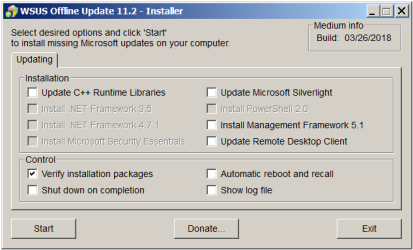
Brds7t7, I have WSUSOffline installed and updates for the PC downloaded.

The only antivirus/malware/whatever program I have installed right now is Malwarebytes. TunnelBear isn't installed right now or Avast. Do you recommend uninstalling Malwarebytes again before trying to install any Windows Updates using WSUSOffline? And you say I should also disable my Windows Firewall and Internet connection?

The client folder is on the same hard drive as the computer the updates would be for. In a guy's tutorial, he says move the Client folder to the C drive, and his screenshot shows the folder next to Windows and Program Files, etc. folders. Does the Client folder need to be moved there or can it just work from where it already is on my C drive? You know, where the original WSUSOffline download got unzipped. That's not a problem to do. I'm just curious if it has to be in the same place as Windows, Program Files, etc.

There are hundreds of updates downloaded in the subfolders (or whatever) in the Client folder. Will it only try to install updates that aren't already installed? I don't even see a box to check for security updates among install options in UpdateInstaller like there was in UpdateGenerator options, but I see the KB408878 Security Only Quality Update for March 2018 in the downloaded files. Which of these boxes in UpdateInstaller should I check?

Screenshot 006.png

Thanks again for the replies. I appreciate it.
 
Last edited:

My Computer

Computer type
PC/Desktop
Computer Manufacturer/Model Number
I do not know. It was put together with separately purchased parts.
OS
Windows 7 Ultimate 64-bit SP1
CPU
Intel Core i5-3570K
Motherboard
ASUS P8Z77-V PRO
Memory
Corsair Vengeance Blue 4x8 GB
Graphics Card(s)
Nvidia GTX 1060
Sound Card
M-Audio Delta 1010LT
Monitor(s) Displays
2 Asus VS247H-P 23.6-Inch LED-Lit LCD monitors
Screen Resolution
1920x1080
Hard Drives
Western Digital WD1002FAEX Caviar Black 1TB SATA III
(no SSD)
My Passport Ultra external hard drive 2TB
PSU
CORSAIR RM650 650W 80 PLUS GOLD Full Modular PSU
Case
Corsair Obsidian Series Black 550D Mid Tower
Cooling
Zalman CNPS9500AT CPU Cooler
Keyboard
Azio Large Print Tri-Color Backlit Wired Keyboard (KB505U)
Mouse
Logitech Gaming Mouse G300
Internet Speed
6-8Mbps down, 2Mbps up
Antivirus
Malwarebytes Premium
Browser
IE, Firefox, Chrome
Other Info
2nd PC: Dell Dimension 4600
OS: Windows 7 Home Premium 32-bit SP1
PSU: EVGA 500W 80+ thingo
CPU: Intel Pentium 4
RAM: 3.00 GB Dual Channel DDR @ 199MHz
MB: Dell 02Y832
GPU: 512MB Nvidia GeForce 6200
HDD: 465GB WDC WD5000AAKS-00A7B2 ATA (SATA)
Opt Drive: HL-DT-ST DVD-ROM GDR8162B ATA Device
Opt Drive: TSSTcorp CD-RW TS-H292C ATA Device
Audio: Creative SB Live
Monitor: Asus-VS247H-P
Hi Efdy, sorry for the delay, I haven't really had time to come online over the weekend.

Seems like you've tried a few things that haven't worked.
Unfortunately, I don't think WSUSOffline will solve the issue of the Rollup not installing.

WSUSOffline is primarily used for getting a new install up to date with Security updates before it's connected to the Internet. Especially these days with more exploits around. It was originally created for saving businesses heavy bandwidth and for getting client PCs up to date quickly using an easy installer or ISO file. But it's handy for home users to get up to date quickly too.

It can't hurt to try it, but I don't think it will solve the issue of that one rollup not installing though. If you're going to run it I would create a backup/image of your system first.

You said you had checked using the Baseline Security Analyzer. Can you run it again using the 'Scan Offline Catalog' option and take a Screenshot of the result and post it here? Does it say you're up to date with the exception of the latest rollup? Does the March Security-only update hang at 13% and revert too?

You shouldn't really need to uninstall Malwarebytes, usually just shutting it down before running the update would do the trick if that was causing the issue.
 

My Computer

Computer type
PC/Desktop
Computer Manufacturer/Model Number
Custom Build
OS
Win 7 Ultimate, Win 8.1 Pro, Linux Mint 19 Cinnamon (All 64-Bit)
CPU
Intel i5 4690K
Motherboard
Gigabyte Z97X-UD3H
Memory
Corsair Vengeance LP 32GB DDR3
Graphics Card(s)
MSI GTX 1060 GAMING X 6GB
Sound Card
Onboard
Hard Drives
Samsung 850 EVO 250GB SSD (x2)
Samsung 860 EVO 1TB SSD (x2)
Crucial MX300 525GB SSD
WD Blue 2TB 5400rpm Intellipark Disabled (x2)
PSU
Corsair HX750i
Case
Phanteks Enthoo Pro
Cooling
CM Hyper 212 EVO on CPU, Noctua Redux NF-P14S 1500rpm (x6)
Keyboard
Corsair K70 RGB LUX
Mouse
Corsair Sabre RGB
Antivirus
Avast Free, MalwareBytes, SAS & CryptoPrevent
Browser
Chrome
Other Info
StarTech PEXESAT322I 2 Port PCI-E SATA Card
ASUS PCE-AC56 Dual-band AC1300 Wireless Card
Akasa FC.Six Manual Fan Controller
And a Partridge in a Pear Tree!
Yes, the same exact thing happened when I tried to install the KB4088878 Security Only Quality Update for March 2018 that happened when I try to install the KB4088875 March 2018 rollup. It was after that that I tried the other suggestions and then installed WSUSOffline. I still don't know what boxes to check in the UpdateInstaller options.

Yes, I think there were just two missing security updates listed in the results of the first Baseline Security Analyzer scan, March 2018 rollup and some old update from 2015 that I downloaded individually. It installed normally, no problems.

I will try to run that Baseline Security Analyzer again as you instructed using the Scan Offline Catalog option and post a screenshot.

Create a backup image of my system before trying to install updates using WSUSOffline? Oh, okay. I don't know how, so I will have to try to learn how to do that before I mess with installing updates with WSUSOffline then.

I have a My Passport external hard drive 2TB connected to the Windows 7 Ultimate 64-bit PC, but I don't really know how to use it. I just have all the boxes checked in the settings part of the My Passport interface (or whatever), and it backs up my files each night. It always says some little tiny files failed to back up, but everything else is saved. That has been helpful, but I don't know how to use it to back up the system in some way that would allow a user to salvage his Windows installation if that is also what it can do. I will try to read about it.

I'm so dumb that when I have been trying to configure System Protection settings, the My Passport external hard drive was highlighted, and I was adjusting System Restore settings and space available for that thinking I was adjusting settings for the C hard drive. I only just realized that when I was trying to figure out why my restore points keep disappearing, which I discovered when this Windows Update problem occurred. So far I tried some instructions from here to switch off System Restore, switch off the PC, switch on the PC, and then switch on System Restore again. I don't know yet if that fixed it. I only did that this weekend. No new restore points have disappeared yet though.

Thanks for helping me.
 
Last edited:

My Computer

Computer type
PC/Desktop
Computer Manufacturer/Model Number
I do not know. It was put together with separately purchased parts.
OS
Windows 7 Ultimate 64-bit SP1
CPU
Intel Core i5-3570K
Motherboard
ASUS P8Z77-V PRO
Memory
Corsair Vengeance Blue 4x8 GB
Graphics Card(s)
Nvidia GTX 1060
Sound Card
M-Audio Delta 1010LT
Monitor(s) Displays
2 Asus VS247H-P 23.6-Inch LED-Lit LCD monitors
Screen Resolution
1920x1080
Hard Drives
Western Digital WD1002FAEX Caviar Black 1TB SATA III
(no SSD)
My Passport Ultra external hard drive 2TB
PSU
CORSAIR RM650 650W 80 PLUS GOLD Full Modular PSU
Case
Corsair Obsidian Series Black 550D Mid Tower
Cooling
Zalman CNPS9500AT CPU Cooler
Keyboard
Azio Large Print Tri-Color Backlit Wired Keyboard (KB505U)
Mouse
Logitech Gaming Mouse G300
Internet Speed
6-8Mbps down, 2Mbps up
Antivirus
Malwarebytes Premium
Browser
IE, Firefox, Chrome
Other Info
2nd PC: Dell Dimension 4600
OS: Windows 7 Home Premium 32-bit SP1
PSU: EVGA 500W 80+ thingo
CPU: Intel Pentium 4
RAM: 3.00 GB Dual Channel DDR @ 199MHz
MB: Dell 02Y832
GPU: 512MB Nvidia GeForce 6200
HDD: 465GB WDC WD5000AAKS-00A7B2 ATA (SATA)
Opt Drive: HL-DT-ST DVD-ROM GDR8162B ATA Device
Opt Drive: TSSTcorp CD-RW TS-H292C ATA Device
Audio: Creative SB Live
Monitor: Asus-VS247H-P
Yes, the same exact thing happened when I tried to install the KB408878 Security Only Quality Update for March 2018 that happened when I try to install the March 2018 rollup. It was after that that I tried the other suggestions and then installed WSUSOffline. I still don't know what boxes to check in the UpdateInstaller options.

Yes, I think there were just two missing security updates listed in the results of the first Baseline Security Analyzer scan, March 2018 rollup and some old update from 2015 that I downloaded individually. It installed normally, no problems.

Ok, so at least you're up to date security wise with the exception of the March rollup. So, no issues there. :thumbsup:
I would abandon the WSUSOffline option as I just don't think it will work in your case. If it's stalling and you're up to date with the rest of the updates then you'll probably get the same result even when using WSUSOffline. It will most likely just stall again and revert.

If you've tried resetting Windows Update as previously posted then I think it might be worth holding off until the April rollup gets pushed out. I've just checked in my Windows Update and I still see no sign of the March rollup. So, I can only assume that it was pulled and hasn't been reissued yet. The rollups are usually pushed out on the 2nd Tuesday of every month so it would be showing in my update list by now.

Capture-05.jpg

Capture-06.png

If the April rollup also won't install then we need to look deeper into what is causing the issue.

And you're not dumb mate, we all learn something new everyday on these forums. Even the more senior members learn new tricks all the time! :)
 

My Computer

Computer type
PC/Desktop
Computer Manufacturer/Model Number
Custom Build
OS
Win 7 Ultimate, Win 8.1 Pro, Linux Mint 19 Cinnamon (All 64-Bit)
CPU
Intel i5 4690K
Motherboard
Gigabyte Z97X-UD3H
Memory
Corsair Vengeance LP 32GB DDR3
Graphics Card(s)
MSI GTX 1060 GAMING X 6GB
Sound Card
Onboard
Hard Drives
Samsung 850 EVO 250GB SSD (x2)
Samsung 860 EVO 1TB SSD (x2)
Crucial MX300 525GB SSD
WD Blue 2TB 5400rpm Intellipark Disabled (x2)
PSU
Corsair HX750i
Case
Phanteks Enthoo Pro
Cooling
CM Hyper 212 EVO on CPU, Noctua Redux NF-P14S 1500rpm (x6)
Keyboard
Corsair K70 RGB LUX
Mouse
Corsair Sabre RGB
Antivirus
Avast Free, MalwareBytes, SAS & CryptoPrevent
Browser
Chrome
Other Info
StarTech PEXESAT322I 2 Port PCI-E SATA Card
ASUS PCE-AC56 Dual-band AC1300 Wireless Card
Akasa FC.Six Manual Fan Controller
And a Partridge in a Pear Tree!
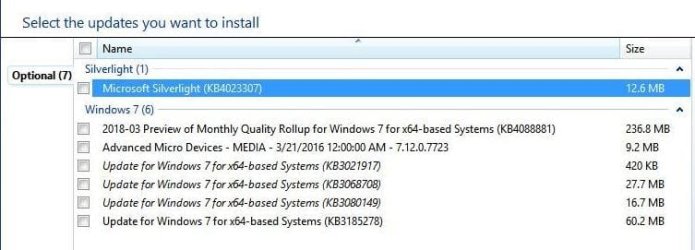
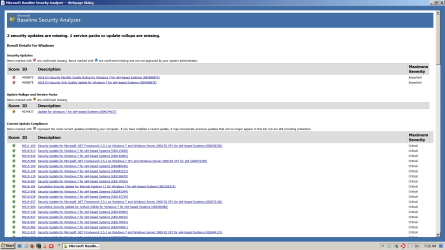
Oh, maybe there was something else missing, and for some reason I thought only the ones with red icons were missing even after reading the results designations. Here's that screenshot of results for Baseline Security Analyzer run with the Scan Offline Catalog option checked.

Screenshot 007.png

I've got time now to try to see what that other one is with the yellow icon and try to install it. Thanks for suggesting doing this scan. And I'll just hold off on further attempts to remedy the problem with installing March rollup KB4088875, and try to keep up with news about it. Thanks for the advice on that. At least it seems like maybe it isn't my PC that's messing up, but their update that is, if that's a fair way to put it. Still doesn't feel as safe though.
 

My Computer

Computer type
PC/Desktop
Computer Manufacturer/Model Number
I do not know. It was put together with separately purchased parts.
OS
Windows 7 Ultimate 64-bit SP1
CPU
Intel Core i5-3570K
Motherboard
ASUS P8Z77-V PRO
Memory
Corsair Vengeance Blue 4x8 GB
Graphics Card(s)
Nvidia GTX 1060
Sound Card
M-Audio Delta 1010LT
Monitor(s) Displays
2 Asus VS247H-P 23.6-Inch LED-Lit LCD monitors
Screen Resolution
1920x1080
Hard Drives
Western Digital WD1002FAEX Caviar Black 1TB SATA III
(no SSD)
My Passport Ultra external hard drive 2TB
PSU
CORSAIR RM650 650W 80 PLUS GOLD Full Modular PSU
Case
Corsair Obsidian Series Black 550D Mid Tower
Cooling
Zalman CNPS9500AT CPU Cooler
Keyboard
Azio Large Print Tri-Color Backlit Wired Keyboard (KB505U)
Mouse
Logitech Gaming Mouse G300
Internet Speed
6-8Mbps down, 2Mbps up
Antivirus
Malwarebytes Premium
Browser
IE, Firefox, Chrome
Other Info
2nd PC: Dell Dimension 4600
OS: Windows 7 Home Premium 32-bit SP1
PSU: EVGA 500W 80+ thingo
CPU: Intel Pentium 4
RAM: 3.00 GB Dual Channel DDR @ 199MHz
MB: Dell 02Y832
GPU: 512MB Nvidia GeForce 6200
HDD: 465GB WDC WD5000AAKS-00A7B2 ATA (SATA)
Opt Drive: HL-DT-ST DVD-ROM GDR8162B ATA Device
Opt Drive: TSSTcorp CD-RW TS-H292C ATA Device
Audio: Creative SB Live
Monitor: Asus-VS247H-P
The third update appears to be a timezone update. It won't hurt to install that one, I doubt it will cure the rollup issue though. But, you can install it and see if it helps.

I wouldn't worry too much, the next rollup will be out in a couple of weeks and include March Security updates too. It's also possible that MS may reissue the March rollup again with some new fixes. From what I've read the March rollup has caused some network issues for some businesses, so that could be the reason it's been pulled. MS doesn't usually pull updates unless there's a pretty big problem with them though, so it might be a blessing that it won't install! :D

You should be fine for a couple weeks, so long as you keep your AV and Malwarebytes definitions up to date and firewall secure. I'll keep an eye out and see if it reappears in my Windows Update list, that will most likely mean it's been reissued with additional fixes. I'll post back in here if that happens.
 

My Computer

Computer type
PC/Desktop
Computer Manufacturer/Model Number
Custom Build
OS
Win 7 Ultimate, Win 8.1 Pro, Linux Mint 19 Cinnamon (All 64-Bit)
CPU
Intel i5 4690K
Motherboard
Gigabyte Z97X-UD3H
Memory
Corsair Vengeance LP 32GB DDR3
Graphics Card(s)
MSI GTX 1060 GAMING X 6GB
Sound Card
Onboard
Hard Drives
Samsung 850 EVO 250GB SSD (x2)
Samsung 860 EVO 1TB SSD (x2)
Crucial MX300 525GB SSD
WD Blue 2TB 5400rpm Intellipark Disabled (x2)
PSU
Corsair HX750i
Case
Phanteks Enthoo Pro
Cooling
CM Hyper 212 EVO on CPU, Noctua Redux NF-P14S 1500rpm (x6)
Keyboard
Corsair K70 RGB LUX
Mouse
Corsair Sabre RGB
Antivirus
Avast Free, MalwareBytes, SAS & CryptoPrevent
Browser
Chrome
Other Info
StarTech PEXESAT322I 2 Port PCI-E SATA Card
ASUS PCE-AC56 Dual-band AC1300 Wireless Card
Akasa FC.Six Manual Fan Controller
And a Partridge in a Pear Tree!
Oh, hello. Okay, thank you again. Should I mark this thread solved now or leave it in case someone has further information to offer? I don't want to waste anyone's time if it would be at this point for them to read this thread considering what Brds7t7 wrote.
 
Last edited:

My Computer

Computer type
PC/Desktop
Computer Manufacturer/Model Number
I do not know. It was put together with separately purchased parts.
OS
Windows 7 Ultimate 64-bit SP1
CPU
Intel Core i5-3570K
Motherboard
ASUS P8Z77-V PRO
Memory
Corsair Vengeance Blue 4x8 GB
Graphics Card(s)
Nvidia GTX 1060
Sound Card
M-Audio Delta 1010LT
Monitor(s) Displays
2 Asus VS247H-P 23.6-Inch LED-Lit LCD monitors
Screen Resolution
1920x1080
Hard Drives
Western Digital WD1002FAEX Caviar Black 1TB SATA III
(no SSD)
My Passport Ultra external hard drive 2TB
PSU
CORSAIR RM650 650W 80 PLUS GOLD Full Modular PSU
Case
Corsair Obsidian Series Black 550D Mid Tower
Cooling
Zalman CNPS9500AT CPU Cooler
Keyboard
Azio Large Print Tri-Color Backlit Wired Keyboard (KB505U)
Mouse
Logitech Gaming Mouse G300
Internet Speed
6-8Mbps down, 2Mbps up
Antivirus
Malwarebytes Premium
Browser
IE, Firefox, Chrome
Other Info
2nd PC: Dell Dimension 4600
OS: Windows 7 Home Premium 32-bit SP1
PSU: EVGA 500W 80+ thingo
CPU: Intel Pentium 4
RAM: 3.00 GB Dual Channel DDR @ 199MHz
MB: Dell 02Y832
GPU: 512MB Nvidia GeForce 6200
HDD: 465GB WDC WD5000AAKS-00A7B2 ATA (SATA)
Opt Drive: HL-DT-ST DVD-ROM GDR8162B ATA Device
Opt Drive: TSSTcorp CD-RW TS-H292C ATA Device
Audio: Creative SB Live
Monitor: Asus-VS247H-P
I would leave it open since you still have an issue. If next month's patch doesn't fix it then you can revisit the thread you started. Pretty sure anyone that post on this thread gets email alerts for any thread activity.
 

My Computer

Computer type
PC/Desktop
OS
Windows 7 Home 64-bit
I'd leave the thread open. If Sky Ranch's fix doesn't work and you still have issues installing the April rollup, then we'll still need to look into the issue a little more. I wouldn't mark it as solved yet.
 

My Computer

Computer type
PC/Desktop
Computer Manufacturer/Model Number
Custom Build
OS
Win 7 Ultimate, Win 8.1 Pro, Linux Mint 19 Cinnamon (All 64-Bit)
CPU
Intel i5 4690K
Motherboard
Gigabyte Z97X-UD3H
Memory
Corsair Vengeance LP 32GB DDR3
Graphics Card(s)
MSI GTX 1060 GAMING X 6GB
Sound Card
Onboard
Hard Drives
Samsung 850 EVO 250GB SSD (x2)
Samsung 860 EVO 1TB SSD (x2)
Crucial MX300 525GB SSD
WD Blue 2TB 5400rpm Intellipark Disabled (x2)
PSU
Corsair HX750i
Case
Phanteks Enthoo Pro
Cooling
CM Hyper 212 EVO on CPU, Noctua Redux NF-P14S 1500rpm (x6)
Keyboard
Corsair K70 RGB LUX
Mouse
Corsair Sabre RGB
Antivirus
Avast Free, MalwareBytes, SAS & CryptoPrevent
Browser
Chrome
Other Info
StarTech PEXESAT322I 2 Port PCI-E SATA Card
ASUS PCE-AC56 Dual-band AC1300 Wireless Card
Akasa FC.Six Manual Fan Controller
And a Partridge in a Pear Tree!
The previous version of your SoftwareDistribution folder is located at:
C:\Windows\SoftwareDistribution.old
To reinstate the history, rename the current Software Distribution folder, i.e. add a different extension, the rename SoftwareDistribution.old to SoftwareDistribution.

FYI. if you right-click on the Batch file you downloaded from SevenForums, click edit, accept popup, you can view the coding by Shawn.
 

My Computer

Computer type
PC/Desktop
Computer Manufacturer/Model Number
HP Desktop & Compaq Laptop
OS
Win 10 x64, Linux Lite, Win 7 x64, BlackArch, & Kali
Hard Drives
Samsung 850 Pro 256Gb,
Hitachi HDD 1Tb,
Crucial MX SSD 250Gb
Segate 3Tb USB 3.0 Ext. Backup HDD
Internet Speed
150Mbps dn, 20Mbps up
Antivirus
Avast Free, Malwarebytes Anti-Exploit & Anti-Ransomware
Browser
Firefox, Chrome, Opera, & VPN
Okay, I will leave this thread open. I always worry about being a bother or doing things wrong according to a website's policies, so thank you for the assurance about leaving this thread open for now. Sorry if email notifications for activity in this thread got annoying. I hope you didn't get one every time I used the button to edit my posts.

While you're waiting for next months patch, and perhaps feeling a bit adventurous,read the following link:
http://www.thewindowsclub.com/software-distribution-folder-in-windows

Flushing the Software Distribution has been known to fix Windows update issues like "unable to configure windows updates".

Good luck

Thanks. I followed those instructions for deleting the contents of the SoftwareDistribution folder and was able to do so without any difficulty, but the same thing happened again as did all the other times when I tried to install the March 2018 rollup KB4088875 update after deleting the contents of the SoftwareDistribution folder, restarting those two services, and restarting the computer. The other updates that appeared after resetting Windows Update History (I think they were ones I hid) installed fine, so I guess my computer does work okay. Thank you for the suggestions you have made to help me.

I looked at the Microsoft information web page for the KB thing mentioned in About Internet Explorer where it says "Update Versions: 11.0.52 (KB4088835)" after you asked me to post what it says in About Internet Explorer, and that page says that update was published in February. I don't know how often that gets updated, but if that happens everything month, will it probably be something that gets taken care of in whatever they make to download and install in Windows Update in April after all this rollup problem? Should I avoid using IE and just use Firefox till then? I've been trying to just use the other computer to go online during this time since the March rollup installation failure. Is it safe to visit websites like SevenForums and Microsoft web pages? Should I keep the Internet connection for this computer switched off when I don't need to go on the web with it?

The previous version of your SoftwareDistribution folder is located at:
C:\Windows\SoftwareDistribution.old
To reinstate the history, rename the current Software Distribution folder, i.e. add a different extension, the rename SoftwareDistribution.old to SoftwareDistribution.

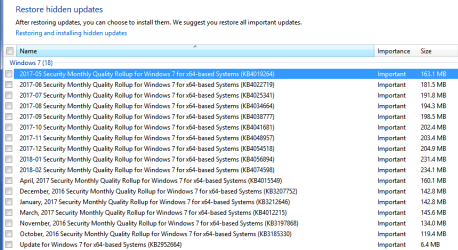
Oh. I don't see a folder named SoftwareDistribution.old in the Windows folder even with "Show hidden files, folders, and drives" ticked. I only see folders named SoftwareDistribution and SoftwareDistribution.bak, which I thought (I guess mistakenly) got created by WSUSOffline when I used it to download Windows updates in preparation to use it to install updates (which I decided not to do per Brds7t7).

Does using the Reset Windows Update History batch file thing create the SoftwareDistribution.old folder? If so, could that SoftwareDistribution.bak folder be what it created instead of one named SoftwareDistribution.old? I installed some other updates since then that appeared in Windows Update after resetting Windows Update History that I think were previously hidden updates. If the SoftwareDistribution.bak is what you said would be named SoftwareDistribution.old, would it be a bad idea to rename it to be my SoftwareDistribution folder after deleting all the contents of the SoftwareDistribution folder per Sky Ranch last night and installing those other previously hidden updates that showed up after resetting Windows Update History? Would I be all right just leaving things as they are and deleting the SoftwareDistribution.bak folder even though my Windows Update History won't show all the updates I previously installed?

Thank you all for helping me with this problem. I appreciate the consideration.
 

My Computer

Computer type
PC/Desktop
Computer Manufacturer/Model Number
I do not know. It was put together with separately purchased parts.
OS
Windows 7 Ultimate 64-bit SP1
CPU
Intel Core i5-3570K
Motherboard
ASUS P8Z77-V PRO
Memory
Corsair Vengeance Blue 4x8 GB
Graphics Card(s)
Nvidia GTX 1060
Sound Card
M-Audio Delta 1010LT
Monitor(s) Displays
2 Asus VS247H-P 23.6-Inch LED-Lit LCD monitors
Screen Resolution
1920x1080
Hard Drives
Western Digital WD1002FAEX Caviar Black 1TB SATA III
(no SSD)
My Passport Ultra external hard drive 2TB
PSU
CORSAIR RM650 650W 80 PLUS GOLD Full Modular PSU
Case
Corsair Obsidian Series Black 550D Mid Tower
Cooling
Zalman CNPS9500AT CPU Cooler
Keyboard
Azio Large Print Tri-Color Backlit Wired Keyboard (KB505U)
Mouse
Logitech Gaming Mouse G300
Internet Speed
6-8Mbps down, 2Mbps up
Antivirus
Malwarebytes Premium
Browser
IE, Firefox, Chrome
Other Info
2nd PC: Dell Dimension 4600
OS: Windows 7 Home Premium 32-bit SP1
PSU: EVGA 500W 80+ thingo
CPU: Intel Pentium 4
RAM: 3.00 GB Dual Channel DDR @ 199MHz
MB: Dell 02Y832
GPU: 512MB Nvidia GeForce 6200
HDD: 465GB WDC WD5000AAKS-00A7B2 ATA (SATA)
Opt Drive: HL-DT-ST DVD-ROM GDR8162B ATA Device
Opt Drive: TSSTcorp CD-RW TS-H292C ATA Device
Audio: Creative SB Live
Monitor: Asus-VS247H-P
No problem, problem resolution is not necessarily an exact science; trial and error is sometimes required to effect a resolution.

SoftwareDistribution.old or SoftwareDistrbution.bak is one in the same, it jut depends on which batch file you utilized. If you navigate to C:\Windows, it should be entry just below SoftwareDistribution

FYI
, if you ran batch file, you can right-click on the program, choose edit, accept popup if one is presented, and you can view source code. Your batch file will either say ren C:\Windows\SoftwareDistribution SoftwareDistribution.old or ren C:\Windows\SoftwareDistribution SoftwareDistribution.bak depending on the author's preference. Shawn Brink usually includes his credentials in REM statement at the beginning of his programs. On SevenForums I try to use a link to his Tutorials or direct to the Batch file.
 

My Computer

Computer type
PC/Desktop
Computer Manufacturer/Model Number
HP Desktop & Compaq Laptop
OS
Win 10 x64, Linux Lite, Win 7 x64, BlackArch, & Kali
Hard Drives
Samsung 850 Pro 256Gb,
Hitachi HDD 1Tb,
Crucial MX SSD 250Gb
Segate 3Tb USB 3.0 Ext. Backup HDD
Internet Speed
150Mbps dn, 20Mbps up
Antivirus
Avast Free, Malwarebytes Anti-Exploit & Anti-Ransomware
Browser
Firefox, Chrome, Opera, & VPN
Back
Top