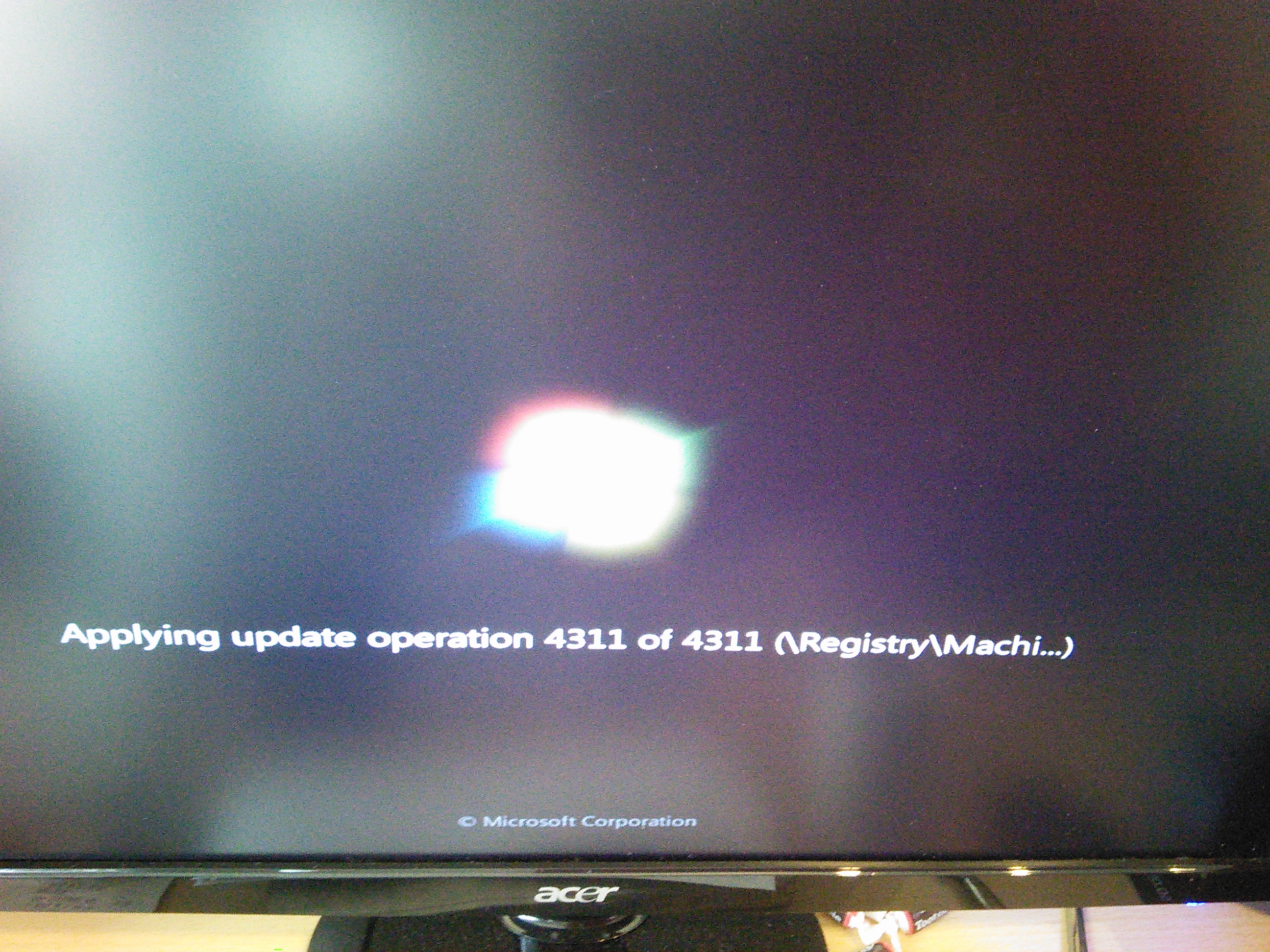
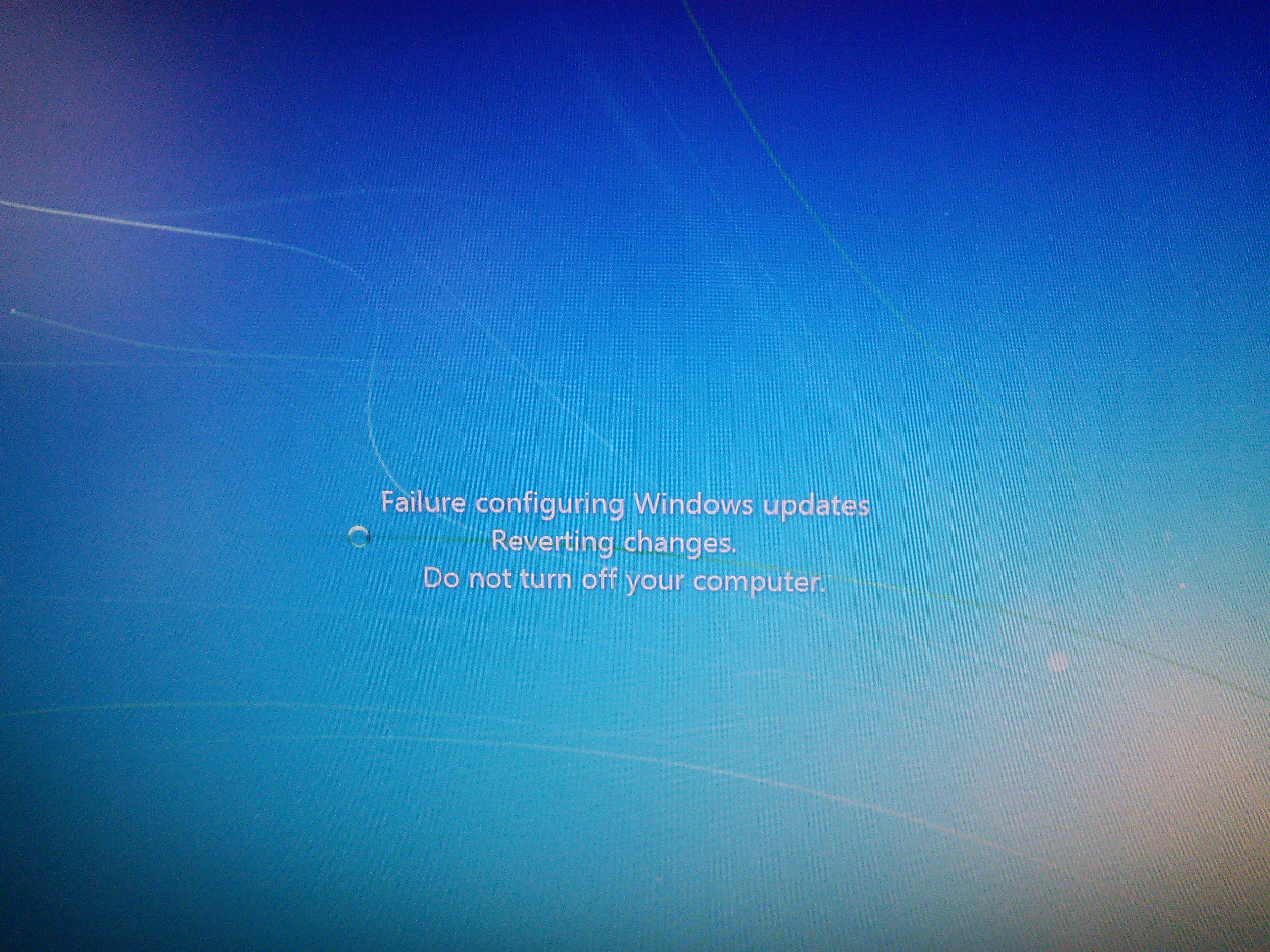
Failure configuring Windows updates, reboot loop

raen

New member
Local time
6:10 PM
Messages
39
This has been going on for a while now, but I've finally gotten tired of it. At first I was worried that it was my hard drive, but someone told me this is a known issue with Windows 7.

When I boot into Windows, I get a message saying that there was a failure configuring updates and that it is reverting the changes. Then it reboots and it tries to apply the updates, this time on a black screen. Lately it's been taking literally ten minutes on the third boot-up (where it gives the "percent complete" info on the same screen as in the first picture) before I can get into Windows.

Is there a way to fix this? What do I do?
hR2OAWj.jpg

3dnBLmw.jpg
 

My Computer

Computer Manufacturer/Model Number
custom
OS
Windows 7 Professional x64 SP1
CPU
AMD FX 8-Core Black Edition AM3+ 3.1 GHz
Motherboard
ASRock 990FX Extreme3
Memory
8 GB DDR3 DRAM
Graphics Card(s)
XFX AMD Radeon HD 6770 850M 1GB DDR5
Sound Card
(motherboard)
Monitor(s) Displays
Acer S231HL LCD
Screen Resolution
1920x1080
Hard Drives
2x ST1500DL003 Seagate Barracuda Green 1.5TB SATA
(one for Windows, one for Linux)
PSU
PC Power & Cooling Silencer 760Watt
Case
Cooler Master HAF 912
Cooling
(PSU)
Internet Speed
basic DSL
Other Info
Optical Drive: LG Super-Multi GH22NS90 DVD Rewriter
Once it's reverted, are you able to get into Windows OK?

If so,
Pleasefollow the WindowsUpdate Posting Instructions and postthe requested data


If thefile is too large (8MB compressed), remove the older CBSPersist cab files untilthe final file is below the limit - you can always post them separately afterzipping them. (the forum doesn't allow the upload of bare CAB files, for anumber of reasons)


Pleasealso post the C:\Windows\windowsudpate.log file


My Computer

Computer type
Laptop
Computer Manufacturer/Model Number
Asus K52F or Lenovo B51-80
OS
Win 7 x64 Home Premium (and x86 VirtualBox VM)/Win10
CPU
i3 370M/i7 6500U
Motherboard
Asus/Lenovo
Memory
8GB - finally :)/8GB
Graphics Card(s)
it's an i3, dude!/dual Intel&nVidia
Sound Card
onboard
Monitor(s) Displays
15.6" built-in
Screen Resolution
1366x768/1920x1080
Hard Drives
750GB Seagate internal
Sundry external drives attached to other computers on the local network
1TB SSD on the Lenovo
PSU
n/a
Internet Speed
as much as I can get - usually on a dongle/phone, so <1MB/s
Antivirus
MSE/Defender
Browser
IE11/12/Edge/Chrome/FF(if I must)
Code:
Microsoft Windows [Version 6.1.7601]
Copyright (c) 2009 Microsoft Corporation.  All rights reserved.

C:\Windows\system32>sfc /scannow

Beginning system scan.  This process will take some time.

Beginning verification phase of system scan.
Verification 100% complete.
Windows Resource Protection found corrupt files but was unable to fix some of th
em.
Details are included in the CBS.Log windir\Logs\CBS\CBS.log. For example
C:\Windows\Logs\CBS\CBS.log
C:\Windows\system32>

CBS.log
sfcdetails.txt
WindowsUpdate.log
 

My Computer

Computer Manufacturer/Model Number
custom
OS
Windows 7 Professional x64 SP1
CPU
AMD FX 8-Core Black Edition AM3+ 3.1 GHz
Motherboard
ASRock 990FX Extreme3
Memory
8 GB DDR3 DRAM
Graphics Card(s)
XFX AMD Radeon HD 6770 850M 1GB DDR5
Sound Card
(motherboard)
Monitor(s) Displays
Acer S231HL LCD
Screen Resolution
1920x1080
Hard Drives
2x ST1500DL003 Seagate Barracuda Green 1.5TB SATA
(one for Windows, one for Linux)
PSU
PC Power & Cooling Silencer 760Watt
Case
Cooler Master HAF 912
Cooling
(PSU)
Internet Speed
basic DSL
Other Info
Optical Drive: LG Super-Multi GH22NS90 DVD Rewriter
The SFC log shows this...
Code:
2015-06-26 14:20:36, Info                  CSI    00000360 [SR] Repairing 1 components
2015-06-26 14:20:36, Info                  CSI    00000361 [SR] Beginning Verify and Repair transaction
2015-06-26 14:20:36, Info                  CSI    00000363 [SR] Cannot repair member file [l:24{12}]"utc.app.json" of Microsoft-Windows-Unified-Telemetry-Client, Version = 6.1.7601.18869, pA = PROCESSOR_ARCHITECTURE_AMD64 (9), Culture neutral, VersionScope = 1 nonSxS, PublicKeyToken = {l:8 b:31bf3856ad364e35}, Type neutral, TypeName neutral, PublicKey neutral in the store, hash mismatch
2015-06-26 14:20:36, Info                  CSI    00000365 [SR] Cannot repair member file [l:66{33}]"telemetry.ASM-WindowsDefault.json" of Microsoft-Windows-Unified-Telemetry-Client, Version = 6.1.7601.18869, pA = PROCESSOR_ARCHITECTURE_AMD64 (9), Culture neutral, VersionScope = 1 nonSxS, PublicKeyToken = {l:8 b:31bf3856ad364e35}, Type neutral, TypeName neutral, PublicKey neutral in the store, hash mismatch

MS say these 'errors' can be ignored.
If you don't want to ignore them - UININSTALL KB3068708 , then run a Check for Updates, and HIDE it when it re-appears. This prevents it reinstalling until MS either re-issue it (fixed) or issue a new patch to replace it.
 

My Computer

Computer type
Laptop
Computer Manufacturer/Model Number
Asus K52F or Lenovo B51-80
OS
Win 7 x64 Home Premium (and x86 VirtualBox VM)/Win10
CPU
i3 370M/i7 6500U
Motherboard
Asus/Lenovo
Memory
8GB - finally :)/8GB
Graphics Card(s)
it's an i3, dude!/dual Intel&nVidia
Sound Card
onboard
Monitor(s) Displays
15.6" built-in
Screen Resolution
1366x768/1920x1080
Hard Drives
750GB Seagate internal
Sundry external drives attached to other computers on the local network
1TB SSD on the Lenovo
PSU
n/a
Internet Speed
as much as I can get - usually on a dongle/phone, so <1MB/s
Antivirus
MSE/Defender
Browser
IE11/12/Edge/Chrome/FF(if I must)
MS say these 'errors' can be ignored.
If you don't want to ignore them - UININSTALL KB3068708 , then run a Check for Updates, and HIDE it when it re-appears. This prevents it reinstalling until MS either re-issue it (fixed) or issue a new patch to replace it.

Can you tell me how to uninstall that?

Thanks!

[EDIT: Never mind, I figured it out. I had to search for it in the Installed Updates tab.]
 
Last edited:

My Computer

Computer Manufacturer/Model Number
custom
OS
Windows 7 Professional x64 SP1
CPU
AMD FX 8-Core Black Edition AM3+ 3.1 GHz
Motherboard
ASRock 990FX Extreme3
Memory
8 GB DDR3 DRAM
Graphics Card(s)
XFX AMD Radeon HD 6770 850M 1GB DDR5
Sound Card
(motherboard)
Monitor(s) Displays
Acer S231HL LCD
Screen Resolution
1920x1080
Hard Drives
2x ST1500DL003 Seagate Barracuda Green 1.5TB SATA
(one for Windows, one for Linux)
PSU
PC Power & Cooling Silencer 760Watt
Case
Cooler Master HAF 912
Cooling
(PSU)
Internet Speed
basic DSL
Other Info
Optical Drive: LG Super-Multi GH22NS90 DVD Rewriter

My Computer

Computer Manufacturer/Model Number
custom
OS
Windows 7 Professional x64 SP1
CPU
AMD FX 8-Core Black Edition AM3+ 3.1 GHz
Motherboard
ASRock 990FX Extreme3
Memory
8 GB DDR3 DRAM
Graphics Card(s)
XFX AMD Radeon HD 6770 850M 1GB DDR5
Sound Card
(motherboard)
Monitor(s) Displays
Acer S231HL LCD
Screen Resolution
1920x1080
Hard Drives
2x ST1500DL003 Seagate Barracuda Green 1.5TB SATA
(one for Windows, one for Linux)
PSU
PC Power & Cooling Silencer 760Watt
Case
Cooler Master HAF 912
Cooling
(PSU)
Internet Speed
basic DSL
Other Info
Optical Drive: LG Super-Multi GH22NS90 DVD Rewriter
It did work - but you now have the predecessor update to remove as well KB3022345. Same procedure.

uninstall it, and reboot, then do a check for updates and hide it (and KB3068708 if it reappears)
Only then check your hidden updates list.
I'm not sure why the History seems to have gone missing - but it's mostly irrelevant anyhow, so no loss.
 

My Computer

Computer type
Laptop
Computer Manufacturer/Model Number
Asus K52F or Lenovo B51-80
OS
Win 7 x64 Home Premium (and x86 VirtualBox VM)/Win10
CPU
i3 370M/i7 6500U
Motherboard
Asus/Lenovo
Memory
8GB - finally :)/8GB
Graphics Card(s)
it's an i3, dude!/dual Intel&nVidia
Sound Card
onboard
Monitor(s) Displays
15.6" built-in
Screen Resolution
1366x768/1920x1080
Hard Drives
750GB Seagate internal
Sundry external drives attached to other computers on the local network
1TB SSD on the Lenovo
PSU
n/a
Internet Speed
as much as I can get - usually on a dongle/phone, so <1MB/s
Antivirus
MSE/Defender
Browser
IE11/12/Edge/Chrome/FF(if I must)
It did work - but you now have the predecessor update to remove as well KB3022345. Same procedure.

uninstall it, and reboot, then do a check for updates and hide it (and KB3068708 if it reappears)
Only then check your hidden updates list.
I'm not sure why the History seems to have gone missing - but it's mostly irrelevant anyhow, so no loss.

All right. I am kind of kicking myself for forgetting to take a screen shot of my update history with all of the failures, but I suppose it doesn't matter too much.

Thanks.
 

My Computer

Computer Manufacturer/Model Number
custom
OS
Windows 7 Professional x64 SP1
CPU
AMD FX 8-Core Black Edition AM3+ 3.1 GHz
Motherboard
ASRock 990FX Extreme3
Memory
8 GB DDR3 DRAM
Graphics Card(s)
XFX AMD Radeon HD 6770 850M 1GB DDR5
Sound Card
(motherboard)
Monitor(s) Displays
Acer S231HL LCD
Screen Resolution
1920x1080
Hard Drives
2x ST1500DL003 Seagate Barracuda Green 1.5TB SATA
(one for Windows, one for Linux)
PSU
PC Power & Cooling Silencer 760Watt
Case
Cooler Master HAF 912
Cooling
(PSU)
Internet Speed
basic DSL
Other Info
Optical Drive: LG Super-Multi GH22NS90 DVD Rewriter
It did work - but you now have the predecessor update to remove as well KB3022345. Same procedure.

uninstall it, and reboot, then do a check for updates and hide it (and KB3068708 if it reappears)
Only then check your hidden updates list.
I'm not sure why the History seems to have gone missing - but it's mostly irrelevant anyhow, so no loss.

So basically every time an installation fails, I uninstall it until my Windows 10 update arrives?

(I'm frustrated at the situation. You have been very helpful and I thank you for your time.)
 

My Computer

Computer Manufacturer/Model Number
custom
OS
Windows 7 Professional x64 SP1
CPU
AMD FX 8-Core Black Edition AM3+ 3.1 GHz
Motherboard
ASRock 990FX Extreme3
Memory
8 GB DDR3 DRAM
Graphics Card(s)
XFX AMD Radeon HD 6770 850M 1GB DDR5
Sound Card
(motherboard)
Monitor(s) Displays
Acer S231HL LCD
Screen Resolution
1920x1080
Hard Drives
2x ST1500DL003 Seagate Barracuda Green 1.5TB SATA
(one for Windows, one for Linux)
PSU
PC Power & Cooling Silencer 760Watt
Case
Cooler Master HAF 912
Cooling
(PSU)
Internet Speed
basic DSL
Other Info
Optical Drive: LG Super-Multi GH22NS90 DVD Rewriter
Those two installations did NOT fail. They merely don't quite follow accepted norms for file installation, and so generate flase positives in an SFC scan which may mask other real errors unless you are able to read the logs successfully.

Are any other Updates failing to install properly?
Please post your C:\Windows\windowsupdate.log file
 

My Computer

Computer type
Laptop
Computer Manufacturer/Model Number
Asus K52F or Lenovo B51-80
OS
Win 7 x64 Home Premium (and x86 VirtualBox VM)/Win10
CPU
i3 370M/i7 6500U
Motherboard
Asus/Lenovo
Memory
8GB - finally :)/8GB
Graphics Card(s)
it's an i3, dude!/dual Intel&nVidia
Sound Card
onboard
Monitor(s) Displays
15.6" built-in
Screen Resolution
1366x768/1920x1080
Hard Drives
750GB Seagate internal
Sundry external drives attached to other computers on the local network
1TB SSD on the Lenovo
PSU
n/a
Internet Speed
as much as I can get - usually on a dongle/phone, so <1MB/s
Antivirus
MSE/Defender
Browser
IE11/12/Edge/Chrome/FF(if I must)
Windows Update log

I've been really busy with non-computer-related things and I can't remember if I followed up with the last session the way I did on the first (checking for updates and hiding). I hope this log has new information.

Thank you.
 

My Computer

Computer Manufacturer/Model Number
custom
OS
Windows 7 Professional x64 SP1
CPU
AMD FX 8-Core Black Edition AM3+ 3.1 GHz
Motherboard
ASRock 990FX Extreme3
Memory
8 GB DDR3 DRAM
Graphics Card(s)
XFX AMD Radeon HD 6770 850M 1GB DDR5
Sound Card
(motherboard)
Monitor(s) Displays
Acer S231HL LCD
Screen Resolution
1920x1080
Hard Drives
2x ST1500DL003 Seagate Barracuda Green 1.5TB SATA
(one for Windows, one for Linux)
PSU
PC Power & Cooling Silencer 760Watt
Case
Cooler Master HAF 912
Cooling
(PSU)
Internet Speed
basic DSL
Other Info
Optical Drive: LG Super-Multi GH22NS90 DVD Rewriter
The most recent error is this...
Code:
2015-07-01    21:03:24:741    1072    9f4    Report    REPORT EVENT: {0678A1CF-4FAA-45B2-9ADA-D583469EB4AB}    2015-07-01 21:03:02:649-0400    1    198    101    {B798E0CA-E40A-41A3-BF2F-B4F11B0AA679}    201    80004005    AutomaticUpdates    Failure    Content Install    Installation Failure: Windows failed to install the following update with error 0x80004005: Security Update for Windows 7 for x64-based Systems (KB3033929).
2015-07-01    21:03:24:741    1072    1b4    AU    >>##  RESUMED  ## AU: Search for updates [CallId = {0729ABC2-D6DA-452B-93BC-D0B52ED213A3}

Earlier update attempts show this...
Code:
 Line 2138: 2015-06-15 03:29:50:844  648 fe0 Report REPORT EVENT: {0C124BDB-033A-4DD5-A618-5FB909897E6B} 2015-06-15 03:29:49:812+1000 1 195 101 {BD0EFCF5-25FC-4D0A-8C57-C967C0B70A54} 201 80070003 AutomaticUpdates Failure Content Install Installation Failure: Windows failed to install the following update with error 0x80070003: Security Update for Windows 7 for x64-based Systems (KB3055642).
 Line 2139: 2015-06-15 03:29:50:844  648 fe0 Report REPORT EVENT: {EF590648-4E98-4EEA-B44F-02E75B2C7EB0} 2015-06-15 03:29:49:828+1000 1 195 101 {931652F3-8861-4BEF-92DD-BBB0E4ED3498} 203 80070003 AutomaticUpdates Failure Content Install Installation Failure: Windows failed to install the following update with error 0x80070003: Security Update for Windows 7 for x64-based Systems (KB3032323).
 Line 2140: 2015-06-15 03:29:50:844  648 fe0 Report REPORT EVENT: {13F4E0B0-293C-4966-8473-4501C41219FD} 2015-06-15 03:29:49:828+1000 1 195 101 {B798E0CA-E40A-41A3-BF2F-B4F11B0AA679} 201 80070003 AutomaticUpdates Failure Content Install Installation Failure: Windows failed to install the following update with error 0x80070003: Security Update for Windows 7 for x64-based Systems (KB3033929).
 Line 2141: 2015-06-15 03:29:50:844  648 fe0 Report REPORT EVENT: {FF844F34-FA62-4D17-B65D-AAB6C119E475} 2015-06-15 03:29:49:843+1000 1 195 101 {E8C8BFC5-CADB-4B5A-8EBE-340B78B76A6B} 201 80070003 AutomaticUpdates Failure Content Install Installation Failure: Windows failed to install the following update with error 0x80070003: Security Update for Windows 7 for x64-based Systems (KB3021674).
 Line 2142: 2015-06-15 03:29:50:844  648 fe0 Report REPORT EVENT: {53769D12-912E-472C-A1A1-996ECBBE5A45} 2015-06-15 03:29:49:860+1000 1 195 101 {925C4FC1-6F28-4422-A980-42DF72506DB2} 201 80070003 AutomaticUpdates Failure Content Install Installation Failure: Windows failed to install the following update with error 0x80070003: Security Update for Microsoft .NET Framework 3.5.1 on Windows 7 and Windows Server 2008 R2 SP1 for x64-based Systems (KB2968294).
 Line 2154: 2015-06-15 03:29:51:000  648 fe0 Report REPORT EVENT: {9D0E049C-8BE1-4FAE-8DA2-779B57F63ABA} 2015-06-15 03:29:49:860+1000 1 195 101 {E37C75B8-901F-4114-981F-B88AD1E95C4E} 201 80070003 AutomaticUpdates Failure Content Install Installation Failure: Windows failed to install the following update with error 0x80070003: Security Update for Windows 7 for x64-based Systems (KB3046002).
 Line 2155: 2015-06-15 03:29:51:000  648 fe0 Report REPORT EVENT: {A44023E9-A411-4B12-87A5-7C7942FEC478} 2015-06-15 03:29:49:860+1000 1 195 101 {2E3562B8-583D-4881-AFB3-135229189C5F} 201 80070003 AutomaticUpdates Failure Content Install Installation Failure: Windows failed to install the following update with error 0x80070003: Security Update for Microsoft .NET Framework 3.5.1 on Windows 7 and Windows Server 2008 R2 SP1 for x64-based Systems (KB2972211).
 Line 2156: 2015-06-15 03:29:51:000  648 fe0 Report REPORT EVENT: {EB79D992-C8DD-4F2E-A308-C258FACD06CB} 2015-06-15 03:29:49:876+1000 1 195 101 {B73E02B6-7A35-485B-A7CA-8BE088FE5294} 204 80070003 AutomaticUpdates Failure Content Install Installation Failure: Windows failed to install the following update with error 0x80070003: Security Update for Windows 7 for x64-based Systems (KB3003743).
 Line 2157: 2015-06-15 03:29:51:000  648 fe0 Report REPORT EVENT: {7D559969-1695-4261-A9A5-1376ED3CB46F} 2015-06-15 03:29:49:891+1000 1 195 101 {8866E6B0-6E20-4813-A57E-7DDF56A9B4E0} 201 80070003 AutomaticUpdates Failure Content Install Installation Failure: Windows failed to install the following update with error 0x80070003: Security Update for Windows 7 for x64-based Systems (KB3022777).
 Line 2158: 2015-06-15 03:29:51:000  648 fe0 Report REPORT EVENT: {AAD23927-9B35-4369-A0D4-411ADBB6A928} 2015-06-15 03:29:49:891+1000 1 195 101 {17FB4AAA-B3CC-4239-838E-64565911D96E} 201 80070003 AutomaticUpdates Failure Content Install Installation Failure: Windows failed to install the following update with error 0x80070003: Security Update for Microsoft .NET Framework 3.5.1 on Windows 7 and Windows Server 2008 R2 SP1 for x64-based Systems (KB2972100).
 Line 2170: 2015-06-15 03:29:51:031  648 fe0 Report REPORT EVENT: {5AFEAA1C-B2D9-4473-BC67-60898ABA5914} 2015-06-15 03:29:49:891+1000 1 195 101 {45F40BA9-5687-4415-85C7-68198F223F0F} 202 80070003 AutomaticUpdates Failure Content Install Installation Failure: Windows failed to install the following update with error 0x80070003: Update for Windows 7 for x64-based Systems (KB2990214).
 Line 2171: 2015-06-15 03:29:51:031  648 fe0 Report REPORT EVENT: {78B34037-31A0-4A90-AB2A-1019D6AD6750} 2015-06-15 03:29:49:907+1000 1 195 101 {73C7D6A7-C186-427C-952A-D917AD697CB7} 201 80070003 AutomaticUpdates Failure Content Install Installation Failure: Windows failed to install the following update with error 0x80070003: Security Update for Windows 7 for x64-based Systems (KB3019215).
 Line 2172: 2015-06-15 03:29:51:031  648 fe0 Report REPORT EVENT: {5094F34C-FE1A-4758-B17A-CCBEFFCEE93C} 2015-06-15 03:29:49:907+1000 1 195 101 {B64214A5-64FA-4ED7-BFE9-603197E146B5} 201 80070003 AutomaticUpdates Failure Content Install Installation Failure: Windows failed to install the following update with error 0x80070003: Security Update for Windows 7 for x64-based Systems (KB3030377).
 Line 2173: 2015-06-15 03:29:51:031  648 fe0 Report REPORT EVENT: {938B11E8-1F59-4A4D-9A89-8D131BB59928} 2015-06-15 03:29:49:907+1000 1 195 101 {89FEBEA4-E23A-4FF5-9CA9-D4FC9E768A70} 200 80070003 AutomaticUpdates Failure Content Install Installation Failure: Windows failed to install the following update with error 0x80070003: Update for Windows 7 for x64-based Systems (KB3021917).
 Line 2174: 2015-06-15 03:29:51:031  648 fe0 Report REPORT EVENT: {77689BA4-9558-4E8B-8AB6-9C8298E16AB3} 2015-06-15 03:29:49:907+1000 1 195 101 {4383F19F-794D-42B4-8D78-533DCA7834D7} 203 80070003 AutomaticUpdates Failure Content Install Installation Failure: Windows failed to install the following update with error 0x80070003: Update for Windows 7 for x64-based Systems (KB3013531).
 Line 2186: 2015-06-15 03:29:51:062  648 fe0 Report REPORT EVENT: {F2D6D3B2-8650-4BFE-910F-311C71EE03A4} 2015-06-15 03:29:49:922+1000 1 195 101 {ED46D995-C9FB-41E2-94DF-146D97D47D07} 201 80070003 AutomaticUpdates Failure Content Install Installation Failure: Windows failed to install the following update with error 0x80070003: Security Update for Windows 7 for x64-based Systems (KB3046269).
 Line 2187: 2015-06-15 03:29:51:062  648 fe0 Report REPORT EVENT: {F1186120-AC25-46A8-AB90-F2A66C2DD792} 2015-06-15 03:29:49:922+1000 1 195 101 {F5BFFF92-DC6E-4441-9045-0C424C3DF6D0} 202 80070003 AutomaticUpdates Failure Content Install Installation Failure: Windows failed to install the following update with error 0x80070003: Security Update for Windows 7 for x64-based Systems (KB3059317).
 Line 2188: 2015-06-15 03:29:51:062  648 fe0 Report REPORT EVENT: {4C4D297B-D07E-4DCA-9C7E-CF1559CC24B8} 2015-06-15 03:29:49:938+1000 1 195 101 {726B8D92-D183-4A25-9588-D45D0DC86E5F} 202 80070003 AutomaticUpdates Failure Content Install Installation Failure: Windows failed to install the following update with error 0x80070003: Security Update for Microsoft .NET Framework 3.5.1 on Windows 7 and Windows Server 2008 R2 SP1 for x64-based Systems (KB3032655).
 Line 2189: 2015-06-15 03:29:51:062  648 fe0 Report REPORT EVENT: {B637CB0C-D679-4DFC-B647-1BE01F55EBC8} 2015-06-15 03:29:49:938+1000 1 195 101 {A228DB91-8C7A-4327-A6AE-556A64ED7B45} 200 80070003 AutomaticUpdates Failure Content Install Installation Failure: Windows failed to install the following update with error 0x80070003: Security Update for Windows 7 for x64-based Systems (KB3039066).
 Line 2190: 2015-06-15 03:29:51:062  648 fe0 Report REPORT EVENT: {C49A5E24-4ABF-4687-9802-04EE5BA853AE} 2015-06-15 03:29:49:938+1000 1 195 101 {6D155681-7172-4DD7-9341-46D42EC794F5} 202 80070003 AutomaticUpdates Failure Content Install Installation Failure: Windows failed to install the following update with error 0x80070003: Security Update for Microsoft .NET Framework 3.5.1 on Windows 7 and Windows Server 2008 R2 SP1 for x64-based Systems (KB3023215).
 Line 2202: 2015-06-15 03:29:51:093  648 fe0 Report REPORT EVENT: {09EF500A-27BA-43A6-83ED-E8CCE0BB122A} 2015-06-15 03:29:49:938+1000 1 195 101 {262A2E5B-38CD-44C8-B980-9C1153C08470} 206 80070003 AutomaticUpdates Failure Content Install Installation Failure: Windows failed to install the following update with error 0x80070003: Security Update for Windows 7 for x64-based Systems (KB2991963).
 Line 2203: 2015-06-15 03:29:51:093  648 fe0 Report REPORT EVENT: {EF0926B2-1625-4011-A362-7B0A0986D052} 2015-06-15 03:29:49:969+1000 1 195 101 {64AC1456-4B02-4D26-947D-A4E555834B1E} 204 80070003 AutomaticUpdates Failure Content Install Installation Failure: Windows failed to install the following update with error 0x80070003: Security Update for Windows 7 for x64-based Systems (KB3057839).


Add the two together and I start thinking about disk problems.


Please run a full CHKDSK and SFC scan....

Click on Start > All Programs > Accessories
Right-click on the Command Prompt entry
Select Run as Administrator and accept the UAC prompt- the Elevated Command Prompt window should pop up.

At the Command prompt, type

CHKDSK C: /R

and hit the Enter key.

You will be told that the drive is locked, and the CHKDSK will run at the next boot - hit the Y key, and then reboot.
The CHKDSK will take a few hours depending on the size of the drive, so be patient!

After the CHKDSK has run, Windows should bootnormally (possibly after a second auto-reboot) - then run the SFC.


SFC -System File Checker - Instructions

Click on Start > All Programs > Accessories
Right-click on the Command Prompt entry
Select Run as Administrator and accept the UAC prompt- the Elevated Command Prompt window should pop up.

At the Command prompt, type

SFC /SCANNOW

and hit the Enter key

Wait for the scan to finish - make a note of any error messages - and then reboot.

Upload the CBS.log file (compressed, please!) to your reply, and post the event logs...


Open Event Viewer

click on theWindows logs entry in the left pane to expand it.

Now click on theApplication entry - wait while it loads.

Click on 'File'in the menu bar and select Save...

Save the file asAppevt.evtx

Repeat for theSystem log

then zip both,and upload them.


My Computer

Computer type
Laptop
Computer Manufacturer/Model Number
Asus K52F or Lenovo B51-80
OS
Win 7 x64 Home Premium (and x86 VirtualBox VM)/Win10
CPU
i3 370M/i7 6500U
Motherboard
Asus/Lenovo
Memory
8GB - finally :)/8GB
Graphics Card(s)
it's an i3, dude!/dual Intel&nVidia
Sound Card
onboard
Monitor(s) Displays
15.6" built-in
Screen Resolution
1366x768/1920x1080
Hard Drives
750GB Seagate internal
Sundry external drives attached to other computers on the local network
1TB SSD on the Lenovo
PSU
n/a
Internet Speed
as much as I can get - usually on a dongle/phone, so <1MB/s
Antivirus
MSE/Defender
Browser
IE11/12/Edge/Chrome/FF(if I must)
Please run a full CHKDSK and SFC scan....


CHKDSK C: /R

After the CHKDSK has run, Windows should bootnormally (possibly after a second auto-reboot) - then run the SFC.


SFC /SCANNOW

Wait for the scan to finish - make a note of any error messages - and then reboot.

Upload the CBS.log file (compressed, please!) to your reply, and post the event logs...

Done.
CBS.log
Scan complete.

Open Event Viewer

click on theWindows logs entry in the left pane to expand it.

Now click on theApplication entry - wait while it loads.

Click on 'File'in the menu bar and select Save...

Save the file asAppevt.evtx

Repeat for theSystem log

then zip both,and upload them.

Not sure how to do this part. Which logs entry? Which application entry?

Thank you.
 

My Computer

Computer Manufacturer/Model Number
custom
OS
Windows 7 Professional x64 SP1
CPU
AMD FX 8-Core Black Edition AM3+ 3.1 GHz
Motherboard
ASRock 990FX Extreme3
Memory
8 GB DDR3 DRAM
Graphics Card(s)
XFX AMD Radeon HD 6770 850M 1GB DDR5
Sound Card
(motherboard)
Monitor(s) Displays
Acer S231HL LCD
Screen Resolution
1920x1080
Hard Drives
2x ST1500DL003 Seagate Barracuda Green 1.5TB SATA
(one for Windows, one for Linux)
PSU
PC Power & Cooling Silencer 760Watt
Case
Cooler Master HAF 912
Cooling
(PSU)
Internet Speed
basic DSL
Other Info
Optical Drive: LG Super-Multi GH22NS90 DVD Rewriter
SFC is clear, at least.

"Open Event Viewer"
Click on the Start button
In the Search box, type Event Viewer
Click on the option for Event Viewer that appears in the listing.
The follow the instructions above.
 

My Computer

Computer type
Laptop
Computer Manufacturer/Model Number
Asus K52F or Lenovo B51-80
OS
Win 7 x64 Home Premium (and x86 VirtualBox VM)/Win10
CPU
i3 370M/i7 6500U
Motherboard
Asus/Lenovo
Memory
8GB - finally :)/8GB
Graphics Card(s)
it's an i3, dude!/dual Intel&nVidia
Sound Card
onboard
Monitor(s) Displays
15.6" built-in
Screen Resolution
1366x768/1920x1080
Hard Drives
750GB Seagate internal
Sundry external drives attached to other computers on the local network
1TB SSD on the Lenovo
PSU
n/a
Internet Speed
as much as I can get - usually on a dongle/phone, so <1MB/s
Antivirus
MSE/Defender
Browser
IE11/12/Edge/Chrome/FF(if I must)

My Computer

Computer Manufacturer/Model Number
custom
OS
Windows 7 Professional x64 SP1
CPU
AMD FX 8-Core Black Edition AM3+ 3.1 GHz
Motherboard
ASRock 990FX Extreme3
Memory
8 GB DDR3 DRAM
Graphics Card(s)
XFX AMD Radeon HD 6770 850M 1GB DDR5
Sound Card
(motherboard)
Monitor(s) Displays
Acer S231HL LCD
Screen Resolution
1920x1080
Hard Drives
2x ST1500DL003 Seagate Barracuda Green 1.5TB SATA
(one for Windows, one for Linux)
PSU
PC Power & Cooling Silencer 760Watt
Case
Cooler Master HAF 912
Cooling
(PSU)
Internet Speed
basic DSL
Other Info
Optical Drive: LG Super-Multi GH22NS90 DVD Rewriter
There were no major problems with the disk - but the Application log shows that TrustedInstaller isn't starting properly.
The system log shows that you have problems with a number of services..

CFRMD - from Comodo
Windows Search
Windows Update

I suspect that the critical one here is the Comodo one.

I would suggest uninstalling your Comodo software, and installing MSE, at least temporarily. Run a full system scan, then attempt Windows update - post the results, and a new set of Event logs.
 

My Computer

Computer type
Laptop
Computer Manufacturer/Model Number
Asus K52F or Lenovo B51-80
OS
Win 7 x64 Home Premium (and x86 VirtualBox VM)/Win10
CPU
i3 370M/i7 6500U
Motherboard
Asus/Lenovo
Memory
8GB - finally :)/8GB
Graphics Card(s)
it's an i3, dude!/dual Intel&nVidia
Sound Card
onboard
Monitor(s) Displays
15.6" built-in
Screen Resolution
1366x768/1920x1080
Hard Drives
750GB Seagate internal
Sundry external drives attached to other computers on the local network
1TB SSD on the Lenovo
PSU
n/a
Internet Speed
as much as I can get - usually on a dongle/phone, so <1MB/s
Antivirus
MSE/Defender
Browser
IE11/12/Edge/Chrome/FF(if I must)
There were no major problems with the disk - but the Application log shows that TrustedInstaller isn't starting properly.
The system log shows that you have problems with a number of services..

CFRMD - from Comodo
Windows Search
Windows Update

I suspect that the critical one here is the Comodo one.

I would suggest uninstalling your Comodo software, and installing MSE, at least temporarily. Run a full system scan, then attempt Windows update - post the results, and a new set of Event logs.

Very odd. We've been down this road before. I am using MSE and have never re-installed Comodo.
 

My Computer

Computer Manufacturer/Model Number
custom
OS
Windows 7 Professional x64 SP1
CPU
AMD FX 8-Core Black Edition AM3+ 3.1 GHz
Motherboard
ASRock 990FX Extreme3
Memory
8 GB DDR3 DRAM
Graphics Card(s)
XFX AMD Radeon HD 6770 850M 1GB DDR5
Sound Card
(motherboard)
Monitor(s) Displays
Acer S231HL LCD
Screen Resolution
1920x1080
Hard Drives
2x ST1500DL003 Seagate Barracuda Green 1.5TB SATA
(one for Windows, one for Linux)
PSU
PC Power & Cooling Silencer 760Watt
Case
Cooler Master HAF 912
Cooling
(PSU)
Internet Speed
basic DSL
Other Info
Optical Drive: LG Super-Multi GH22NS90 DVD Rewriter
OK (thought I recognised the name!)
Let's see if we can get rid of that error....

Open an Elevated Command Prompt, and run the following commands...

REG QUERY HKLM\SYSTEM\CurrentControlSet\Services\CFRMD /S
SC QUERYEX WSearch
SC QUERYEX wuauserv

post the results.
 

My Computer

Computer type
Laptop
Computer Manufacturer/Model Number
Asus K52F or Lenovo B51-80
OS
Win 7 x64 Home Premium (and x86 VirtualBox VM)/Win10
CPU
i3 370M/i7 6500U
Motherboard
Asus/Lenovo
Memory
8GB - finally :)/8GB
Graphics Card(s)
it's an i3, dude!/dual Intel&nVidia
Sound Card
onboard
Monitor(s) Displays
15.6" built-in
Screen Resolution
1366x768/1920x1080
Hard Drives
750GB Seagate internal
Sundry external drives attached to other computers on the local network
1TB SSD on the Lenovo
PSU
n/a
Internet Speed
as much as I can get - usually on a dongle/phone, so <1MB/s
Antivirus
MSE/Defender
Browser
IE11/12/Edge/Chrome/FF(if I must)
REG QUERY HKLM\SYSTEM\CurrentControlSet\Services\CFRMD /S
SC QUERYEX WSearch
SC QUERYEX wuauserv


Code:
Microsoft Windows [Version 6.1.7601]
Copyright (c) 2009 Microsoft Corporation.  All rights reserved.

C:\Windows\system32>REG QUERY HKLM\SYSTEM\CurrentControlSet\Services\CFRMD /S

HKEY_LOCAL_MACHINE\SYSTEM\CurrentControlSet\Services\CFRMD
    Type    REG_DWORD    0x2
    Start    REG_DWORD    0x1
    ErrorControl    REG_DWORD    0x1
    Tag    REG_DWORD    0x7
    ImagePath    REG_EXPAND_SZ    system32\DRIVERS\CFRMD.sys
    DisplayName    REG_SZ    CFRMD
    Group    REG_SZ    FSFilter Activity Monitor
    DependOnService    REG_MULTI_SZ    FltMgr
    WOW64    REG_DWORD    0x1
    Description    REG_SZ    Safe Deletion Mini-Filter Driver
    DebugFlags    REG_DWORD    0x0

HKEY_LOCAL_MACHINE\SYSTEM\CurrentControlSet\Services\CFRMD\Instances
    DefaultInstance    REG_SZ    CFRMD Instance

HKEY_LOCAL_MACHINE\SYSTEM\CurrentControlSet\Services\CFRMD\Instances\CFRMD Insta
nce
    Altitude    REG_SZ    370031
    Flags    REG_DWORD    0x0


C:\Windows\system32>SC QUERYEX WSearch

SERVICE_NAME: WSearch
        TYPE               : 10  WIN32_OWN_PROCESS
        STATE              : 4  RUNNING
                                (STOPPABLE, NOT_PAUSABLE, ACCEPTS_SHUTDOWN)
        WIN32_EXIT_CODE    : 0  (0x0)
        SERVICE_EXIT_CODE  : 0  (0x0)
        CHECKPOINT         : 0x0
        WAIT_HINT          : 0x0
        PID                : 2500
        FLAGS              :

C:\Windows\system32>SC QUERYEX wuauserv

SERVICE_NAME: wuauserv
        TYPE               : 20  WIN32_SHARE_PROCESS
        STATE              : 4  RUNNING
                                (STOPPABLE, NOT_PAUSABLE, ACCEPTS_PRESHUTDOWN)
        WIN32_EXIT_CODE    : 0  (0x0)
        SERVICE_EXIT_CODE  : 0  (0x0)
        CHECKPOINT         : 0x0
        WAIT_HINT          : 0x0
        PID                : 1084
        FLAGS              :

C:\Windows\system32>

Thank you.
 

My Computer

Computer Manufacturer/Model Number
custom
OS
Windows 7 Professional x64 SP1
CPU
AMD FX 8-Core Black Edition AM3+ 3.1 GHz
Motherboard
ASRock 990FX Extreme3
Memory
8 GB DDR3 DRAM
Graphics Card(s)
XFX AMD Radeon HD 6770 850M 1GB DDR5
Sound Card
(motherboard)
Monitor(s) Displays
Acer S231HL LCD
Screen Resolution
1920x1080
Hard Drives
2x ST1500DL003 Seagate Barracuda Green 1.5TB SATA
(one for Windows, one for Linux)
PSU
PC Power & Cooling Silencer 760Watt
Case
Cooler Master HAF 912
Cooling
(PSU)
Internet Speed
basic DSL
Other Info
Optical Drive: LG Super-Multi GH22NS90 DVD Rewriter
OK - let's see if we can disable the driver in Device Manager first, rather than deleting it completely.

Open Device Manager
Click on View > Show hidden devices
lIs there an entry for the CFRMD driver there (probably in the 'Non-Plug and Play Devices folder)?
If so, try to Disable it by right-clicking on it. If there's a Disable option, use that, and confirm it, then reboot and see if WIndows Updates works.
If there's no Disable option (or there's no difference after just disabling it), use the Uninstall option that should be there - again, reboot and test WU and see what happens.

Then post new C:\Windows\windowsupdate.log, and Event logs
 

My Computer

Computer type
Laptop
Computer Manufacturer/Model Number
Asus K52F or Lenovo B51-80
OS
Win 7 x64 Home Premium (and x86 VirtualBox VM)/Win10
CPU
i3 370M/i7 6500U
Motherboard
Asus/Lenovo
Memory
8GB - finally :)/8GB
Graphics Card(s)
it's an i3, dude!/dual Intel&nVidia
Sound Card
onboard
Monitor(s) Displays
15.6" built-in
Screen Resolution
1366x768/1920x1080
Hard Drives
750GB Seagate internal
Sundry external drives attached to other computers on the local network
1TB SSD on the Lenovo
PSU
n/a
Internet Speed
as much as I can get - usually on a dongle/phone, so <1MB/s
Antivirus
MSE/Defender
Browser
IE11/12/Edge/Chrome/FF(if I must)
Back
Top