Fake program Anti-malware

reborn7778

New member
Local time
10:48 AM
Messages
32
Sady news, i found a fake program called AntiMalware GO from my old computer windows XP, but i was gave to my little sister, so i have tried remove from program Malwarebytes Anti-Malware, but they don't let me open it, it is from fake antimalware, how are they build that fake. Geez. so my old computer is very old, and seem weak, since 6 years, from my my birthday, my dad brought for me. it is completed destroy. i hate fake program. :cry:

I have a tried way other, but found this link, still don't work, Remove AntiMalware Go (Uninstall Guide)
 

My Computer

OS
Windows 7 64 bit
Sady news, i found a fake program called AntiMalware GO from my old computer windows XP, but i was gave to my little sister, so i have tried remove from program Malwarebytes Anti-Malware, but they don't let me open it, it is from fake antimalware, how are they build that fake. Geez. so my old computer is very old, and seem weak, since 6 years, from my my birthday, my dad brought for me. it is completed destroy. i hate fake program. :cry:

I have a tried way other, but found this link, still don't work, Remove AntiMalware Go (Uninstall Guide)

Run Malwarebytes in safe mode with networking
 

My Computer

Computer type
PC/Desktop
Computer Manufacturer/Model Number
Custom Build
OS
Windows 10 Pro x64, Arch Linux
CPU
Intel Core 2 Quad Q8200 OC'd 3.08GHz
Motherboard
Asus Rampage formula LGA775
Memory
8GB DDR2 900Mhz
Graphics Card(s)
MSI GT730 2GB GDDR5 (Kepler)
Sound Card
Supreme FX2
Monitor(s) Displays
Samsung LS22F350 LED
Screen Resolution
1080P
Hard Drives
Kingston SSDNow UV400 120GB, 500GB Hitachi, 2TB Samsung, 500GB Seagate FreeAgent, 640GB Samsung, 160GB Toshiba (Arch)
PSU
AeroCool 500W Bronze
Cooling
Cooler Master V6 + 3X fans
Keyboard
Prolink keyboard
Mouse
Logitech M705
Internet Speed
1MiB/s
Browser
Chrome Beta
Sady news, i found a fake program called AntiMalware GO from my old computer windows XP, but i was gave to my little sister, so i have tried remove from program Malwarebytes Anti-Malware, but they don't let me open it, it is from fake antimalware, how are they build that fake. Geez. so my old computer is very old, and seem weak, since 6 years, from my my birthday, my dad brought for me. it is completed destroy. i hate fake program. :cry:

I have a tried way other, but found this link, still don't work, Remove AntiMalware Go (Uninstall Guide)

Run Malwarebytes in safe mode with networking

I have a tried that, it is don't work.
 

My Computer

OS
Windows 7 64 bit
Sady news, i found a fake program called AntiMalware GO from my old computer windows XP, but i was gave to my little sister, so i have tried remove from program Malwarebytes Anti-Malware, but they don't let me open it, it is from fake antimalware, how are they build that fake. Geez. so my old computer is very old, and seem weak, since 6 years, from my my birthday, my dad brought for me. it is completed destroy. i hate fake program. :cry:

I have a tried way other, but found this link, still don't work, Remove AntiMalware Go (Uninstall Guide)

Run Malwarebytes in safe mode with networking

I have a tried that, it is don't work.

Remove the Fake AV using a Rescue Disk
Download Kaspersky Rescue Disk 10

http://www.raymond.cc/blog/archives...-compared-in-search-for-the-best-rescue-disk/
 

My Computer

Computer type
PC/Desktop
Computer Manufacturer/Model Number
Custom Build
OS
Windows 10 Pro x64, Arch Linux
CPU
Intel Core 2 Quad Q8200 OC'd 3.08GHz
Motherboard
Asus Rampage formula LGA775
Memory
8GB DDR2 900Mhz
Graphics Card(s)
MSI GT730 2GB GDDR5 (Kepler)
Sound Card
Supreme FX2
Monitor(s) Displays
Samsung LS22F350 LED
Screen Resolution
1080P
Hard Drives
Kingston SSDNow UV400 120GB, 500GB Hitachi, 2TB Samsung, 500GB Seagate FreeAgent, 640GB Samsung, 160GB Toshiba (Arch)
PSU
AeroCool 500W Bronze
Cooling
Cooler Master V6 + 3X fans
Keyboard
Prolink keyboard
Mouse
Logitech M705
Internet Speed
1MiB/s
Browser
Chrome Beta

My Computer

Computer type
PC/Desktop
Computer Manufacturer/Model Number
Golden Mk. I.4
OS
Windows 10 Pro x64 ; Xubuntu x64
CPU
Intel i7 860 @ 2.80 GHz O/C'ed to 4.0GHz
Motherboard
Gigabyte P55A-UD3R Rev.1. Award BIOS F13
Memory
16GB Corsair Vengance DDR3 @ 661 MHz Dual Channel (9-9-9-24)
Graphics Card(s)
EVGA NVidia GTX 560 1024MB
Sound Card
Realtek Integrated
Monitor(s) Displays
Dual Samsung SyncMaster 2494HS
Screen Resolution
1920*1080 and 1920*1080
Hard Drives
1*Samsung 840 EVO 120GB SSD;
1*OCZ Vertex 2 60GB SSD;
2*Samsung F3 SpinPoint 1TB in RAID0;
1*Samsung F1 SpinPoint 1TB;
2*Western Digital 1TB External USB 3.0
1*Western Digital 500GB External USB 3.0
1*Seagate 500GB External USB 2.0
PSU
Thermaltake ToughPower QFan 750W
Case
Thermaltake Element S VK60001W2Z
Cooling
Corsair H60 Water Cooling, 2*230mm and 2*80mm case fans
Keyboard
Logitech G110
Mouse
Logitech MX518
u do know malwarebytes has an assassin tool and removes on restart? never had it fail on me.
 

My Computer

Computer Manufacturer/Model Number
Windows 7 Ultimate 64-bit
OS
Windows 7 Ultimate N 64-bit
CPU
AMD Black Edition - AMD Phenom X4 2.5 GHz Processor
Motherboard
Bio Star
Memory
8GB DDR2 800MHZ BRANDED
Graphics Card(s)
Palti NVIDIA GeForce GTX 460
Monitor(s) Displays
3D 23.6" & 22"
Screen Resolution
1920x1080@120Hz
Hard Drives
313GB SAMSUNG SAMSUNG HD321KJ
PSU
OCZ 600W StealthXStream PSU, PowerWhisper, Active PFC
Internet Speed
22793
There's a simple way to remove Fake AV programs but it takes some timing ;)

Here's a simple (or not) guide for you...

1, Turn off then boot the machine
2, The instant you see the desktop appear, right-click the Taskbar and select Task Manager
   Note
It is imperative that you're quick, most (if not all) Fake AV will disable the Task Manager as soon as it's loaded into memory

3, In Task Manager, processes tab, right-click any suspect entry and select 'End Process Tree'
   Tip
The processes to End will no doubt be associated with 'Antimalware Go'


Now that the process has been killed you will need to get yourself back online...

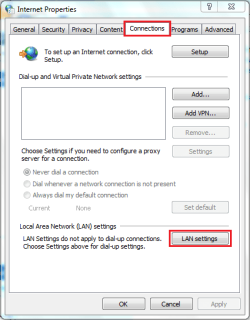
Open up Control Panel > Network and Internet > Internet Options and select the 'Connections' tab, then click 'Lan Settings' as indicated below

IE Connections.PNG

Make sure that the 'Use a proxy server for your LAN' is unchecked as indicated below
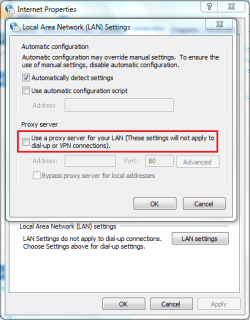
IE Lan Settings.PNG

You should then be able to systematically and manually remove the files associated with Antimalware Go. These will likely be...

File Locations
%userprofile%\Appdata\Temp
Program files\Antimalware Go

Registry Locations
HKEY_CURRENT_USER\Software\Microsoft\Windows\CurrentVersion\Run “[random].exe”
HKEY_CURRENT_USER\Software\[random]
HKEY_CURRENT_USER\Software\Microsoft\Windows\CurrentVersion\Run “[random].exe”
HKEY_CURRENT_USER\Software\Microsoft\Internet Explorer\PhishingFilter “Enabled” = “0?
   Note
[random] means that it'll no doubt be a completely random selection of letters & numbers


After all this, download MalwareBytes and run a full system scan then reboot your machine.

Hope this helps.


OS

 

My Computer

Computer Manufacturer/Model Number
Compaq Desktop
OS
Windows 7 Ultimate x64
CPU
AMD Sempron Dual Core
Memory
3GB
Graphics Card(s)
NVIDIA GeForce 6150SE nForce 430
Screen Resolution
1024x768
Hard Drives
150GB Sata
Back
Top