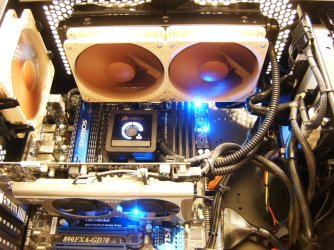
Fan for my push pull h60

silverstormz

Apples
Member
VIP
Local time
3:06 PM
Messages
177
After alot of advice i went and purchased the corsair h60 and im impressed !
But the point of this is i want to know what kind of fans would you guys recomend for a push pull configuration
Thanks -stormz
 

My Computer

Computer type
PC/Desktop
OS
windows 7 home premium
CPU
INTEL [email protected]
Motherboard
MSI Z77A-GD55
Memory
5gb Corsair/kingston mix
Graphics Card(s)
Asus gtx 660 DCUII
Monitor(s) Displays
LG 23EA63V 23" IPS
Screen Resolution
1980x1080
Hard Drives
Seagate 500gb
PSU
Corsair TX850M PSU
Case
Corsair carbide 200R
Cooling
Noctua NH-U12P SE2
Keyboard
Logitech g510
Mouse
Corsair m60
Internet Speed
1mbs
Antivirus
Malwarebytes,Avg
Browser
Firefox
Noctua for the quiet push/pull solution.
HPIM1472.JPG
HPIM1011.JPG
 

My Computer

Computer type
PC/Desktop
Computer Manufacturer/Model Number
A blend of brains, brawn and dumb luck.
OS
Windows 7 Ultimate 64
CPU
i7 3770k OC'd 4.6 @ 1.17v, also FX 8120 & i5 miniITX
Motherboard
MSI P67A-GD80 b3
Memory
32 gb G.Skill Sniper DDR3 10-12-12-31 @ 2133
Graphics Card(s)
XFX Radeon 7870 2GB DDR5
Sound Card
Sound Blaster Z Series Card
Monitor(s) Displays
(2) LG LED 23" 1920 x 1080 2ms Monitors via mini d-port
Screen Resolution
1680 X 1050 p
Hard Drives
Samsung 256 gb 830 SSD sata III
(1) 1 tb WD Black
(2) 1 tb Hitachi deskmates/sata II
(2) 1 tb WD green/sata II
(2) 3 tb Seagate Barracuda
(1) 120 gb OCZ Vertex SS
(1) Drobo 5N w/5 Seagate 3tb
PSU
EVGA modular 1000G2 80% gold rating & APC 1200 RS
Case
CoolerMaster Storm Styker
Cooling
7 case fans 140mm & 120mm, NZXT Kraken X60
Keyboard
(2) Logitech Illuminated Keyboards (1) usb (1) wireless
Mouse
Logitech G700 & T-BC21 - nano nx for the laptop
Internet Speed
Basic 120mbps down
Antivirus
Trend Micro Titanium Max Security & Malwarebytes Premium
Browser
Chrome and IE 10
Other Info
5 Noctua case fans + 3 Noctua in p/p on NZXT cooler
Integrated hot swap drive bays for 2.5" Drives
(2) Lite-on dvd/cd/Blu Ray optical 22X
Integrated fan controller and led on/off
HP Officejet Pro 8630 all-n-one
Hot-swappable 3.5" hard drive bay
Netgear Nighthawk router
Asus USB 3 & sata 6 PCIe card
Vantec IDE to sata adptr./Ultra sata adptr
Lenovo L420 i5 lappy with m sata
Drobo 5N advanced NAS
I agree with linnemeyerhere. They work great pushing and pulling air and they are quiet. I do wish they would make them in black. I have two of them on a H50 running at 1430 rpm's and I can't hear them. I also have two on the side panel quiet, very quiet.
 

My Computer

Computer type
PC/Desktop
Computer Manufacturer/Model Number
Home made Desktop
OS
Windows 10 Pro. 64/ version 1709 Windows 7 Pro/64
CPU
Intel i7-6800K @ 4.3
Motherboard
ASUS X-99 Deluxe II
Memory
Corsair Platinum 16 gig @2400
Graphics Card(s)
EVGA GTX 1070 OC
Monitor(s) Displays
Asus 27" LED LCD/VE278Q
Screen Resolution
1920-1080 or 1280-720 HDMI
Hard Drives
INTEL SSD 730-240 Gb Sata 3.0/
PSU
EVGA Platium 1200W
Case
Phanteks Luxe Tempered Glass 8 fans/ one radiator
Cooling
XSPC/ Water Cooled CPU
Keyboard
Das 4 Professional
Mouse
Logitech M705/MX Anywhere 2-S
Internet Speed
100 mbits
Antivirus
Microsoft Security Essentials/ Malwarebytes Premium 3.0/ SAS
Browser
I.E. 11 default/Firefox/ ISP Time Warner Cable/Spectrum
Other Info
LG BluRay Burner/
Sound system-KLipsch-THX/
Icy Dock ssd Hot Swap bays.
Yeh i ended up purchaseing these i with they looked nicer but they do the job
Im tempted to paint them black since there so ugly and i have a clear side pannel ...
 

My Computer

Computer type
PC/Desktop
OS
windows 7 home premium
CPU
INTEL [email protected]
Motherboard
MSI Z77A-GD55
Memory
5gb Corsair/kingston mix
Graphics Card(s)
Asus gtx 660 DCUII
Monitor(s) Displays
LG 23EA63V 23" IPS
Screen Resolution
1980x1080
Hard Drives
Seagate 500gb
PSU
Corsair TX850M PSU
Case
Corsair carbide 200R
Cooling
Noctua NH-U12P SE2
Keyboard
Logitech g510
Mouse
Corsair m60
Internet Speed
1mbs
Antivirus
Malwarebytes,Avg
Browser
Firefox
Do Not paint the blades. You will get them out of balance and change their air flow and possibly make the noisy. Do Not paint the hole the blades are centered in because it will change the way the fan works. On second thought don't paint anything on them you will get use to looking at them. Let them work like they were designed to or you will make a $5.00 fan out of a $25.00 fan.
 

My Computer

Computer type
PC/Desktop
Computer Manufacturer/Model Number
Home made Desktop
OS
Windows 10 Pro. 64/ version 1709 Windows 7 Pro/64
CPU
Intel i7-6800K @ 4.3
Motherboard
ASUS X-99 Deluxe II
Memory
Corsair Platinum 16 gig @2400
Graphics Card(s)
EVGA GTX 1070 OC
Monitor(s) Displays
Asus 27" LED LCD/VE278Q
Screen Resolution
1920-1080 or 1280-720 HDMI
Hard Drives
INTEL SSD 730-240 Gb Sata 3.0/
PSU
EVGA Platium 1200W
Case
Phanteks Luxe Tempered Glass 8 fans/ one radiator
Cooling
XSPC/ Water Cooled CPU
Keyboard
Das 4 Professional
Mouse
Logitech M705/MX Anywhere 2-S
Internet Speed
100 mbits
Antivirus
Microsoft Security Essentials/ Malwarebytes Premium 3.0/ SAS
Browser
I.E. 11 default/Firefox/ ISP Time Warner Cable/Spectrum
Other Info
LG BluRay Burner/
Sound system-KLipsch-THX/
Icy Dock ssd Hot Swap bays.
A member here painted his fan blades for looks and got away with it and it's one thing to do that with a $5.00 fan but a quality $23.00-26.00 fan ......no way jose, it just doesn't make sense. IMHO. If you want black then buy a black fan, led fan buy a clear bladed led fan but if you want quiet with power and precision then Noctua is the ticket!
 

My Computer

Computer type
PC/Desktop
Computer Manufacturer/Model Number
A blend of brains, brawn and dumb luck.
OS
Windows 7 Ultimate 64
CPU
i7 3770k OC'd 4.6 @ 1.17v, also FX 8120 & i5 miniITX
Motherboard
MSI P67A-GD80 b3
Memory
32 gb G.Skill Sniper DDR3 10-12-12-31 @ 2133
Graphics Card(s)
XFX Radeon 7870 2GB DDR5
Sound Card
Sound Blaster Z Series Card
Monitor(s) Displays
(2) LG LED 23" 1920 x 1080 2ms Monitors via mini d-port
Screen Resolution
1680 X 1050 p
Hard Drives
Samsung 256 gb 830 SSD sata III
(1) 1 tb WD Black
(2) 1 tb Hitachi deskmates/sata II
(2) 1 tb WD green/sata II
(2) 3 tb Seagate Barracuda
(1) 120 gb OCZ Vertex SS
(1) Drobo 5N w/5 Seagate 3tb
PSU
EVGA modular 1000G2 80% gold rating & APC 1200 RS
Case
CoolerMaster Storm Styker
Cooling
7 case fans 140mm & 120mm, NZXT Kraken X60
Keyboard
(2) Logitech Illuminated Keyboards (1) usb (1) wireless
Mouse
Logitech G700 & T-BC21 - nano nx for the laptop
Internet Speed
Basic 120mbps down
Antivirus
Trend Micro Titanium Max Security & Malwarebytes Premium
Browser
Chrome and IE 10
Other Info
5 Noctua case fans + 3 Noctua in p/p on NZXT cooler
Integrated hot swap drive bays for 2.5" Drives
(2) Lite-on dvd/cd/Blu Ray optical 22X
Integrated fan controller and led on/off
HP Officejet Pro 8630 all-n-one
Hot-swappable 3.5" hard drive bay
Netgear Nighthawk router
Asus USB 3 & sata 6 PCIe card
Vantec IDE to sata adptr./Ultra sata adptr
Lenovo L420 i5 lappy with m sata
Drobo 5N advanced NAS
One question the noctuas use 3 pin mobo conecters or molex adapers does it not need to be 4 pin mobo ? or are they good enough to compensate for that?
I dont like the stock fan of my h60 after about a week of useing it its to loud temps are good but too loud
So my question is would the noctuas be ok to replace the stock fans and use push pull with them?
Also what type of noctua should i get?
 

My Computer

Computer type
PC/Desktop
OS
windows 7 home premium
CPU
INTEL [email protected]
Motherboard
MSI Z77A-GD55
Memory
5gb Corsair/kingston mix
Graphics Card(s)
Asus gtx 660 DCUII
Monitor(s) Displays
LG 23EA63V 23" IPS
Screen Resolution
1980x1080
Hard Drives
Seagate 500gb
PSU
Corsair TX850M PSU
Case
Corsair carbide 200R
Cooling
Noctua NH-U12P SE2
Keyboard
Logitech g510
Mouse
Corsair m60
Internet Speed
1mbs
Antivirus
Malwarebytes,Avg
Browser
Firefox
Noctua fans will plug into a 3 or 4 mother board connector. The forth pin is used for speed modulation and monitoring. Check your mother board manual and make sure your fan connection are 12v. If you use a connection off of the power supply that is 12v you will need a adapter, they are cheep.
I believe this site will give you all the information you need to make a selection.
http://noctua.at/main.php?show=produkte&lng=en
 

My Computer

Computer type
PC/Desktop
Computer Manufacturer/Model Number
Home made Desktop
OS
Windows 10 Pro. 64/ version 1709 Windows 7 Pro/64
CPU
Intel i7-6800K @ 4.3
Motherboard
ASUS X-99 Deluxe II
Memory
Corsair Platinum 16 gig @2400
Graphics Card(s)
EVGA GTX 1070 OC
Monitor(s) Displays
Asus 27" LED LCD/VE278Q
Screen Resolution
1920-1080 or 1280-720 HDMI
Hard Drives
INTEL SSD 730-240 Gb Sata 3.0/
PSU
EVGA Platium 1200W
Case
Phanteks Luxe Tempered Glass 8 fans/ one radiator
Cooling
XSPC/ Water Cooled CPU
Keyboard
Das 4 Professional
Mouse
Logitech M705/MX Anywhere 2-S
Internet Speed
100 mbits
Antivirus
Microsoft Security Essentials/ Malwarebytes Premium 3.0/ SAS
Browser
I.E. 11 default/Firefox/ ISP Time Warner Cable/Spectrum
Other Info
LG BluRay Burner/
Sound system-KLipsch-THX/
Icy Dock ssd Hot Swap bays.

My Computer

Computer type
PC/Desktop
OS
Windows 10 Home x64
CPU
INTEL Core i5-750 Quad-Core 3.37GHz
Motherboard
ASUS P7P55D
Memory
HyperX Fury Black Series 8GB (2 x 4GB) 1866Mhz
Graphics Card(s)
EVGA GeForce GTX 750 Superclocked 1GB 128-Bit GDDR5
Monitor(s) Displays
LG 32MA68HY 32" IPS
Screen Resolution
1920 x 1080
Hard Drives
Samsung 840 Evo 120GB, SEAGATE 500GB Barracuda® 7200.12, SATA 3 Gb/s, 7200 RPM, 16MB cache
PSU
ANTEC TruePower New TP-550, 80 PLUS, 550W
Case
ANTEC Three Hundred Illusion
Cooling
COOLER MASTER Hyper 212 Plus, 4 x 120mm 1 x 140mm Noctua's
Internet Speed
85 + Mbps
Antivirus
Avast
Browser
Vivaldi
I use a H80 myself with 2x noctuas with added rubber grommets and it is pretty much dead silent, and if others remember seeing my case I am a sucker for noctua fans, lol. I did wanted to test the corsair fans that I got with it at full speed and holy crap I read that they was load but I only tried 1 fan at it sounded like a freaking Harley Davidson so if you do plan on getting a corsair hydro series do not use the corsair fans that comes with it because it will most likely drive you crazy if you want to run them at full speed
 

My Computer

Computer type
PC/Desktop
OS
Windows 7 Home Premium x64
CPU
Intel Core i7 860 (Lynnfield)
Motherboard
Asus P7P55D (LGA1156)
Memory
Corsair Vengeance 9,9,9,24 1600Mhz 1.50v 2x4G
Graphics Card(s)
Asus nVidia 560 GTX
Sound Card
Asus Xonar DG
Monitor(s) Displays
Acer P235H & NEC E201W
Screen Resolution
1920x1080 & 900x1600
Hard Drives
2
PSU
Corsair 650 Modular
Case
Corsair 800D
Cooling
Corsair H80 with Noctua fans
Keyboard
Ducky Shine
Mouse
tT Theron
Internet Speed
100/100
Browser
IE10
I plan to buy 2 noctuas for my h60 but where would i go about geting another set of screws/washers for mounting it on the other side?
 

My Computer

Computer type
PC/Desktop
OS
windows 7 home premium
CPU
INTEL [email protected]
Motherboard
MSI Z77A-GD55
Memory
5gb Corsair/kingston mix
Graphics Card(s)
Asus gtx 660 DCUII
Monitor(s) Displays
LG 23EA63V 23" IPS
Screen Resolution
1980x1080
Hard Drives
Seagate 500gb
PSU
Corsair TX850M PSU
Case
Corsair carbide 200R
Cooling
Noctua NH-U12P SE2
Keyboard
Logitech g510
Mouse
Corsair m60
Internet Speed
1mbs
Antivirus
Malwarebytes,Avg
Browser
Firefox
silverstormz,
You should be able to source these from your local hobby shop or hardware store and if need be I'm sure there available online somewhere.
Hydro Series
Then hit faq's and scroll to the bottom for running a push/pull.
6x32x1.25 = #6 / 32 thread pitch / 1.25 length or maybe longer depending on the case, you can always cut them with a couple of nuts screwed inside the cut and then screw them off the threads to re-pitch them....( a trick I thought up ).
 

My Computer

Computer type
PC/Desktop
Computer Manufacturer/Model Number
A blend of brains, brawn and dumb luck.
OS
Windows 7 Ultimate 64
CPU
i7 3770k OC'd 4.6 @ 1.17v, also FX 8120 & i5 miniITX
Motherboard
MSI P67A-GD80 b3
Memory
32 gb G.Skill Sniper DDR3 10-12-12-31 @ 2133
Graphics Card(s)
XFX Radeon 7870 2GB DDR5
Sound Card
Sound Blaster Z Series Card
Monitor(s) Displays
(2) LG LED 23" 1920 x 1080 2ms Monitors via mini d-port
Screen Resolution
1680 X 1050 p
Hard Drives
Samsung 256 gb 830 SSD sata III
(1) 1 tb WD Black
(2) 1 tb Hitachi deskmates/sata II
(2) 1 tb WD green/sata II
(2) 3 tb Seagate Barracuda
(1) 120 gb OCZ Vertex SS
(1) Drobo 5N w/5 Seagate 3tb
PSU
EVGA modular 1000G2 80% gold rating & APC 1200 RS
Case
CoolerMaster Storm Styker
Cooling
7 case fans 140mm & 120mm, NZXT Kraken X60
Keyboard
(2) Logitech Illuminated Keyboards (1) usb (1) wireless
Mouse
Logitech G700 & T-BC21 - nano nx for the laptop
Internet Speed
Basic 120mbps down
Antivirus
Trend Micro Titanium Max Security & Malwarebytes Premium
Browser
Chrome and IE 10
Other Info
5 Noctua case fans + 3 Noctua in p/p on NZXT cooler
Integrated hot swap drive bays for 2.5" Drives
(2) Lite-on dvd/cd/Blu Ray optical 22X
Integrated fan controller and led on/off
HP Officejet Pro 8630 all-n-one
Hot-swappable 3.5" hard drive bay
Netgear Nighthawk router
Asus USB 3 & sata 6 PCIe card
Vantec IDE to sata adptr./Ultra sata adptr
Lenovo L420 i5 lappy with m sata
Drobo 5N advanced NAS
I plan to buy 2 noctuas for my h60 but where would i go about geting another set of screws/washers for mounting it on the other side?

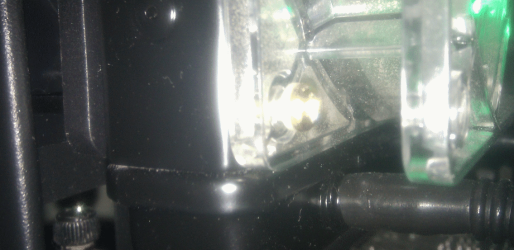
I have a H60 myself. The screws that come with the set are long enough to go through the first fan, through the radiator and screw in to the fan on the other side. That's how I've got my push/pull config set up in my case. Then I just have normal case fan screws screwed in to the fan against the case.

Here's a photo, not very clear, but you should get the idea with the gold headed screw:

h60.png

If you wiggle the screw through the gap to get it through the second hole, then have a thin screwdriver that can fit through the top hole in the fan to screw it in, then you can screw the fan in on the other side with the same screw too. (Also noticed that the inside of my PC could do with a bit of a clean, lol).

I'm using the fan that came with the cooler and a 120mm Coolermaster fan. Temps and sound are decent, but thinking of getting a couple of Noctuas as well.
 

My Computer

Computer type
PC/Desktop
Computer Manufacturer/Model Number
Custom Built
OS
Windows 8.1 Pro x64
CPU
Intel Core i7 4790k
Motherboard
MSI Z97S Krait Edition
Memory
8GB Corsair Dominator 1600MHz
Graphics Card(s)
MSI TwinFrozr GeForce GTX770
Sound Card
ASUS Xonar DX/XD 7.1
Monitor(s) Displays
Dell 24" S2409W + Dell 20" E207WFP
Screen Resolution
1920x1080 + 1680x1050
Hard Drives
1x 120GB OCZ Agility 3, 1x 750GB Western Digital Caviar Black, 1x 1TB Western Digital Caviar Blue
PSU
Corsair HX850 modular
Case
Fractal Design Define R4
Cooling
Corsair H60 w/ twin Corsair SP120 fans
Keyboard
Logitech G510S Keyboard
Mouse
Logitech G500S Laser Mouse
Internet Speed
40Mbps
Antivirus
Microsoft Security Essentials
Browser
Google Chrome
Other Info
LG Blu-Ray player

My Computer

Computer type
PC/Desktop
OS
windows 7 home premium
CPU
INTEL [email protected]
Motherboard
MSI Z77A-GD55
Memory
5gb Corsair/kingston mix
Graphics Card(s)
Asus gtx 660 DCUII
Monitor(s) Displays
LG 23EA63V 23" IPS
Screen Resolution
1980x1080
Hard Drives
Seagate 500gb
PSU
Corsair TX850M PSU
Case
Corsair carbide 200R
Cooling
Noctua NH-U12P SE2
Keyboard
Logitech g510
Mouse
Corsair m60
Internet Speed
1mbs
Antivirus
Malwarebytes,Avg
Browser
Firefox
They will be perfect if not a little pricey, I like the black allen heads myself but really no need unless they will be clearly visible and you must have that extra level of cool.
 

My Computer

Computer type
PC/Desktop
Computer Manufacturer/Model Number
A blend of brains, brawn and dumb luck.
OS
Windows 7 Ultimate 64
CPU
i7 3770k OC'd 4.6 @ 1.17v, also FX 8120 & i5 miniITX
Motherboard
MSI P67A-GD80 b3
Memory
32 gb G.Skill Sniper DDR3 10-12-12-31 @ 2133
Graphics Card(s)
XFX Radeon 7870 2GB DDR5
Sound Card
Sound Blaster Z Series Card
Monitor(s) Displays
(2) LG LED 23" 1920 x 1080 2ms Monitors via mini d-port
Screen Resolution
1680 X 1050 p
Hard Drives
Samsung 256 gb 830 SSD sata III
(1) 1 tb WD Black
(2) 1 tb Hitachi deskmates/sata II
(2) 1 tb WD green/sata II
(2) 3 tb Seagate Barracuda
(1) 120 gb OCZ Vertex SS
(1) Drobo 5N w/5 Seagate 3tb
PSU
EVGA modular 1000G2 80% gold rating & APC 1200 RS
Case
CoolerMaster Storm Styker
Cooling
7 case fans 140mm & 120mm, NZXT Kraken X60
Keyboard
(2) Logitech Illuminated Keyboards (1) usb (1) wireless
Mouse
Logitech G700 & T-BC21 - nano nx for the laptop
Internet Speed
Basic 120mbps down
Antivirus
Trend Micro Titanium Max Security & Malwarebytes Premium
Browser
Chrome and IE 10
Other Info
5 Noctua case fans + 3 Noctua in p/p on NZXT cooler
Integrated hot swap drive bays for 2.5" Drives
(2) Lite-on dvd/cd/Blu Ray optical 22X
Integrated fan controller and led on/off
HP Officejet Pro 8630 all-n-one
Hot-swappable 3.5" hard drive bay
Netgear Nighthawk router
Asus USB 3 & sata 6 PCIe card
Vantec IDE to sata adptr./Ultra sata adptr
Lenovo L420 i5 lappy with m sata
Drobo 5N advanced NAS
There is a lot of enthusiasts on these forums, a little extra for a whole level of cool? out of the question, ill take 10!
 

My Computer

Computer Manufacturer/Model Number
The Vampire
OS
Windows 7 Ultimate
CPU
Intel i5 2500k @ 3.30
Motherboard
P8Z68 V-Pro
Memory
G.Skill Ripjaws 1600 2x4 Gb
Graphics Card(s)
BFG GTX 260 MAXCORE 55 OC 896MB GDDR3
Sound Card
Onboard
Monitor(s) Displays
50'' Sony Display Panel
Screen Resolution
1360 x 768
Hard Drives
Seagate 750 GB
WD 160 GB
PSU
OCZ 750 Watts ZT Series Fully Modular PSU 80 Plus Bronze
Case
NZXT Red Phantom
Cooling
120mm x2 Intake, 120mm x 1 and 200mm x2 Exhaust
Keyboard
LX710 Logitech Wireless Keyboard
Mouse
Logitech Wireless Mouse
They will be perfect if not a little pricey, I like the black allen heads myself but really no need unless they will be clearly visible and you must have that extra level of cool.
What ones of that list may i ask? :P
 

My Computer

Computer type
PC/Desktop
OS
windows 7 home premium
CPU
INTEL [email protected]
Motherboard
MSI Z77A-GD55
Memory
5gb Corsair/kingston mix
Graphics Card(s)
Asus gtx 660 DCUII
Monitor(s) Displays
LG 23EA63V 23" IPS
Screen Resolution
1980x1080
Hard Drives
Seagate 500gb
PSU
Corsair TX850M PSU
Case
Corsair carbide 200R
Cooling
Noctua NH-U12P SE2
Keyboard
Logitech g510
Mouse
Corsair m60
Internet Speed
1mbs
Antivirus
Malwarebytes,Avg
Browser
Firefox
Which ever measure the closest to the 1 1/4" long, that way they thread through the fan and into the radiator. My calculator shows 31.75mm equivalent. And it's been my experience that the 1 1/4" do run just long so the 31's should work unless the fan is unusually thick?
 

My Computer

Computer type
PC/Desktop
Computer Manufacturer/Model Number
A blend of brains, brawn and dumb luck.
OS
Windows 7 Ultimate 64
CPU
i7 3770k OC'd 4.6 @ 1.17v, also FX 8120 & i5 miniITX
Motherboard
MSI P67A-GD80 b3
Memory
32 gb G.Skill Sniper DDR3 10-12-12-31 @ 2133
Graphics Card(s)
XFX Radeon 7870 2GB DDR5
Sound Card
Sound Blaster Z Series Card
Monitor(s) Displays
(2) LG LED 23" 1920 x 1080 2ms Monitors via mini d-port
Screen Resolution
1680 X 1050 p
Hard Drives
Samsung 256 gb 830 SSD sata III
(1) 1 tb WD Black
(2) 1 tb Hitachi deskmates/sata II
(2) 1 tb WD green/sata II
(2) 3 tb Seagate Barracuda
(1) 120 gb OCZ Vertex SS
(1) Drobo 5N w/5 Seagate 3tb
PSU
EVGA modular 1000G2 80% gold rating & APC 1200 RS
Case
CoolerMaster Storm Styker
Cooling
7 case fans 140mm & 120mm, NZXT Kraken X60
Keyboard
(2) Logitech Illuminated Keyboards (1) usb (1) wireless
Mouse
Logitech G700 & T-BC21 - nano nx for the laptop
Internet Speed
Basic 120mbps down
Antivirus
Trend Micro Titanium Max Security & Malwarebytes Premium
Browser
Chrome and IE 10
Other Info
5 Noctua case fans + 3 Noctua in p/p on NZXT cooler
Integrated hot swap drive bays for 2.5" Drives
(2) Lite-on dvd/cd/Blu Ray optical 22X
Integrated fan controller and led on/off
HP Officejet Pro 8630 all-n-one
Hot-swappable 3.5" hard drive bay
Netgear Nighthawk router
Asus USB 3 & sata 6 PCIe card
Vantec IDE to sata adptr./Ultra sata adptr
Lenovo L420 i5 lappy with m sata
Drobo 5N advanced NAS

My Computer

Computer type
PC/Desktop
Computer Manufacturer/Model Number
Custom Built
OS
Windows 8.1 Pro x64
CPU
Intel Core i7 4790k
Motherboard
MSI Z97S Krait Edition
Memory
8GB Corsair Dominator 1600MHz
Graphics Card(s)
MSI TwinFrozr GeForce GTX770
Sound Card
ASUS Xonar DX/XD 7.1
Monitor(s) Displays
Dell 24" S2409W + Dell 20" E207WFP
Screen Resolution
1920x1080 + 1680x1050
Hard Drives
1x 120GB OCZ Agility 3, 1x 750GB Western Digital Caviar Black, 1x 1TB Western Digital Caviar Blue
PSU
Corsair HX850 modular
Case
Fractal Design Define R4
Cooling
Corsair H60 w/ twin Corsair SP120 fans
Keyboard
Logitech G510S Keyboard
Mouse
Logitech G500S Laser Mouse
Internet Speed
40Mbps
Antivirus
Microsoft Security Essentials
Browser
Google Chrome
Other Info
LG Blu-Ray player
Which ever measure the closest to the 1 1/4" long, that way they thread through the fan and into the radiator. My calculator shows 31.75mm equivalent. And it's been my experience that the 1 1/4" do run just long so the 31's should work unless the fan is unusually thick?
Im useing noctuas fyi :)
 

My Computer

Computer type
PC/Desktop
OS
windows 7 home premium
CPU
INTEL [email protected]
Motherboard
MSI Z77A-GD55
Memory
5gb Corsair/kingston mix
Graphics Card(s)
Asus gtx 660 DCUII
Monitor(s) Displays
LG 23EA63V 23" IPS
Screen Resolution
1980x1080
Hard Drives
Seagate 500gb
PSU
Corsair TX850M PSU
Case
Corsair carbide 200R
Cooling
Noctua NH-U12P SE2
Keyboard
Logitech g510
Mouse
Corsair m60
Internet Speed
1mbs
Antivirus
Malwarebytes,Avg
Browser
Firefox
Back
Top