
Fan problem

vikrantsjs

New member
Local time
4:56 AM
Messages
69
Location
Kasganj
my laptop is COMPAQ CQ62.
before 7 days my fan was working nice.
but since 3 days it stops.
then i blow some air in the fan than it start but speed was very slow.
now it was running very slow.
how can i correct this problem.
and now my core temp is increasing very fast.
HELP ME:sleepy:
and my lap is also become very slow.
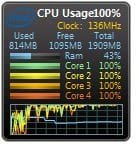
it uses all my 4 cores of i5 100%.
 

Attachments
  • Capture1.JPG
    Capture1.JPG
    13.7 KB · Views: 128

My Computer

Computer Manufacturer/Model Number
compaq cq62
OS
windows 7
CPU
2.3
Memory
2 GB DDR3
Monitor(s) Displays
15.6"
Screen Resolution
1366*768
Hard Drives
320 GB
Internet Speed
BROADBAND
Other Info
PROCESSOR - I5, 320 GB HDD
Can you gain access to the fan it's self? If so then I would clean it with a lightly moist q-tip on all of it's blades and surround then allow to dry and again clean with light air on the fan and around the cooler. Clean the inside plastic with a dry tooth brush and air and re-assemble. If the same problem happens then you can attempt to re-oil the bearing but I don't hold much hope of access to the bearing unless you can pull off the bearings cover remember less is more and really at that point it would be best to investigate the cost and availability of a new fan if available. Good luck and don't get over your head !
 

My Computer

Computer type
PC/Desktop
Computer Manufacturer/Model Number
A blend of brains, brawn and dumb luck.
OS
Windows 7 Ultimate 64
CPU
i7 3770k OC'd 4.6 @ 1.17v, also FX 8120 & i5 miniITX
Motherboard
MSI P67A-GD80 b3
Memory
32 gb G.Skill Sniper DDR3 10-12-12-31 @ 2133
Graphics Card(s)
XFX Radeon 7870 2GB DDR5
Sound Card
Sound Blaster Z Series Card
Monitor(s) Displays
(2) LG LED 23" 1920 x 1080 2ms Monitors via mini d-port
Screen Resolution
1680 X 1050 p
Hard Drives
Samsung 256 gb 830 SSD sata III
(1) 1 tb WD Black
(2) 1 tb Hitachi deskmates/sata II
(2) 1 tb WD green/sata II
(2) 3 tb Seagate Barracuda
(1) 120 gb OCZ Vertex SS
(1) Drobo 5N w/5 Seagate 3tb
PSU
EVGA modular 1000G2 80% gold rating & APC 1200 RS
Case
CoolerMaster Storm Styker
Cooling
7 case fans 140mm & 120mm, NZXT Kraken X60
Keyboard
(2) Logitech Illuminated Keyboards (1) usb (1) wireless
Mouse
Logitech G700 & T-BC21 - nano nx for the laptop
Internet Speed
Basic 120mbps down
Antivirus
Trend Micro Titanium Max Security & Malwarebytes Premium
Browser
Chrome and IE 10
Other Info
5 Noctua case fans + 3 Noctua in p/p on NZXT cooler
Integrated hot swap drive bays for 2.5" Drives
(2) Lite-on dvd/cd/Blu Ray optical 22X
Integrated fan controller and led on/off
HP Officejet Pro 8630 all-n-one
Hot-swappable 3.5" hard drive bay
Netgear Nighthawk router
Asus USB 3 & sata 6 PCIe card
Vantec IDE to sata adptr./Ultra sata adptr
Lenovo L420 i5 lappy with m sata
Drobo 5N advanced NAS
You have a software or driver conflict. type ctrl+shift+esc to open task manager, click show processes for all users then scroll down to find out what's using all of your cpu time and post a screenshot of the results
 
Back
Top