Fantom Drives GreenDrive Disk 1 Unknown, Not Initialized - Data Recove

ohitsmrg

New member
Local time
3:47 PM
Messages
4
Hello

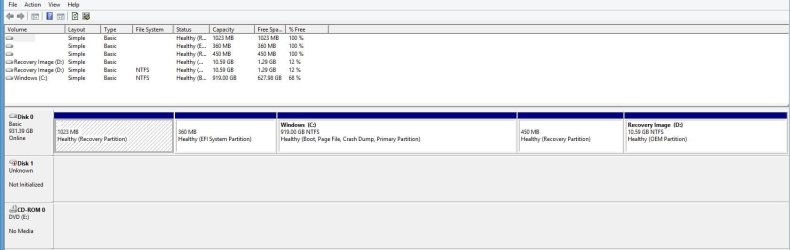
I am trying to recover data from my external HD 1 TB Fantom Drive GreenDrive. It crashed and I had no choice to force power down. When I look into Disk Management - I see that Disk 1 Unknown Size Not Initialized.

See Disk Man.JPG for printscreen of Disk Management.

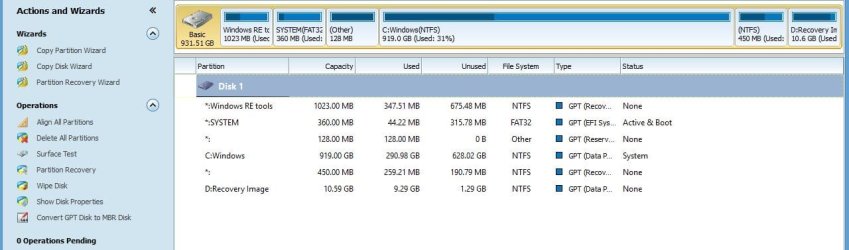
I tried following the Mini Partition Tool advice and did not find the external drive on the software. Please see Mini Partion Tool.JPG for print screen.

I am thinking about buying another external HD 2TB and clone this drive to recover the data. Any advice to clone a drive that I cannot select.

Thanks in advance for your help!
 

Attachments
  • Disk Man.JPG
    Disk Man.JPG
    71.2 KB · Views: 2
  • Mini Partion Tool.JPG
    Mini Partion Tool.JPG
    63.3 KB · Views: 0

My Computer My Computer

Computer type
PC/Desktop
OS
Window 8 and Window 7
It crashed
I've seen that and the HDDs had truly crashed, wasn't anything I could do but in a couple of instances I sent them off to a firm that recovers data if the platters/disks in them haven't been physically damaged. Sometimes the read-write heads will scratch the platters and they are then truly screwed up.
 

My Computer My Computer

Computer type
PC/Desktop
Computer Manufacturer/Model Number
Customs, Dell, Gateway, HP, Toshiba, Acer, ASUS
OS
Windows 7 Ultimate 64-bit, Windows 8.1 64-bit, Mac OS X 10.10, Linux Mint 17, Windows 10 Pro TP
Keyboard
Microsoft
Mouse
Microsoft
Hi - Do you know if TestDisk "http://www.cgsecurity.org/wiki/TestDisk" would offer any help? or any of the programs below would help?

Recuva- Recuva - Undelete, Unerase, File and Disk Recovery - Free Download)
Stellar Phoenix- Data recovery software | Best recovery tools by Stellar
Virtual Lab- www.binarybiz.com :: Data Recovery - RAID, Disk, Windows and OSX Data Recovery Software
Seagate file recovery- File Recovery Software | Seagate

The fact the computer recognize their is a disk gives me hope that the data is still safe.
 

My Computer My Computer

Computer type
PC/Desktop
OS
Window 8 and Window 7
I am assuming that other external drives are functional without any problem on your PC..

Run PhotoRec in Test Disk.

If it could recognise the external drive , well and good. You can continue with recovery. ( For this you must connect another external drive to save the recovered data before running PhotoRec.)

You may then follow this guide. Follow only what is under the head " Recovery" in http://www.sevenforums.com/software/193467-guide-using-photorec-recovery-software.html

If PhotoRec does not recognise your external drive, then you have no option but to take out the HDD from its casing, hook it up as a second internal drive and check whether you can access the data. We will attempt to cross the bridge if and when we come to it.

So first check whether PhotoRec would recognise your external.

( I may not be able to follow up this thread. I have just kickstarted it and would request Slartybart/Anshad Edavana to take over and continue.)
 

My Computer My Computer

OS
Windows 7 Home Premium 32 bit
Hi,

Thank you for your advice - I understand you have a lot of experience with these problems.

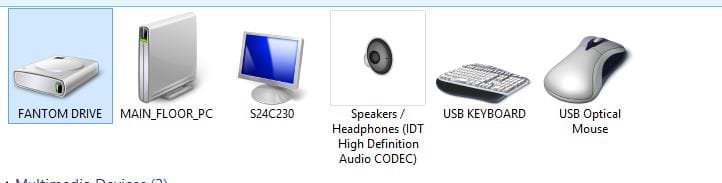
The computer recognizes the Fathom Drive but there is no drive assignment in Window Explorer (See Photo).

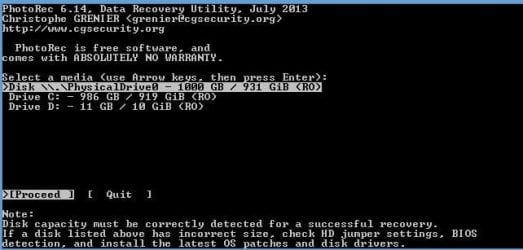
I tried PhotoRec_Win.Exe but the software did not see Disk1 (See Photo). It only see Disk 0. Do I need to open the external HD case even when the computer recognizes the HD but doesn't assign a letter to it?

Once again, Thank you!
 

Attachments

  • PhotoRec Attemp.JPG
    PhotoRec Attemp.JPG
    33.8 KB · Views: 6
  • Recognize Disk But No Assignment.JPG
    Recognize Disk But No Assignment.JPG
    21.5 KB · Views: 1

My Computer My Computer

Computer type
PC/Desktop
OS
Window 8 and Window 7
Windows may be able to read some information from the external disk's firmware but that doesn't mean it has recognised the disk. The Disk management does not show the capacity of the drive. Partition Wizard does not read your drive. Now PhotoRec also does not see the drive.

The only other non-invasive procedures you can try is try a different cable to rule out a faulty cable..Try the external drive on some other working PC. We are only going through the customary and routine drill to leave nothing to personal misconceptions.

My own feeling is that there has been a catostrophic failure of either the interface electronics inside the enclosure or the HDD itself. Which one we will not know unless the HDD is taken out and tried as a second internal drive directly connecting to a SATA port.

In any case, I would like you to wait for a second and third opinion from others before you go ahead with this proposition.

I hope Slartybart and Anshad Edavana are watching his thread and would chip in.

And you wouldn't be able to clone a drive which is not accessible.
 

My Computer My Computer

OS
Windows 7 Home Premium 32 bit
It crashed and I had no choice to force power down.

Please explain what exactly happened ?. Have you dropped the drive or the disk suddenly stopped working ?.
 

My Computer My Computer

Computer type
PC/Desktop
OS
Windows 7 Ultimate x64
A few days ago, the drive spin quite fast and my computer crashed. I manually powered off the laptop. The drive started having these problems after that. I am not sure what caused the actual event. A few days before that - I accidentally tripped over the USB cable but the drive looked fine and was still working with new USB Cable

Sorry that it wasn't specific.

Thanks for your help
 
Last edited:

My Computer My Computer

Computer type
PC/Desktop
OS
Window 8 and Window 7
The symptoms looks like a failing HDD but a faulty USB-SATA bridge is also possible. If you can disassemble the unit without causing any damage to the casing, i would suggest directly connecting the disk to a SATA port of a Desktop computer. If Windows can detect the disk with full capacity and proper model name, USB-SATA bridge will be faulty. If "Disk management" prompted to in initialize the disk, just cancel the dialogue box - doing so may cause data loss.
 

My Computer My Computer

Computer type
PC/Desktop
OS
Windows 7 Ultimate x64
Back
Top