
Hi All,
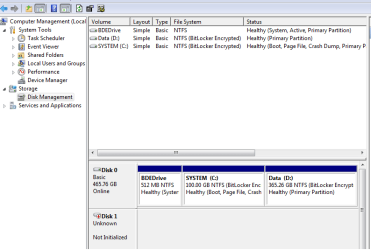
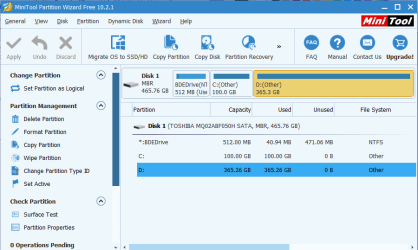
I have WD external hard disk connected via USB and it does not get detected in explorer. Checked few threads here and tried them and no success. I am attaching screen shot from My computer disk management where it shows disk as "Not initialized" and "Unallocated". I had installed Minitool partition recovery but the disk is not appearing in that window. Please help. I do not want to lose the data
I have WD external hard disk connected via USB and it does not get detected in explorer. Checked few threads here and tried them and no success. I am attaching screen shot from My computer disk management where it shows disk as "Not initialized" and "Unallocated". I had installed Minitool partition recovery but the disk is not appearing in that window. Please help. I do not want to lose the data
Attachments
My Computer
- Computer type
- Laptop
- Computer Manufacturer/Model Number
- Fujitsu
- OS
- Windows 7 enterprise 64bit

