Fast internet, slow download speeds

Exicuton

New member
Local time
5:24 AM
Messages
11
Hi there.

So today my friend and I, who live in the same country, was downloading this file. It was around 6GB, which is irrelevant, but yea. It was from the same site, we have the same internet, yet he was downloading with 2.6MB/s while I was downloading with 1.338MB/s and it stayed like that for the remaining 40 minutes. Didn't even move at one point, while his went from 2.1 to 2.6 over 10 minutes.
Worth noting, we use the same ISP, he only have 25/2 while I have 50/5, and I could easily download 2 files with the exact same speed (1.338MB/s each), but not 1 with 2.6MB/s or more. There's also a client downloader, for this game, where he again got 2.6+ whereas mine always stayed at an amazing 80-180kb/s. I tried disabling anti virus, firewall, Malwarebytes, nothing changed it. I know you're thinking it's just the seeds or site that is limited to an x number of download speed, but it really can't be the case in this. It happens with every site I try. It's always at 1.3xMB/s and never moves regardless of how good it is.
I honestly don't remember, but I don't think this happens when it's a .torrent file, using programs like uTorrent with good p2p. It happens in all browsers, and apparently game client downloaders.
I can download 5 different downloads at 1.3xMB/s using all of my available internet, but when it comes to a single file, it for some reason, is impossible.

A lot of rambling in this thread, I apologize.
I'm not complaining about the download speed, but it just seems like there's something wrong. My downloads also have a habit of failing in chrome after a few minutes, for no reason. That only happens from some sources though.

I hope some of this makes sense to someone because I am completely lost.
Any advice is welcome.

- Exi
 

My Computer My Computer

At a glance

Windows 7 Ultimate x64Processor Intel(R) Core(TM) i5-4430 CPU @ 3.0...8GBNvidia GTX 760
OS
Windows 7 Ultimate x64
CPU
Processor Intel(R) Core(TM) i5-4430 CPU @ 3.00GHz, 3001 Mhz
Motherboard
ASRock H87 Pro4 1150 ATX
Memory
8GB
Graphics Card(s)
Nvidia GTX 760
Sound Card
Asus ROG Spitfire Pro
Monitor(s) Displays
AOC 24" 144Hz - G-SYNC
Screen Resolution
1920x1080
PSU
650W
Case
NZXT
Keyboard
CM Storm Quick Fire TK
Mouse
Logitech G400s
Internet Speed
65/15
Antivirus
MSE & Malwarebytes
Browser
Chrome
there seems to be problems with Chrome, try using IE9....
 

My Computer My Computer

At a glance

Win7 Home Premium x64 W10Pro&HomeA12 9720p 4+8 TurionII M5206GB 8GBR7
Computer type
Laptop
Computer Manufacturer/Model Number
HP 17-ak0xx, dv7 3173nr
OS
Win7 Home Premium x64 W10Pro&Home
CPU
A12 9720p 4+8 TurionII M520
Motherboard
HP 3839
Memory
6GB 8GB
Graphics Card(s)
R7
Monitor(s) Displays
24" sa550
Screen Resolution
1600x900 1920x1080
Mouse
Logitechx2
Internet Speed
120Mb/s down 12up
It happens in all browsers

there seems to be problems with Chrome, try using IE9....
It's the same. Thank you though. (:

23wse8k.jpg
 

My Computer My Computer

At a glance

Windows 7 Ultimate x64Processor Intel(R) Core(TM) i5-4430 CPU @ 3.0...8GBNvidia GTX 760
OS
Windows 7 Ultimate x64
CPU
Processor Intel(R) Core(TM) i5-4430 CPU @ 3.00GHz, 3001 Mhz
Motherboard
ASRock H87 Pro4 1150 ATX
Memory
8GB
Graphics Card(s)
Nvidia GTX 760
Sound Card
Asus ROG Spitfire Pro
Monitor(s) Displays
AOC 24" 144Hz - G-SYNC
Screen Resolution
1920x1080
PSU
650W
Case
NZXT
Keyboard
CM Storm Quick Fire TK
Mouse
Logitech G400s
Internet Speed
65/15
Antivirus
MSE & Malwarebytes
Browser
Chrome
What happens if you start 20 such downloads of the same file from the same site? Do they all stay in the 1.3 range? Do they all come from the same file server? Use the W7 Resource Monitor to help you to figure out what server each download is coming from. See if you and your friend are hitting the same server. Even if you are, for files that large, it could be coming from several different servers configured as a server farm and appearing to the internet as one IP/server.

Ask your ISP if they offer a large file for speed testing? Usually such large files are kept on a server in each town that the ISP serves so that they can troubleshoot connectivity locally and then work their way out from there.

Maybe the problem is in your building or neighborhood.
Maybe you can find a speed test like this one:
PlanetFlow2 - PlanetLab's traffic monitoring system

happy hunting :-)
 

My Computer My Computer

At a glance

W7 Pro SP1 64biti78GBIntel HD Graphics
Computer type
Laptop
Computer Manufacturer/Model Number
Employer provided Dell Latitude
OS
W7 Pro SP1 64bit
CPU
i7
Memory
8GB
Graphics Card(s)
Intel HD Graphics
Hard Drives
crappy SSD
Antivirus
Employer mandated Symantec Endpoint Protection
Browser
Pale Moon 64bit, IE11 64bit & Chrome 64bit
What happens if you start 20 such downloads of the same file from the same site? Do they all stay in the 1.3 range? Do they all come from the same file server? Use the W7 Resource Monitor to help you to figure out what server each download is coming from. See if you and your friend are hitting the same server. Even if you are, for files that large, it could be coming from several different servers configured as a server farm and appearing to the internet as one IP/server.

Ask your ISP if they offer a large file for speed testing? Usually such large files are kept on a server in each town that the ISP serves so that they can troubleshoot connectivity locally and then work their way out from there.

Maybe the problem is in your building or neighborhood.
Maybe you can find a speed test like this one:
PlanetFlow2 - PlanetLab's traffic monitoring system

happy hunting :-)
Thank you for the answer!

Well, if I start 20 downloads, they will download at 340Kb/s since my max download speed is 6.8Mb/s (50/5). It's not a problem to utilize my whole speed. Worth noting is that I managed to fix the problem in my browsers by running Auslogics Internet Optimizer, but it still didn't fix a few of the problems I have off browser, which annoys me. (Downloading through specific clients)
I am aware that they use a wide variety of servers for most websites that offer large downloads, but it really doesn't matter what server I end up on, my download is just generally low. It feels like it's being blocked for some reason. The highest it landed at was 3.5Mb/s, which is good, if it actually stayed there, but it just spiked for ½ a second and then fell down to 800Kb/s. So if it can spike for a second, then in theory it should be able to stay there or at least closer to it. I just can't make sense of it. And according to resource manager we did download from the exact same server or subserver at one point. (Just tried open/closing the program until we hit the same)

They probably do yea, but it's not necessary at this point, since I fixed my browser downloads. Good idea though. I will remember it, since it's hard to find files with the size of a few GB to test it on.
a4679s.jpg


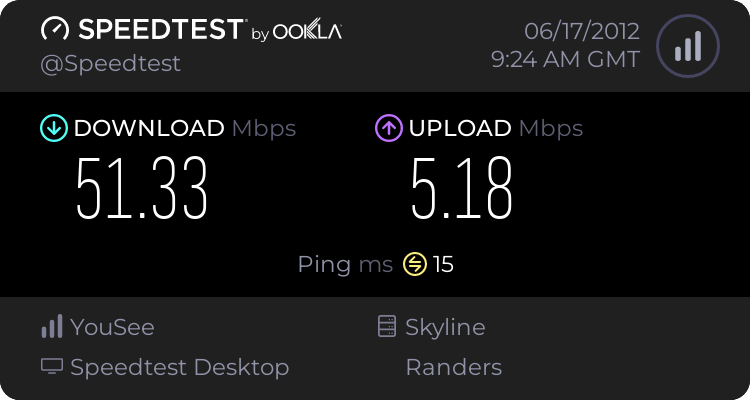
I usually use sites like Speedtest.net since most others are located in the US where my Mbps will be compromised due to the far distance. But it didn't find any problems, that test. Not sure if it should or if it just tests the speed.
2013405779.png
 

My Computer My Computer

At a glance

Windows 7 Ultimate x64Processor Intel(R) Core(TM) i5-4430 CPU @ 3.0...8GBNvidia GTX 760
OS
Windows 7 Ultimate x64
CPU
Processor Intel(R) Core(TM) i5-4430 CPU @ 3.00GHz, 3001 Mhz
Motherboard
ASRock H87 Pro4 1150 ATX
Memory
8GB
Graphics Card(s)
Nvidia GTX 760
Sound Card
Asus ROG Spitfire Pro
Monitor(s) Displays
AOC 24" 144Hz - G-SYNC
Screen Resolution
1920x1080
PSU
650W
Case
NZXT
Keyboard
CM Storm Quick Fire TK
Mouse
Logitech G400s
Internet Speed
65/15
Antivirus
MSE & Malwarebytes
Browser
Chrome
Try a Download from Nvidia. I had 50 meg once and would come down at 5.4mbs. Also your ISP may be capping your speed over long download spikes. I suggest you look at there T's and C's.
 

My Computer My Computer

At a glance

Windows 7 Home PreQ8200 Intell 2.333DDR3 1333 4gigAti HD4870
Computer Manufacturer/Model Number
Home Build.
OS
Windows 7 Home Pre
CPU
Q8200 Intell 2.333
Motherboard
Asus P5Q3 Delux
Memory
DDR3 1333 4gig
Graphics Card(s)
Ati HD4870
Sound Card
Onboard Soundmax. 7.1
Monitor(s) Displays
1, 20" Samsung
Screen Resolution
1600/900
PSU
Good enough
Case
Le Shark
Cooling
FAN FAN FAN FAN, Thermaltake Minitype 90 with speed fan 4.
Keyboard
Standard, Gaming Wolfking
Mouse
Cm-storm-inferno-wired-gaming-mouse
Internet Speed
Sky Crappy upto 20meg I get a whapping 5.8mbs.
Worth noting is that I managed to fix the problem in my browsers by running Auslogics Internet
a4679s.jpg
Try a Download from Nvidia. I had 50 meg once and would come down at 5.4mbs. Also your ISP may be capping your speed over long download spikes. I suggest you look at there T's and C's.

Thanks for answering! (:

I did actually read the T&C before posting here just to be sure and I definitely have no limits of how much or at what speeds I can download, besides the obvious 6.8Mb/s that my connection is capable of.
As you can see above I did manage to fix my browser downloading issues with Auslogics, so right now my problem is only off browser via download clients (not p2p or .torrent). Which is even more weird to me, since I have no idea what the issue could be.

- Exi
 

My Computer My Computer

At a glance

Windows 7 Ultimate x64Processor Intel(R) Core(TM) i5-4430 CPU @ 3.0...8GBNvidia GTX 760
OS
Windows 7 Ultimate x64
CPU
Processor Intel(R) Core(TM) i5-4430 CPU @ 3.00GHz, 3001 Mhz
Motherboard
ASRock H87 Pro4 1150 ATX
Memory
8GB
Graphics Card(s)
Nvidia GTX 760
Sound Card
Asus ROG Spitfire Pro
Monitor(s) Displays
AOC 24" 144Hz - G-SYNC
Screen Resolution
1920x1080
PSU
650W
Case
NZXT
Keyboard
CM Storm Quick Fire TK
Mouse
Logitech G400s
Internet Speed
65/15
Antivirus
MSE & Malwarebytes
Browser
Chrome
...I usually use sites like Speedtest.net since...
Understood - which is why I was suggesting that you hunt for a local version of the test that I linked to. It is more than just a speed test.
 

My Computer My Computer

At a glance

W7 Pro SP1 64biti78GBIntel HD Graphics
Computer type
Laptop
Computer Manufacturer/Model Number
Employer provided Dell Latitude
OS
W7 Pro SP1 64bit
CPU
i7
Memory
8GB
Graphics Card(s)
Intel HD Graphics
Hard Drives
crappy SSD
Antivirus
Employer mandated Symantec Endpoint Protection
Browser
Pale Moon 64bit, IE11 64bit & Chrome 64bit
...I usually use sites like Speedtest.net since...
Understood - which is why I was suggesting that you hunt for a local version of the test that I linked to. It is more than just a speed test.

Well I don't really see the difference of the test being local or not, since it'll only affect the Mbps it shows, right? I mean the test didn't come up with any errors or problems.
 

My Computer My Computer

At a glance

Windows 7 Ultimate x64Processor Intel(R) Core(TM) i5-4430 CPU @ 3.0...8GBNvidia GTX 760
OS
Windows 7 Ultimate x64
CPU
Processor Intel(R) Core(TM) i5-4430 CPU @ 3.00GHz, 3001 Mhz
Motherboard
ASRock H87 Pro4 1150 ATX
Memory
8GB
Graphics Card(s)
Nvidia GTX 760
Sound Card
Asus ROG Spitfire Pro
Monitor(s) Displays
AOC 24" 144Hz - G-SYNC
Screen Resolution
1920x1080
PSU
650W
Case
NZXT
Keyboard
CM Storm Quick Fire TK
Mouse
Logitech G400s
Internet Speed
65/15
Antivirus
MSE & Malwarebytes
Browser
Chrome
You might be correct. I don't understand how the test checks what it claims to check.
 

My Computer My Computer

At a glance

W7 Pro SP1 64biti78GBIntel HD Graphics
Computer type
Laptop
Computer Manufacturer/Model Number
Employer provided Dell Latitude
OS
W7 Pro SP1 64bit
CPU
i7
Memory
8GB
Graphics Card(s)
Intel HD Graphics
Hard Drives
crappy SSD
Antivirus
Employer mandated Symantec Endpoint Protection
Browser
Pale Moon 64bit, IE11 64bit & Chrome 64bit
Back
Top