Favorites bar

ZORG

New member
Local time
11:19 PM
Messages
24
Greetings

Does anybody know how to save the Favorites as we used to do in the previous version of IE8. I don´t like the Favorites Bar. I tried, but i wasn´t able to find a way of saving new links as i used to do int the previous versions.

zorg
 

My Computer

OS
win 7 ultimate
If you mean adding links to the favorites bar, you can simply drag the icon from the address bar to the favorites bar. You can also click on the 1st icon in the icon bar (gold star) to open a side window with favorites, where you can delete, add, drag and drop, create new folders, etc. After clicking on the gold star, if you wish to keep the Favorites side window open, you must click on the green arrow horizontal right of the 'Add to Favorites' drop down list in the top portion of the side window. (I hope that's not to confusing...)

You may want to drag the Favorites bar to the top of the list for easy access.

As you'll notice, there are tabs at the top for access also to your History and RSS feeds.

James
 

My Computer

OS
Win7U 64 RTM
CPU
Q9550
Motherboard
GA-EP45-UD3R
Memory
8GB Gskill
Graphics Card(s)
ASUS|EAH4850/HTDI/1GD3/A
Sound Card
xfi Plat
Monitor(s) Displays
Dell 2405fpw
Screen Resolution
1920x1200
Hard Drives
Seagate & WD sata Drives
PSU
Antec
Case
Antec
Keyboard
MS Natural Ergonomic 4000
Mouse
Logitech MX610 USB Cordless
You can also enable the favorites bar links in the taskbar - interestingly enough they are called Links there. Just right click on the taskbar > Toolbars > check Links.

But else the "old ways" do not work any more.
 

My Computer

Computer Manufacturer/Model Number
HP, Dell, Gateway, Toshiba - 4 laptops and 2 desktops
OS
Vista, Windows7, Mint Mate, Zorin, Windows 8
CPU
from 1.6GHz Duo to i7
Monitor(s) Displays
2x HP w2207
Hard Drives
5x HDD, 7x SSD, 12x Externals
Keyboard
with trackball - no mices
Mouse
Trackball mice
Internet Speed
DSL 6000
IE8 is the current version of IE. Are you asking about IE9 Beta?
 

My Computer

Computer type
PC/Desktop
Computer Manufacturer/Model Number
OQO 2+
OS
Windows 8 Pro w/MC 32-bit
CPU
Intel Atom 1.86 GHz
Motherboard
OQO 2+
Memory
2 GB
Graphics Card(s)
Intel GMA 500
Sound Card
IDT
Monitor(s) Displays
LCD
Screen Resolution
800 x 480 (portable) 1280 x 1024 (docked)
Hard Drives
64 GB SSD
PSU
9 Ah Battery (portable) or OQO Brick (docked)
Case
Shirt Pocket Sized
Cooling
Tiny Fan
Keyboard
Slide out (portable) DiNovo Edge (docked)
Mouse
Eraser head (portable) Logitech Bluetooth (docked)
Internet Speed
WWAN or 802.11G (portable) T1 (docked)
Browser
IE 10
Other Info
DVD-RW OQO Docking Station
Greetings

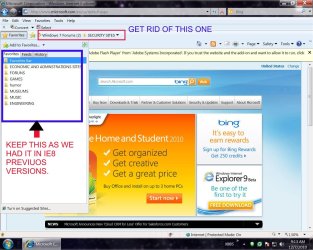
My problem is that i have too many favorites. It may sound a bit weird but that´s the way it is. I have folders organized so that i can do my job without having to search all through the system to find what i need.

I used to save my links in MY Favorites and i had just to import them when finishing formating or changing the OS.

Importing was not a problem, but i just can´t add more links the same way i used to. I attached a picture so that you´ll be able to figure out what i mean.

zorg
 

Attachments

  • PICTURE-1.jpg
    PICTURE-1.jpg
    175.6 KB · Views: 36

My Computer

OS
win 7 ultimate
You don't need to put anything in the favorites bar. But it's handy for a few sites you access often.
 

My Computer

Computer type
PC/Desktop
Computer Manufacturer/Model Number
OQO 2+
OS
Windows 8 Pro w/MC 32-bit
CPU
Intel Atom 1.86 GHz
Motherboard
OQO 2+
Memory
2 GB
Graphics Card(s)
Intel GMA 500
Sound Card
IDT
Monitor(s) Displays
LCD
Screen Resolution
800 x 480 (portable) 1280 x 1024 (docked)
Hard Drives
64 GB SSD
PSU
9 Ah Battery (portable) or OQO Brick (docked)
Case
Shirt Pocket Sized
Cooling
Tiny Fan
Keyboard
Slide out (portable) DiNovo Edge (docked)
Mouse
Eraser head (portable) Logitech Bluetooth (docked)
Internet Speed
WWAN or 802.11G (portable) T1 (docked)
Browser
IE 10
Other Info
DVD-RW OQO Docking Station
hello roncerr

The problem is that there´s no way to save links in the left-side option of the browser. you know, as if the IE8 wished to trick me! I save the link, it doesn´t go to there (to the left side), if i manage to save it, when i a close the browser and open it again, the link has disapeared. Is it happening because its default value is to save links to the bar or it might be another problem?

I´ve thougth that eliminating that bar i´d be able to save links normally on the left side as i used to do.

zorg
 

My Computer

OS
win 7 ultimate
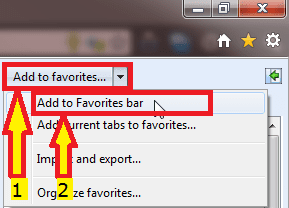
In IE9, add a site to favorites folder by clicking the title of the drop down menu (1 in the snip below), or click Add to favorites bar to add site to favorites bar.

IE9_add_to_favorites.png

Kari
 

My Computer

Computer type
Laptop
Computer Manufacturer/Model Number
HP ENVY 17-1150eg
OS
Windows 10 Pro x64 EN-GB
CPU
1.6 GHz Intel Core i7-720QM Processor
Memory
6 GB
Graphics Card(s)
ATI Mobility Radeon HD 5850 Graphics
Sound Card
Beats sound system with integrated subwoofer
Monitor(s) Displays
17" laptop display, 22" LED and 32" Full HD TV through HDMI
Screen Resolution
1600*900 (1), 1920*1080 (2&3)
Hard Drives
Internal: 2 x 500 GB SATA Hard Disk Drive 7200 rpm
External: 2TB for backups, 3TB USB3 network drive for media
Cooling
As Envy runs a bit warm, I have it on a Cooler Master pad
Keyboard
Logitech diNovo Media Desktop Laser (bluetooth)
Mouse
Logitech Performance Mouse MX
Internet Speed
50/10 Mbps VDSL
Antivirus
Windows Defender 4.3.9431.0
Browser
Maxthon 3.5.2., IE11
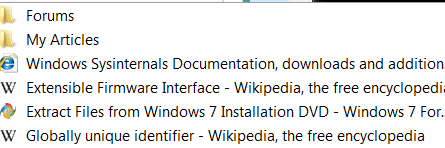
You can also create folders under Favorites bar to organize your many entries a little better. I have both folders and single links in there. E.g. like this:
 

Attachments

  • 2010-12-07_1718.png
    2010-12-07_1718.png
    4.8 KB · Views: 10

My Computer

Computer Manufacturer/Model Number
HP, Dell, Gateway, Toshiba - 4 laptops and 2 desktops
OS
Vista, Windows7, Mint Mate, Zorin, Windows 8
CPU
from 1.6GHz Duo to i7
Monitor(s) Displays
2x HP w2207
Hard Drives
5x HDD, 7x SSD, 12x Externals
Keyboard
with trackball - no mices
Mouse
Trackball mice
Internet Speed
DSL 6000
Hi Kari

The problem is that there´s no way in hell to make it accept to add a link just clicking on Add to Favorites.
I installed it twice ´cause i thought it could be a bad installation but it seems not to be that, at least that´s what i think.

zorg
 

My Computer

OS
win 7 ultimate
Hi Kari

The problem is that there´s no way in hell to make it accept to add a link just clicking on Add to Favorites.
I installed it twice ´cause i thought it could be a bad installation but it seems not to be that, at least that´s what i think.

zorg
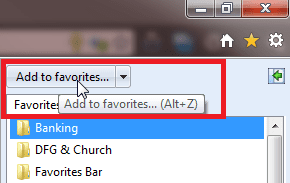
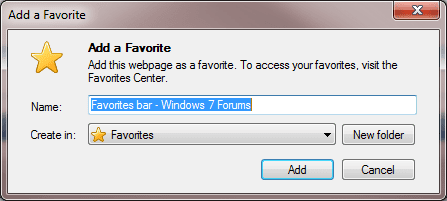
Clicking the title of that drop down menu, you add a bookmark whereever you want to. Default location Favorites folder.

I click here:

IE9_add_to_favorites_2.png

It opens this:

IE9_add_to_favorites_3.png

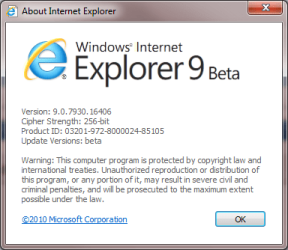
Using Internet Explorer 9 Beta:

IE9_version.PNG

Kari

EDIT: I'm sorry. I first now realized you are talking about IE8, I am talking about IE9. Really sorry... :o
 
Last edited:

My Computer

Computer type
Laptop
Computer Manufacturer/Model Number
HP ENVY 17-1150eg
OS
Windows 10 Pro x64 EN-GB
CPU
1.6 GHz Intel Core i7-720QM Processor
Memory
6 GB
Graphics Card(s)
ATI Mobility Radeon HD 5850 Graphics
Sound Card
Beats sound system with integrated subwoofer
Monitor(s) Displays
17" laptop display, 22" LED and 32" Full HD TV through HDMI
Screen Resolution
1600*900 (1), 1920*1080 (2&3)
Hard Drives
Internal: 2 x 500 GB SATA Hard Disk Drive 7200 rpm
External: 2TB for backups, 3TB USB3 network drive for media
Cooling
As Envy runs a bit warm, I have it on a Cooler Master pad
Keyboard
Logitech diNovo Media Desktop Laser (bluetooth)
Mouse
Logitech Performance Mouse MX
Internet Speed
50/10 Mbps VDSL
Antivirus
Windows Defender 4.3.9431.0
Browser
Maxthon 3.5.2., IE11
Hi Kari

The problem is that there´s no way in hell to make it accept to add a link just clicking on Add to Favorites.
I installed it twice ´cause i thought it could be a bad installation but it seems not to be that, at least that´s what i think.

zorg

Zorg, filling out your system specs helps us to help you.

Also, we need to know whether you are using 64 bit or 32 bit IE (You will only have 64 bit if you are running 64 bit Windows)? You can determine which IE is in use by clicking on Help\About in IE. If it's 64 bit, it will say '64 Bit Edition' next to the version #. If it's not 64 bit, it won't say anything next to the version #.

Also, please post any error messages you may be receiving.

Now, on to the problem:

Perhaps we are just not understanding. Are you saying that your issue is not how to add favorites, but that you are unable to add any favorites at all? Please correct me if this is wrong, but in the event that this is your issue, it could be a problem with an IE add-on.

1) First, try using System Restore to restore your system to a date before the problem began, as per this link:

http://www.sevenforums.com/tutorials/700-system-restore.html?ltr=S

2) If this doesn't help, or if you have no restore points pre-dating the issue, try to run IE without add-ons:

Start\All Programs\Accessories\System Tools|Internet Explorer (No add-ons)

If after running IE without add-ons you are then able to add to favorites, you can remove all of your add-ons and re-install them one at a time until the problem recurs, telling you which add-on it is.

If disabling add-ons doesn't solve your problem (and if I am now understanding you problem correctly), here are a few links that may help:

Favorites won't open and new faworites can't be added

HELP - IE 8 Can't Add to Favorites

ie8 cannot add to favorites - Google Search

James
 

My Computer

OS
Win7U 64 RTM
CPU
Q9550
Motherboard
GA-EP45-UD3R
Memory
8GB Gskill
Graphics Card(s)
ASUS|EAH4850/HTDI/1GD3/A
Sound Card
xfi Plat
Monitor(s) Displays
Dell 2405fpw
Screen Resolution
1920x1200
Hard Drives
Seagate & WD sata Drives
PSU
Antec
Case
Antec
Keyboard
MS Natural Ergonomic 4000
Mouse
Logitech MX610 USB Cordless
...The problem is that there´s no way to save links in the left-side option of the browser...
Click favorites then "add to favorites". It will be added to the general favorites folder rather than one of its sub folders. (You still have the option to put it in a subfolder if you want using the dropdown list.)

I use that method to add favorites to the list. But to access my favorites to go back to a saved site, I use a shortcut on my desktop to the Favorites folder in Windows Explorer since I have way to many favorites to find the one I want in the tiny browser left-side window.
 

My Computer

Computer type
PC/Desktop
Computer Manufacturer/Model Number
OQO 2+
OS
Windows 8 Pro w/MC 32-bit
CPU
Intel Atom 1.86 GHz
Motherboard
OQO 2+
Memory
2 GB
Graphics Card(s)
Intel GMA 500
Sound Card
IDT
Monitor(s) Displays
LCD
Screen Resolution
800 x 480 (portable) 1280 x 1024 (docked)
Hard Drives
64 GB SSD
PSU
9 Ah Battery (portable) or OQO Brick (docked)
Case
Shirt Pocket Sized
Cooling
Tiny Fan
Keyboard
Slide out (portable) DiNovo Edge (docked)
Mouse
Eraser head (portable) Logitech Bluetooth (docked)
Internet Speed
WWAN or 802.11G (portable) T1 (docked)
Browser
IE 10
Other Info
DVD-RW OQO Docking Station
Ok! Now it seems to have worked out. I reinstalled IE8 and didn´t install the ADD-ONS and i managed to save the links to the Favorites. Now, what i´ll have to do is to find out the shitty one that caused me so much trouble.

All right, thank you very much for the help.

zorg
 

My Computer

OS
win 7 ultimate
Back
Top